Key Takeaways
- Persistent Context: claude-mem eliminates the need to re-explain project architecture or previous bug fixes by storing session history locally.
- Token Efficiency: The plugin uses Claude’s agent-sdk to compress raw logs into semantic summaries, saving significant context tokens.
- Automated Workflow: It automatically captures tool usage and injects relevant memories into new sessions without manual intervention.
- Local Privacy: All data is stored in a local SQLite database with vector search, ensuring code privacy.
What Is claude-mem?
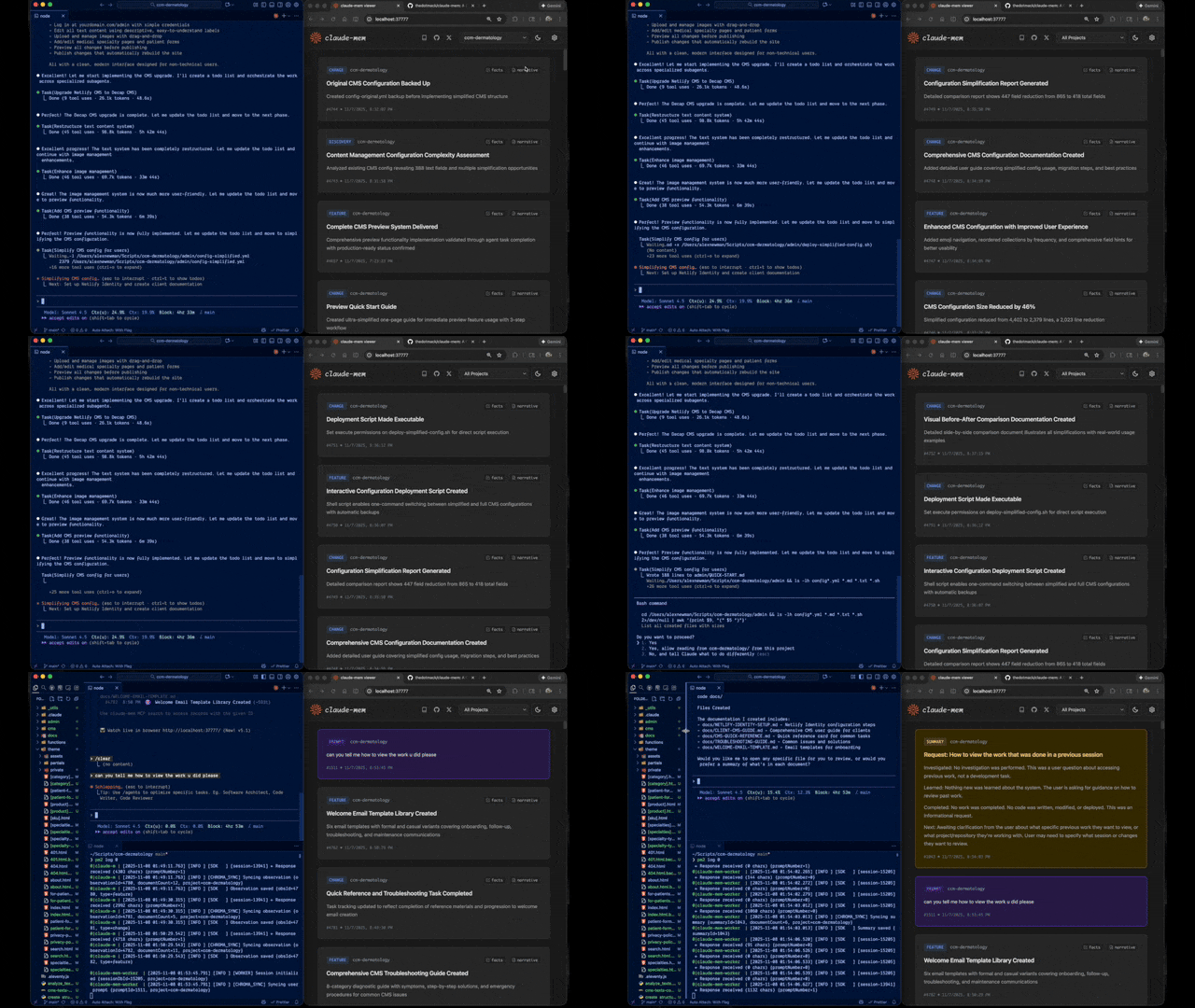
claude-mem is an open-source plugin for Claude Code that provides persistent, project-aware memory by recording and retrieving past coding activities.
Every standard Claude-powered coding session suffers from “context amnesia.” When the terminal closes, the knowledge of architectural decisions, refactors, and debugging steps vanishes. This forces developers to burn context tokens and mental energy re-explaining the codebase at the start of every new session.
claude-mem solves this by acting as a dedicated observer AI. It watches your interactions, compresses them into dense “observations,” stores them in a local database, and intelligently injects only the most relevant context back into future sessions.
- GitHub: https://github.com/thedotmack/claude-mem
- Website: https://claude-mem.ai
Core Features and Capabilities
claude-mem is engineered for real-world development, offering automatic session capturing, semantic compression, and privacy-focused local storage.
Unlike simple logging tools, this plugin actively manages the cognitive load of the AI model.
Automatic Session Capturing
The system hooks directly into Claude Code’s lifecycle events (start, tool use, stop, end). It records edits, tool invocations, decisions, and architectural notes as you work. There are no extra commands or manual export steps required; memory capture happens passively in the background.
AI-Powered Context Compression
To maintain token efficiency, claude-mem uses Claude’s agent-sdk. It transforms massive raw transcripts and tool logs into compact, structured “observations.” These summaries preserve the semantics—what decision was made and why—rather than just retaining raw text. This layered workflow loads high-level summaries first, drilling into details only when necessary.
Seamless Context Injection
When a new session begins, claude-mem automatically injects:
- Recent session summaries.
- Histories of key decisions and bug fixes.
- Context relevant to the specific files currently being edited.
Local-First Privacy
Data sovereignty is a priority. All information is stored locally using SQLite and embeddings/vector search. Users have fine-grained control over what is stored and can mark specific sections as private to prevent persistence.
PRO TIPS:
You can explicitly query your project’s history using natural language. Try asking Claude, “What did we change in the auth module last week?” and claude-mem will retrieve the specific observations.
How claude-mem Works
The plugin operates on a distinct three-step pipeline: Capture, Compress, and Inject.
1. Capture
claude-mem interfaces with Claude Code’s plugin system to listen to the full session lifecycle.
- SessionStart: Detects a new session and prepares for memory injection.
- UserPromptSubmit: Analyzes the user’s intent.
- PostToolUse: Captures the actual events, including diffs, commands, logs, and test results.
- Stop/SessionEnd: Finalizes the data collection.
2. Compress
Raw transcripts are too “noisy” and token-heavy to be useful long-term. Using the agent-sdk, claude-mem generates semantic summaries. For example, instead of storing 50 lines of diffs, it might store: “Migrated auth from JWT to session-based and updated middleware X.” Observations are tagged by type (decision, bugfix, feature) and related files.
3. Inject
When you return to Claude Code, the plugin analyzes the files you are currently touching. It performs a semantic search over past observations and injects a lightweight index of related memories. Detailed summaries are loaded only when the context demands it, ensuring Claude “remembers” without overwhelming the context window.
Installation and Quick Start
You can install claude-mem directly via the Claude Code marketplace or manually via the CLI in under a minute.
Requirements
Ensure you have the following installed:
- Claude Code CLI (
claude --version) - Node.js 18+
If you do not have Claude Code installed, use npm:
npm install -g @anthropic-ai/claude-code
claude --version
Install via Marketplace (Recommended)
Launch a Claude Code terminal session and run the following commands:
/plugin marketplace add thedotmack/claude-mem
/plugin install claude-mem
After installation, restart Claude Code. The worker will auto-start, set up the SQLite storage, and begin capturing memory immediately.
Install from Source (Advanced)
For users requiring granular control or development builds:
# Clone the repository
git clone https://github.com/thedotmack/claude-mem.git
cd claude-mem

# Install dependencies
npm install

# Build hooks and worker service
npm run build

# Worker service will auto-start on first Claude Code session
# Or manually start with:
npm run worker:start

# Verify worker is running
npm run worker:status
PRO TIPS:
Use the optional Web UI (
http://localhost:37777)to visually inspect memory timelines. This allows you to audit exactly what the AI has recorded regarding your repository’s history.
Data Directory Location
Data is stored in ~/.claude-mem/:
- Database:
~/.claude-mem/claude-mem.db - PID file:
~/.claude-mem/.worker.pid - Port file:
~/.claude-mem/.worker.port - Logs:
~/.claude-mem/logs/worker-YYYY-MM-DD.log - Settings:
~/.claude-mem/settings.json
Why It Is a Game Changer
claude-mem transforms Claude Code from a stateless assistant into a long-term collaborator that understands the evolution of your project.
Fixes “Context Amnesia”
In complex repositories, architecture evolves over weeks, not minutes. claude-mem ensures the AI remembers why specific patterns were chosen or which bugs were previously investigated. This eliminates the repetitive cycle of explaining the same core concepts at the start of every work week.
Saves Tokens and Money
Naively pasting old logs into a new session is expensive. By selectively compressing debugging sessions into high-signal paragraphs and refactors into architectural notes, claude-mem utilizes the context window more effectively. Claude can focus on current work while retaining access to historical data without drowning in it.
Open Source and Inspectable
Because the tool is open-source and local-first, it offers complete transparency. Developers can audit the memory layer, clean it up, or build custom extensions—such as integrations with issue trackers or observability tools—on top of the existing foundation.
FAQ
Q: Does claude-mem send my code to third-party servers?
A: No. claude-mem is designed with a “local-first” architecture. Your observations and vector embeddings are stored locally in SQLite.
Q: Can I use this with the free version of Claude?
A: This plugin is designed specifically for Claude Code, which typically requires a Pro subscription and API access. It is not a browser extension for the web interface.
Q: How does the plugin decide what memory to inject?
A: It uses semantic search based on the files you are currently working on and the intent of your current prompt to fetch only the most relevant historical observations.
Q: Can I delete specific memories if Claude gets confused?
A: Yes. Because the data is stored in a local SQLite database and accessible via the Web UI (if enabled), you can manage and curate the memory to ensure accuracy.