Imagine having a creative collaborator available 24/7 who understands your design vision, generates multiple iterations instantly, and helps you refine ideas from concept to creation. That’s what Google’s Mixboard offers—an exciting experimental tool from Google Labs that’s redefining how creators, designers, and innovators approach visual brainstorming.
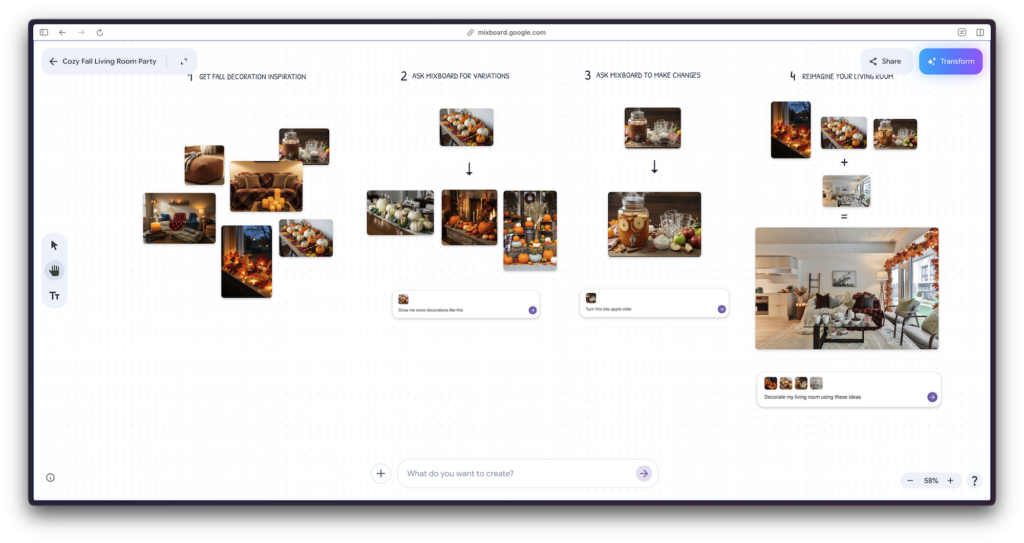
Launched in September 2025, Google’s Mixboard is an AI-powered concepting board that combines the intuitive visual exploration of Pinterest with the generative power of Google’s advanced AI models like Gemini 2.5 Flash and the innovative Nano Banana image editing model. Whether you’re planning a home renovation, designing a product, organizing an event, or exploring creative concepts, Mixboard provides an unrestricted canvas where imagination meets artificial intelligence.
In this guide, we’ll explore what makes Google’s Mixboard stand out in the crowded landscape of AI creative tools, walk you through its core features, and show you how to leverage this free experimental tool to supercharge your creative projects. Whether you’re a designer, content creator, project manager, or someone simply looking to visualize ideas more effectively, Mixboard offers tangible value at the intersection of technology and creativity.
What is Google’s Mixboard?
Understanding the Concept Board Revolution
Google’s Mixboard is an experimental AI-powered visual brainstorming tool that functions as a digital canvas for exploring, expanding, and refining creative ideas. Unlike traditional mood board applications or design software that require technical expertise, Mixboard is designed for accessibility—no downloads, no steep learning curves, and no design experience required.
At its core, Mixboard combines three essential elements: a flexible open canvas, generative AI capabilities powered by Google’s cutting-edge models, and an intuitive interface that responds to natural language commands. This combination allows users to iterate quickly on visual concepts, blend images and text, and explore multiple design directions simultaneously.
Who Should Use Mixboard?
Google’s Mixboard caters to a diverse audience. Home decorators can visualize room renovations before committing to purchases. Event planners can explore theme variations with sophisticated AI-generated backdrops. Product designers can rapidly prototype visual concepts. Content creators can develop brand aesthetics and visual narratives. Architects can explore design variations. Students and educators can use it for project visualization. Essentially, anyone who benefits from visualizing ideas before implementation can find value in Mixboard.
Why Google Built Mixboard
Google Labs, Google’s innovation division, created Mixboard to democratize creative exploration through AI. The tool reflects a broader trend in the tech industry: making powerful AI capabilities accessible to non-technical users. By offering a web-based platform with no installation barriers, Mixboard removes friction from the creative process and invites experimentation from users across all skill levels.
Key Features and How They Work
Feature 1: Multiple Project Launch Options
Google’s Mixboard offers flexible starting points for your creative journey:
- Template-based projects: Choose from pre-populated boards designed for common use cases—home decor, event planning, product ideation, and more
- Text prompt initiation: Describe your project in plain language, and AI generates initial board concepts
- Blank canvas creation: Start with an empty board for complete creative freedom
This flexibility means you can hit the ground running immediately, whether you have a clear vision or want to explore possibilities.
Feature 2: AI-Generated and Imported Visuals
Mixboard bridges the gap between AI generation and personal creativity:
- Generate unique visuals: Describe what you want (“Memphis-style dinnerware collection” or “cozy autumn living room”), and Mixboard’s generative AI creates original images
- Upload personal images: Bring your own photos, sketches, or reference images into the board
- Hybrid approach: Combine generated and uploaded images on the same canvas for a custom creative experience
This dual capability means you’re not limited by a single content source—you can leverage both AI generation and your own visual assets.
Feature 3: Natural Language Editing with Nano Banana
One of Mixboard’s most innovative features is its integration with Nano Banana, Google’s specialized image editing model. Rather than using traditional design tools, you can simply describe what you want:
- Make small adjustments: “Change the chair from blue to red” or “Make the lighting warmer”
- Combine images: “Place this vase on that table” or “Add these decorations to the living room”
- Transform elements: “Restyle these cups in a modern aesthetic” or “Change the season from summer to winter”
- Refine compositions: “Move that element to the left” or “Add more plants around the space”
The AI interprets your natural language commands and edits images accordingly, dramatically reducing the technical barrier to sophisticated image manipulation.
Feature 4: One-Click Iteration Tools
Creative exploration requires flexibility. Mixboard provides one-click options to explore variations:
- Regenerate: Create a new version of an image or section based on the same parameters
- More like this: Generate similar variations to explore subtle design iterations
- Batch operations: Apply changes across multiple elements simultaneously
These tools encourage experimentation by making iteration frictionless—you can explore dozens of design directions in minutes rather than hours.
Feature 5: Context-Aware Text Generation
Mixboard moves beyond visual brainstorming by generating supporting text:
- Automatic descriptions: AI can generate text descriptions based on images on your board
- Concept documentation: Generate project briefs, mood descriptions, or styling notes
- Contextual relevance: Generated text takes into account other elements on your board for coherence
This feature bridges the gap between visual inspiration and actionable creative direction, useful for communicating your concepts to collaborators or clients.
Why Mixboard Stands Out in the AI Creative Tools Landscape
AI-Powered but Human-Centered
While many AI tools prioritize technological sophistication, Mixboard prioritizes usability. The interface speaks natural language, responds to intuitive gestures, and doesn’t require learning proprietary commands or workflows. You’re not learning to use an AI tool—you’re collaborating with one.
Speed Without Sacrificing Quality
Traditional moodboarding is time-consuming: searching for images, editing them, arranging them on a canvas, iterating on feedback. Mixboard collapses this timeline dramatically. What once took hours of manual work happens in minutes, freeing you to focus on the creative decisions that matter—which direction feels right, not the technical execution.
Accessible to Everyone
Google’s Mixboard is free during its public beta phase and requires only a Google account and web browser. No software subscriptions, no technical requirements beyond internet access, no learning curve that requires tutorials. This accessibility model aligns with Google’s philosophy of democratizing powerful technology.
Built on Production-Grade AI
Unlike experimental tools that feel novel but unreliable, Mixboard runs on Google’s proven generative AI infrastructure: Gemini 2.5 Flash for text generation and reasoning, and Nano Banana for precise image editing. These models have been refined through millions of user interactions and represent the cutting edge of generative AI technology.
Transparent About Its Experimental Nature
Google clearly labels Mixboard as experimental and encourages feedback through its Discord community. This transparency about limitations and early-stage status builds trust with users and creates a collaborative relationship around tool development.
Getting Started: A Step-by-Step Guide
Step 1: Access Mixboard
Visit labs.google/mixboard using any modern web browser (Chrome, Safari, Firefox, Edge all work). You’ll need to sign in with a Google account—the same account you use for Gmail, YouTube, or Google Drive. As of December 2025, Mixboard is available as a public beta in the United States.
Step 2: Create Your First Project
You have three options:
- Click “New Project” and choose from featured templates (home decor, event planning, product design)
- Select “Start from prompt” and describe your project in natural language
- Pick a blank canvas for complete creative freedom
For your first experience, a template provides helpful structure and demonstrates what’s possible.
Step 3: Build Your Board
Once your project loads, you’ll see an open canvas. Add content by:
- Clicking the “Generate” button to create new images from text descriptions
- Using the “Upload” feature to bring in your own photos
- Dragging elements around the canvas to organize your composition
Start with 3-5 initial concepts to establish your creative direction.
Step 4: Iterate Using Natural Language
This is where Mixboard becomes powerful. Select an image or group of images and describe changes naturally:
- “Make this brighter and more modern”
- “Change the color palette to warm earth tones”
- “Add geometric patterns to this wall”
- “Combine these two design directions”
The AI interprets your instructions and edits accordingly.
Step 5: Explore Variations
Use the “Regenerate” and “More like this” buttons to explore multiple directions without starting over. Create separate sections on your board for different design explorations (e.g., “Modern Direction,” “Traditional Direction,” “Bold & Colorful”).
Step 6: Document and Share
Once you’ve developed your concepts, Mixboard allows you to:
- Take screenshots of your final boards
- Generate descriptions of your work
- Share links with collaborators (if they have access)
- Export your boards for presentation to clients or team members
Practical Use Cases and Real-World Applications
Home Design and Renovation
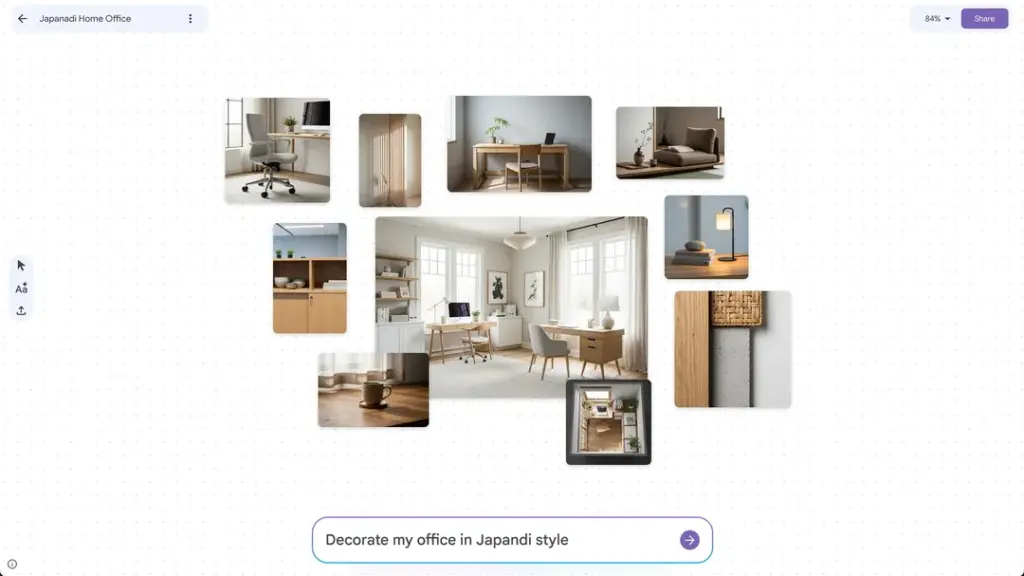
Visualize your entire room before purchasing furniture. Upload a photo of your current space, then use Mixboard to explore color schemes, furniture arrangements, and styling options. Test whether that vintage rug works with modern furniture, or how different paint colors transform the room’s mood.
Event Planning
Create mood boards for themed events. Explore decoration styles, color combinations, and venue setups. Generate multiple design directions to present to clients or team members. Use natural language editing to instantly adjust details—change the flower colors, adjust lighting, modify the layout.
Product Design and Branding
Designers can rapidly prototype product aesthetics and visual concepts. Create mood boards that establish brand identity, explore color palettes, and test design variations. Generate multiple iterations of packaging, product styling, or brand assets in a fraction of the time traditional design requires.
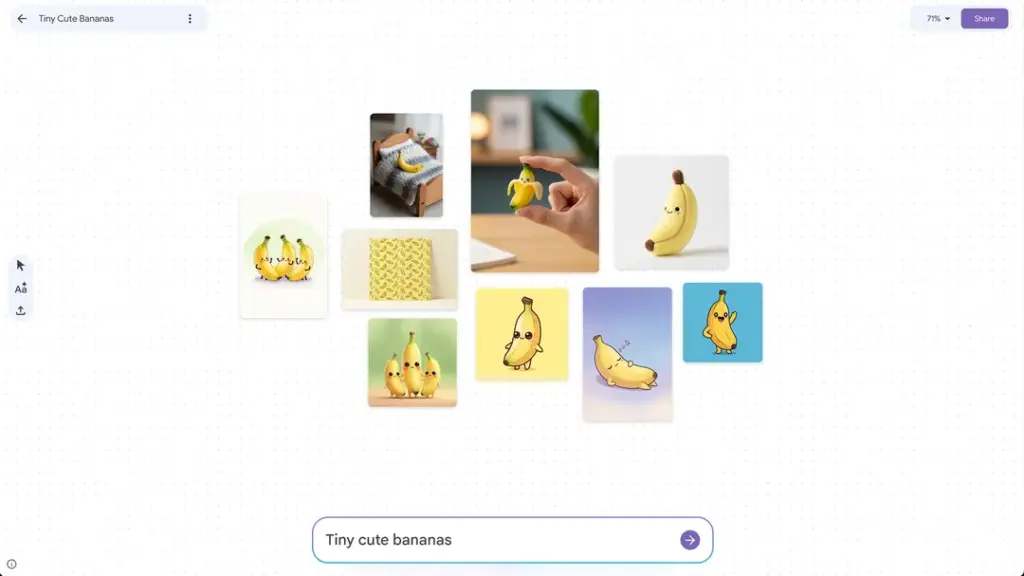
Interior and Fashion Design
Professional designers can use Mixboard as a brainstorming tool to explore styles, materials, colors, and compositions quickly. While Mixboard isn’t a replacement for professional design software, it accelerates the ideation phase significantly.
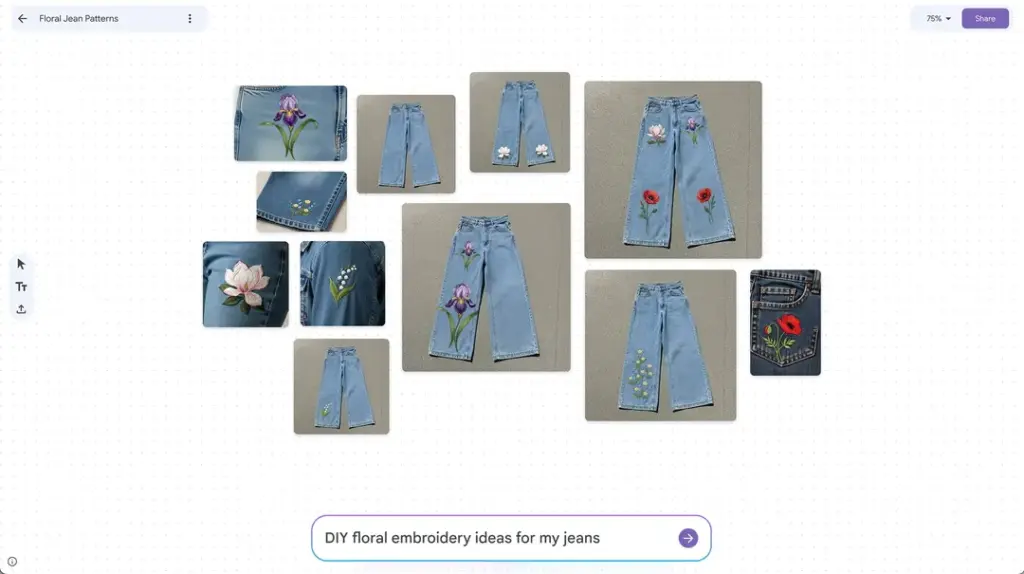
DIY Projects and Crafts
Explore creative possibilities for personal projects. Whether you’re renovating your home, planning a garden, styling a space, or crafting something unique, Mixboard helps you visualize the end result before investing time and money.
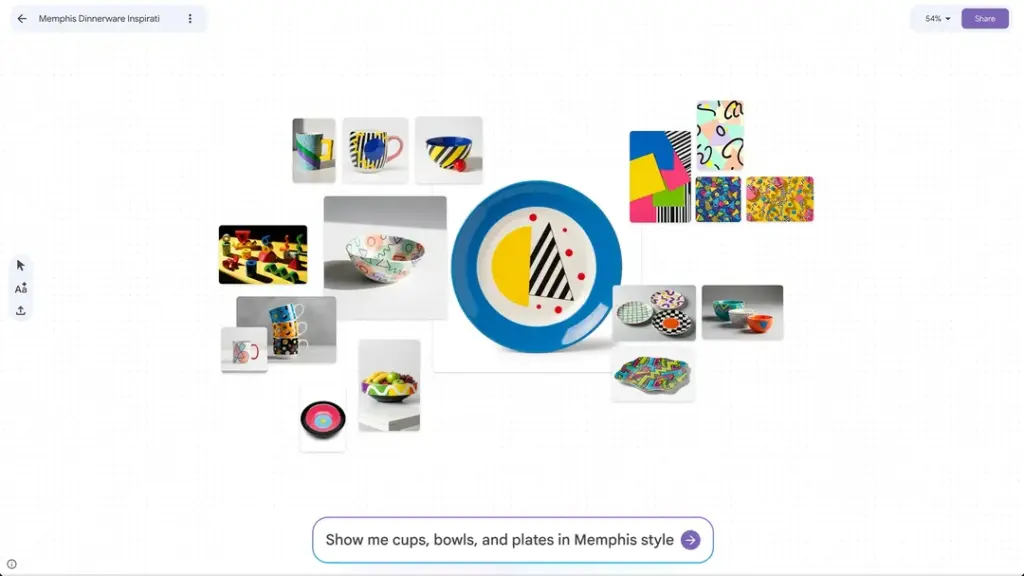
Content Creation and Social Media
Visual creators can use Mixboard to develop aesthetic concepts, explore visual narratives, and create cohesive visual themes for social media, blogs, or content series.
Educational Projects
Students and educators can use Mixboard for project visualization, presentation design, or exploring creative concepts in art, design, and visual communication courses.
Limitations and Considerations
Availability and Geographic Restrictions
As of December 2025, Mixboard is available as a public beta in the United States. International users may need to use VPN services to access it. Availability may expand or contract as Google evaluates the tool’s performance and feedback.
Daily Generation Limits
Users have a limit of 100 generations per day, which is ample for most creative sessions but may be restrictive for intensive daily users. Google may adjust these limits as the tool evolves.
AI Model Limitations
Like all generative AI, Mixboard sometimes struggles with:
- Complex spatial arrangements or precise positioning
- Highly specialized or technical details
- Maintaining exact consistency across multiple images
- Understanding ambiguous or contradictory prompts
These limitations are normal for AI tools and typically improve over time through model refinement.
Learning Curve for Optimal Results
While Mixboard is accessible to anyone, getting excellent results requires understanding how to write clear, descriptive prompts. Users who spend time learning to communicate their vision precisely will achieve better outcomes than those using vague or unclear directions.
Early-Stage Tool Status
As an experimental tool, Mixboard may experience downtime, feature changes, or discontinuation if Google decides not to move it from Labs to a permanent product. Users building critical workflows around it should maintain backup documentation.
The Broader Implications: AI and Creative Democracy
Google’s Mixboard represents something larger than a single tool—it reflects a significant shift in how creative work is becoming democratized through AI. Historically, professional design, visual ideation, and sophisticated image manipulation required years of training, expensive software, and specialized skills.
Mixboard collapses these barriers. A small business owner can now explore professional-grade design concepts. A student can visualize complex ideas without design expertise. Someone with a creative vision but no technical skills can bring that vision to life quickly.
This democratization raises important questions about the future of creative work: What skills become more valuable when technical execution is AI-assisted? How do professionals differentiate their work when powerful tools are accessible to everyone? How do we ensure AI development serves human creativity rather than replacing it?
Mixboard suggests Google’s answer: AI should remove technical barriers, allowing humans to focus on the uniquely human aspects of creativity—imagination, taste, vision, and decision-making. The tool handles the execution; you handle the direction.
Getting Started With Google’s Mixboard Today
Ready to experience AI-powered visual brainstorming? Here’s your next step:
- Visit labs.google/mixboard to access the tool
- Sign in with your Google account (no additional signup required)
- Start with a template to get oriented with the interface
- Create your first project using natural language prompts
- Join the Discord community for tips, inspiration, and updates from other users and Google’s team
The future of creative exploration is here, and it’s more accessible than ever. Whether you’re a professional designer, a creative enthusiast, or someone with a great idea that needs visualization, Mixboard invites you to experiment, iterate, and refine your vision with the help of artificial intelligence.
The creative tools landscape is rapidly evolving, and Google’s Mixboard is a compelling example of how AI is becoming an essential creative partner—not replacing human creativity, but amplifying it, accelerating it, and making it accessible to everyone with an idea and a web browser.
Your next great creative breakthrough might be just a few natural language prompts away.