Are you tired of AI-translated subtitles that drift out of sync?
We’ve all been there. You use a powerful LLM to translate a movie or TV show, but the result is a mess. The timestamps shift, the AI hallucinates characters from the wrong language, or it simply stops halfway through.
Today, I’m sharing a game-changing, open-source workflow that solves these problems completely. It combines the power of Google Gemini with a smart SRT Validator to give you perfect, studio-quality subtitles for free.
Why This Tool is a Game Changer
Most AI translation tools require expensive API subscriptions or manual copy-pasting. This setup is different.
By leveraging CLIProxyAPI and the SRT Translator & Validator, you can:
- Access Gemini Pro for Free: Utilize your personal Google account’s free tier quota (no billing account required).
- Eliminate Timestamp Drift: The tool automatically aligns the translated subtitles with the source timestamps.
- Prevent “Hallucinations”: It strictly validates the output script (e.g., ensuring a Vietnamese subtitle file doesn’t randomly contain Chinese or Thai characters).
- Resume Capability: If the AI stops mid-file, the tool picks up exactly where it left off.
The Tech Stack (How it Works)
This workflow uses two open-source components:
- CLIProxyAPI: A bridge that turns your local terminal into an API server, allowing you to access Gemini models via the web interface without complex OAuth setups.
- SRT Translator & Validator: A browser-based UI that handles the logic: uploading files, sending prompts, validating the text, and fixing errors.
Step-by-Step Guide: Translate Subtitles for Free
Step 1: Install CLIProxyAPI
First, you need the bridge to talk to Google Gemini.
For macOS (via Homebrew):
brew install router-for-me/tap/cliproxyapiLogin to Gemini:
This command opens your browser to authenticate with Google. Tip: Use a Google Cloud Project with no billing attached to ensure it stays free.
cliproxyapi --loginStep 2: Start the Local Server
Run the proxy server on your machine.
cliproxyapi
# Server starts at http://localhost:8317
Step 3: Open the Translator Dashboard
Open the index.html on project folder
Since the app runs entirely in your browser (client-side), your data remains private and connects directly to your local CLIProxyAPI server.
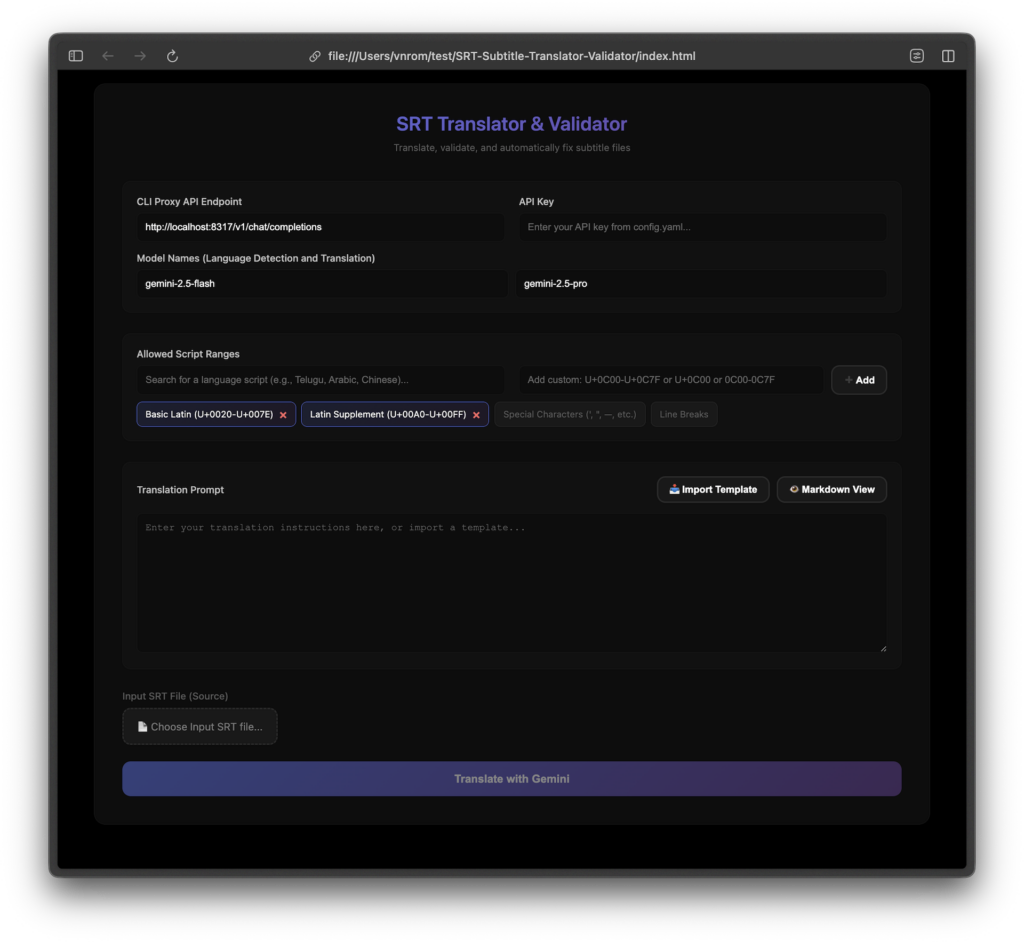
Step 4: Configure & Translate
- API Key: Enter the key from your CLIProxy config (or use
dummyif you haven’t set a strict key locally). - Allowed Scripts: Select your target language (e.g., Japanese, Spanish) to prevent character errors.
- Upload: Drag and drop your English
.srtfile. - Prompt: Use the built-in template or customize your own:”Translate this subtitle from English to Vietnamese. Keep the tone casual and natural.”
- Click Translate.
Step 5: Validate and Fix
Once finished, the tool will highlight any errors (red lines).
- Timestamp Errors: Click “Fix All Errors” to snap timestamps back to the original source.
- Script Errors: The tool will automatically send bad lines back to Gemini for re-translation.
Why Is This Better Than ChatGPT Plus?
| Feature | ChatGPT Plus (Web) | SRT Translator (This Tool) |
| Cost | $20/month | Free (Free Tier Quota) |
| File Limit | often truncates long files | Auto-resume for long files |
| Timestamps | Often shifts or hallucinates | Strict Sync with source |
| Validation | None (Manual check needed) | Auto-detection of script errors |
Conclusion
This is currently the most robust method to generate localized subtitles for movies, educational content, or YouTube videos without spending a dime. It combines the reasoning power of Gemini 2.5/3.0 with the strict logic of a code-based validator.
Ready to vibe code your subtitles?
Get the Tool on GitHub
Happy Subtitling!