Managing multiple TikTok accounts often starts out feeling simple, but it rarely stays that way for long. Switching between accounts, logging in and out, or reusing the same device works fine at first, until sessions stop holding and accounts begin to interfere with each other in ways that are hard to trace. When one account runs into trouble, the impact often spreads, forcing you to fix or rebuild setups that were working just days before.
The real challenge isn’t TikTok itself, but the lack of separation behind the accounts. Multiple profiles sharing the same device, app data, or system history slowly create overlap, and that overlap is what makes long-term management unstable. Multilogin cloud phones solve this by changing the foundation entirely. Each TikTok account runs inside its own Android cloud phone with its own app data and session history, so accounts stay independent, reusable, and easier to manage as you grow beyond a few profiles.
Can you have multiple TikTok accounts?
Yes, TikTok allows you to add and switch between multiple accounts inside the app. For personal use or short sessions, this feels convenient. You log in, switch profiles, post, reply, and move on. At that level, TikTok’s built-in switching does what it promises.
The problems start when those accounts are used regularly, over longer periods, or for work. Reusing the same app environment means shared session history, repeated logins, and constant switching. Small issues build quietly. Sessions drop. Accounts need to re-authenticate. Mistakes happen during fast switches. What worked for one or two accounts begins to feel fragile as usage increases.
TikTok gives permission to have multiple accounts, but it does not provide the structure needed to manage multiple TikTok accounts independently over time. There is no separation at the environment level and no reliable way to keep accounts isolated once they grow beyond casual use. That’s where cloud phones change the setup entirely, replacing account switching with dedicated environments designed to hold each account on its own and keep them stable as usage scales.
Why managing multiple TikTok accounts gets complicated fast
Managing multiple TikTok accounts feels easy at the beginning because the app makes switching simple, but that ease fades once accounts are used daily and expected to stay active. Over time, the same device and app environment is reused again and again, which leads to mixed session data, repeated logins, and small mistakes that slowly turn into bigger issues. What starts as a convenient setup becomes unstable as soon as accounts are reused, managed by teams, or scaled beyond a couple of profiles.
The complications usually show up as:
- Shared devices causing session overlap between accounts
- Frequent switching leading to accidental actions on the wrong account
- Sessions dropping and accounts needing repeated re-verification
- Unstable setups that break as soon as activity increases
The core problem isn’t the number of accounts, and it isn’t a lack of devices. The problem is the lack of structure. Managing multiple TikTok accounts long term requires isolated environments that keep each account separate and stable, not more phones or faster switching.
Why cloud phones are built for multiple TikTok accounts
Cloud phones are designed around how TikTok actually works. Because TikTok is a mobile-first platform, it expects each account to live inside its own mobile environment where app data, session history, and behavior stay consistent over time. When multiple accounts share the same device or app space, those signals overlap, which slowly makes accounts unstable even if everything looks fine at first. Cloud phones remove that overlap by giving each account its own Android environment, so activity stays contained and predictable instead of mixing together.
- TikTok is mobile-first by design: The platform expects accounts to behave like they belong to real phones using the native app, not shared or rotating setups.
- Native app behavior carries long-term signals: Session history, app data, and usage patterns are stored inside the mobile environment and are meant to stay consistent for one account.
- Shared environments create instability over time: When multiple accounts reuse the same device or app space, session data overlaps and accounts start to interfere with each other.
- Each account needs its own mobile environment: A dedicated Android environment keeps app data, cache, and login state isolated so one account never affects another.
- The core rule stays simple and reliable: One TikTok account equals one Android environment, which is what allows accounts to remain stable as usage grows.
How Multilogin cloud phones work for multiple TikTok accounts
Managing multiple TikTok accounts stops being chaotic when each account has its own place to live. Multilogin Cloud Phones are built around a simple structure: one Android environment per account. Instead of switching accounts on the same device or rotating phones, every TikTok account runs inside its own cloud phone that behaves like a real Android device, keeps its data intact, and stays isolated from the rest.
Multilogin replaces device switching with environment isolation, which is why accounts remain stable as you reuse and scale them.
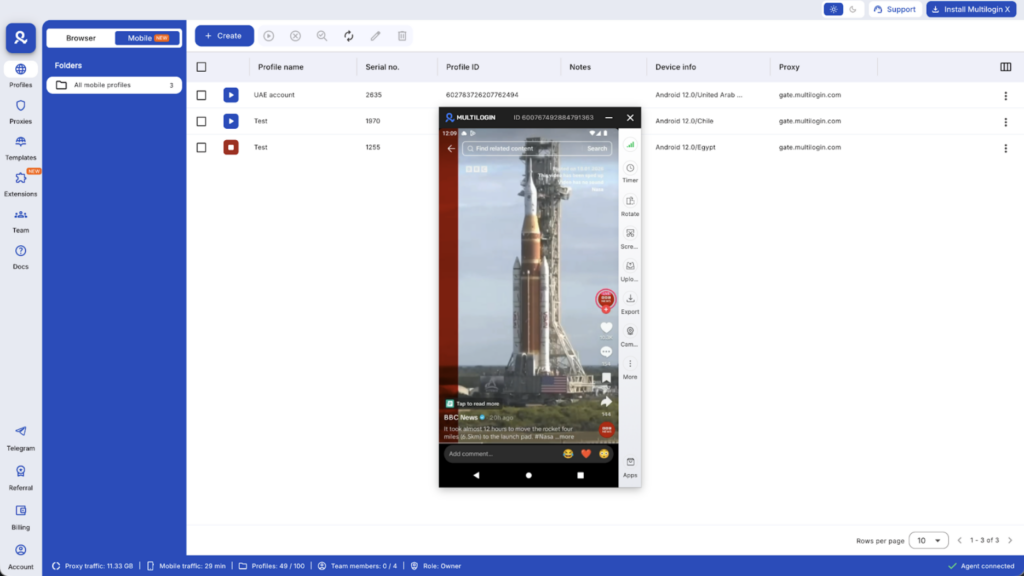
Run one cloud phone per TikTok account
Every TikTok account is tied to a single Android cloud phone. That separation is strict by design, because reuse inside the same environment is where conflicts start.
- One cloud phone equals one TikTok identity
- No switching between TikTok accounts inside the same environment
- Sessions stay saved exactly where you left them
- An issue in one account never spreads to others
This turns account management into maintenance, not constant rebuilding.
Native TikTok app behavior on cloud phones
TikTok runs as a native mobile app inside each cloud phone, not as a browser workaround. That matters because TikTok is mobile-first and expects consistent app behavior over time.
- Install TikTok directly inside each Android cloud phone
- Use the same mobile app flow as a physical device
- App data, cache, and login sessions persist between launches
- No emulators and no artificial device layers
Accounts behave normally because the environment never resets behind them.
Location control for TikTok accounts
Location inconsistency is one of the fastest ways to destabilize TikTok accounts. Multilogin handles location at the environment level instead of relying on manual fixes.
- Choose a country and region for each cloud phone
- IP, SIM, network, and GPS signals match automatically
- Location remains consistent across sessions
- Accounts avoid sudden shifts that trigger restrictions
Stability comes from alignment, not constant adjustments.
Scaling multiple TikTok accounts without changing structure
Scaling usually breaks TikTok setups when growth forces reuse or shortcuts. With Multilogin, scale means adding environments, not modifying existing ones.
- New TikTok accounts are added as new cloud phones
- Existing environments remain untouched
- Cloud phones can be paused and reused without losing session state
- Growth adds capacity without increasing risk
The structure stays the same whether you manage two accounts or two hundred.
Manage mobile and web TikTok accounts from one dashboard
TikTok workflows don’t live only on mobile apps. Multilogin brings everything into one control layer so accounts stay organized as volume grows.
- Android Cloud Phones handle native TikTok app activity
- Browser profiles support TikTok web-based tasks
- All accounts are launched, paused, and tracked from one dashboard
- No switching tools, no juggling devices
Everything stays visible, which reduces mistakes as teams and workloads expand.
Handling TikTok accounts without phone number reuse issues
Phone number reuse often becomes a problem later, not at signup. When multiple TikTok accounts are created or accessed from shared environments, hidden links build up over time.
Multilogin doesn’t change TikTok’s rules. It changes how accounts are organized after creation.
- Each TikTok account runs in its own Android cloud phone
- Supporting assets, like email accounts, can be created inside the same environment
- App data and session history stay contained per account
- Reuse happens safely without mixing signals
By keeping every account inside its own environment, phone number pressure doesn’t escalate as accounts are reused long term.
Automation support for multiple TikTok accounts
Automation in Multilogin is meant to support multiple TikTok accounts after the foundation is stable. It is not a shortcut, and it does not replace proper account separation. Automation works reliably here because each TikTok account already runs inside its own persistent Android cloud phone, with saved sessions and a consistent device identity.
When environments are isolated and reusable, automation becomes predictable instead of fragile.
Supported automation options include:
- Selenium for controlled browser and workflow automation
- Playwright for modern, script-based interaction flows
- Puppeteer for event-driven automation tasks
- Postman for API-based actions and testing
- Multilogin CLI for automating environment-level tasks such as launching, managing, and coordinating cloud phones at scale
Automation builds on structure. When each TikTok account lives in its own stable environment, automated actions stay contained, repeatable, and isolated, without interfering with other accounts.
Team access for multiple TikTok accounts
Managing multiple TikTok accounts with a team usually breaks down when logins are shared or ownership isn’t clear. Multilogin avoids that by tying access to environments, not credentials, so collaboration stays clean as teams grow.
With team access built around cloud phones:
- Share access without sharing logins: Team members work inside assigned environments, not accounts.
- Assign permissions per cloud phone: Control who can launch, manage, or automate each TikTok account.
- Clear ownership per account: Every cloud phone maps to a single TikTok identity, so responsibility is obvious.
- Safe handoff as teams grow: Accounts move between team members without resets or session loss.
This setup keeps collaboration structured, reduces mistakes, and lets agencies scale TikTok operations without turning access control into a risk.
What multiple TikTok accounts look like when done right
When multiple TikTok accounts are managed the right way, the experience stops feeling fragile and reactive, because you are no longer fixing the same issues every time you log in or scale. Each account behaves consistently, sessions hold the way they should, and problems stay contained instead of spreading across the setup. This happens because the structure underneath does not change as you grow, and nothing is reused in ways that quietly connect accounts over time.
In a properly structured setup, you’ll notice that:
- Each TikTok account runs inside its own Android cloud phone, which removes the need for switching accounts inside the same environment and prevents system data from being shared between identities.
- Sessions remain persistent across restarts, so when you return to an account, the TikTok app opens exactly where it was left, without repeated logins or unexpected resets.
- Location signals stay consistent, with IP, region, and device data aligned over time instead of changing from session to session and triggering instability.
- All accounts are controlled from one dashboard, making it easy to launch, pause, organize, and revisit accounts without juggling physical devices or multiple tools.
- Scaling stays predictable, because adding new TikTok accounts simply means adding new cloud phones, not modifying or rebuilding existing environments.
There are no shortcuts involved here. The stability comes from structure, and once that structure is in place, managing multiple TikTok accounts becomes calm, repeatable, and sustainable instead of stressful.
Final verdict
Managing multiple TikTok accounts only breaks down when accounts are forced to share the same device, app data, or session history. That overlap is what causes sessions to drop, mistakes to happen, and problems in one account to quietly affect the rest. Multilogin Cloud Phones remove that risk by giving every TikTok account its own Android environment, where app data, location signals, and login state stay consistent over time. Instead of switching, rebuilding, or fixing the same issues repeatedly, accounts remain isolated, reusable, and easy to scale. With the right structure in place, multiple TikTok accounts stop feeling fragile and start behaving like independent, stable setups you can actually rely on long term.
FAQs
1. Can you have multiple TikTok accounts?
Yes, TikTok allows users to create and switch between multiple accounts inside the app. This works well for light, personal use. Problems usually appear when accounts are reused regularly, managed for work, or scaled beyond a few profiles, because TikTok does not isolate accounts at the device level.
2. How do you manage multiple TikTok accounts long term without issues?
To manage multiple TikTok accounts long term, each account needs its own stable mobile environment. When accounts share the same device or app data, sessions start to overlap and break. Using one Android cloud phone per account keeps app data and login history separate, which makes accounts reusable and stable over time.
3. Why does switching between TikTok accounts stop working at scale?
Switching accounts inside the TikTok app reuses the same device environment. As activity increases, shared session history and repeated logins create friction. Sessions drop more often, mistakes happen during fast switching, and small issues spread across accounts instead of staying isolated.
4. Can you have multiple TikTok accounts with the same email?
TikTok may allow account creation with the same email in some cases, but reuse increases linking risk over time. A safer approach is one email per TikTok account, created and used inside its own Android environment. This keeps supporting assets aligned with the account instead of reused across setups.
5. How to have multiple TikTok accounts without phone number reuse problems?
Phone number issues usually appear later, not during signup. The real cause is shared environments. When each TikTok account runs inside its own Android cloud phone, with its own email and app data, phone number pressure does not escalate because identities are not mixed behind the scenes.
6. Why do cloud phones work better than using multiple physical phones?
Physical phones still require manual switching, tracking, and maintenance. Cloud phones give you the same native Android behavior while keeping every account isolated, saved, and accessible from one dashboard. This removes human error and makes scaling predictable instead of chaotic.
7. How many TikTok accounts can you manage with Multilogin?
You can manage as many TikTok accounts as you have cloud phones. Each cloud phone represents one independent Android environment and one TikTok identity. Scaling simply means adding more environments, without changing or rebuilding existing accounts.
8. Is it safe for teams to manage multiple TikTok accounts together?
Yes, when access is tied to environments instead of shared logins. With cloud phones, teams can be assigned specific accounts, permissions can be controlled per environment, and accounts can be handed over safely without resetting sessions or sharing credentials.