 By
By Self-Hosting Supermemory: Your Guide to the Fastest Memory API for AI – Plus OpenClaw Integration
Imagine your AI agent remembering every preference, every past conversation, every document you’ve ever shared—across days, weeks, or even years. No more “I don’t recall that” moments. No more context windows exploding. Just pure, persistent intelligence.
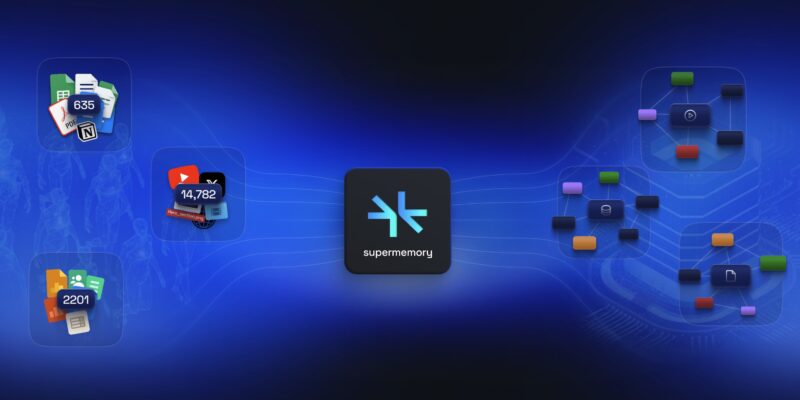
That’s exactly what Supermemory delivers: the state-of-the-art Memory API built for the AI era. It’s not just another vector database or basic RAG tool. It’s a full memory engine that builds dynamic knowledge graphs, learns user profiles in real time, handles multimodal ingestion (text, PDFs, images, videos), and serves lightning-fast, context-aware recall.
And the best part? You can self-host it for complete privacy, unlimited scale, and total control—especially if you’re an enterprise team or a privacy-first builder. In this guide, I’ll walk you through everything: what Supermemory is, why self-hosting rocks, the exact enterprise deployment steps (pulled straight from the official docs), practical usage, and finally how to wire it up with OpenClaw—the open-source AI messaging gateway—to create a truly unforgettable personal AI assistant.
Whether you’re a solo dev building the next big agent or part of a team shipping enterprise AI, this post will get you up and running. Let’s dive in.
What Is Supermemory? The Memory Engine AI Has Been Waiting For
Supermemory is the universal memory infrastructure for AI agents. It solves the core problem every LLM faces: forgetfulness. Traditional chatbots reset after every session. Vector stores give you search but no relationships or evolution over time. Supermemory gives you all three layers in one:
- Graph Memory — A living knowledge graph where facts connect, update, extend, and even “forget” intelligently.
- Learned User Profiles — Automatic extraction of static facts (preferences, roles) and dynamic episodic memory (recent conversations).
- SuperRAG — Advanced semantic search with metadata filtering, contextual chunking, and hybrid retrieval that beats plain vector search.
- Multimodal Ingestion — Drop in URLs, PDFs, images, docs, videos, conversations—Supermemory extracts, chunks, embeds, and indexes everything.
- Connectors — Auto-sync from Notion, Google Drive, OneDrive, S3, web pages, and more.
- MCP Support — Works with the Model Context Protocol for seamless integration across tools.
Benchmarks speak for themselves: Supermemory tops LongMemEval and LoCoMo leaderboards. Recall latency is sub-300ms (10× faster than Zep, 25× faster than Mem0). It scales to 50 million tokens per user and handles billions of tokens daily for enterprise customers.
Use cases? Endless:
- Personal second brains that never forget your notes or preferences.
- Customer support agents with perfect conversation history across Slack, WhatsApp, and email.
- Healthcare copilots summarizing patient records securely.
- Legal tools tracking clauses and regulations over time.
- Education platforms turning lecture notes into adaptive quizzes.
It’s model-agnostic (works with OpenAI, Anthropic, Groq, Gemini, local LLMs) and comes with SDKs for TypeScript, Python, cURL, and direct OpenAI/Anthropic compatibility.
Best of all: while the hosted version at console.supermemory.ai is generous and production-ready, self-hosting puts you in full control—no vendor lock-in, no data leaving your infrastructure, and custom scaling to match your workloads.
Why Self-Host Supermemory?
Cloud is great for quick prototyping, but self-hosting wins when:
- Privacy & Compliance — SOC 2, GDPR, HIPAA? Keep everything on-prem or in your VPC.
- Cost at Scale — No per-token or per-query fees once deployed.
- Customization — Tweak the graph logic, add private connectors, route through your own AI Gateway.
- Latency & Reliability — Deploy closer to your users or behind corporate firewalls.
- Unlimited Everything — No rate limits, no surprise bills.
Supermemory’s self-hosting is built for enterprise scale and runs on Cloudflare Workers (auto-scaling, globally distributed) + PostgreSQL with pgvector. It’s not a one-click Docker for hobbyists (yet—there’s an open GitHub repo for the frontend/app if you want to experiment locally), but the enterprise path is battle-tested and straightforward.
Step-by-Step: Self-Hosting Supermemory (Enterprise Guide)
Important note: Full self-hosting is available only to enterprise customers who have opted into the self-hosting plan. Contact the Supermemory team for your deployment package. Standard users should use the hosted API.
Prerequisites
- Enterprise Deployment Package — Provided by the Supermemory team. Contains:
- Unique Host ID
- Compiled JavaScript bundle
- Deployment script (
deploy.ts)
- Cloudflare Account
- Account ID (from dashboard URL)
- API Token with these exact permissions:
- Account: AI Gateway: Edit
- Account: Hyperdrive: Edit
- Account: Workers KV Storage: Edit
- Account: Workers R2 Storage: Edit
- Workers & Pages enabled + a workers.dev subdomain
- Database
- PostgreSQL instance with pgvector extension enabled
- Must support SSL and be reachable from Cloudflare IPs
- Format:
postgresql://user:pass@host:5432/db
- LLM & Service Keys (at minimum):
- OpenAI API key (required)
- Resend API key (for emails)
- Optional: Anthropic, Gemini, Groq, GitHub/Google OAuth, connector secrets (Drive, OneDrive, Notion)
Setup Steps
# 1. Extract the package
unzip supermemory-enterprise-deployment.zip
cd supermemory-deployment

# 2. Copy and edit environment variables
cp packages/alchemy/env.example .env
# Edit .env (use your favorite editor)
Key required environment variables (full list in the example file):
NODE_ENV=productionHOST_ID=your-enterprise-host-idBETTER_AUTH_SECRET=$(openssl rand -base64 32)BETTER_AUTH_URL=https://api.yourdomain.com(no trailing slash)DATABASE_URL=postgresql://...CLOUDFLARE_ACCOUNT_ID=...CLOUDFLARE_API_TOKEN=...OPENAI_API_KEY=sk-...RESEND_API_KEY=...
Optional but recommended: Sentry DSN, AI Gateway settings, auth providers, connector keys.
# 3. Deploy (one command!)
bun ./deploy.ts
That’s it. Your Supermemory instance will be live on Cloudflare Workers. The deployment script handles Workers, KV, R2, Hyperdrive, and database migrations automatically.
Accessing Your Instance
- API base URL: whatever you set in
BETTER_AUTH_URL - Admin dashboard and health checks are available once deployed
- Update anytime by re-running the script with the same
.env
Pro tips:
- Use Cloudflare Hyperdrive for blazing-fast Postgres connections.
- Monitor with Sentry or Cloudflare Analytics.
- For local development/testing: clone the public GitHub repo (https://github.com/supermemoryai/supermemory) and run the Remix app + local Postgres (see CONTRIBUTING.md).
Troubleshooting? Most issues are Cloudflare token permissions, database reachability, or missing LLM keys—double-check the .env and Cloudflare logs.
Using Supermemory in Practice
Once deployed, usage is delightfully simple via REST API or official SDKs.
High-level flow:
- Ingest — Send text, files, chats, URLs.
- Supermemory works — Extracts, chunks, embeds, builds graph relationships.
- Recall — Semantic search + profile injection returns perfectly relevant context.
Example Python usage (using the official SDK pattern):
from supermemory import Supermemory

sm = Supermemory(api_key="sm_...", base_url="https://api.your-selfhosted.com")

# Add memory from anywhere
sm.add_memory(
    content="User prefers dark mode and uses Notion for notes",
    user_id="user_123",
    metadata={"source": "onboarding"}
)

# Search with filters
results = sm.search(
    query="What are the user's project preferences?",
    user_id="user_123",
    limit=5,
    filters={"date": {"gt": "2025-01-01"}}
)

# Get evolving user profile (always fresh)
profile = sm.get_profile("user_123")
JavaScript / TypeScript works identically. You can also drop in the Memory Router (OpenAI-compatible proxy) for zero-code memory in existing apps.
Scaling for production:
- Workers auto-scale globally.
- Use container tags for multi-tenancy (e.g.,
work,personal). - Enable auto-recall/auto-capture for agents.
- Monitor ingestion queue and recall latency in the dashboard.
Common issues? Start with debug: true in configs, check database connection, and verify LLM quotas.
Building a Supermemory-Powered OpenClaw Application
OpenClaw is the open-source personal AI assistant that actually does things—clearing inboxes, managing calendars, checking flights—all from WhatsApp, Telegram, Discord, Slack, iMessage, etc. It’s proactive, skill-based, and community-driven.
Pairing it with self-hosted Supermemory turns OpenClaw into an unforgettable super-agent with persistent memory across every channel and session.
Simple Setup Steps for Supermemory + OpenClaw
1. Self-host Supermemory — Follow the guide above. Note your API base URL and generate an API key.
2. Install OpenClaw
- Clone the official OpenClaw repo
- Run locally or via Docker:
git clone https://github.com/openclaw-ai/openclaw
cd openclaw

# Follow their Docker Compose or npm setup
docker compose up -d
3. Add Supermemory Integration
- The official Supermemory plugin works with cloud, but for self-hosted:
- Install the base plugin:
openclaw plugins install @supermemory/openclaw-supermemory - Or build a custom skill (recommended for full control):
- Install the base plugin:
# In your OpenClaw skills directory
openclaw skills create supermemory-memory- Edit the skill to point to your self-hosted endpoint:
// supermemory-memory.skill.ts
import { Supermemory } from '@supermemory/sdk';

const sm = new Supermemory({
  apiKey: process.env.SUPERMEMORY_API_KEY,
  baseUrl: 'https://api.your-selfhosted-supermemory.com'  // ← your instance
});

// Auto-recall before every turn
async function beforeAI(context) {
  const memories = await sm.search(context.userMessage, context.userId);
  context.injectToPrompt(memories.map(m => m.content).join('\n'));
}

// Auto-capture after turn
async function afterAI(context) {
  await sm.addMemory(context.fullConversation, context.userId);
}
4. Configure & Run
- Set env vars:
export SUPERMEMORY_API_KEY=sm_...
export SUPERMEMORY_BASE_URL=https://api.your-selfhosted...- Restart OpenClaw.
- Use slash commands:
/remember I love hiking in the mountainsor/recall my travel preferences. - Advanced: Enable custom container tags (
work,family,bookmarks) so memories stay organized.
Benefits of this combo:
- OpenClaw remembers everything across WhatsApp → Telegram → Slack seamlessly.
- Supermemory’s graph + profiles make responses eerily personalized.
- Everything stays in your infrastructure—no data sent to third-party clouds.
- You get autonomous memory tools inside chats:
supermemory_store,supermemory_search, etc.
In minutes you’ll have a private, always-on AI assistant that feels truly alive.
Ready to Give Your AI a Memory?
Self-hosting Supermemory puts the most advanced memory engine in your hands—private, scalable, and ridiculously fast. Pair it with OpenClaw and you’ve got a personal AI that actually remembers you.
Next steps:
- Reach out to the Supermemory team for enterprise self-hosting access.
- Star the repos: https://github.com/supermemoryai/supermemory and OpenClaw.
- Check the full docs: https://supermemory.ai/docs
- Join the Discord or community to share your builds.
Drop a comment below: What will you build first with persistent AI memory? A personal second brain? An enterprise support agent? A self-hosted OpenClaw that never forgets?
I can’t wait to hear your stories. Happy building—and may your agents never forget again!