
Stock ROM / Firmware for Motorola One Action (XT2013)
DOWNLOAD:
RETUS:
- XT2013-4_TROIKA_NA_RETUS_10_QSBS30.121-12-12-14_subsidy-DEFAULT_regulatory-DEFAULT_CFC.xml.zip
- XT2013-4_TROIKA_NA_RETUS_10_QSBS30.121-12-12-12_subsidy-DEFAULT_regulatory-DEFAULT_CFC.xml.zip
- XT2013-4_TROIKA_NA_RETUS_10_QSBS30.121-12-12-10_subsidy-DEFAULT_regulatory-DEFAULT_CFC.xml.zip
- XT2013-4_TROIKA_NA_RETUS_9.0_PSBS29.105-29-2_subsidy-DEFAULT_regulatory-DEFAULT_CFC.xml.zip
RETLA:
- XT2013-1_TROIKA_RETLA_11_RSBS31.Q1-48-36-26_subsidy-DEFAULT_regulatory-XT2013-1-CARICAM_CFC.xml.zip
- XT2013-1_TROIKA_RETLA_11_RSBS31.Q1-48-36-25_subsidy-DEFAULT_regulatory-XT2013-1-CARICAM_CFC.xml.zip
- XT2013-1_TROIKA_RETLA_11_RSBS31.Q1-48-36-23_subsidy-DEFAULT_regulatory-XT2013-1-CARICAM_CFC.xml.zip
- XT2013-1_TROIKA_RETLA_11_RSBS31.Q1-48-36-21_subsidy-DEFAULT_regulatory-XT2013-1-CARICAM_CFC.xml.zip
- XT2013-1_TROIKA_RETLA_10_QSBS30.62-17-17-10_subsidy-DEFAULT_regulatory-XT2013-1-CARICAM_CFC.xml.zip
- XT2013-1_TROIKA_RETLA_9.0_PSBS29.39-49-7-1_subsidy-DEFAULT_regulatory-XT2013-1-CARICAM_CFC.xml.zip
RETUS:
- XT2013-4_TROIKA_NA_RETUS_10_QSBS30.121-12-12-14_subsidy-DEFAULT_regulatory-DEFAULT_CFC.xml.zip
- XT2013-4_TROIKA_NA_RETUS_10_QSBS30.121-12-12-12_subsidy-DEFAULT_regulatory-DEFAULT_CFC.xml.zip
- XT2013-4_TROIKA_NA_RETUS_10_QSBS30.121-12-12-10_subsidy-DEFAULT_regulatory-DEFAULT_CFC.xml.zip
- XT2013-4_TROIKA_NA_RETUS_9.0_PSBS29.105-29-2_subsidy-DEFAULT_regulatory-DEFAULT_CFC.xml.zip
RETRU:
- XT2013-2_TROIKA_RETRU_10_QSBS30.62-19-17-13_subsidy-DEFAULT_regulatory-DEFAULT_CFC.xml.zip
- XT2013-2_TROIKA_RETRU_10_QSBS30.62-19-17-11_subsidy-DEFAULT_regulatory-DEFAULT_CFC.xml.zip
- XT2013-2_TROIKA_RETRU_9.0_PSBS29.39-49-7-1_subsidy-DEFAULT_regulatory-DEFAULT_CFC.xml.zip
RETIN:
- XT2013-2_TROIKA_RETIN_11_RSBS31.Q1-48-36-26_subsidy-DEFAULT_regulatory-XT2013-2-INDIA_CFC.xml.zip
- XT2013-2_TROIKA_RETIN_11_RSBS31.Q1-48-36-25_subsidy-DEFAULT_regulatory-XT2013-2-INDIA_CFC.xml.zip
- XT2013-2_TROIKA_RETIN_11_RSBS31.Q1-48-36-23_subsidy-DEFAULT_regulatory-XT2013-2-INDIA_CFC.xml.zip
- XT2013-2_TROIKA_RETIN_11_RSBS31.Q1-48-36-21_subsidy-DEFAULT_regulatory-XT2013-2-INDIA_CFC.xml.zip
- XT2013-2_TROIKA_RETIN_11_RSBS31.Q1-48-36-20_subsidy-DEFAULT_regulatory-XT2013-2-INDIA_CFC.xml.zip
- XT2013-2_TROIKA_RETIN_10_QSBS30.62-17-17-10_subsidy-DEFAULT_regulatory-XT2013-2-INDIA_CFC.xml.zip
- XT2013-2_TROIKA_RETIN_9.0_PSBS29.39-49-7-1_subsidy-DEFAULT_regulatory-XT2013-2-INDIA_CFC.xml.zip
OPENEU:
- XT2013-2_TROIKA_OPENEU_11_RSBS31.Q1-48-36-23-2_subsidy-DEFAULT_regulatory-DEFAULT_CFC.xml.zip
- XT2013-2_TROIKA_OPENEU_10_QSBS30.62-17-17-8_subsidy-DEFAULT_regulatory-DEFAULT_CFC.xml.zip
- XT2013-2_TROIKA_OPENEU_9.0_PSBS29.39-41-4_subsidy-DEFAULT_regulatory-DEFAULT_CFC.xml.zip
RETEU:
- XT2013-1_TROIKA_RETEU_RS_11_RSBS31.Q1-48-36-26_subsidy-DEFAULT_regulatory-DEFAULT_CFC.xml.zip
- XT2013-1_TROIKA_RETEU_RS_11_RSBS31.Q1-48-36-25_subsidy-DEFAULT_regulatory-DEFAULT_CFC.xml.zip
- XT2013-1_TROIKA_RETEU_RS_11_RSBS31.Q1-48-36-23_subsidy-DEFAULT_regulatory-DEFAULT_CFC.xml.zip
- XT2013-1_TROIKA_RETEU_RS_11_RSBS31.Q1-48-36-21_subsidy-DEFAULT_regulatory-DEFAULT_CFC.xml.zip
- XT2013-1_TROIKA_RETEU_RS_11_RSBS31.Q1-48-36-20_subsidy-DEFAULT_regulatory-DEFAULT_CFC.xml.zip
RETBR:
- XT2013-1_TROIKA_RETBR_10_QSBS30.62-17-17-10_subsidy-DEFAULT_regulatory-DEFAULT_CFC.xml.zip
- XT2013-1_TROIKA_RETBR_9.0_PSBS29.39-49-7-1_subsidy-DEFAULT_regulatory-DEFAULT_CFC.xml.zip
RETAR:
- XT2013-1_TROIKA_RETAR_11_RSBS31.Q1-48-36-26_subsidy-DEFAULT_regulatory-XT2013-1-ARGENTINA-V2_CFC.xml.zip
- XT2013-1_TROIKA_RETAR_11_RSBS31.Q1-48-36-25_subsidy-DEFAULT_regulatory-XT2013-1-ARGENTINA-V2_CFC.xml.zip
- XT2013-1_TROIKA_RETAR_11_RSBS31.Q1-48-36-23_subsidy-DEFAULT_regulatory-XT2013-1-ARGENTINA-V2_CFC.xml.zip
- XT2013-1_TROIKA_RETAR_11_RSBS31.Q1-48-36-21_subsidy-DEFAULT_regulatory-XT2013-1-ARGENTINA-V2_CFC.xml.zip
- XT2013-1_TROIKA_RETAR_10_QSBS30.62-17-17-10_subsidy-DEFAULT_regulatory-XT2013-1-ARGENTINA-V2_CFC.xml.zip
AMZ:
- XT2013-4_TROIKA_AMZ_10_QSBS30.121-12-12-14_subsidy-DEFAULT_regulatory-DEFAULT_CFC.xml.zip
- XT2013-4_TROIKA_AMZ_10_QSBS30.121-12-12-12_subsidy-DEFAULT_regulatory-DEFAULT_CFC.xml.zip
- XT2013-4_TROIKA_AMZ_10_QSBS30.121-12-12-10_subsidy-DEFAULT_regulatory-DEFAULT_CFC.xml.zip
- XT2013-4_TROIKA_AMZ_9.0_PSB29.105-27_subsidy-DEFAULT_regulatory-DEFAULT_CFC.xml.zip
RETEU:
- XT2013-1_TROIKA_RETEU_RS_11_RSBS31.Q1-48-36-26_subsidy-DEFAULT_regulatory-DEFAULT_CFC.xml.zip
- XT2013-1_TROIKA_RETEU_RS_11_RSBS31.Q1-48-36-25_subsidy-DEFAULT_regulatory-DEFAULT_CFC.xml.zip
- XT2013-1_TROIKA_RETEU_RS_11_RSBS31.Q1-48-36-23_subsidy-DEFAULT_regulatory-DEFAULT_CFC.xml.zip
- XT2013-1_TROIKA_RETEU_RS_11_RSBS31.Q1-48-36-21_subsidy-DEFAULT_regulatory-DEFAULT_CFC.xml.zip
- XT2013-1_TROIKA_RETEU_RS_11_RSBS31.Q1-48-36-20_subsidy-DEFAULT_regulatory-DEFAULT_CFC.xml.zip
- XT2013-1_TROIKA_RETBR_10_QSBS30.62-17-17-10_subsidy-DEFAULT_regulatory-DEFAULT_CFC.xml.zip
- XT2013-1_TROIKA_RETBR_9.0_PSBS29.39-49-7-1_subsidy-DEFAULT_regulatory-DEFAULT_CFC.xml.zip
OPENMX:
- XT2013-1_TROIKA_OPENMX_11_RSBS31.Q1-48-36-26_subsidy-DEFAULT_regulatory-XT2013-1-MEXICO_CFC.xml.zip
- XT2013-1_TROIKA_OPENMX_11_RSBS31.Q1-48-36-25_subsidy-DEFAULT_regulatory-XT2013-1-MEXICO_CFC.xml.zip
- XT2013-1_TROIKA_OPENMX_11_RSBS31.Q1-48-36-23_subsidy-DEFAULT_regulatory-XT2013-1-MEXICO_CFC.xml.zip
- XT2013-1_TROIKA_OPENMX_11_RSBS31.Q1-48-36-21_subsidy-DEFAULT_regulatory-XT2013-1-MEXICO_CFC.xml.zip
- XT2013-1_TROIKA_OPENMX_10_QSBS30.62-17-17-10_subsidy-DEFAULT_regulatory-XT2013-1-MEXICO_CFC.xml.zip
- XT2013-1_TROIKA_OPENMX_9.0_PSBS29.39-49-7-1_subsidy-DEFAULT_regulatory-XT2013-1-MEXICO_CFC.xml.zip
AMZ:
- XT2013-4_TROIKA_AMZ_10_QSBS30.121-12-12-14_subsidy-DEFAULT_regulatory-DEFAULT_CFC.xml.zip
- XT2013-4_TROIKA_AMZ_10_QSBS30.121-12-12-12_subsidy-DEFAULT_regulatory-DEFAULT_CFC.xml.zip
- XT2013-4_TROIKA_AMZ_10_QSBS30.121-12-12-10_subsidy-DEFAULT_regulatory-DEFAULT_CFC.xml.zip
- XT2013-4_TROIKA_AMZ_9.0_PSB29.105-27_subsidy-DEFAULT_regulatory-DEFAULT_CFC.xml.zip
OPENEU:
- XT2013-2_TROIKA_OPENEU_11_RSBS31.Q1-48-36-23-2_subsidy-DEFAULT_regulatory-DEFAULT_CFC.xml.zip
- XT2013-2_TROIKA_OPENEU_10_QSBS30.62-17-17-8_subsidy-DEFAULT_regulatory-DEFAULT_CFC.xml.zip
- XT2013-2_TROIKA_OPENEU_9.0_PSBS29.39-41-4_subsidy-DEFAULT_regulatory-DEFAULT_CFC.xml.zip
RETEU:
- XT2013-1_TROIKA_RETEU_RS_11_RSBS31.Q1-48-36-26_subsidy-DEFAULT_regulatory-DEFAULT_CFC.xml.zip
- XT2013-1_TROIKA_RETEU_RS_11_RSBS31.Q1-48-36-25_subsidy-DEFAULT_regulatory-DEFAULT_CFC.xml.zip
- XT2013-1_TROIKA_RETEU_RS_11_RSBS31.Q1-48-36-23_subsidy-DEFAULT_regulatory-DEFAULT_CFC.xml.zip
- XT2013-1_TROIKA_RETEU_RS_11_RSBS31.Q1-48-36-21_subsidy-DEFAULT_regulatory-DEFAULT_CFC.xml.zip
- XT2013-1_TROIKA_RETEU_RS_11_RSBS31.Q1-48-36-20_subsidy-DEFAULT_regulatory-DEFAULT_CFC.xml.zip
RETBR:
- XT2013-1_TROIKA_RETBR_10_QSBS30.62-17-17-10_subsidy-DEFAULT_regulatory-DEFAULT_CFC.xml.zip
- XT2013-1_TROIKA_RETBR_9.0_PSBS29.39-49-7-1_subsidy-DEFAULT_regulatory-DEFAULT_CFC.xml.zip
OPENMX:
- XT2013-1_TROIKA_OPENMX_11_RSBS31.Q1-48-36-26_subsidy-DEFAULT_regulatory-XT2013-1-MEXICO_CFC.xml.zip
- XT2013-1_TROIKA_OPENMX_11_RSBS31.Q1-48-36-25_subsidy-DEFAULT_regulatory-XT2013-1-MEXICO_CFC.xml.zip
- XT2013-1_TROIKA_OPENMX_11_RSBS31.Q1-48-36-23_subsidy-DEFAULT_regulatory-XT2013-1-MEXICO_CFC.xml.zip
- XT2013-1_TROIKA_OPENMX_11_RSBS31.Q1-48-36-21_subsidy-DEFAULT_regulatory-XT2013-1-MEXICO_CFC.xml.zip
- XT2013-1_TROIKA_OPENMX_10_QSBS30.62-17-17-10_subsidy-DEFAULT_regulatory-XT2013-1-MEXICO_CFC.xml.zip
- XT2013-1_TROIKA_OPENMX_9.0_PSBS29.39-49-7-1_subsidy-DEFAULT_regulatory-XT2013-1-MEXICO_CFC.xml.zip
OPENCL:
- XT2013-1_TROIKA_OPENCL_11_RSBS31.Q1-48-36-26_subsidy-DEFAULT_regulatory-DEFAULT_CFC.xml.zip
- XT2013-1_TROIKA_OPENCL_11_RSBS31.Q1-48-36-25_subsidy-DEFAULT_regulatory-DEFAULT_CFC.xml.zip
- XT2013-1_TROIKA_OPENCL_11_RSBS31.Q1-48-36-23_subsidy-DEFAULT_regulatory-DEFAULT_CFC.xml.zip
- XT2013-1_TROIKA_OPENCL_11_RSBS31.Q1-48-36-21_subsidy-DEFAULT_regulatory-DEFAULT_CFC.xml.zip
- XT2013-1_TROIKA_OPENCL_11_RSBS31.Q1-48-36-20_subsidy-DEFAULT_regulatory-DEFAULT_CFC.xml.zip
- XT2013-1_TROIKA_OPENCL_10_QSBS30.62-17-17-10_subsidy-DEFAULT_regulatory-DEFAULT_CFC.xml.zip
- XT2013-1_TROIKA_OPENCL_9.0_PSBS29.39-49-7-1_subsidy-DEFAULT_regulatory-DEFAULT_CFC.xml.zip
Flashing instructions:
# Medthod 1:
- Download and install driver: Motorola_Mobile_Drivers_32-64.rar
- Download and extract the rom/firmware above.
- Download and install RSD Lite tool: RSDLite6.2.4.zip
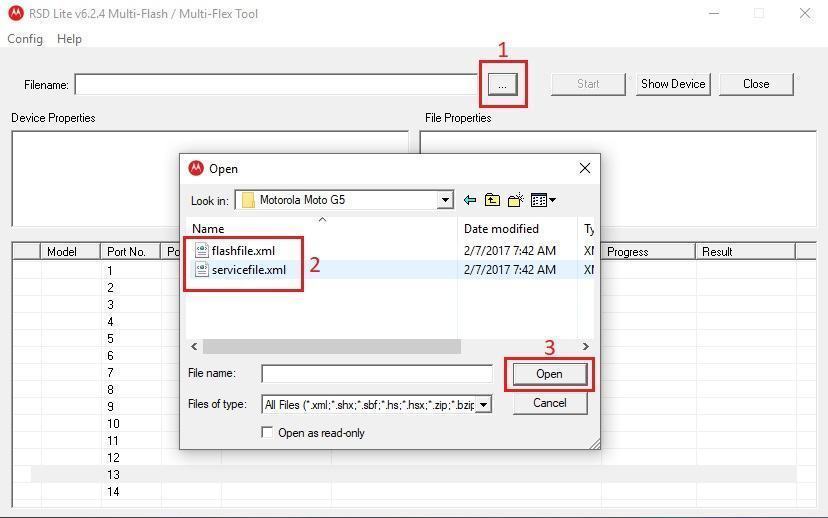
- Open RSD Lite tool >> click 3 dots “…” in the “Filename” >>> Choose to servicefile.xml or flashfile.xml in the rom/firmware folder.
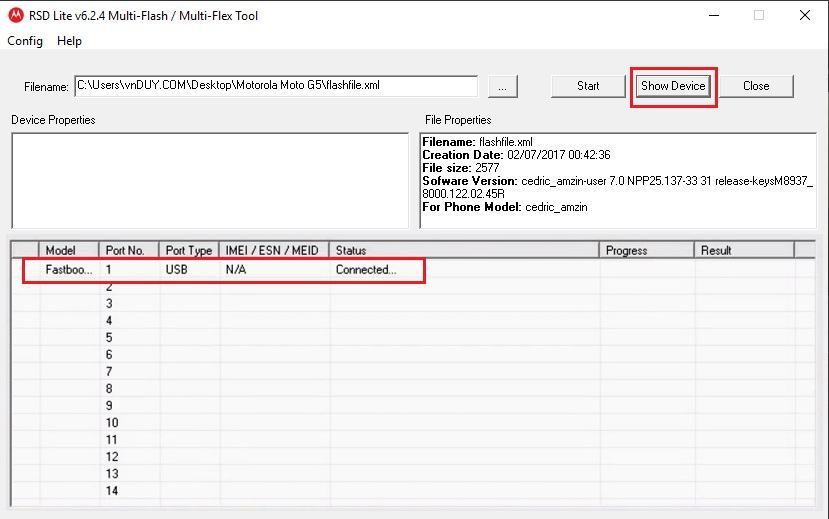
- Power off your phone >>> reboot to Fastboot Mode >>> connect to PC with USB cable and click Start on the tool.
# Medthod 2:
Edit servicefile.xml (or flashfile.xml) to .bat file