In a financial landscape dominated by expensive, proprietary data platforms like Bloomberg and FactSet, accessing quality market data often feels like an exclusive privilege reserved for institutional players with deep pockets. But what if there was another way? What if you could access 100+ financial datasets, standardize data across multiple providers, and build sophisticated analysis pipelines—all without paying exorbitant subscription fees?
Enter OpenBB, an open-source financial data platform that is fundamentally democratizing access to market data for analysts, quantitative traders, and AI agencies worldwide.
As a technical editor who has seen countless “data solutions” come and go, I can tell you OpenBB is different. It’s not just a library; it’s an ecosystem. In this guide, I will walk you through everything from the architectural concepts to building a multi-asset portfolio analyzer.
What is OpenBB really?
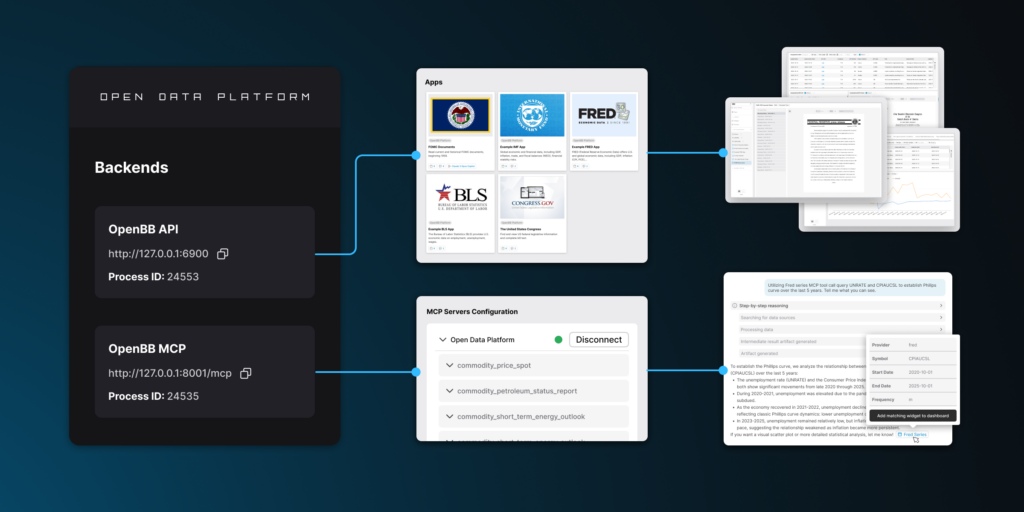
OpenBB’s Open Data Platform (ODP) is a modular, extensible toolkit designed to help data engineers and quants integrate proprietary, licensed, and public data sources into downstream applications. It operates as a “connect once, consume everywhere” infrastructure layer.
Think of it as a universal translator for financial data.
Normally, if you want to switch from Yahoo Finance to Polygon.io, you have to rewrite your entire codebase because their API schemas are different. OpenBB solves this. You learn one command structure, and the platform handles the translation in the background. It consolidates data and exposes it across multiple surfaces simultaneously:
- Python environments for quants and researchers.
- Graphical interfaces via OpenBB Workspace.
- REST APIs for web applications.
- Model Context Protocol (MCP) servers for AI agents.
Why OpenBB matters
Before we jump into the code, let’s look at why this architecture is winning over the open-source community:
- Modularity & Lightweight Architecture: Unlike its predecessor (the monolithic OpenBB Terminal), the new ODP is built to be modular. You start with a lightweight core and only install the extensions you need. No more bloat.
- Multi-Surface Access: Whether you are writing a Python script, building a web dashboard, or using a GUI, the underlying data integration layer remains the same.
- Data Standardization: This is the killer feature. OpenBB uses Pydantic for structured inputs and outputs. A call to fetch historical stock prices returns the exact same schema whether the data comes from Yahoo Finance, FMP, or Polygon.
- AI-Ready Architecture: In the age of LLMs, data structure is king. OpenBB’s docstrings and field names are optimized for AI comprehension, making it a perfect tool for function calling in AI agents.
- Free & Open-Source: Licensed under AGPLv3, it guarantees no vendor lock-in.
- Extensibility: You can build custom extensions to integrate your own private APIs or local data lakes.
Installation guide
Let’s get your environment set up. We are going to do this the “right” way to ensure you don’t run into dependency conflicts later.
Prerequisites
Ensure you have the following ready:
- Python 3.9.21 to 3.12 (OpenBB officially supports this range).
- pip (Python package manager).
- Git (optional, but needed for source installations).
- IDE: VS Code, PyCharm, or Jupyter Notebook.
Step 1: Set up a virtual environment
I cannot stress this enough: always use a virtual environment. Financial libraries often have complex dependencies (pandas, numpy, scipy), and mixing them with your system Python is a recipe for disaster.
Option A: Using venv (Built-in)
python3 -m venv openbb-env
source openbb-env/bin/activate  # On Windows: openbb-env\Scripts\activate
Option B: Using Conda
If you are in data science, Conda is often easier for managing Python versions.
conda create -n openbb-platform python=3.11.9
conda activate openbb-platform
Once activated, your terminal prompt should show the environment name (e.g., (openbb-env)).
Step 2: Install OpenBB via PyPI
The simplest method is using PyPI. You have two choices here depending on how “batteries-included” you want your setup to be.
Basic Installation (Core + Default Extensions)
This is great if you want to keep things light and only add specific providers later.
pip install openbbFull Installation (All Providers & Extensions)
If you want access to every available data provider (Yahoo, Polygon, FMP, Intrinio, etc.) right out of the box, use this command. It installs more dependencies but gives you maximum flexibility.
pip install "openbb[all]"Step 3: Install from source (Optional)
For the developers who want to contribute to the codebase or need the absolute latest features before they hit PyPI:
git clone https://github.com/OpenBB-finance/OpenBB.git
cd openbb_platform
pip install poetry
python dev_install.py
To install all extensions during development:
python dev_install.py -eStep 4: Verify installation
Let’s make sure everything is working. Open your terminal and run:
python -c "from openbb import obb; print(obb)"If successful, you will see the OpenBB object representation printed out. If you see an error, check your Python version and ensure your virtual environment is active.
Step 5: Set up API keys (Optional but Recommended)
While OpenBB supports free providers like Yahoo Finance, the real power comes when you connect premium sources like Financial Modeling Prep (FMP), Polygon, or Intrinio.
Option A: OpenBB Hub (Recommended)
This is the modern way to manage keys, especially if you move between machines.
- Navigate to https://pro.openbb.co.
- Create an account and sign in.
- Go to the Data Providers section.
- Add your API keys for your desired providers.
- Generate a Personal Access Token (PAT) under the Credentials tab.
Then, authenticate inside your Python script:
from openbb import obb

# Login with Personal Access Token
obb.account.login(pat="your_personal_access_token", remember_me=True)

# Or login with email and password
obb.account.login(email="[email protected]", password="your_password", remember_me=True)
Option B: Local Environment Variables
If you prefer to keep everything local, create a user_settings.json file in your OpenBB config directory (~/.openbb on macOS/Linux or %APPDATA%\OpenBB on Windows).
{
  "credentials": {
    "fmp_api_key": "your_fmp_key",
    "polygon_api_key": "your_polygon_key",
    "alpha_vantage_api_key": "your_alpha_vantage_key"
  }
}
Troubleshooting common installation issues
- “No module named ‘openbb'”: You likely forgot to activate your virtual environment. Check
which pythonorwhere python. - “Python version not supported”: OpenBB requires Python 3.9.21+. If you are on an older 3.9 or 3.8, upgrade using Conda.
- Dependency conflicts: If
pipcomplains about conflicts, trypip install --upgrade pip setuptools wheeland install in a fresh environment. - Timeout errors: If PyPI is slow, use a mirror or upgrade pip:
pip install --upgrade pip.
Using OpenBB: A practical guide
Now for the fun part. Let’s write some code to analyze financial data.
Initialize OpenBB
Start your script or Jupyter Notebook with the standard import:
from openbb import obb

# If using API keys from OpenBB Hub, login first
# obb.account.login(pat="your_token", remember_me=True)

print("OpenBB initialized successfully!")
Fetching historical stock data
The most common task is getting price data. Notice how semantic the command is: equity -> price -> historical.
from openbb import obb

# Fetch historical price data for Apple
data = obb.equity.price.historical(symbol="AAPL", provider="yfinance")

# Convert the OpenBB object to a Pandas DataFrame for analysis
df = data.to_dataframe()

# Display the data
print(df.head())
Output:
date        open       high        low         close    volume

2025-12-16  245.63     246.89      244.12      246.45   45230000
2025-12-15  244.23     245.50      243.95      245.67   38120000
...
Working with multiple symbols
OpenBB handles lists of symbols natively, saving you from writing loops.
# Fetch data for multiple stocks at once
symbols = ["AAPL", "MSFT", "GOOGL"]
data = obb.equity.price.historical(symbol=symbols, provider="yfinance")

df = data.to_dataframe()
print(df.head())
Specifying date ranges
You can filter data directly in the call using standard ISO date strings.
# Get data for a specific time period
data = obb.equity.price.historical(
    symbol="TSLA",
    start_date="2024-01-01",
    end_date="2024-12-31",
    interval="1d",
    provider="yfinance"
)

df = data.to_dataframe()
print(f"Total trading days: {len(df)}")
Exploring available data providers
This is where the “Universal Translator” concept shines. You can switch providers just by changing one string argument.
# List providers for equity historical prices are in the docs.
# Supported providers typically include: yfinance, fmp, polygon, tiingo, intrinio, alpha_vantage, tradier

# Switch between providers seamlessly
data_fmp = obb.equity.price.historical(symbol="AAPL", provider="fmp")
data_yfinance = obb.equity.price.historical(symbol="AAPL", provider="yfinance")

# Both calls return standardized data structures, allowing your analysis code to remain unchanged.
Using OpenBB in Jupyter Notebooks
Jupyter is the playground of data science. Here is a complete workflow visualizing Moving Averages (MA).
# Cell 1: Import and initialize
from openbb import obb
import pandas as pd
import matplotlib.pyplot as plt

# Cell 2: Fetch data
symbols = ["AAPL", "MSFT", "NVDA"]
start_date = "2023-01-01"

historical_data = {}
for symbol in symbols:
    data = obb.equity.price.historical(
        symbol=symbol,
        start_date=start_date,
        provider="yfinance"
    )
    historical_data[symbol] = data.to_dataframe()

# Cell 3: Analyze and visualize
aapl = historical_data["AAPL"]
# Calculate Moving Averages
aapl["MA_20"] = aapl["close"].rolling(window=20).mean()
aapl["MA_50"] = aapl["close"].rolling(window=50).mean()

# Plotting
plt.figure(figsize=(12, 6))
plt.plot(aapl.index, aapl["close"], label="Close Price")
plt.plot(aapl.index, aapl["MA_20"], label="20-Day MA")
plt.plot(aapl.index, aapl["MA_50"], label="50-Day MA")
plt.title("AAPL Price with Moving Averages")
plt.xlabel("Date")
plt.ylabel("Price ($)")
plt.legend()
plt.show()
Accessing fundamental data
Price isn’t everything. OpenBB gives you deep access to what’s happening inside the company.
# Get company profile information (Sector, CEO, Description)
profile = obb.equity.profile(symbol="AAPL")
print(profile)

# Get financial statements
income_statement = obb.equity.fundamental.income_statement(symbol="AAPL")

# Get earnings data
earnings = obb.equity.fundamental.earnings(symbol="AAPL")
Working with other asset classes
OpenBB isn’t just for stocks.
# Crypto data
crypto_data = obb.crypto.price.historical(symbol="BTC", provider="yfinance")

# Forex data
forex = obb.forex.price.historical(symbol="EURUSD", provider="yfinance")

# Economic indicators (Federal Reserve Economic Data)
gdp = obb.economy.fred(symbol="A191RL1Q225SBEA")  # Real GDP data
Advanced: Building a multi-asset portfolio analyzer
Let’s put it all together. Here is a function that takes a list of symbols, fetches their data, and calculates the total return over a period. This is the foundation of a backtesting engine.
from openbb import obb
import pandas as pd

def analyze_portfolio(symbols, start_date="2024-01-01"):
    """Analyze historical performance of a portfolio."""

    portfolio_data = {}
    returns = {}

    for symbol in symbols:
        # Fetch historical data
        data = obb.equity.price.historical(
            symbol=symbol,
            start_date=start_date,
            provider="yfinance"
        )
        df = data.to_dataframe()
        portfolio_data[symbol] = df

        # Calculate returns (Simple return: End / Start - 1)
        returns[symbol] = (df["close"].iloc[-1] / df["close"].iloc[0] - 1) * 100

    # Create a summary report
    summary = pd.DataFrame({
        "Symbol": symbols,
        "Return %": [returns[s] for s in symbols]
    }).sort_values("Return %", ascending=False)

    return summary, portfolio_data

# Usage Example
portfolio = ["AAPL", "MSFT", "GOOGL", "NVDA"]
summary, data = analyze_portfolio(portfolio)
print(summary)
Advanced tips & next steps
Once you have mastered the basics, here is how you can take your OpenBB game to the professional level:
1. Custom extensions
The modular architecture is designed for this. If you have internal proprietary data or a niche API not yet supported, you can build a custom extension. This allows you to use obb.my_firm.custom_data() alongside standard OpenBB commands.
2. Integrate with AI agents
This is the frontier. Because OpenBB returns structured Pydantic models and has clean docstrings, it is exceptionally easy to feed into Large Language Models (LLMs). You can build an agent that autonomously “searches for undervalued tech stocks” by chaining OpenBB functions.
3. Deploy via REST API
If you are building a web app and don’t want to embed the Python library directly, you can run OpenBB as an API server.
pip install "openbb[all]"
openbb-api
This launches a FastAPI server at http://127.0.0.1:6900, instantly turning your machine into a financial data server.
4. Connect to OpenBB workspace
For teams, the OpenBB Workspace provides a graphical interface. You can integrate your local Python environment with the Workspace to share analysis and visualizations with non-technical colleagues.
5. Scale with Docker
For production deployments, do not rely on local environments. Containerize your OpenBB application using Docker to ensure consistency across your dev, staging, and production servers.
Conclusion
OpenBB represents a paradigm shift in financial data access. By combining modularity, standardization, AI-readiness, and genuine open-source ethos, it’s empowering a new generation of analysts, quants, and AI agencies to compete on a more level playing field.
Whether you’re a solo trader building backtesting systems, a quant hedge fund integrating custom data pipelines, or an AI agency developing financial agents, OpenBB provides the infrastructure to focus on analysis rather than data plumbing.
Getting started is remarkably simple: just pip install openbb, authenticate with API keys, and begin analyzing. The documentation is comprehensive, the community is supportive, and the platform continues evolving with new features and data providers.
Key takeaways:
- Unified Access: OpenBB standardizes access to 100+ data sources.
- Easy Install:
pip install openbbinside a virtual environment is all you need. - Flexible: Works in Python scripts, Jupyter Notebooks, and as a REST API.
- Scalable: Built to handle everything from quick lookups to enterprise pipelines.
The financial data landscape is evolving. OpenBB isn’t just a tool—it’s a movement toward democratized, transparent financial technology. Start exploring today, and discover how open-source can transform your analysis workflow.