An Instagram Video Downloader is something almost every regular Instagram user eventually wishes they had. Millions of people watch, save, and reuse Reels, Stories, and video posts every day, yet Instagram offers no built-in download button. Screen recording looks like the easy fix, but it lowers quality and captures buttons, captions, and notifications you never wanted. Free web downloaders aren’t much better, because many are packed with ads and only work sometimes. Vcows Instagram video downloader solves this problem. It is a desktop video suite that lets you download, convert, edit, and compress media, and it saves Instagram videos clean and in their original quality.
When Does an Instagram Video Downloader Help You?
Instagram is built for scrolling, not for keeping. A Reel can vanish from your feed, a Story expires after 24 hours, and a creator can delete a post at any time. A reliable downloader gives you a personal offline copy that you control. Here are the situations where saving a video really pays off.
Watching Offline Without Interruptions
Long flights, weak signals, and data limits make streaming unreliable. A saved Reel or tutorial plays anywhere, with no buffering, no ads, and no need to find the post again.
Backing Up Your Own Content
If you are a creator or brand, your Reels and Stories are valuable assets. Downloading them gives you a backup you can store, edit, and reuse on other platforms.
Collecting Reference and Inspiration
Marketers, editors, and designers often study trending formats, transitions, and pacing. Keeping a local library of reference clips makes frame-by-frame review much easier than replaying a feed.
Saving Stories Before They Expire
Stories disappear quickly. If you have the right to keep one, such as a collaboration clip or your own announcement, downloading it preserves the moment beyond the 24-hour window.
Reposting With Permission
Reposting with credit, or with the creator’s approval, works best when you start from a clean, high-quality file rather than a blurry screen recording.
Save IG Reels Without Watermark With Vcows Instagram Video Downloader
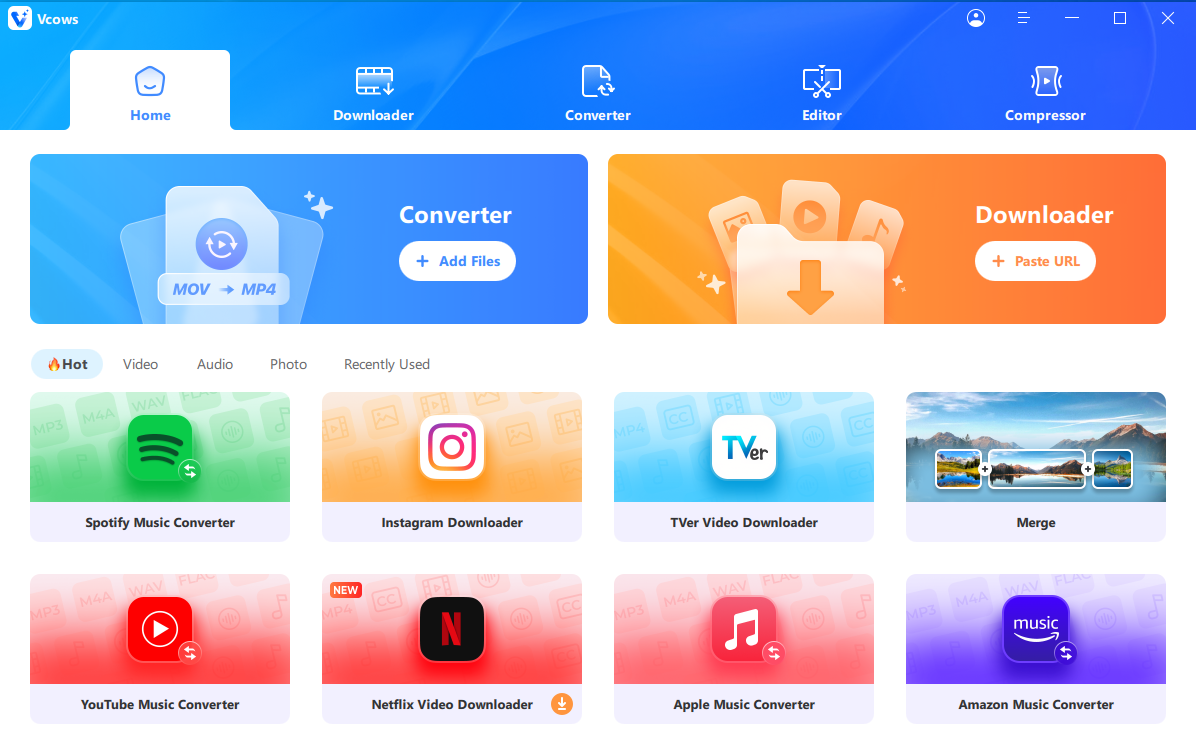
Vcows is a desktop toolkit that brings video, audio, and image tools together in one place. Its Instagram downloader lets you save Reels, videos, Stories, photos, and profile pictures by simply pasting a link, without switching between different websites. Once your file is downloaded, you can use the same software to convert formats, compress files, or make basic edits. Vcows also supports downloads from many of other websites like YouTube, NetFlix Amazone and includes AI tools for tasks such as noise removal, video stabilisation, and reframing. Available for Windows and Mac, it offers a convenient option for users who prefer handling downloads and media tasks in one desktop application.
How Vcows Transforms Your Video Downloading Journey
Download Videos in One Click
Vcows lets you save videos with a single click from more than 10,000 websites. Supported platforms include popular names such as Instagram, YouTube, TikTok, Amazon, and Bilibili, along with thousands of others, so you can build your video library from one reliable tool.
Convert the Downloaded Videos
With support for over 1,000 formats, Vcows ensures your files play on any device or platform. For video, it supports MP4, AVI, WMV, MOV, MKV, M4V, MPEG, FLV, F4V, 3GP, 3G2, ASF, DV, VOB, OGV, DIVX, XVID, WEBM, MXF, TS, M2TS, and TRP. For audio, it supports MP3, WAV, WMA, M4A, M4B, M4R, APE, AAC, AC3, MKA, AIFF, FLAC, AU, OGG, AMR, and MP2. It also handles DVD content, including DVD discs, ISO files, DVD folders, IFO files, and VOB files.
Edit Your Videos
Vcows includes a built-in editor, so you can refine your downloaded videos without needing extra software. You can cut and merge clips, crop and rotate footage, and apply filters to give your videos a polished look. To protect your privacy, you can blur faces, and you can also add text overlays, adjust the volume up or down, stabilize shaky footage, and increase or decrease the playback speed.
Compress the Video Size
Vcows allows you to reduce or adjust the size of your video files to save storage space and make sharing easier, all without losing quality.
Video to GIF
Turn your favorite video clips into GIFs with ease. Converting videos to GIF format makes them simple and fun to share on social media and in messaging apps.
How to Download Instagram Reels?
Step 1: Download, Install, and launch
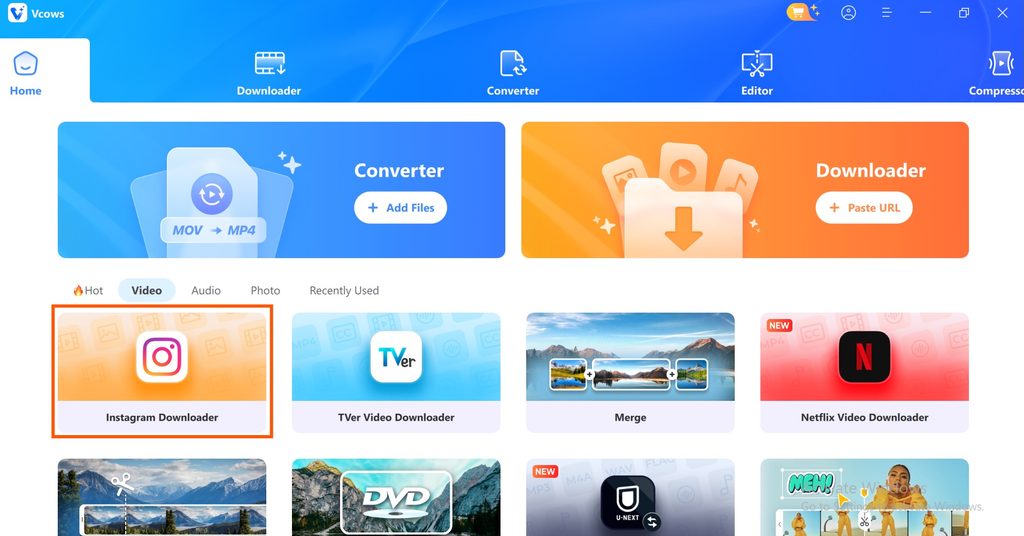
Visit the official website of Vcows to download and install Vcows instagram video downloader, after installing launch the software and click on Instagram Downloader, and login your instagram account.
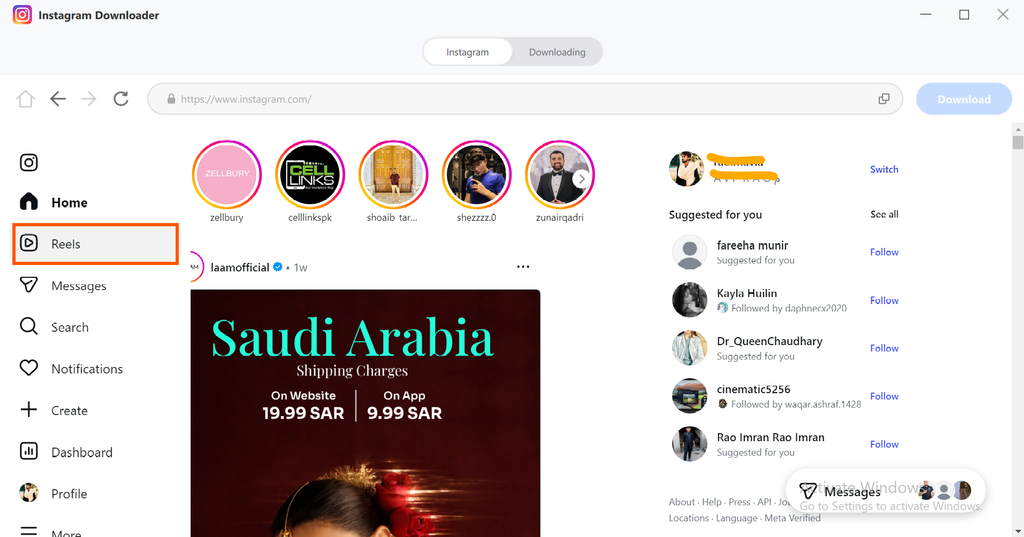
Step 2: Click on Reels
After signing in to your instagram account, click on reels section on your left side to explore the reels.
Step 3: Add Reels in Downloading list
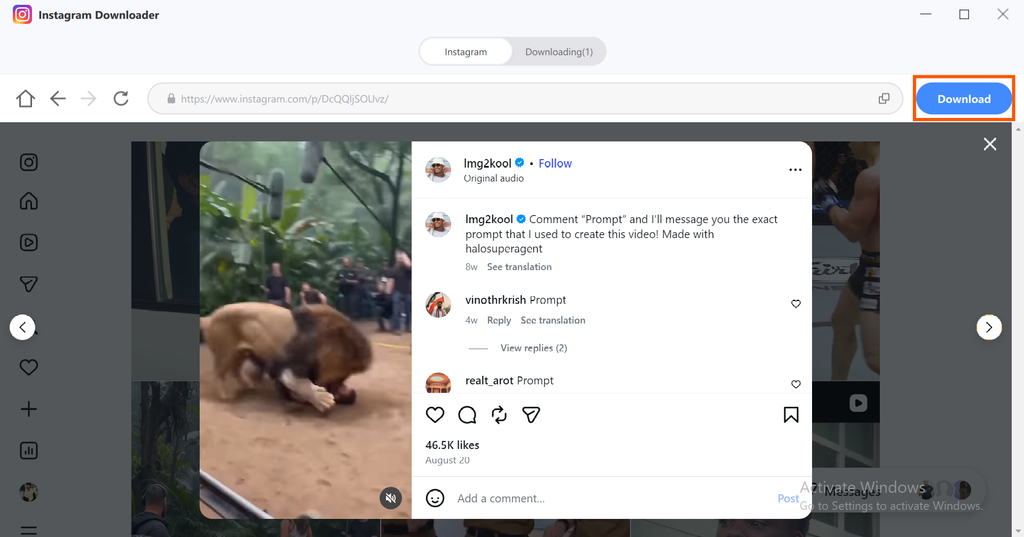
When you Play an instagram reel you will see an download button on your right click on it, your selected reel will be added to download list, you can add multiple reels in that list,
Step 3: Download your selected Reels
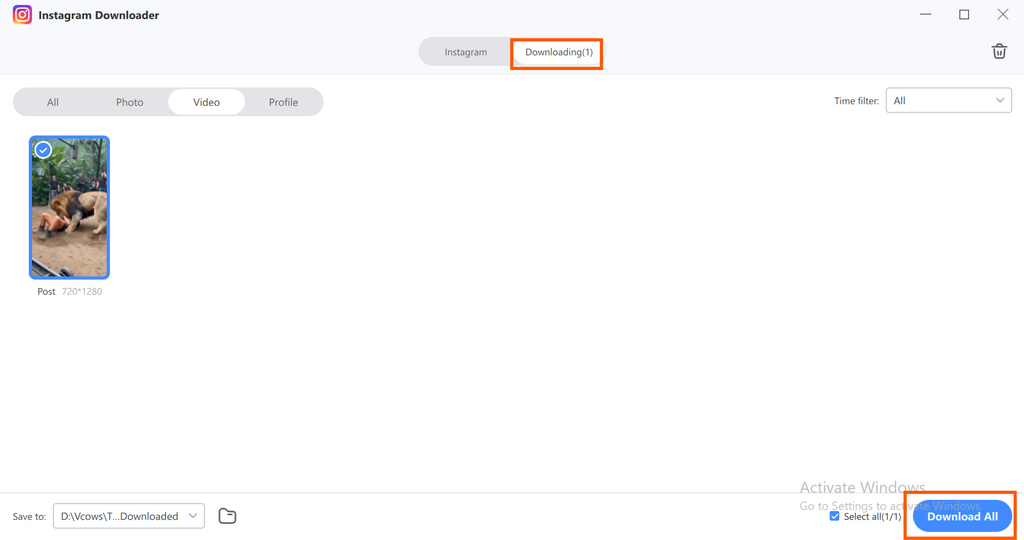
After adding the reels into download list, click on downloading button above and then click on download all this will download all selected reels at once so you can then watch them offline or use for any project.
Comparing Vcows Desktop Suite with Free Online Downloading Services
| Key Features | Vcows | Free Online Downloading Services |
|---|---|---|
| Ads and pop-ups | Clean desktop interface with no ads | Often crowded with ads, redirects, and fake download buttons |
| Reliability | Stable software with regular updates | Hit-or-miss, can break when Instagram changes |
| Supported sites | 10,000+ sites in one app | Usually limited to a few popular platforms |
| Content types | Reels, videos, Stories, photos, profile pictures | Often limited to basic video or photo links |
| Video quality | Up to HD, 4K, and 8K where the source allows | Frequently capped or compressed |
| Batch downloads | Yes, queue multiple links | Typically one link at a time |
| Format conversion | 1000+ formats with GPU acceleration | Few output options, often MP4 only |
| Editing and compression | Built-in cut, merge, crop, compress, and AI tools | None, download only |
FAQ’s
Is it legal to download Instagram videos?
Saving a video for personal, offline viewing is generally considered legal. Reposting or selling someone else’s content without permission can violate copyright and Instagram’s terms. Always credit creators and ask for approval first. This is general information, not legal advice.
Can I download Reels from private accounts?
No. Downloaders can only access public posts. Content from private accounts is restricted to approved followers, so tools cannot fetch it. If you need a private video, ask the owner to send you the original file directly.
What is the best way to download Instagram Reels in high quality?
Use software that saves the original video file instead of recording your screen. Vcows is a good example. This desktop suite lets you paste a Reel link, choose your format, and download a clean file, with built-in tools to convert, edit, or compress it afterwards.
Does Vcows work on both Windows and Mac?
Yes, Vcows works on both Windows and Mac, allowing users to access its video tools on either operating system.
Conclusion
Saving Instagram Reels without a watermark becomes easier when you use the right tool. Vcows Instagram Video Downloader offers a convenient way to save Reels, Stories, and other Instagram content for offline viewing, backups, and creative projects. Unlike basic online downloaders, it also includes video conversion, editing, compression, and batch downloading features in one desktop application. Whether you are a content creator, marketer, or regular Instagram user, Vcows helps simplify your media workflow while maintaining video quality where the source allows.
Ready to save your favourite Instagram Reels? Download Vcows today and download instagram reels in high quality without any watermark or screen recording.