T3 Code: Minimal Web GUI for AI Coding Agents – Complete Installation and Usage Guide

Key Takeaways
T3 Code turns your local machine into a powerful self-hosted AI coding agent with a lightweight web GUI, letting developers orchestrate OpenAI Codex (and soon Claude) to plan, edit, and execute code changes without subscriptions or cloud lock-in.
In an era where AI coding tools promise to accelerate development but often come with heavy IDE integrations, subscription costs, or privacy concerns, T3 Code stands out as a refreshingly minimal solution. Developed by the team behind pingdotgg and the popular T3 Stack, this open-source project provides a lightweight web-based graphical user interface specifically designed for interacting with coding agents. Launched in early 2026, it is currently optimized for OpenAI’s Codex model while preparing support for Anthropic’s Claude Code. Whether you are a solo developer seeking a fast local harness or part of a team wanting full control over data and costs, T3 Code delivers an agentic workflow that feels like having an AI collaborator directly in your projects.
The tool is entirely self-hosted, running on your machine via a simple command or downloadable desktop application. It leverages your existing API keys, ensuring you only pay for the underlying model usage while keeping all interactions local. This approach addresses common pain points with tools like Cursor or hosted alternatives: excessive resource consumption, vendor lock-in, and limited customization. With built-in support for chat threads, integrated terminals, file diffs, worktree management, and customizable keybindings, T3 Code offers a focused experience that prioritizes speed and developer control.
What is T3 Code and Why It Matters for Modern Developers
T3 Code is not another full-featured IDE or a cloud-based coding platform. Instead, it functions as a minimal harness for AI coding agents. At its core, the application launches a web interface that connects to powerful language models through your API credentials. The current implementation centers on OpenAI Codex, enabling the agent to understand natural language instructions, generate plans, propose code edits, run terminal commands, and manage git workflows.
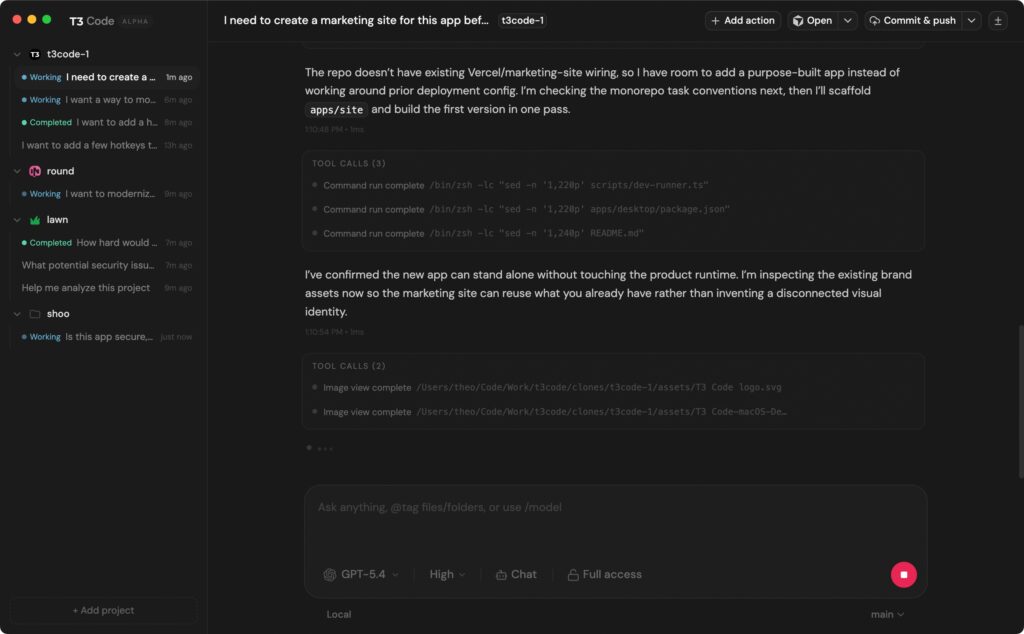
Key features include an interactive chat interface that supports markdown rendering and threaded conversations, a built-in terminal drawer for real-time execution, visual diffs for proposed changes, and worktree support for isolated project branches. The interface also includes approvals before applying edits, preventing unintended modifications. For power users, remote access capabilities allow secure browser-based control from other devices, and fully customizable keybindings adapt the tool to individual workflows.
The benefits extend beyond simplicity. Because T3 Code is open-source under the MIT license and built with TypeScript, developers can inspect, modify, or extend the codebase. It integrates seamlessly with the broader T3 ecosystem, making it ideal for Next.js or full-stack projects. Early adopters appreciate the low overhead compared to resource-heavy alternatives, the privacy of local execution, and the ability to use the exact models they already pay for without additional fees.
How T3 Code Works as an AI Coding Agent
The agentic workflow in T3 Code follows a clear orchestration loop that sets it apart from simple code completion tools. You begin by creating a new chat thread tied to your current project or worktree. Describe the task in natural language, such as “build a responsive marketing site with Tailwind and add a contact form.” The agent, powered by Codex, responds by outlining a step-by-step plan.
From there, the system uses internal tools to interact with your filesystem, propose file creations or edits, and display them as a tree view with side-by-side diffs. You review and approve changes before they are applied. The integrated terminal allows the agent to run commands like npm install or tests, with output streamed directly in the interface. Git operations, including commits and branch management, are handled transparently. This closed-loop process continues until the task is complete, with each step visible and interruptible.
Future updates will introduce “plan mode” and enhanced message queuing, further refining the experience. The current version already reduces tool-call noise and supports script execution via custom commands, making it suitable for both quick prototypes and complex refactors.
Prerequisites Before Installing T3 Code
Setting up T3 Code requires minimal preparation, reflecting its lightweight design. You need a machine running a modern operating system supported by Electron for the desktop version or Node.js for the CLI route. An OpenAI account with API access to Codex-capable models is essential, along with a valid API key. Basic familiarity with terminal commands helps, though the web GUI handles most interactions.
No additional heavy dependencies are required beyond what the npx command pulls. For remote usage, you will need Bun as the runtime and optionally Tailscale for secure networking. Disk space is negligible, and RAM usage remains low even during active agent sessions.
Step-by-Step Installation Guide
T3 Code offers two primary installation paths, both designed for speed and convenience.
Using npx t3 for Quick Local Testing
The fastest way to experience T3 Code is through the npx command, which downloads and runs the latest version without permanent installation. Open your terminal and execute:
npx t3This command launches the web server and automatically opens the GUI in your default browser. The first run may prompt you to enter your OpenAI API key in the settings panel. Once configured, the interface loads with project selection and chat creation options. Updates happen automatically on subsequent runs, ensuring you always have the latest features.
This method is ideal for testing or temporary sessions and works across macOS, Windows, and Linux.
Installing the Desktop Application for Daily Use
For a more integrated experience, download the standalone desktop application from the official GitHub releases page. Versions for all major platforms are available as of v0.0.3. After downloading and installing the appropriate package, launch T3 Code like any other native app.
The desktop version includes auto-updates, system tray integration, and slightly faster performance due to native Electron optimizations. It retains the exact same web-based interface while providing better keyboard focus and window management.
Both methods result in the same functional GUI, so choose based on preference. The project explicitly notes it is in early development, so expect occasional bugs and monitor the releases for patches.
Configuring T3 Code for Optimal Performance
After installation, configuration centers on connecting your AI provider and customizing the environment. In the settings screen, paste your OpenAI API key and verify connectivity through the built-in health check. The application stores state in a local directory, typically under ~/.t3, keeping everything private.
Advanced users can customize keybindings by creating or editing ~/.t3/keybindings.json. The default configuration includes shortcuts such as mod+j to toggle the terminal, mod+n for new chats, and mod+shift+o for opening the current project in your preferred editor. Rules support context-aware conditions like terminalFocus, allowing precise workflow tuning.
For remote access, build the server with bun run build and start it using flags such as –host and –auth-token. This enables secure browser access from phones or other machines while maintaining full encryption via the token.
Getting Started with T3 Code: Practical Usage Examples
Launching T3 Code presents a clean dashboard with project and thread management. Create a new local chat or one preserving worktree state, then begin interacting with the agent.
Consider a typical workflow: open an existing Next.js project and instruct the agent to “add authentication with NextAuth and a protected dashboard page.” The agent generates a plan, proposes file changes with diffs, and waits for approval. Once approved, it runs necessary npm commands in the integrated terminal and commits changes if configured.
Another example involves starting from scratch: “initialize a new marketing site using Tailwind and deploy-ready scripts.” The agent creates the project structure, installs dependencies, and iterates based on your feedback. These interactions demonstrate the power of the orchestration layer-Codex handles reasoning while the GUI manages execution.
Keybindings enhance efficiency. Use mod+d to split terminals during debugging or mod+shift+n for a fresh local thread without disturbing the current branch.
Advanced Features and Tips for Power Users
T3 Code includes several productivity enhancers beyond basic chatting. The terminal drawer supports multiple sessions and split views, ideal for running tests alongside the agent. Worktree support allows isolated experimentation without affecting the main branch. Thread archiving and sorting by latest update are planned but can be managed manually in the meantime.
For remote development, the secure token-based setup combined with Tailscale creates a private coding environment accessible anywhere. Developers working across devices report seamless transitions between laptop and desktop sessions.
To maximize results, provide clear, iterative prompts and review diffs carefully before approving. Combine T3 Code with your favorite editor by using the open-favorite command, keeping the agent as the orchestration layer rather than a replacement for manual coding.
Troubleshooting Common Issues and Community Resources
As an early-stage project, T3 Code may encounter occasional issues such as scrolling behavior in long threads or tool-call visibility. The TODO list highlights active improvements including auto-scroll fixes and reduced noise. Most problems resolve by restarting the application or checking the latest release.
For support, join the official Discord server linked in the repository. The community actively shares workflows and workarounds. The GitHub issues page, while not yet accepting contributions, serves as a reference for known limitations.
The Future of T3 Code and AI Coding Agents
The roadmap includes full Claude Code integration, plan mode for structured reasoning, external runner support, and enhanced thread management. These additions will solidify T3 Code as a versatile platform for both local and distributed development.
By keeping the tool minimal and open-source, the team ensures it remains adaptable as AI models evolve. Developers who adopt T3 Code today gain early access to a philosophy that prioritizes control, speed, and transparency in an increasingly agent-driven coding world.
T3 Code represents a significant step toward accessible, self-hosted AI development tools. Its combination of simplicity, powerful agent orchestration, and local-first design makes it an excellent choice for anyone tired of bloated alternatives. Whether you install via npx for quick experiments or the desktop app for daily use, the interface quickly becomes an indispensable coding companion.
Start with the npx command today, connect your OpenAI key, and experience how a minimal GUI can unlock the full potential of coding agents. The future of development is agentic, local, and open-and T3 Code is leading the way.