 By
CopilotKit: Agentic UI Architecture and Full-Stack Runtime Loop
Key Takeaways
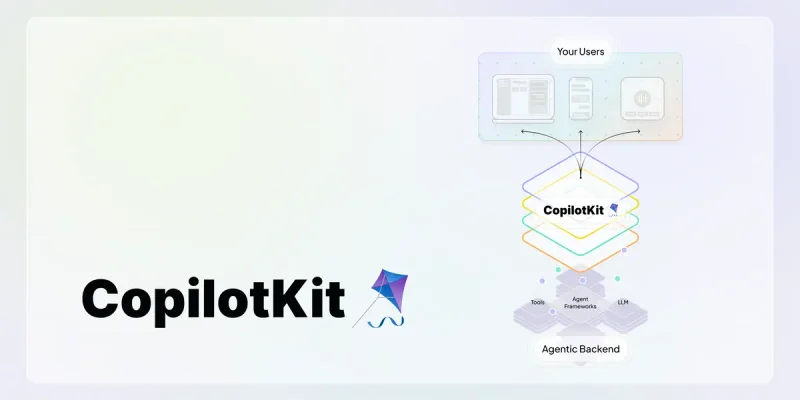
CopilotKit provides an open-source, full-stack framework for embedding generative user interfaces, shared state synchronization, and human-in-the-loop workflows into web and mobile applications. It decouples client-side component reactivity from backend model execution using the open AG-UI protocol and the A2UI 1.0 specification. Through unified Fetch handlers in@copilotkit/runtime, sandboxed MCP Apps execution, and multi-channel adapters for Slack and Microsoft Teams, CopilotKit transitions conversational AI from isolated text popups into deeply integrated software surfaces.
Embedding artificial intelligence into software traditionally relied on isolated floating chat windows. In this legacy pattern, a user types a prompt into a text field, an external large language model processes the request through a stateless API call, and the response streams back as raw Markdown text.
While functional for basic document question answering, this decoupled approach breaks down in complex interactive applications:
- Zero Interface Context: The model cannot inspect the active client-side view state, selected database records, or uncommitted form values unless developers construct manual prompt serialization pipelines.
- Lack of Bidirectional Mutation: The assistant cannot directly trigger state updates, mutate form inputs, or highlight conflicting interface components based on user intent.
- Absence of Human-in-the-Loop Interruption: Complex execution graphs cannot pause deterministically to request approval before dispatching high-impact financial or data operations.
[Legacy Chat Widget] ──(Raw Markdown Text)──> [Passive User Inspection]
                                   (Manual copy-paste) │
                                                       ▼
[Target Application] <───────────────────────── [Manual Form Editing]

========================= VS =========================

[CopilotKit Agentic UI Loop]
      │
      ├── State Synchronization (useAgent, state reflection)
      ├── Tool Invocation & Render Hooks (useFrontendTool)
      └── Human-in-the-Loop Pause (useHumanInTheLoop)
      │
      ▼
[Target Application Components Directly Updated at Runtime]
CopilotKit resolves this limitation by standardizing an agent-user interaction loop. The project is distributed under the permissive MIT License in the CopilotKit repository and managed as an Nx and pnpm monorepo in package.json, using oxlint, oxfmt, and lefthook for workspace quality gates.
| Architecture Dimension | Legacy Chat Widgets | CopilotKit Agentic UI |
|---|---|---|
| Interaction Model | Unidirectional text streaming | Bidirectional state sync and execution |
| State Awareness | Stateless prompt strings | Direct React hook subscriptions |
| Generative Rendering | Raw text or basic Markdown | Dynamic JSX and declarative A2UI components |
| Tool Invocation | Backend-only API execution | Hybrid browser DOM actions and backend tools |
| Multi-Channel Reach | Isolated web iframe | Unified agents across Web, Slack, and Teams |
Core mechanics: AG-UI wire protocol and client hooks
The foundation of CopilotKit relies on separating client UI reactivity from backend agent graph execution. This separation is bridged by the Agent-User Interaction (AG-UI) protocol, implemented across @ag-ui/core, @ag-ui/client, and @ag-ui/encoder.
Programmatic control with the useAgent hook
In modern CopilotKit applications, client components interact with agents through dedicated React hooks. Rather than forcing developers to manually coordinate Server-Sent Events, @copilotkit/react-core exports the useAgent hook in packages/react-core/src/v2/hooks/use-agent.tsx.
The hook manages subscription lifecycles through the UseAgentUpdate enum:
UseAgentUpdate.OnMessagesChanged: Dispatched when message histories update or stream increments.UseAgentUpdate.OnStateChanged: Dispatched when the shared agent state graph mutates.UseAgentUpdate.OnRunStatusChanged: Dispatched during agent run lifecycle transitions (initialization, finalized, failed).
To prevent interface stutter during token streaming, useAgent implements a configurable throttleMs property. The hook applies a leading-plus-trailing scheduling pattern over a shared window: the initial event triggers an immediate re-render, intermediate updates within the interval are coalesced, and a trailing timer ensures the final state renders when the window expires. Lifecycle callbacks bypass throttling to preserve prompt responsiveness.
import { useAgent, UseAgentUpdate } from "@copilotkit/react-core";

export function AgentWorkflowMonitor({ agentId }: { agentId: string }) {
  const { agent } = useAgent({
    agentId,
    updates: [
      UseAgentUpdate.OnStateChanged,
      UseAgentUpdate.OnRunStatusChanged,
    ],
    throttleMs: 150, // Coalesces streaming tokens to minimize unnecessary React re-renders
  });

  return (
    <div className="rounded-lg border border-slate-700 p-4">
      <h3 className="font-semibold text-slate-200">Execution Phase: {agent.state.phase}</h3>
      <p className="text-sm text-slate-400">Status: {agent.runStatus}</p>
      <button
        onClick={() => agent.setState({ phase: "validation_pending" })}
        className="mt-3 rounded bg-indigo-600 px-3 py-1 text-sm text-white"
      >
        Update Workflow Phase
      </button>
    </div>
  );
}
Dynamic generative UI with useFrontendTool
While backend tools execute on servers to query databases or invoke external APIs, frontend applications often require tools that execute inside the browser and render custom UI components directly in the conversation thread.
CopilotKit provides this capability via useFrontendTool, implemented in packages/react-core/src/v2/hooks/use-frontend-tool.tsx. When a component mounts, copilotkit.addTool(tool) registers the executable action into the active runtime session.
When the tool definition includes a render function, CopilotKit registers the renderer into addHookRenderToolCall. When the component unmounts, the cleanup handler removes the active executable tool from the agent registry, but intentionally retains the render hook. This architectural design ensures that historic tool executions remain visible and interactive in the chat transcript even after users navigate away from the triggering view.
For synchronous approval gates, packages/react-core/src/v2/hooks/use-human-in-the-loop.tsx provides useHumanInTheLoop. The hook returns a pending Promise that halts agent progression until the user acts via respond(), while cleaning up AbortSignal listeners on settlement or abort to prevent memory leaks.
Declarative generative UI and sandboxed MCP apps
Beyond imperative React render callbacks, modern CopilotKit introduces standard-based declarative generative UI and third-party tool sandboxing.
Declarative surfaces with A2UI 1.0
To avoid vendor lock-in and enable cross-framework rendering across React, Angular, and Vue, CopilotKit adopts the A2UI 1.0 specification. Implemented via @copilotkit/a2ui-renderer and @ag-ui/a2ui-middleware, the framework defines surface boundaries using DEFAULT_SURFACE_ID = "default" and mandatory entry points via ROOT_COMPONENT_ID = "root" in packages/a2ui-renderer/src/a2ui-types.ts.
On the server, createSurfaceWriter in packages/runtime/src/v2/runtime/generative-ui/surface-writer.ts provides a programmatic façade emitting ACTIVITY_DELTA events (generative-ui-surface). Rather than pushing monolithic HTML blobs, the server streams atomic JSON Patch operations that the client validates against its component catalog before updating the DOM tree.
Sandboxed MCP apps execution
When agents consume tools from Model Context Protocol (MCP) servers that return interactive visual widgets, hosting third-party web code directly inside the application introduces significant security risks.
The framework-agnostic MCP Apps host in packages/mcp-apps-renderer/src/sandbox.ts isolates untrusted widgets using a nested double-iframe architecture:
- Sandbox Flags: The host explicitly applies
sandbox="allow-scripts allow-forms"while omittingallow-same-origin. This ensures the widget runs with an opaque origin and cannot access host session cookies, local storage, or application DOM. - Proxy Relay: An outer
srcdocproxy iframe relays messages between the host application and inner widget frame viapostMessage. - CSP Source Validation: Allowed domains are validated against
CSP_HOST_SOURCEregex patterns to prevent header or meta tag injection when applying Content Security Policies.
Practical layer: Next.js App Router implementation
Constructing a production CopilotKit deployment requires configuring a server-side runtime handler and wrapping client components in the context provider.
Server-side runtime handler
The backend runtime package @copilotkit/runtime provides unified adapters across multiple server frameworks. In Runtime v2, createCopilotRuntimeHandler in packages/runtime/src/v2/runtime/core/fetch-handler.ts exports a pure (Request) => Promise<Response> handler compatible with Next.js App Router, Bun, Deno, and Cloudflare Workers.
In Next.js App Router, the endpoint is instantiated within a catch-all route handler:
// app/api/copilotkit/[[...slug]]/route.ts
import {
  CopilotRuntime,
  createCopilotRuntimeHandler,
} from "@copilotkit/runtime/v2";
import { LangGraphAgent } from "@copilotkit/runtime/langgraph";

const runtime = new CopilotRuntime({
  agents: {
    operations_copilot: new LangGraphAgent({
      deploymentUrl: process.env.LANGGRAPH_DEPLOYMENT_URL || "http://localhost:8123",
      graphId: "operations_copilot",
      langsmithApiKey: process.env.LANGSMITH_API_KEY || "",
    }),
  },
});

const handler = createCopilotRuntimeHandler({
  runtime,
  basePath: "/api/copilotkit",
  cors: true,
});

export const GET = handler;
export const POST = handler;
export const OPTIONS = handler;
Client application setup and tool registration
On the frontend, wrap your root application with CopilotKit and mount either CopilotSidebar or CopilotChat from @copilotkit/react-ui:
// app/layout.tsx
import "@copilotkit/react-ui/styles.css";
import { CopilotKit } from "@copilotkit/react-core";
import { CopilotSidebar } from "@copilotkit/react-ui";

export default function RootLayout({ children }: { children: React.ReactNode }) {
  return (
    <html lang="en">
      <body>
        <CopilotKit runtimeUrl="/api/copilotkit">
          {children}
          <CopilotSidebar
            defaultOpen={false}
            labels={{
              title: "Operations Assistant",
              initial: "How can I assist with your deployment workflow?",
            }}
          />
        </CopilotKit>
      </body>
    </html>
  );
}
Components rendered inside this provider can register interactive tools:
// components/DatabaseMigrator.tsx
"use client";

import { useFrontendTool } from "@copilotkit/react-core";
import { useState } from "react";

interface MigrationParams {
  clusterId: string;
  targetVersion: string;
}

export function DatabaseMigrator() {
  const [status, setStatus] = useState<string>("idle");

  useFrontendTool<MigrationParams>({
    name: "requestMigrationPlan",
    description: "Generate and display a visual database migration confirmation card",
    parameters: [
      { name: "clusterId", type: "string", description: "Target database identifier", required: true },
      { name: "targetVersion", type: "string", description: "Engine version to apply", required: true },
    ],
    render: ({ status: toolStatus, args }) => {
      const { clusterId, targetVersion } = args;
      return (
        <div className="rounded border border-indigo-500/40 bg-slate-900 p-3 text-xs text-slate-200">
          <p className="font-bold text-indigo-400">Migration Request</p>
          <p>Cluster: {clusterId}</p>
          <p>Target Version: {targetVersion}</p>
          <div className="mt-2 flex gap-2">
            <button
              onClick={() => setStatus(`Approved for ${clusterId}`)}
              className="rounded bg-emerald-600 px-2 py-1 text-white hover:bg-emerald-500"
            >
              Confirm Migration
            </button>
            <span className="self-center text-slate-400">State: {toolStatus}</span>
          </div>
        </div>
      );
    },
    handler: async ({ clusterId, targetVersion }) => {
      return { scheduled: true, clusterId, targetVersion, timestamp: Date.now() };
    },
  });

  return (
    <div className="p-4">
      <p className="text-sm text-slate-300">Cluster Status: {status}</p>
    </div>
  );
}
Runtime lifecycle boundaries and security considerations
Operating an agentic UI layer introduces distinct operational considerations compared to static client interfaces.
Edge vs long-running server lifecycles
CopilotKit provides different runtime adapters tailored to process topologies. In particular, the Hono wrapper in packages/runtime/src/v2/runtime/endpoints/hono.ts behaves differently from dedicated process servers:
- Eager Process Wrappers (Node/Express): Because Node and Express own a persistent process, they immediately start managed Channels engines on instantiation.
- Lazy Multi-Runtime Wrappers (Hono): Hono acts as the multi-runtime edge surface powering Next.js App Router route handlers. In serverless environments, isolates freeze and recycle per request. Eager activation would spawn duplicate listeners for the same Channel across cold starts. Consequently, the Hono wrapper stays lazy, requiring long-running hosts (
@hono/node-server, Bun, Deno) to explicitly callawait app.channels.ready()once at startup, while serverless functions leave it dormant.
Channels SDK and organizational boundaries
The Channels engine package @copilotkit/channels-core (v0.12.0) provides multi-platform messaging adapters across Slack, Microsoft Teams, Discord, and WhatsApp.
In Slack deployments, SanitizingHttpAgent in packages/channels-slack/src/sanitizing-http-agent.ts parses Server-Sent Events via parseSSEStream and coerces nullable string fields (such as TOOL_CALL_START with a null parentMessageId from LangGraph interrupts) to prevent strict Zod validation errors from aborting runs prematurely.
When extending web agents into workplace channels, teams must enforce strict boundaries:
- Session Authentication: Web sessions authenticated through secure browser cookies cannot be implicitly mapped to Slack or Teams user identifiers without explicit account linking.
- Payload Sanitization: Form components rendered via Slack Block Kit or Adaptive Cards must sanitize untrusted agent outputs to mitigate indirect prompt injection when rendering external database records.
- Token Budget Overhead: Exposing comprehensive client state via
useAgentincreases token transmission volume. Teams should subscribe to selective state slices rather than forwarding full application trees into agent context windows.
Continual Learning and trajectory capture
In packages/learning/src/trajectory-collector.ts, CopilotKit introduces full-stack trajectory capture. The client captures user clicks, navigation, text inputs, and network events alongside agent actions, enforcing MAX_TRAJECTORY_EVENT_BYTES = 16 * 1024 (16 KB) and client-side PII redaction. Ingested into CopilotKit Intelligence, these trajectories enable agents to continuously learn workflow patterns and generate reviewable Skills.
Adoption criteria and engineering takeaway
CopilotKit transitions AI integration from disconnected text chat widgets to tightly coupled, interactive agentic software surfaces.
When to adopt CopilotKit
- Interactive Workspace Workflows: Applications where AI agents need to read form state, update spreadsheet cells, or trigger visual confirmation cards directly inside the UI.
- Multi-Surface Agent Deployments: Engineering teams planning to deploy a single unified agent core across web apps, mobile clients, and enterprise chat systems (Slack and Microsoft Teams).
- Standardized AG-UI and MCP Workflows: Teams using LangGraph state machines or Model Context Protocol tool servers that need standardized frontend streaming, A2UI generative rendering, and sandboxed widget execution.
When to use simpler alternatives
- Pure Document Question Answering: Static documentation sites and search wikis that only need streaming Markdown text without client-side state mutation.
- Headless Background Automation: Asynchronous pipeline workers that operate without user-in-the-loop validation or visual feedback.