 By
Never Miss an Important Update: Build an AI Workflow That Summarizes Firmware and App Changelogs
If you own more than one Android device, keeping up with updates is a part-time job. Monthly security patches, new firmware builds, app releases and open-source tool updates all arrive on different schedules, usually with release notes that say little more than “bug fixes and stability improvements.”
Missing the important ones can be costly. You might skip a critical security patch, or flash a new Samsung build without realizing it raises the bootloader version and blocks you from downgrading later.
The good news is that you no longer have to read every changelog yourself. With some simple workflow software and an AI model, you can collect release notes automatically and turn them into a short digest that tells you what changed, whether it matters for your devices and what you should do next. The steps below work with most automation tools, so you can follow along with whatever you already use.
Why changelogs are so hard to follow
The problem is not a lack of information. It is that the information is scattered and written in very different styles.
- Security bulletins are detailed but technical. Google’s Android Security Bulletin for November 2026, for example, lists dozens of CVEs across two patch levels, 2026-11-01 and 2026-11-05, including critical remote code execution flaws.
- Manufacturer firmware notes are often vague, even when the update changes something important under the hood.
- App and tool releases on GitHub can be long, with breaking changes buried halfway down the page.
Reading all of this every week is unrealistic. An AI workflow can do the reading for you and flag only what matters.
What the workflow does
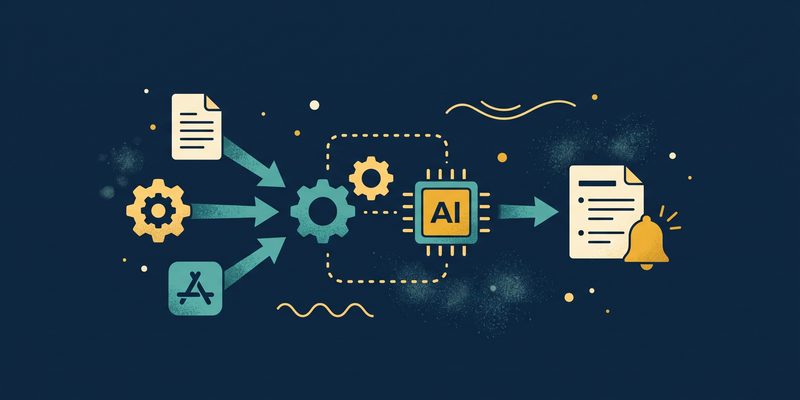
The idea is simple. A scheduled workflow collects new release notes, sends them to an AI model with clear instructions, filters the results for your devices and delivers a short summary to your phone or inbox.
- Collect: pull new changelogs and bulletins from your chosen sources.
- Summarize: ask an AI model to extract the key changes and risks.
- Filter: keep only updates that affect your devices, apps and tools.
- Deliver: send a weekly digest by email, Telegram or Discord.
Step 1: Choose your sources
Start with a short list of sources you actually care about. A focused list produces a more useful digest than trying to watch everything.
- Android Security Bulletins: Google publishes a new bulletin every month, listing the vulnerabilities fixed at each patch level.
- Manufacturer security pages: Samsung, Google Pixel, Motorola and other brands publish their own monthly security update notes.
- Firmware version trackers: tools that check the latest firmware for your model and region can show when a new build appears.
- GitHub releases: most open-source projects offer a releases feed in the format github.com/owner/project/releases.atom, which is easy to monitor automatically.
Step 2: Fetch new updates on a schedule
Set the workflow to run once a day or once a week. Each run checks your sources, compares them with what it saw last time and passes along only new entries.
Storing a simple list of version numbers or release IDs you have already processed prevents duplicate summaries. It also keeps AI costs low, because the model only reads genuinely new content.
Step 3: Let AI summarize what changed
This is where AI saves the most time. Send each new changelog to a language model with a structured prompt, so every summary follows the same format and is easy to scan.
A good prompt asks the model to return:
- What changed: two or three plain-English bullet points.
- Security impact: the patch level and whether any critical issues are fixed.
- Risks: known issues, breaking changes or anything that affects rooting, custom ROMs or downgrades.
- Recommendation: update now, wait for feedback, or skip.
Use a fast, inexpensive model for routine app updates and a stronger one for long security bulletins. That keeps costs predictable without sacrificing accuracy where it matters most.
Step 4: Filter for your devices
Give the workflow a list of your devices, firmware regions and the apps or tools you use. The AI can then mark each update as relevant or not before anything reaches you.
This step is especially useful for firmware. As SamMobile explains in its guide to Samsung firmware numbers, the bootloader version is shown by a single character in the build number, and you cannot roll back to firmware with a lower bootloader version. Asking the AI to flag any build that raises the bootloader version can save you from an update you cannot undo.
Step 5: Deliver a digest you will actually read
Send everything as one weekly message rather than a notification for every release. A good digest might look like this:
- Galaxy S24 (EUX): new build with the November 2026 patch. Bootloader version increased, so downgrading will no longer be possible. Recommendation: back up first.
- Pixel 8: November security update available. Fixes critical remote code execution issues. Recommendation: update now.
- Open-source flashing tool v2.4: adds support for newer devices, changes command syntax. Recommendation: read the release notes before updating scripts.
Telegram bots, Discord webhooks and email all work well as delivery channels. Choose whatever you check most often.
Tips and cautions
- Always verify before flashing. AI summaries are a starting point, not a replacement for checking the official release notes and your exact model and region.
- Back up first. Before installing any firmware, back up your data and confirm the build matches your device.
- Watch for hallucinations. Ask the model to quote version numbers exactly as they appear in the source, and flag anything it is unsure about.
- Keep sources official. Stick to manufacturer pages, Google’s bulletins and trusted repositories, especially for firmware downloads.
Final thoughts
Update overload is not going away, especially if you manage several phones, tablets or custom ROM setups. An AI changelog workflow turns that noise into a short weekly briefing, so you can install the important updates quickly and avoid the ones that could cause trouble.
Start with two or three devices and a handful of sources, review the summaries for a few weeks and refine your prompts. Before long, you will spend minutes instead of hours keeping your devices safe and up to date.