Herdr: Terminal‑native multiplexer for AI coding agents and remote sessions

Key Takeaways: Herdr turns your terminal into an agent‑aware multiplexer, letting you run, organize, and reattach to multiple AI coding agents and remote shells from one lightweight, rust‑powered client.
Meet herdr: An agent multiplexer that lives in your terminal
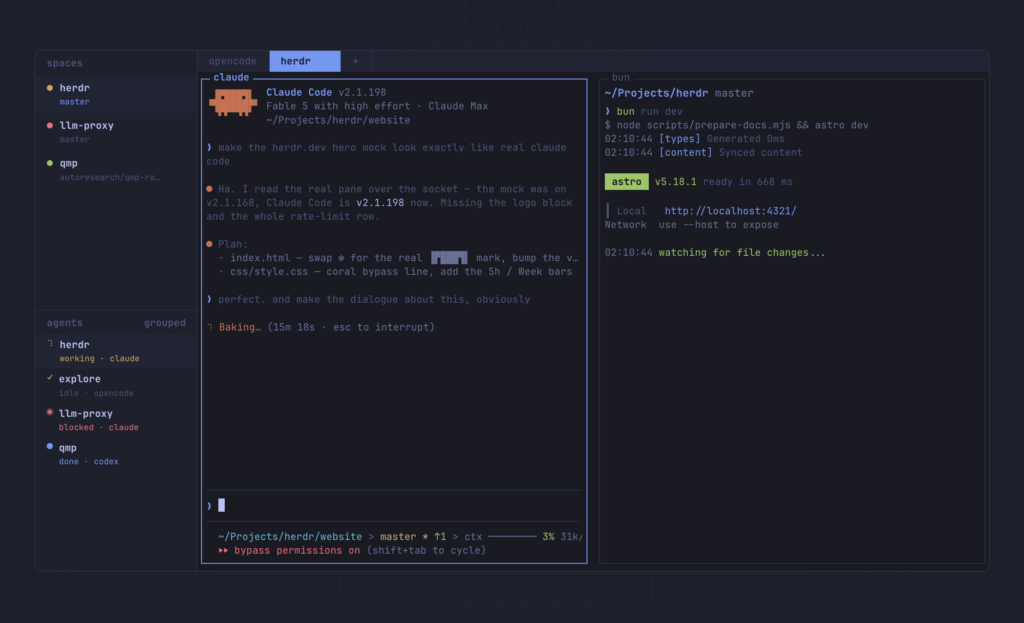
Herdr is a terminal‑native multiplexer and runtime for coding agents that organizes your work into workspaces, tabs, and panes inside the terminal you already use. Instead of wrapping your tools in an Electron GUI or browser dashboard, herdr shows each agent’s real terminal view and tracks whether it is blocked, working, done, or idle. Under the hood, herdr is a single Rust binary with no heavy dependencies, designed to run on Linux and macOS, with preview‑only beta support for Windows.
For developers juggling Claude Code, Codex, pi, Grok CLI, and other AI agents, herdr becomes the central nervous system that keeps sessions alive, surfaces state at a glance, and lets you detach and reattach without killing your agents.
- GitHub repository: https://github.com/ogulcancelik/herdr
- Homepage & docs: https://herdr.dev
Why you need a terminal‑native agent orchestrator
Traditional multiplexers like tmux give you persistence and panes, but they were designed before autonomous coding agents were commonplace. GUI managers show agent state, yet pull you out of your terminal and into a proprietary view that can’t easily be scripted or embedded in existing workflows. Herdr merges both worlds: persistent, terminal‑native sessions plus agent awareness, so you can keep using your shell while getting semantic insight into what your agents are doing.
In practice, this means you can walk away from your laptop while agents keep running, come back later, reattach from any terminal locally or over SSH, and immediately see which panes need attention and which have finished their tasks.
Core concepts: Server, client, workspaces, tabs, panes
Herdr’s model is built around a background server and one or more clients, plus a hierarchy of workspaces, tabs, and panes.
- Server and client. By default, running
herdrin a terminal attaches to a background session server; detaching closes only the client, while the server and its pane processes keep running. - Named sessions. You can maintain separate sets of runtime state using named sessions like
workorinfra, attaching and stopping them withherdr session attach workandherdr session stop work. - Workspaces, tabs, panes. Workspaces map cleanly onto projects or repos, tabs group related panes inside a workspace, and panes are real terminal processes — not a reinterpreted view.
Copying, notifications, themes, and keybindings are all tuned for serious terminal users: you get keyboard‑driven copy mode, mouse‑native pane management, and 18 built‑in themes from Catppuccin and Tokyo Night to Solarized and Rosé Pine.
Installing Herdr on Linux and macOS
Herdr ships stable binaries for Linux and macOS, plus an installer script and package support via Homebrew and Nix.
One‑line installer (curl)
On Linux or macOS, the quickest way to install herdr is the official install script:
curl -fsSL https://herdr.dev/install.sh | shThis script downloads the correct release binary for your platform and places it on your PATH, so you can start herdr from any shell.
Homebrew and mise
If you’re on macOS or a Homebrew‑managed Linux system, you can install via Brew:
brew install herdrHerdr also supports the mise tool registry. On systems with an up‑to‑date mise:
mise use -g herdrIf mise reports that herdr is not found in the registry, updating mise or using the GitHub fallback (mise use -g github:ogulcancelik/herdr) solves the issue.
Manual binary installation
You can also download binaries directly from GitHub Releases when you want explicit control over versions or are packaging herdr for a custom environment.
On Linux or macOS:
- Download the asset matching your system, such as:
herdr-linux-x86_64for 64‑bit Linux.herdr-linux-aarch64for ARM Linux.herdr-macos-x86_64for Intel macOS.herdr-macos-aarch64for Apple Silicon macOS.
- Make it executable and move it onto your
PATH:
chmod +x herdr-linux-x86_64
sudo mv herdr-linux-x86_64 /usr/local/bin/herdr
After that, typing herdr in a new terminal should start the client.
Windows preview beta
Native Windows support is currently preview‑only beta, with binaries published on prerelease channels.
You install the preview channel with a PowerShell command from herdr.dev/install.ps1, or download a herdr-windows-x86_64.exe asset from a preview GitHub prerelease, then add it to your PATH.
Quick start: Your first herdr workspace
Once herdr is installed, the core workflow is intentionally simple.
Start herdr where the work lives
From the directory that contains your project (for example, a Git repo):
cd ~/projects/my-app
herdr
Herdr starts or attaches to the default background server, opening a client in your current terminal.
Create workspaces, tabs, and panes
Herdr uses tmux‑style keybindings with a prefix (by default ctrl+b). Some essentials:
ctrl+bthenShift+Ncreates a new workspace.- Run your agent or normal dev process in the root pane.
ctrl+bthenv(vertical) orctrl+bthenminus(horizontal) splits panes.ctrl+bthenccreates a new tab.ctrl+bthenwopens workspace navigation, whilectrl+bthengnavigates sessions.
You can move between panes with ctrl+b then h/j/k/l, zoom panes with ctrl+b then z, and toggle the sidebar with ctrl+b then b.
Detach and reattach
To detach the client while leaving agents and processes running:
ctrl+b qThis closes the herdr UI in your current terminal, but the background server and panes continue to run.
From another terminal — or after a restart — run:
herdrHerdr will reattach to the default session, restoring your workspaces, tabs, and panes with the same processes still alive.
Remote workflows: Using herdr as a thin SSH client
Herdr’s --remote mode turns your local terminal into a thin client for a remote herdr server over SSH.
Running herdr directly on the remote host
The simplest remote flow is:
ssh you@yourserver
herdr
You start herdr on the remote host, detach when you’re done, and later reattach to the same session from another SSH connection.
Attaching without opening a shell first
Herdr also supports direct remote attach from your local terminal:
herdr --remote workbox
herdr --remote ssh://you@yourserver:2222
The first form attaches to a named remote session like workbox, while the second attaches over a full SSH URL with username and port.
In both flows, herdr handles the background session management so your remote panes survive disconnects and reboots when configured with persistence.
Integrating AI coding agents with herdr
Herdr is explicitly designed to orchestrate AI coding agents and give you semantic visibility into their state.
Agent awareness and supported tools
The sidebar shows whether an agent is:
- blocked (waiting for input),
- working (actively running),
- done (finished but not yet acknowledged), or
- idle (done and seen).
Out of the box, herdr uses process names and terminal output heuristics to detect state, and it ships built‑in integrations for agents like:
- pi, claude code, codex, opencode, hermes agent, qodercli, and others.
Detected but not fully tested agents, such as Gemini CLI and cline, still work as regular terminal processes, while custom integrations can report labels and states via the socket API.
Installing direct integrations
To wire up agents more tightly, herdr exposes a socket API and CLI for installing integrations:
herdr integration install pi
herdr integration install claude
herdr integration install codex
herdr integration install opencode
herdr integration install hermes
herdr integration install qodercli
These integrations forward semantic state to herdr so the sidebar can reliably track each agent’s lifecycle and restore sessions after restarts.
Agents using herdr as an orchestration layer
Agents can talk back to herdr over a local Unix socket, creating workspaces, splitting panes, spawning helpers, reading output, and waiting on state changes.
This allows more advanced setups where agents coordinate other agents, delegate tasks to helper panes, and use herdr as part of a programmable multi‑agent development environment.