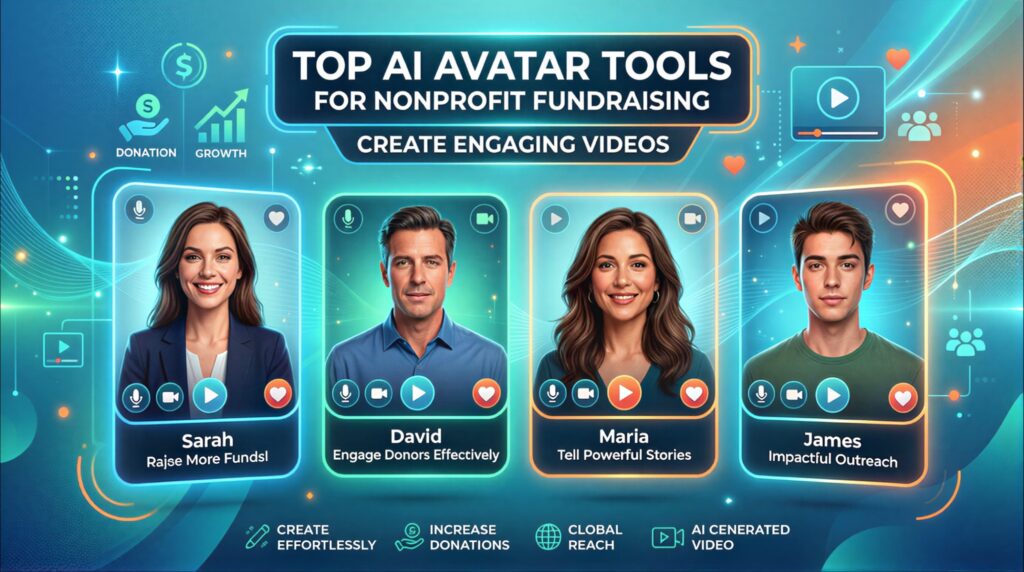
Video has become one of the most effective ways for nonprofits to tell their story. A short clip of a beneficiary, a founder’s appeal, or a campaign update can move donors more than a page of text. Yet many organizations still find video out of reach. Professional shoots need cameras, lighting, editors, and talent, and most small nonprofit teams have none of these in-house. Traditional production also struggles with timing. A campaign may need the same message in several languages, in different formats for Instagram, email, and a website, and refreshed regularly as programs change. Re-filming each version quickly exhausts a limited budget. AI avatar tools offer a practical alternative. Instead of filming a spokesperson, teams write a script, choose an avatar or photo, and generate a presenter-style video. In this guide, we are going to explore 5 top AI Avatar tools for nonprofit fundraising videos.
Why Use AI Avatars for Nonprofit Fundraising Videos?
Create fundraising videos without a traditional filming setup
An AI avatar can deliver your message without a camera crew or studio. You provide the script, and the platform renders the video. This is especially useful for organizations whose staff are busy in the field and rarely available for filming.
Produce content faster with smaller teams
Because scripts can be edited and re-rendered quickly, a single staff member can often produce a finished video in an afternoon. Small teams can respond to a current event or matching-gift deadline without waiting weeks for a production schedule.
Create multilingual fundraising campaigns
Many platforms support dozens or even hundreds of languages. This helps nonprofits reach diaspora communities, international donors, and local-language audiences without hiring separate presenters for each market. Always have a native speaker review translations before publishing, since tone matters a great deal in donor appeals.
Make multiple versions for different platforms
The same core script can become a 15-second social clip, a 90-second email video, and a longer landing-page explainer. Changing aspect ratio and length is far easier than re-shooting.
Maintain a consistent spokesperson across campaigns
A recognizable presenter builds trust over time. An avatar can represent your executive director or founder consistently across appeals, even when that person is traveling or unavailable. Organizations should, however, be transparent with donors about the use of AI presenters.
Create social media fundraising content at scale
Regular posting keeps supporters engaged between major campaigns. AI tools make it realistic to produce weekly updates, thank-you messages for donors, and short impact stories without overloading staff.
Top AI Avatar Tools for Nonprofit Fundraising Videos
1. HitPaw VikPea
HitPaw VikPea is an AI-powered video enhancement tool that can help nonprofits create clearer and more engaging fundraising videos. Beyond Generating Nonprofit Fundraising Videos, it supports 4K/8K upscaling, noise reduction, sharpening, colour enhancement, video stabilisation, and frame interpolation up to 60FPS. It can also repair old or damaged footage, remove video backgrounds, and enhance AI-generated videos from platforms such as Sora, Kling, Veo, and Seedance. With scene-specific AI models and cloud-powered rendering, VikPea can improve everything from campaign footage and donor stories to archived videos, making it a versatile option for nonprofit content teams.
Why Does HitPaw VikPea Stand Out From the Crowd?
Create Engaging Fundraising Videos With AI
HitPaw VikPea helps nonprofit teams turn fundraising ideas into engaging video content with AI-powered generation tools. Its support for models such as Kling 3.0 and Kling V3 Omni enables users to create realistic scenes, smoother motion, and creative visuals. This can help charities develop campaign videos, donor messages, awareness content, and social media visuals without needing advanced video production skills.
Improve the Quality of Fundraising Footage
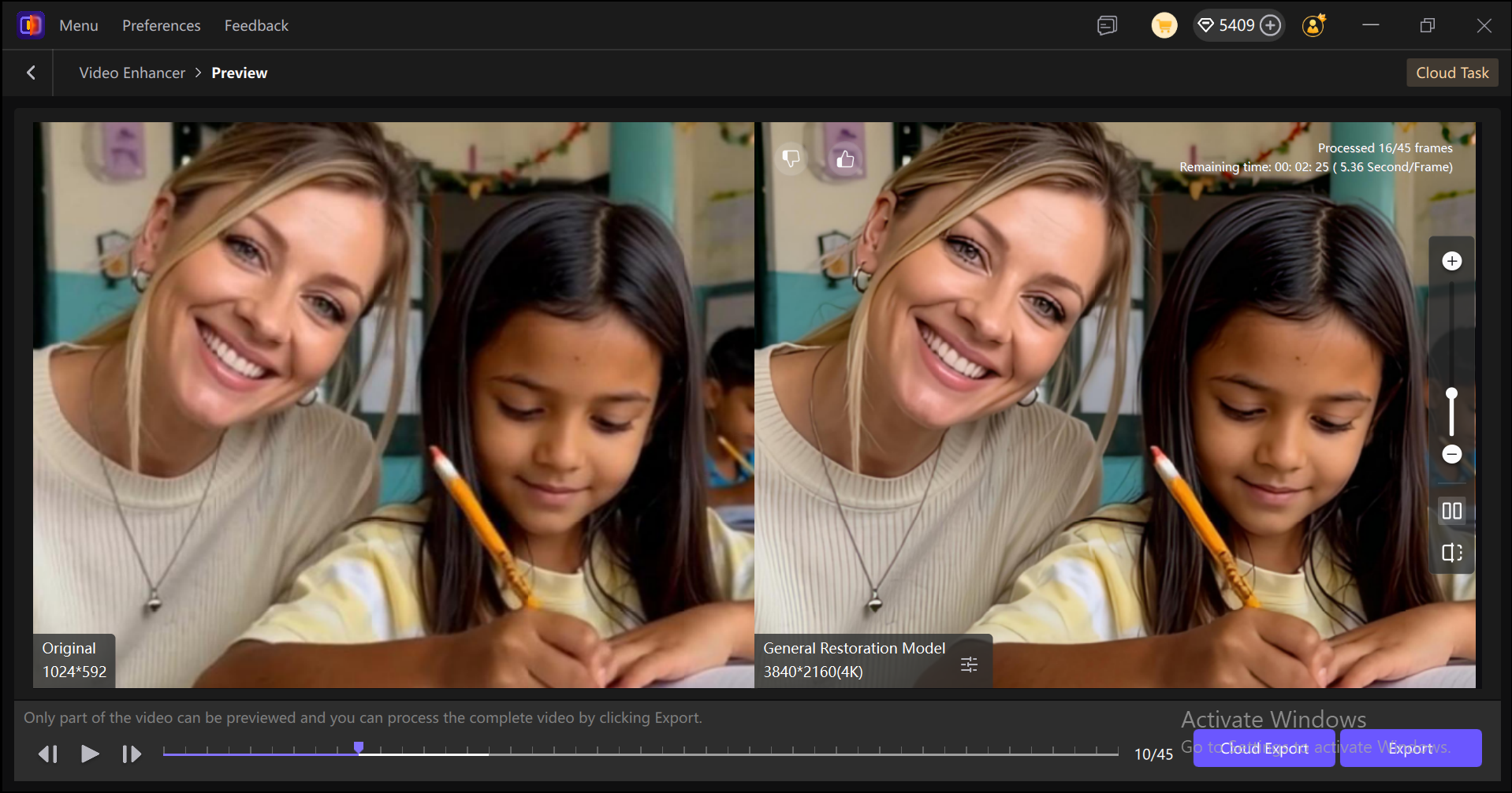
Clear and professional visuals can make fundraising content easier to watch and share. VikPea’s AI Video Enhancer improves blurry footage, reduces noise, enhances lighting and textures, and stabilises shaky recordings. Its AI Frame Interpolation feature can also provide smoother playback of up to 60FPS. Nonprofit teams can use these tools to improve existing campaign footage without complex editing.
Bring Black and White Nonprofit Stories to Life
Many nonprofits use old photographs and black-and-white footage to share their history, community work, and impact. VikPea’s AI Video Colorizer can restore lifelike colours to faded or monochrome footage while improving brightness, contrast, and saturation. This allows organisations to refresh archival content and present important stories in a more visually engaging format for donors and supporters.
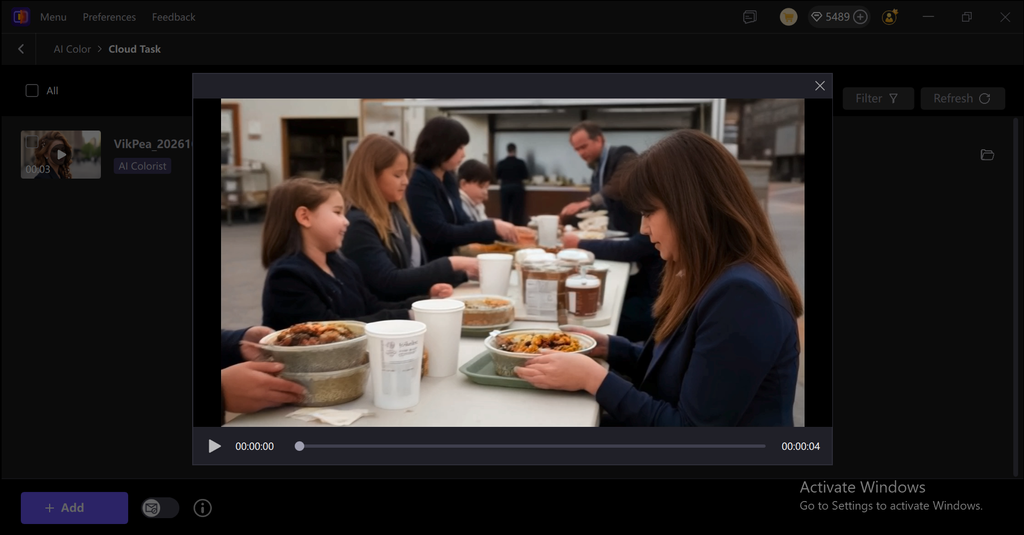
Remove Backgrounds for Cleaner Campaign Videos
VikPea’s AI Background Removal tool provides more precise subject separation with cleaner edges. Nonprofits can use it to remove distracting backgrounds from volunteer interviews, campaign clips, speaker videos, and promotional content. New backgrounds can then be added to create a more consistent visual style across fundraising campaigns, social media posts, and other digital materials.
Restore Damaged Fundraising Footage
Important nonprofit stories are sometimes captured in older or damaged videos that are difficult to reuse. VikPea’s AI Video Repair technology can help restore corrupted, pixelated, or low-quality footage by reconstructing missing details and improving clarity. This can make archived interviews, community events, beneficiary stories, and previous fundraising campaigns more suitable for modern audiences.
Sharpen Blurry Donor and Campaign Videos
Unclear footage can reduce the impact of an otherwise meaningful fundraising message. VikPea’s AI Unblur feature can improve videos affected by motion, focus problems, or poor recording conditions. By restoring sharpness and recovering visible details, it can help nonprofits polish interviews, event recordings, volunteer content, and campaign videos before publishing them.
Video Beauty
Fundraising videos often feature volunteers, campaign representatives, and community members. VikPea’s Video Beauty feature can refine facial details and improve skin appearance for a smoother, more polished presentation. This provides nonprofit teams with a simple way to enhance presenter-focused footage while maintaining a professional appearance across their fundraising campaigns.
How To Create AI Fundraising Videos with HitPaw VikPea
Step 1: Download, Install and Launch
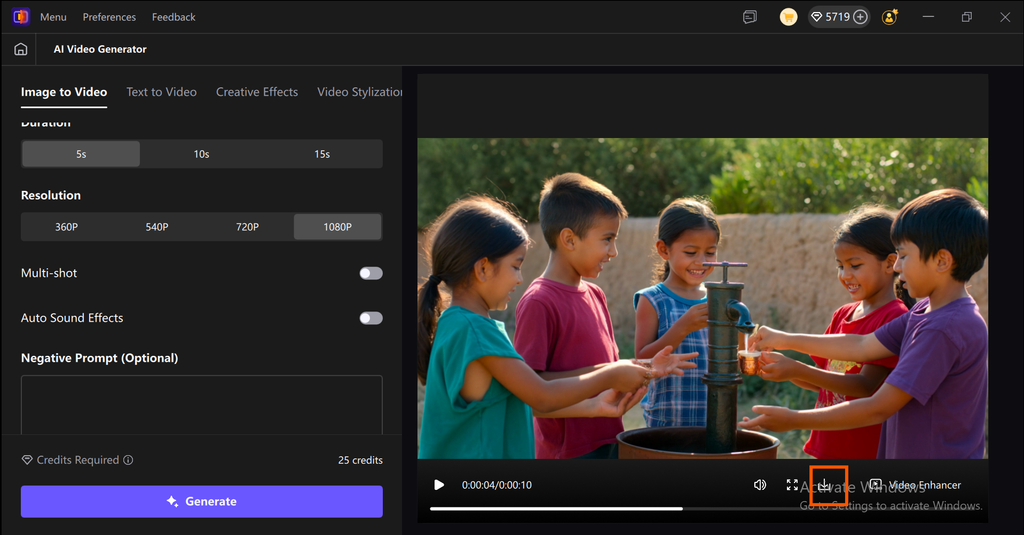
Download, install and launch VikPea from the official webiste of HitPaw VikPea, and click on AI video generator.
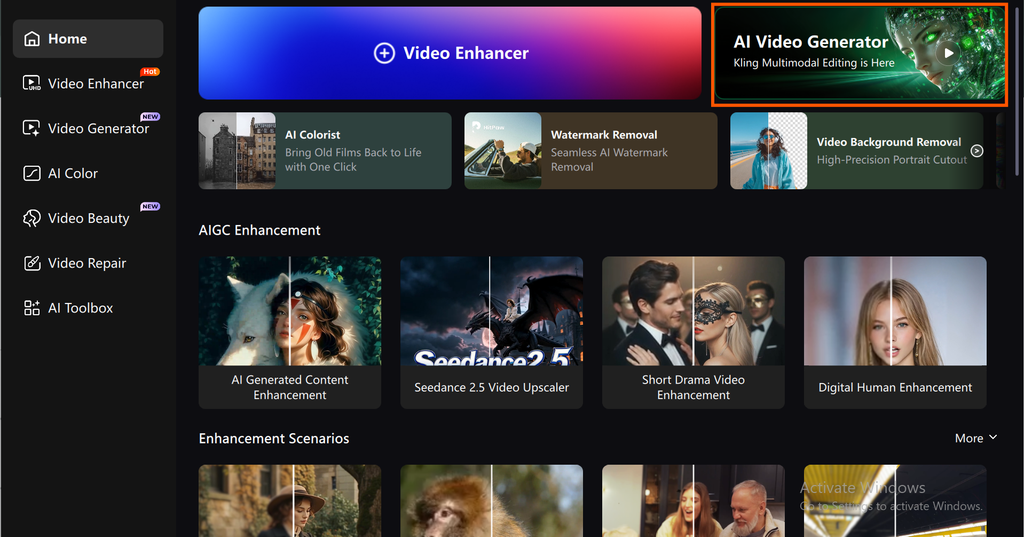
Step 2: Choose Video Generation Model
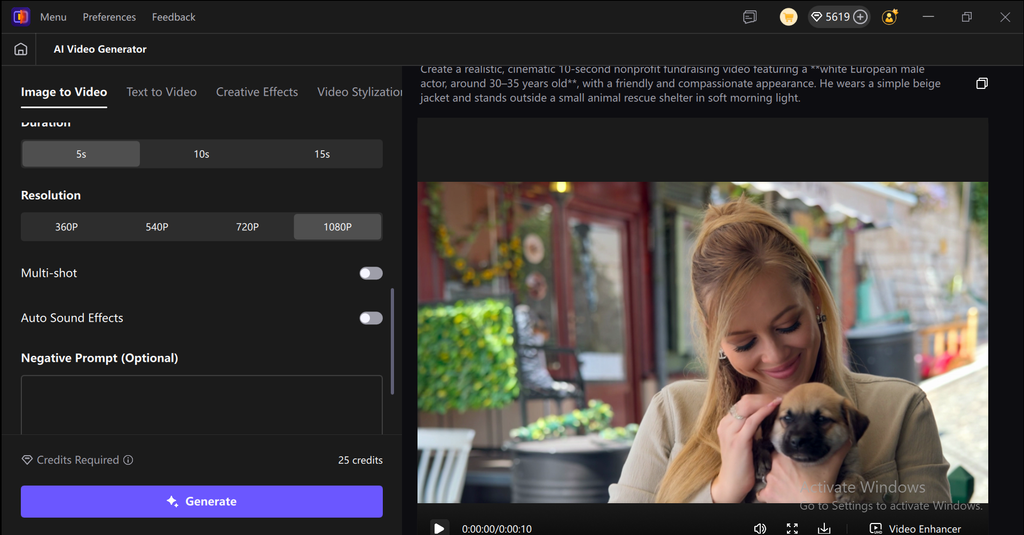
On your left side you will see a control panel Choose the Kling V3 Omni model for best quality, you can also choose Image to video or text to video from the tops left corner, scroll down a little and choose the video quality and duration according to your needs.
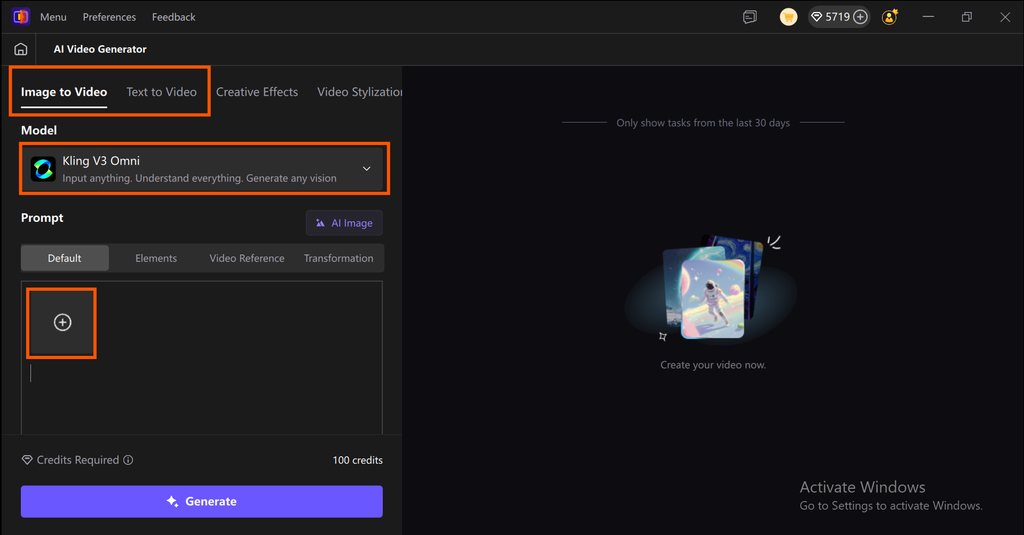
Step 3: Write Your Prompt
After modifying all settings now you can write your prompt according to your video needs in the prompt section and then click on the generate button.
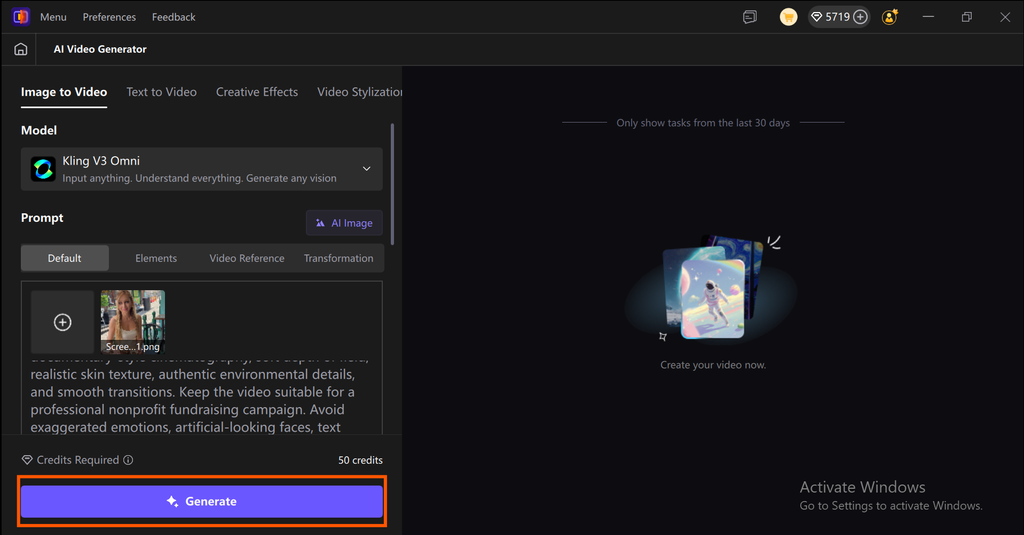
Step 4: Preview and Download
After waiting a few seconds your Nonprofit Fundraising video is ready now you can play and preview your video and click on the download icon to save the video into your device.
2. HeyGen
HeyGen is an AI video platform centered on realistic avatars that deliver scripted messages with natural lip-sync. It offers a large library of stock avatars and allows custom avatars created from recorded footage. Its translation and voice features make it useful for multilingual appeals. Pricing has evolved, with several paid plans and usage limits, so check the current plans before committing.
Key Features
- Large avatar library: Stock presenters plus custom avatar creation for a consistent spokesperson.
- Text-to-video and image-to-video: Generate videos from a script, prompt, or photo.
- Video translation: Translate spoken content and match lip movements across languages.
- Voice cloning: Create a voice model from your own recordings, where available on your plan.
- Multiple formats and resolutions: Export for different platforms, with higher resolutions on higher-tier plans.
- Templates and editing tools: Add text, backgrounds, and branding elements to videos.
3. Synthesia
Synthesia is an enterprise-focused AI video platform that lets teams create presenter videos from text. Its official site describes a large library of avatars and support for more than 160 languages. The platform is widely used for training and corporate communications, and it lists nonprofits among its customer types. Its governance and brand features suit organizations that need consistent, approved content.
Key Features
- Large avatar library: Over 240 AI avatars, plus options for personal and brand avatars.
- Wide language support: Create and translate videos in more than 160 languages.
- AI voices and voice cloning: A large voice library, with voice cloning available.
- Brand kit and templates: Keep logos, colors, and layouts consistent across campaigns.
- PowerPoint and script-to-video: Convert existing slides or written content into videos.
- Collaboration and version control: Useful for teams that need approvals before publishing.
4. D-ID
D-ID is a generative AI platform known for turning still photos into talking avatars. Its Creative Reality Studio lets users create presenter-style videos from an image and text, with multilingual speech support. The platform also offers interactive AI agents and video translation tools. It is a good fit for organizations that want to animate a single portrait, such as a founder’s photo, quickly and affordably.
Key Features
- Photo-based avatars: Animate any suitable front-facing photo into a speaking presenter.
- Creative Reality Studio: A self-service browser-based studio for creating videos without technical skills.
- Multilingual support: Produce videos in more than 100 languages, according to reviews of the platform.
- Text-to-video generation: Create videos directly from written scripts.
- Interactive AI agents: Build conversational assistants that can answer supporter questions.
- Developer API: Integrate avatar video generation into your own website or systems.
5. Colossyan
Colossyan is an AI video platform built around workplace learning, with features that also suit nonprofit training and internal communications. It converts scripts, PDFs, and slide decks into presenter-style videos, and offers a library of avatars and voices. Its translation features help organizations adapt one video for many language audiences. Colossyan is less focused on ad and social-media video than some competitors, so it fits best where educational or explanatory content is the priority.
Key Features
- Script, PDF, and slide conversion: Turn existing documents into narrated videos quickly.
- Multilingual voices and translation: Create one video and adapt it to many languages.
- Large voice library: Hundreds of AI voices across accents and dialects.
- Avatar variety: Presenters suited to different audiences and themes.
- Interactive elements: Useful for training-style content, such as quizzes and branching.
- Collaboration tools: Support team-based editing of video projects.
How HitPaw VikPea Leads Other AI Avatar Video Generators
HitPaw VikPea is not a direct replacement for a dedicated enterprise platform. Its distinct advantage is that it pairs avatar creation with video enhancement, which helps teams that already work with older or lower-quality footage. The table below summarizes how the tools differ for nonprofit fundraising use.
| Functions | HitPaw VikPea | HeyGen | Synthesia | D-ID | Colossyan |
|---|---|---|---|---|---|
| Core focus | AI video enhancer (up to 8K) with AI avatar, image-to-video and text-to-video, AI coloriser, BG remover, Remove Objects, and many more | Avatar videos and lip-synced video translation | Scripted presenter and training videos | Talking avatars from photos, plus interactive agents | Presenter-led training and L&D videos |
| Avatar approach | Turns any photo into a talking, singing avatar with lip-sync | 700+ stock avatars on paid plans, unlimited photo avatars, custom digital twin | 9 to 240+ stock avatars depending on plan, plus Personal Avatars | 100+ stock avatars, personal avatars, voice cloning | 20+ to 200+ stock avatars by plan, plus instant custom avatars |
| Voiceover Languages | 400+ voices | 30+ on free, 175+ on paid plans | 140+ | 100+ for text-to-speech, 30+ for Video Translate | 70+ |
| Video enhancement and upscaling | Yes: 4K/8K upscaling, denoising, colorization, stabilization | No | No | No | No |
| Extra AI video generation | Text and image to video using models such as Kling, Seedance and Veo 3 | Video Agent and Avatar IV | Limited | Limited | Limited |
| Platforms | Windows, Mac, iOS, Android | Web | Web | Web and mobile app | Web |
| Best for | Creators who want to enhance, restore, and generate video, plus avatars, all-in-one solution | Marketers who need realistic avatars and translation | Corporate training with enterprise governance | Quick talking-photo videos and interactive agents | L&D teams making scenario-based training |
Conclusion:
AI avatar and video tools can help nonprofits create engaging fundraising content without the cost and complexity of traditional production. While platforms such as HeyGen, Synthesia, D-ID, and Colossyan focus mainly on avatars, HitPaw VikPea offers a broader solution by combining AI video generation with enhancement, upscaling, restoration, colorization, background removal, and more. This makes it useful for creating new fundraising videos while also improving existing campaign footage. If you want a flexible tool that can support both video creation and professional-quality enhancement, HitPaw VikPea is worth exploring. Try VikPea and turn your fundraising ideas into clearer, more engaging videos.