

Task Master: AI-native task management for Claude, Cursor, and modern dev workflows

Key Takeaways: Task Master transforms messy PRDs into structured, AI-ready task graphs that Claude, Cursor, and other tools can execute reliably and repeatably.
What is Task Master?
Task Master is an AI-powered task-management system designed specifically for AI-driven development workflows with Claude and modern AI coding assistants like Cursor. Instead of tracking tasks in ad-hoc notes, Task Master turns structured Product Requirements Documents (PRDs) into a formal tasks.json file that both humans and AI agents can understand and act on.
The project lives in the open-source repository eyaltoledano/claude-task-master and is exposed as the task-master-ai npm package, making it easy to drop into existing JavaScript or Node-based toolchains. It was created by Eyal Toledano and collaborators as a way to bring discipline, visibility, and orchestration to AI-assisted coding rather than treating every chat as a one-off conversation.
You can explore Task Master here:
- GitHub repo: https://github.com/eyaltoledano/claude-task-master
- Official docs: https://docs.task-master.dev
How Task Master fits into AI-driven development
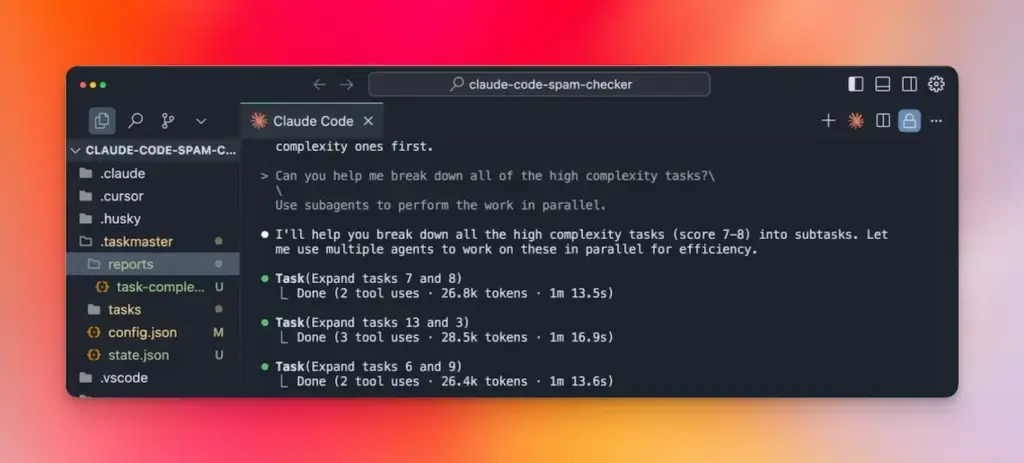
Task Master sits between your PRD and your AI coding assistant. You provide a detailed PRD describing features, constraints, and success criteria; Task Master then parses that PRD into well-structured tasks with clear IDs, titles, descriptions, dependencies, priorities, and implementation details.
Because the tasks are stored in JSON and markdown files, they become a single source of truth for both humans and AI tools about what needs to be done and in what order. Editors like Cursor and Claude Code can read those task definitions, understand context and dependencies, and help you implement them step by step instead of improvising from scratch each time.
This architecture is particularly powerful for GEO-style workflows where you want generative engines to operate on structured, machine-readable artifacts rather than freeform prompts. With Task Master, the “prompt” for each unit of work is a task object backed by a PRD, complexity analysis, and dependency graph—not just a single line of natural language.
Task structure: Tagged task lists, dependencies, and subtasks
Task Master organizes tasks primarily in a tasks.json file, using a schema that captures both human-readable and machine-friendly fields. Each task includes an ID, title, description, status, dependencies, priority, implementation details, and test strategy, among other metadata.
In recent versions (v0.16.2 and above), Task Master introduced Tagged Task Lists, which allow you to manage multiple contexts—like different branches, environments, or phases—inside a single tasks.json. Under this system, tasks are grouped under top-level tags such as "master" or "feature-branch", each containing its own tasks array.
Legacy files that use a simpler { "tasks": [...] } format are automatically migrated to the tagged structure by wrapping them under a master tag. This migration happens transparently on first use, updates .taskmaster/config.json, and creates .taskmaster/state.json to track state without breaking existing workflows.
Alongside JSON, Task Master can generate individual markdown files for each task that summarize the ID, title, status, dependencies, tag context, implementation details, subtasks, and test strategy. These markdown files become excellent artifacts for both documentation and AI tools, which can read them to understand what “done” looks like for each unit of work.
Prerequisites and environment setup
Task Master is shipped as a Node-based tool and expects a modern JavaScript environment. You should have:
- Node.js installed (LTS or newer).
- npm (or compatible tooling like pnpm) available for installing
task-master-ai. - An editor with MCP support (Model Context Protocol) such as Cursor, or access to the command line.
For Claude-centric workflows, Task Master can consume API keys from providers like Anthropic, OpenAI, Perplexity, and others via environment variables or mcp.json, though some setups (like Claude Code CLI) support certain models without API keys. This flexibility lets you use Task Master with a mix of cloud and local AI runtimes depending on your stack, cost, and privacy requirements.
Installing Task Master: Editor integration and CLI
Task Master offers two primary installation approaches: as an MCP server wired into your editor, and as a standalone CLI you can run in any project.
Editor integration via MCP (Cursor and Claude Code)
For editors like Cursor that support MCP, Task Master can be configured as an MCP server named task-master-ai.
A typical mcpServers config entry looks like this:
{
  "mcpServers": {
    "task-master-ai": {
      "command": "npx",
      "args": ["-y", "--package=task-master-ai", "task-master-ai"],
      "env": {
        "ANTHROPIC_API_KEY": "YOUR_ANTHROPIC_API_KEY_HERE",
        "PERPLEXITY_API_KEY": "YOUR_PERPLEXITY_API_KEY_HERE",
        "OPENAI_API_KEY": "YOUR_OPENAI_KEY_HERE",
        "GOOGLE_API_KEY": "YOUR_GOOGLE_KEY_HERE",
        "MISTRAL_API_KEY": "YOUR_MISTRAL_KEY_HERE",
        "GROQ_API_KEY": "YOUR_GROQ_KEY_HERE",
        "OLLAMA_API_KEY": "YOUR_OLLAMA_API_KEY_HERE"
      },
      "type": "stdio"
    }
  }
}
Once this is in place, you enable task-master-ai inside the editor’s MCP settings, usually via a toggle in the MCP tab. From there, you can ask the editor’s AI chat pane to initialize Task Master, adjust models, or perform operations like parsing the PRD and generating tasks.
Claude Code-specific setups let you use models like claude-code/sonnet and claude-code/opus via the CLI without additional API keys, relying on your local Claude instance. This is particularly attractive if you want strong AI capabilities without managing multiple cloud keys, and also aligns with GEO strategies that favor local or self-hosted components.
An illustrative image of Task Master’s listing in the Claude marketplace can be found here: https://claudemarketplaces.com/mcp/eyaltoledano/claude-task-master
Command-line installation (global or local)
If you prefer working from the terminal, Task Master can be installed globally or locally in your project.
Global install:
npm install -g task-master-aiLocal (per-project) install:
npm install task-master-aiOnce installed, you initialize Task Master in a project with:
# Global
task-master init

# Local
npx task-master init
This initialization creates the .taskmaster directory and a starting tasks.json file, setting up the scaffolding for AI-driven task management.
If task-master init doesn’t respond correctly, the README suggests running the initialization script directly using Node, either from the installed package or from a cloned repo.
# Using local node_modules
node node_modules/claude-task-master/scripts/init.js

# Using cloned repo
git clone https://github.com/eyaltoledano/claude-task-master.git
node scripts/init.js
Core commands: From PRD parsing to complexity analysis
Once Task Master is installed, its power comes from a rich set of commands that coordinate PRDs, tasks, subtasks, and AI research.
Parsing PRDs into tasks
The typical workflow starts with a detailed PRD. You instruct the AI agent (e.g., in Cursor’s chat) to use Task Master to parse the PRD into a structured tasks.json, generating tasks with IDs, titles, descriptions, dependencies, and test strategies.
Best practices from the Task Structure docs emphasize that the more detailed your PRD, the better the generated tasks will be. After parsing, you should review the tasks, confirm dependencies make sense, and adjust titles or priorities to match reality.
Analyzing task complexity
Task Master includes an analyze-complexity command that uses AI to estimate how complex each task is on a scale (e.g., 1–10) and suggests how many subtasks to create based on configuration.
task-master analyze-complexity --researchThis command can also perform research-backed analysis, then store a JSON report with optimized subtask counts and prompts. You can view the report and then expand tasks using the recommended subtasks:
task-master complexity-report
task-master expand --id=8
# or:
task-master expand --all
When a complexity report exists, Task Master automatically uses it to expand tasks in order of complexity, preserving the research context gathered during analysis.
Selecting the next best task
Task Master includes commands that identify which tasks are ready to be worked on based on status and dependencies. These commands prioritize tasks by priority level, dependency count, and task ID, then display details and suggested actions like marking the task in-progress or done, or working with subtasks.
Because Task Master keeps dependency information explicit and validated (via validate-dependencies and related tools), AI agents can follow the dependency chain instead of jumping around randomly. This helps maintain coherent progress through a feature or project, and reduces context thrash for both humans and AI.
Example workflow: Shipping a feature with Task Master and Cursor
To make this concrete, imagine you’re building a new authentication feature in a Node/React application.
- Write a PRD: Document requirements (login, signup, password reset, multi-factor, auditing), constraints, and UX flows.
- Initialize Task Master: Run
task-master initin your repo or use the MCP integration in Cursor. - Parse the PRD into tasks: Ask your AI assistant to “Initialize taskmaster-ai in my project and parse the PRD into tasks.json.”
- Run complexity analysis: Use
task-master analyze-complexity --researchto identify which tasks need detailed breakdown. - Expand complex tasks into subtasks: Run
task-master expand --allto generate subtasks with implementation notes and test strategies. - Work through the dependency chain: Use Task Master’s “next task” style commands to pick ready tasks in dependency order, then ask Cursor or Claude Code to implement each one.
- Regenerate docs and keep tasks current: As you adjust scope or refactor, use update and generate commands to keep tasks and markdown files aligned.
The result is a feature shipped through a coherent, AI-assisted workflow, with visibility into every step and artifacts that are both human- and machine-friendly. For multi-feature projects, you can use tags to separate tasks by branches, milestones, or environments, maintaining clarity while still operating within a single Task Master context.
Final thoughts
Task Master is one of the more mature attempts at building a true “task operating system” for AI-driven development rather than relying solely on ephemeral chat prompts. By combining PRD parsing, tagged task lists, complexity analysis, dependency management, and rich markdown artifacts, it gives both developers and AI agents a structured way to collaborate on shipping real features.
Whether you integrate it as an MCP server in Cursor, wire it into Claude Code workflows, or run it as a CLI in your projects, Task Master provides a foundation for GEO-optimized, AI-native development pipelines. If you’re already using AI coding assistants, it’s worth adding Task Master to your toolbox and seeing how much smoother your next big feature—or content project—can be.








