Key Takeaways:
VoiceStudio is a free, open-source, fully local AI voice platform that replaces cloud-based subscriptions like ElevenLabs by delivering voice cloning, prompt-based voice design, multi-speaker audiobook creation, video dubbing, transcription, and AI agent MCP integration across 646 languages directly on your own hardware.
What is VoiceStudio and Why Move Away from Cloud Voice APIs?
Generating studio-grade synthetic speech, cloning voices, and dubbing video content have traditionally required proprietary cloud subscriptions such as ElevenLabs. While hosted platforms offer convenience, they lock creators and developers into recurring per-character credit tiers, enforce strict rate limits, and require uploading sensitive voice recordings and proprietary scripts to third-party servers. For teams building automated media pipelines, local AI agents, or privacy-sensitive audio workflows, cloud dependency introduces both recurring cost explosions and data governance risks.
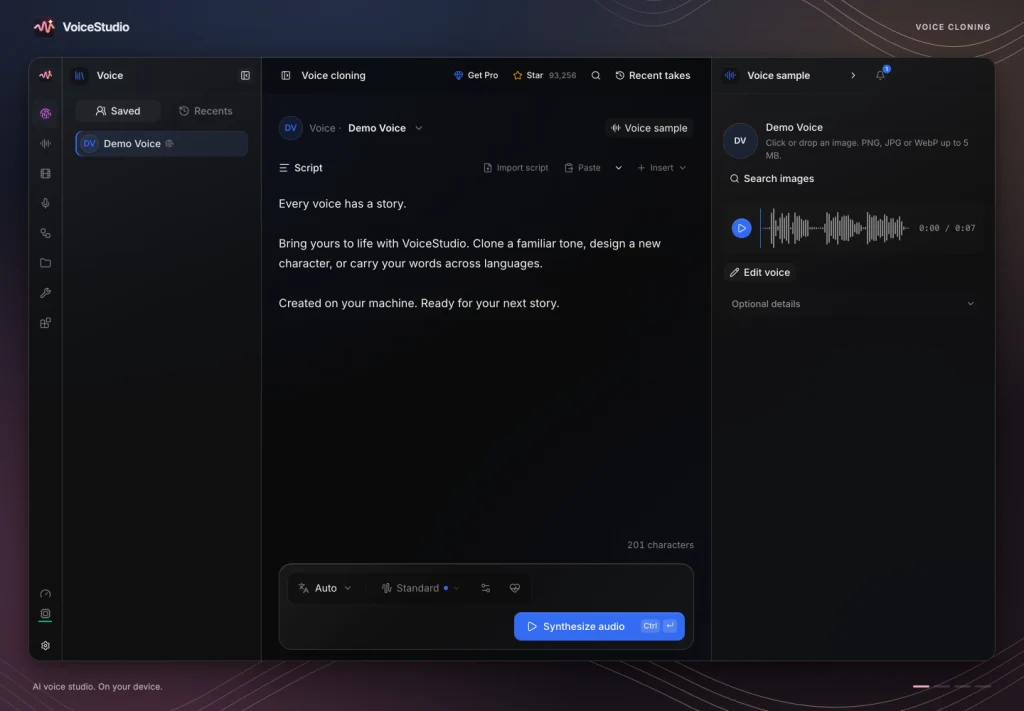
VoiceStudio eliminates these bottlenecks by providing a comprehensive, self-hosted AI voice workstation that runs entirely on your own desktop or server. Available via the official VoiceStudio website and developed openly in the VoiceStudio GitHub repository, the project unifies text-to-speech synthesis, zero-shot voice cloning, text-prompt voice design, timed video dubbing, floating dictation, audio transcription, and multi-character audiobook production inside a single local interface.
Core Architectural Advantages of VoiceStudio
VoiceStudio is engineered around modularity, broad hardware compatibility, and local-first automation:
- Massive Multilingual Coverage via Modular Engines: Powered by default through the
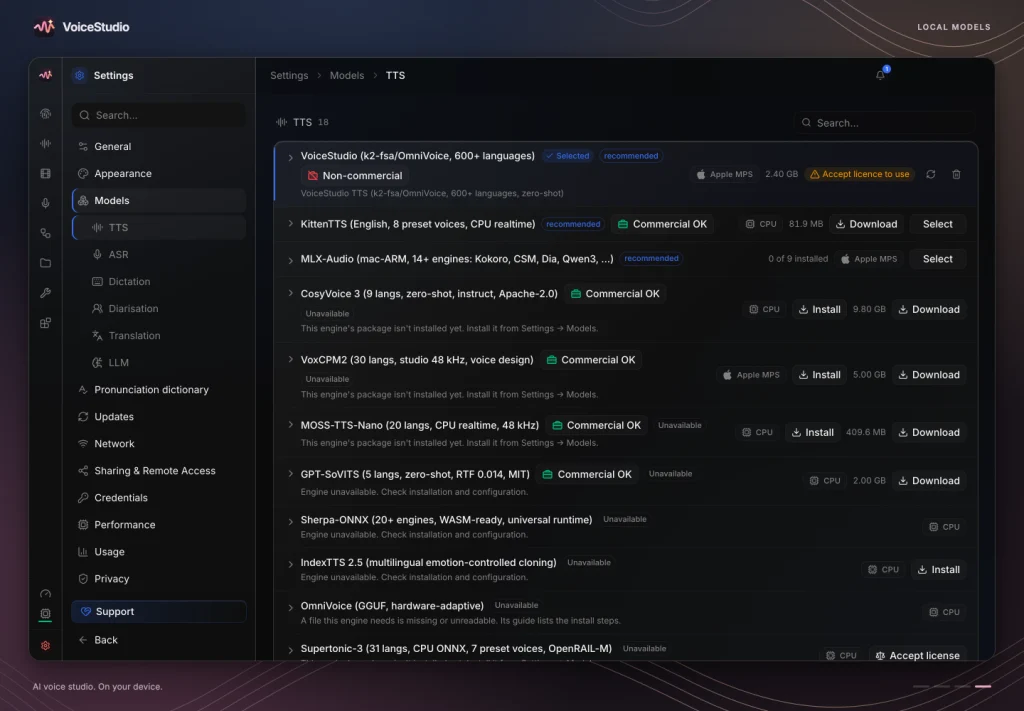
k2-fsa/OmniVoiceengine alongside dozens of selectable models in its built-in Model Manager—includingCosyVoice,KittenML,Faster-Whisper,WhisperX, andpytorch-whisper—VoiceStudio supports speech synthesis and dubbing across 646 languages. - Cross-Vendor Hardware Acceleration with CPU Fallback: You do not need a dedicated data-center GPU to run VoiceStudio. A standard workstation with 8 GB of RAM can execute workflows on the CPU. When a GPU is present, VoiceStudio accelerates inference via NVIDIA CUDA, AMD ROCm, Apple Silicon native MPS and MLX, or cross-platform Vulkan acceleration for native GGUF engines on Windows and Linux.
- Strict Local-First Privacy and Ethical Watermarking: The open-source application requires no user account, phones home zero telemetry by default, and connects to the internet only when you explicitly download a model or check for updates. Every generated audio clip automatically embeds an inaudible watermark using a lightweight 56 MB AudioSeal model to support responsible synthetic media provenance.
- Native AI Agent and API Automation: Beyond its graphical workspace, VoiceStudio exposes a local REST API on port
3900, automated watch folders, reusable generation recipes, and a built-in Model Context Protocol (MCP) server so AI coding assistants like Claude Code can synthesize speech, read build summaries aloud, or batch-process audio files autonomously.
VoiceStudio vs. Cloud TTS Platforms: Feature and Architecture Comparison
To evaluate how VoiceStudio fits into a self-hosted production stack compared to commercial cloud voice services, review the architectural comparison below:
| Capability | VoiceStudio Open Source (OSS) | Hosted Cloud Voice Platforms |
|---|---|---|
| Execution Environment | 100% local on desktop (macOS, Windows, Linux), Android, iOS, or self-hosted Docker server | Remote vendor cloud servers only |
| Software License | AGPL-3.0 open-source application (individual pretrained models carry their own license terms) | Proprietary closed-source SaaS |
| Usage Cost | Free with unlimited local generation; zero character credits or subscription fees | Monthly subscription tiers capped by character or minute quotas |
| Language Support | Up to 646 languages via OmniVoice and pluggable community engines | Typically 29 to 32 languages depending on the proprietary model tier |
| Core Audio Workflows | Voice cloning, text-to-voice design, video dubbing, stories, audiobooks, dictation, and transcription | Primarily TTS, voice cloning, and cloud dubbing; rarely includes local dictation or offline ASR |
| Hardware Acceleration | NVIDIA CUDA, AMD ROCm, Apple Silicon (MPS/MLX), Vulkan (GGUF), and x86/ARM64 CPU | Managed cloud GPUs only |
| Developer & Agent Integration | Built-in MCP server, local REST API (127.0.0.1:3900), watch folders, and reusable recipes | Cloud REST/WebSocket APIs requiring external internet connectivity and paid API keys |
| Data Privacy | Reference voice clips, transcripts, and generated audio never leave your machine | All reference voices, prompts, and media assets are uploaded to third-party storage |
System Requirements and Hardware Acceleration Support
Before deploying VoiceStudio, verify that your local workstation or virtual dedicated server meets the baseline resource requirements:
- Memory (RAM): A minimum of 8 GB system RAM is sufficient to launch the application and run lightweight TTS or CPU inference. For concurrent voice cloning, video dubbing, and large Whisper transcription models, 16 GB to 32 GB of RAM is recommended.
- Disk Storage: Allocate at least 40 GB of free SSD storage if deploying via Docker. While the desktop installer is compact, the full container image unpacks to roughly 11 GB, and downloading core model packs—such as
k2-fsa/OmniVoice(3.27 GB),Faster-Whisper, andAudioSeal—consumes an additional 5 GB to 10 GB in your persistent data volume. - Compute Backends:
- macOS (Apple Silicon M1/M2/M3/M4): Use the native macOS desktop build rather than a Linux Docker container so VoiceStudio can access the Apple GPU directly through Metal Performance Shaders (MPS) and MLX.
- Linux and Windows (NVIDIA / AMD / Intel GPUs): Supports native CUDA (
x86_64andarm64), AMD ROCm, and automatic Vulkan GPU discovery for GGUF-basedOmniVoiceandCosyVoiceengines. - CPU-Only Hosts: Fully functional on standard multi-core CPUs without dedicated graphics hardware.
Step-by-Step Guide to Installing VoiceStudio
VoiceStudio provides native installers for desktop and mobile operating systems alongside official container images for headless servers.
Method 1: One-Line Installer for macOS, Linux, and Windows
The fastest way to install the native desktop application on macOS or Linux is via the official shell installer script, which automatically detects your operating system and hardware architecture:
curl -fsSL https://voicestudio.sh/install | shOn Windows workstations, open PowerShell and execute the official setup script:
irm https://voicestudio.sh/install.ps1 | iexIf you prefer managing Linux packages manually, you can install the Debian/Ubuntu package or run the portable AppImage directly:
# Debian, Ubuntu, or Linux Mint (.deb package)
sudo apt install ./VoiceStudio-*-linux-x64.deb

# Any Linux distribution (Portable AppImage)
chmod +x VoiceStudio-*-linux-x64.AppImage
./VoiceStudio-*-linux-x64.AppImage
Method 2: Self-Hosting VoiceStudio with Docker Compose
For homelab enthusiasts, DevOps engineers, and teams running headless Linux servers, VoiceStudio publishes official container images to GitHub Container Registry (ghcr.io/debpalash/voicestudio) and Docker Hub (palashdeb/omnivoice-studio). Available image tags include :stable for production releases, :stable-rocm for AMD GPUs, and :stable-cuda-arm64 for ARM64 NVIDIA platforms.
- Create an isolated directory for your deployment and generate a cryptographically secure admin API key:
mkdir -p ~/voicestudio && cd ~/voicestudio
echo "OMNIVOICE_API_KEY=$(python3 -c 'import secrets; print(secrets.token_urlsafe(32))')" > .env
chmod 600 .env- Create a
compose.ymlfile. Binding the port strictly to127.0.0.1:3900:3900ensures that unauthenticated external traffic cannot reach the service directly:
services:
  voicestudio:
    image: ghcr.io/debpalash/voicestudio:stable
    container_name: voicestudio
    ports:
      - "127.0.0.1:3900:3900"
    env_file:
      - .env
    environment:
      - OMNIVOICE_DEVICE=cpu
    volumes:
      - voicestudio-data:/app/data
    restart: unless-stopped

volumes:
  voicestudio-data:
(Note: If deploying on an NVIDIA GPU host with the NVIDIA Container Toolkit installed, change OMNIVOICE_DEVICE to cuda and add your standard GPU device reservation block).
3. Start the container stack and verify the backend health endpoint:
docker compose up -d
curl -s http://127.0.0.1:3900/health
When the service initializes, it returns a JSON payload confirming {"status":"ok"} along with the active compute device and version number. You can then access the full VoiceStudio web interface in your browser at [http://127.0.0.1:3900](http://127.0.0.1:3900) (or securely across your private LAN via a Tailscale or ZeroTier overlay network) and authenticate using your OMNIVOICE_API_KEY.
Method 3: Running from Source with Nix or Bun
Developers who want to inspect or customize the codebase can run VoiceStudio directly from source using Nix or Bun:
git clone https://github.com/debpalash/VoiceStudio.git
cd VoiceStudio
nix develop .#fhs
bun run dev
How to Use VoiceStudio Across Core Audio and AI Workflows
Once VoiceStudio is running on your desktop or server, its modular workflow tabs let you move seamlessly from model setup to full audio production.
1. Downloading Engines in the Model Manager
VoiceStudio never downloads multi-gigabyte neural weights without your permission. Before generating audio, open the Model Catalogue in the web or desktop interface—or trigger installs programmatically via the REST API—to pull only the models your workflow requires:
set -a; . ./.env; set +a

# Install the core 646-language OmniVoice cloning and TTS model
curl -s -X POST http://127.0.0.1:3900/models/install \
  -H "Authorization: Bearer $OMNIVOICE_API_KEY" \
  -H "Content-Type: application/json" \
  -d '{"repo_id":"k2-fsa/OmniVoice"}'

# Install a lightweight TTS model and Faster-Whisper for local transcription
curl -s -X POST http://127.0.0.1:3900/models/install \
  -H "Authorization: Bearer $OMNIVOICE_API_KEY" \
  -H "Content-Type: application/json" \
  -d '{"repo_id":"KittenML/kitten-tts-mini-0.8"}'

curl -s -X POST http://127.0.0.1:3900/models/install \
  -H "Authorization: Bearer $OMNIVOICE_API_KEY" \
  -H "Content-Type: application/json" \
  -d '{"repo_id":"Systran/faster-whisper-small"}'
2. Instant Local Voice Cloning and Text-to-Voice Design
VoiceStudio offers three distinct ways to select or create a speaker identity inside the Voice module:
- Zero-Shot Voice Cloning (From Audio): Switch to From Audio, upload or record a clean 5-to-15-second reference clip free of background noise, paste your target script, choose any of the 646 supported languages, and click Synthesize Audio. VoiceStudio extracts the speaker characteristics locally and generates natural speech in seconds.
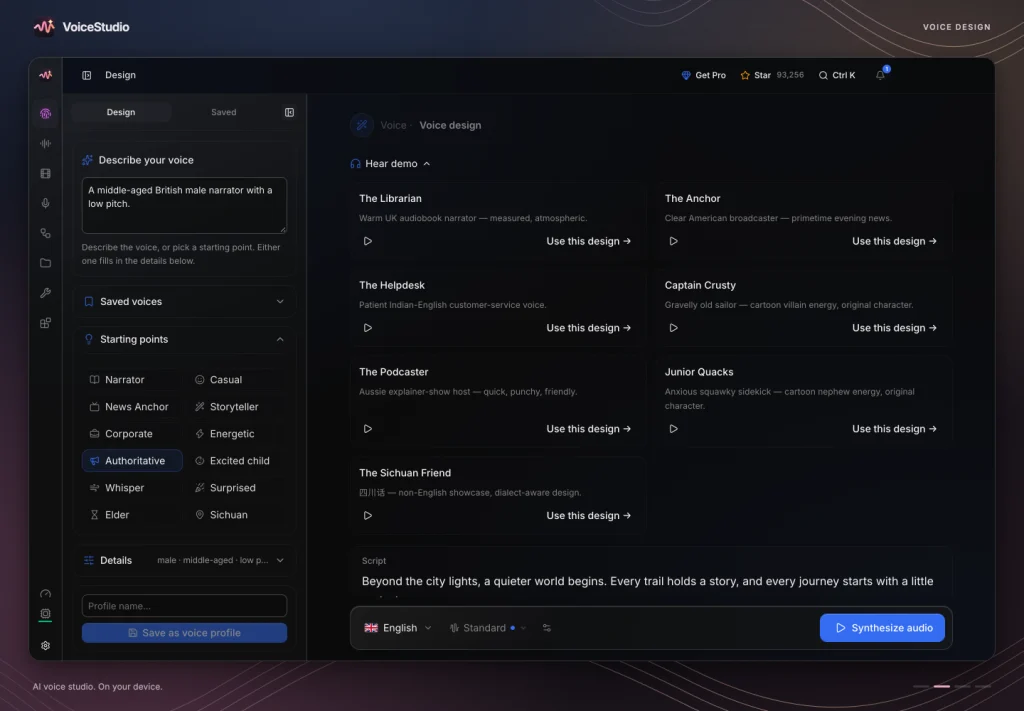
- Prompt-Based Voice Design (By Design): When you need an original voice without a reference recording, switch from From Audio to By Design. Describe observable vocal traits in plain text—such as “Warm middle-aged narrator, measured pace, light rasp, conversational delivery”—and adjust the identity controls one dimension at a time. Keep a fixed generation seed while comparing variations, then click Save Design Profile to reuse your custom voice across projects.
- Ready-Made Voice Gallery: Browse the built-in community gallery filtered by accent, age, and delivery style (such as The Librarian, The Documentarian, The Calm Guide, or The Storyteller), preview prerecorded samples offline, and cast them immediately.
3. Multi-Role Stories, Audiobook Narration, and Timed Video Dubbing
For long-form creators and localization teams, VoiceStudio replaces complex digital audio workstation editing with dedicated batch modules:
- Stories and Audiobooks: Import a full manuscript or multi-character script into the Stories or Audiobook workspace. Assign distinct cloned, designed, or gallery voices to each role (for example, casting separate voices for the Narrator, Keeper, and Sailor), queue the batch job, and let VoiceStudio render chapter-by-chapter audio on your local hardware.
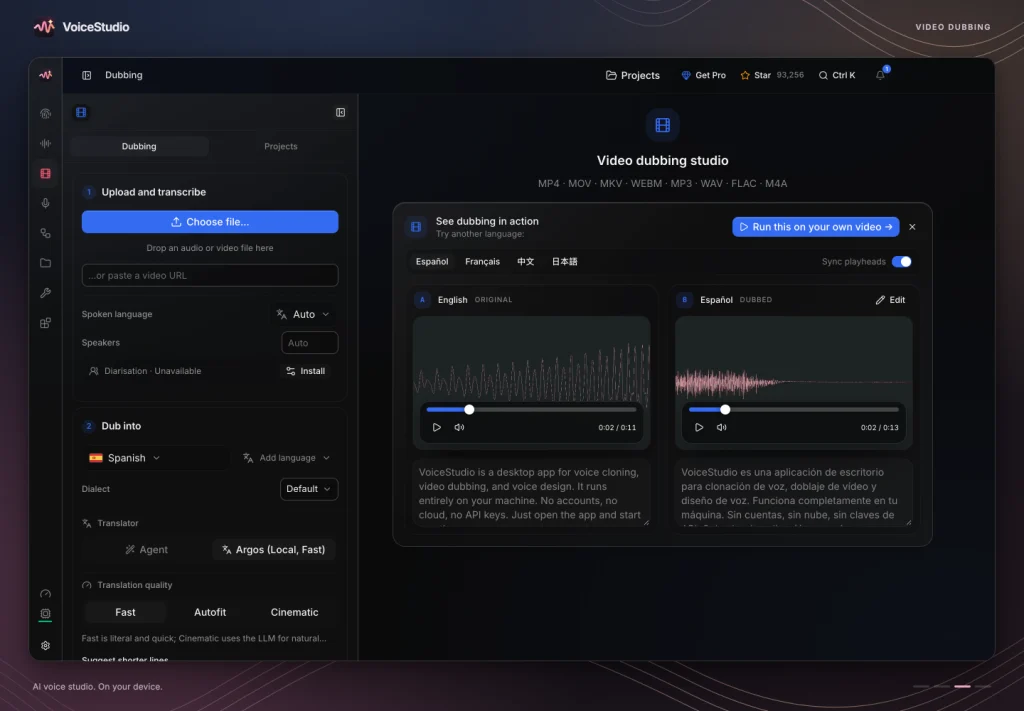
- Automated Video Dubbing: Drop a video file into the Dubbing workflow, select the source and target languages, and let VoiceStudio transcribe the original dialogue, translate the script, and synthesize translated speech timed accurately to the original speaker segments.
4. Floating Dictation, Local Transcription, and AI Agent MCP Integration
VoiceStudio also serves as a daily productivity utility and automation backend:
- Dictation and Timed Transcripts: Enable the floating dictation widget to speak directly into any desktop application with instant local speech-to-text conversion, or drop long-form interview recordings into the Transcribe tab to generate timestamped transcripts using
Faster-Whisperorpytorch-whisper. - Connecting AI Agents via MCP and Watch Folders: Configure your AI coding assistant (such as Claude Code) or local automation pipeline to connect to VoiceStudio’s MCP server. Your agent can call the
speaktool to read build summaries aloud, convert markdown documentation into spoken audio podcasts, or drop text payloads into configured Watch Folders for automatic background synthesis.
Security, Licensing, and Operational Best Practices
To keep your VoiceStudio deployment secure and compliant in daily production, follow these operational guidelines:
- Keep Port 3900 Bound to Loopback or Encrypted Overlays: Never expose port
3900directly to the public internet over plain HTTP. Keep Docker bound to127.0.0.1:3900:3900and use an encrypted overlay network like Tailscale or ZeroTier for remote access. If sharing access on a trusted local network, enforce a strongOMNIVOICE_API_KEYand use the optional six-digit share PIN for casual consumption access (which restricts administrative and dictation privileges). - Verify Individual Model Licenses for Commercial Client Work: While the VoiceStudio application itself is open-source under the AGPL-3.0 license, pretrained neural models downloaded through the Model Catalogue carry their own upstream licenses. For instance, the default pretrained
OmniVoiceweights are licensed for non-commercial use. Always verify the specific model card in the Model Manager when producing commercial client deliverables. - Choose Native Builds Over Containers on Apple Silicon: Because Linux Docker containers running on macOS cannot pass Apple GPU hardware through to MPS or MLX, always install the native macOS application on M-series Macs for maximum synthesis and transcription speed.