Trying to run a modern video-and-audio diffusion model on an 8 GB gaming GPU is like assembling a 50-volume encyclopedia on a tiny studio desk. You can keep only a few volumes open at once. Worse, if you leave zero margin for scratch paper, the OS either crashes or quietly shoves your data into slow system memory.
FreeVideo tackles that bottleneck head-on. It packages a local inference engine, a ComfyUI plugin, and a standalone CLI for OpenVDN’s 8-step MiniMax H3 (VDN-H3) video model—plus H3 Image and Qwen-Image 2.1 Turbo as of v0.5.0. On supported NVIDIA cards, it brings those models down to 8 GB VRAM and 16 GB system RAM, alongside an experimental Apple silicon preview.
Most low-VRAM tools rely on a single static offload toggle. FreeVideo uses a stricter approach: before every render, it checks your live GPU and host memory, runs the 32B text encoder in a throwaway child process, streams transformer blocks across three storage tiers, and stops or retries jobs cleanly before Windows WDDM spill or Linux swap locks up your machine.
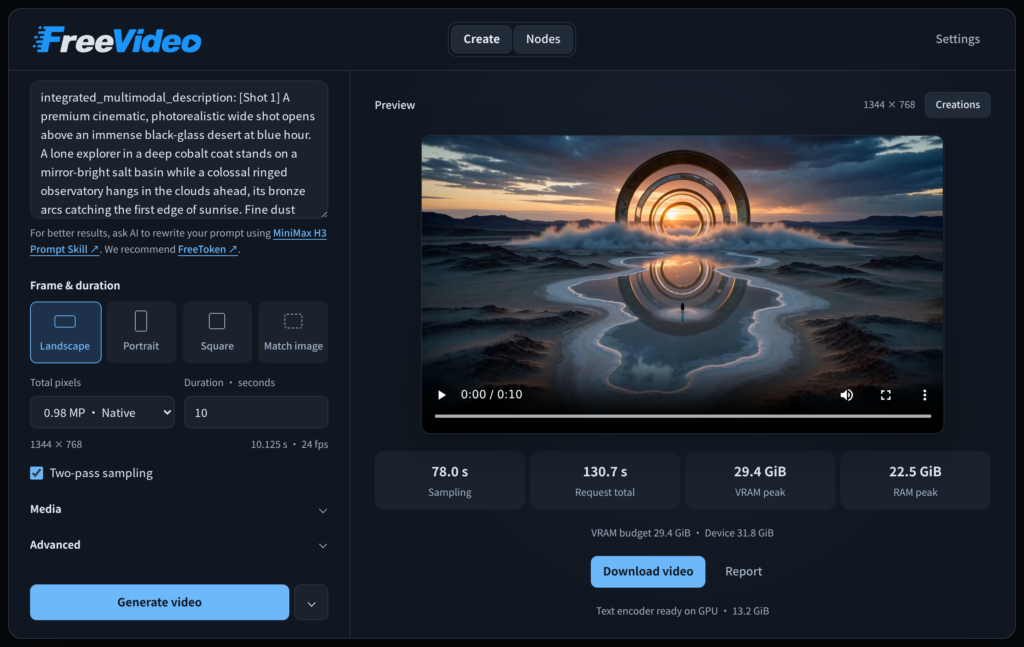
What happens when you run a generation request
You can trigger FreeVideo from the FreeVideo → FreeVideo-All-in-One workflow in ComfyUI/custom_nodes/FreeVideo or from the terminal:
./freevideo generate --prompt-file prompt.txt --out video.mp4Either path goes through the same Adaptive Execution Planner. Better yet, you can inspect the placement math for any GPU/RAM combination without downloading weights or even having a CUDA card plugged in:
./freevideo plan --vram-gib 8 --ram-gib 16Without explicit flags, plan reads your detected hardware and installed packages, while ./freevideo doctor --probe runs live kernel checks. During an actual render, execution moves through four distinct stages.
Step 1: Hardware gates and live memory headroom
FreeVideo checks hard compatibility rules before touching any model weights. You need an NVIDIA GPU with CUDA compute capability 8.0 or higher (Ampere / RTX 30-series or newer with native BF16 support). Turing and Pascal cards are rejected during setup and planning, and Linux x86_64 systems also require NVIDIA driver 580 or newer.
Once a GPU passes that gate, the planner reads live free VRAM, OS free RAM, Linux cgroup v1/v2 container limits, and Windows system commit headroom. It never counts swap or the Windows pagefile as usable memory. On Linux cgroups, it only credits clean filesystem page cache when complete counter stats are available.
From those live figures, FreeVideo reserves a fixed safety buffer: 0.25 GiB of VRAM on Windows (or 2.5% clamped to 0.5–1.0 GiB elsewhere), plus 5% of host RAM clamped to 2–4 GiB on Windows (1–4 GiB elsewhere).
Unified-memory CUDA hardware on Linux—such as DGX or GB10 unified-memory systems where CPU and GPU share one physical pool—gets one special rule. The planner takes the smaller of the two free pools and sets the RAM weight-retention budget to zero so it never duplicates blocks between “GPU” and “host” memory.
Step 2: Isolated 32B text encoding
MiniMax H3 pairs its video transformer with a 32B NVFP4/AWQ Qwen3-VL text encoder that weighs roughly 15.7 GB. Holding that encoder in RAM alongside the video model would blow past a 16 GB machine right away.
FreeVideo avoids that collision by spinning up text encoding in an isolated child worker process. The worker computes and saves your prompt conditioning, then exits completely before the diffusion transformer loads a single layer. If your host RAM budget cannot hold the encoder and no cached conditioning exists, the planner rejects the job up front instead of wasting GPU time.
Step 3: Precision, kernel probes, and 3-tier transformer residency
Next, the planner picks a weight format and attention backend that match your GPU. On Ampere and consumer GeForce Ada or Blackwell cards, it selects 8-bit rotated integer weights (ConvRot int8) because consumer GeForce GPUs run FP8 with FP32 accumulation at half the rate of full-speed int8. Workstation and datacenter Ada, Hopper, and Blackwell cards keep FP8 (row-wise on SM89, per-tensor on SM100+).
An isolated attention probe then tests backends in order: SageAttention 2 (skipped on unsupported architectures), PyTorch Flash attention, cuDNN, FlashAttention 2, and FlashAttention 4. It picks the first backend that passes and pairs it with the widest attention head group (56, 28, 16, 8, or 4, dropping to 2 in Windows int8 host-output fallback) whose token-scaled activation scratchpad still fits in VRAM.
With kernels selected, FreeVideo splits the 50 video transformer blocks (roughly 432.5 MB each in prepared form) across three storage tiers.
In Tier 1 (VRAM resident), FreeVideo caps GPU residency at 44 blocks unless all 50 fit with at least a 1.5 GiB safety margin on Linux. When host RAM can hold the remaining layers, it often keeps as few as 8 blocks in VRAM because PCIe transfers overlap with compute. Below a 10 GiB VRAM budget, it can drop to zero resident blocks, stage residual tensors in a reusable host buffer, and move attention outputs to host RAM alongside fixed feed-forward, projection, and attention-window chunking.
In Tier 2 (pinned host RAM), offloaded blocks that fit inside your host RAM budget (capped at 22 GB of pinned memory) stay locked in RAM in a bit-reversed, interleaved order. That layout lets compute on cached blocks overlap cleanly with disk reads.
In Tier 3 (disk streaming), whenever offloaded weights exceed host RAM—or on Windows whenever fewer than all 50 blocks stay in VRAM—remaining layers stream from disk on every step. Linux uses memory-mapped I/O (mmap) with kernel cache-drop hints. Windows deliberately switches to positional parallel file reads instead of mmap, because mapping large safetensors sections consumes the Windows virtual commit limit and causes allocation failures.
Step 4: Quality tiers, frame math, and streamed VAE decoding
FreeVideo offers four quality presets (light, medium, high, and max) with strict output rules: 24 fps, width and height at least 256 in multiples of 32, and frame counts snapped to 17*n + 5 (minimum 1.625 seconds). The high and max presets also enable guarded audio-video step caching, which reuses at most 40% of steps and never skips two steps in a row.
| Tier | Sampling Schedule | Upscale / Caching Behavior | Best Fit |
|---|---|---|---|
light | 8 + 3 steps (two-pass) | 2x learned spatial upscale | Fastest draft previews & Apple silicon |
medium | 8 + 3 steps (two-pass) | 1.5x learned spatial upscale | Balanced quality on 8–16 GB GPUs |
high | 16 steps (single-pass) | Guarded step caching (<= 40% reused) | Higher fidelity without two-pass blur |
max | 20 steps (single-pass) | Guarded step caching (<= 40% reused) | Top detail when VRAM/time allow |
Once sampling finishes, the 36-block video VAE decoder brings its own memory spike. Whenever VRAM is below 20 GiB, FreeVideo keeps only the decoder blocks that fit after workspace overhead and streams both the remaining blocks and temporal video clips to disk.
That same streaming design powers v0.5.0’s H3 Image and Qwen-Image 2.1 Turbo pipelines. Both reuse the isolated text-encoder worker, layer streaming, and 256– or 512-pixel tiled VAE decoding to generate up to ~`16 MP images (4 MPdefault,16 MPathigh) on 8 GB` VRAM. Note one caveat: the initial image activation curve was calibrated against datacenter B200 caps and has not yet been re-measured on consumer cards.
Key safety boundaries, OOM recovery, and LAN isolation
Fitting large video models on desktop hardware takes more than splitting layers. You also need protection against OS memory quirks, overlapping jobs, and exposed local web UIs.
On Windows, exceeding physical VRAM under the WDDM driver model does not raise a clean PyTorch CUDA out-of-memory error. Instead, Windows silently spills allocations into system RAM and slows to a crawl. It also lacks expandable CUDA allocator segments and shares VRAM with the desktop compositor, which is why FreeVideo enforces tighter allocator ceilings and more conservative activation tables on Windows than on Linux at the same nominal VRAM size.
If an out-of-memory or Windows commit-exhaustion error still happens, --resource-retries lets FreeVideo spawn up to two fresh worker processes instead of retrying inside a damaged one (keeping a commit-exhausted Windows worker alive can leak roughly 6 GiB of private commit). The first retry drops resident VRAM blocks; the second narrows attention head groups, shrinks chunk sizes, and pushes attention outputs to host memory, which can slightly alter floating-point reduction order. Sticky hardware device-state faults are never retried.
For queued and server workloads, an in-process admission lock atomically reserves full peak host RAM, Windows commit, and pinned bytes before a job starts. It rejects admission if memory probes are invalid and never counts swap. Keep in mind that this lock only guards a single central queue—not separate independent processes or multiple installations on the same host.
Memory retention also adapts by OS. On Linux, video and image workers stay co-resident in memory by default (FREEVIDEO_KEEP_MODELS=auto) and release automatically when external GPU apps or host memory pressure appear. Idle retention works on Windows too, while neither co-residency nor preloading applies to Apple silicon’s unified memory or the desktop app.
If you share ComfyUI over your local network with freevideo server --listen 0.0.0.0, ComfyUI itself stays bound to loopback behind an authenticated reverse proxy:
- Requests require either a session cookie or a Bearer token checked in constant time, returning
401otherwise. - Without
--tls-certand--tls-key, LAN traffic travels over plain unencrypted HTTP, so add TLS certificates on any shared network. - Over the proxy,
/viewand/api/viewrequests targeting ComfyUI’sinputfolder are filtered to FreeVideo’s own subfolders (freevideo,freevideo-image,freevideo-image-ref,freevideo-draft), blockingblake3:hashes and..path traversal (though once authenticated,outputandtempviews still pass through, noting that this is application-level path filtering rather than an OS sandbox). - The local Agent API verifies that launcher and installation LAN flags agree, and rejects mismatched
Hostor duplicateOriginheaders. - Inside FreeVideo’s managed ComfyUI environment, browser workflow persistence is turned off by default on first launch (unless you already configured it) so deleted prompts do not linger in browser storage.
Model provenance and licensing stay strictly separated. Official downloads (VDN-H3, Qwen3-VL, H3 Image, Qwen-Image 2.1) are pinned to 40-character commit revisions and checked against SHA-256 checksums in shipped manifests across huggingface.co, hf-mirror.com, and modelscope.cn (launchers also support offline ZIP import). Per LICENSE, NOTICE, and THIRD_PARTY_NOTICES.md, FreeVideo’s engine code is Apache-2.0, while the MiniMax H3 / VDN-H3 weights remain governed by the MiniMax H3 Community License Agreement, which carries territorial and acceptable-use restrictions.
Setup, daily commands, and MCP integration
FreeVideo distributes packaged desktop builds (FreeVideo.exe on Windows, FreeVideo-Linux-x86_64.AppImage for Ubuntu 22.04+, Debian 12+, Fedora 36+, and RHEL 9+, and FreeVideo-Mac-arm64.dmg / FreeVideo.app on macOS) as well as a source setup:
git clone https://github.com/FlashML-org/FreeVideo.git
cd FreeVideo
./setup.sh
On Linux, setup.sh automatically provisions Python 3.12 (no pre-installed system Python required) and installs the runtime, ComfyUI, and models directly inside the repository folder. You can point FREEVIDEO_HOME elsewhere or reuse existing ComfyUI checkpoints via extra_model_paths.yaml.
On Windows and macOS, verify downloads against SHA256SUMS.txt. The Apple silicon preview requires macOS 14+ and Xcode Command Line Tools; it runs via Metal/MLX in isolated child processes using ConvRot int8 weights (using Metal 4 int8 tensor units on M5+ or GPU BF16 dequantization on earlier M-series chips). Because the Mac bundle is not yet Apple-notarized, approve it per-app in System Settings -> Privacy & Security rather than disabling Gatekeeper globally. Also note that the Mac preview omits --upscale-from and --audio / original-audio modes.
In daily use, the ./freevideo CLI wrapper (or freevideo.cmd on Windows) covers service management, generation, diagnostics, and agent tools:
| Command | What It Does | Key Notes |
|---|---|---|
freevideo / freevideo open --port 8190 | Starts and opens managed ComfyUI | On non-Linux, bare freevideo prints help or opens the desktop app |
freevideo status / stop [--force] / restart | Checks, stops, or restarts the service | Logs live in launcher/service.log and launcher/comfy-runs |
freevideo server --listen 0.0.0.0 [--new-token] [--enable] [--tls-cert ... --tls-key ...] | Exposes authenticated LAN proxy (--disable turns off) | --enable registers a Linux systemd user service |
./freevideo generate --prompt-file prompt.txt --out video.mp4 | Runs standalone video generation | Supports --no-two-pass and --resource-retries; writes <output>.request.json |
./freevideo plan --vram-gib 8 --ram-gib 16 | Prints placement JSON without loading weights | Accepts --width, --height, --seconds |
./freevideo predict / resource-history | Estimates memory/time or inspects past runs | Backed by resource-history.sqlite3 |
./freevideo doctor --probe / diagnose / optimize / bench / calibrate | Runs live hardware probes, diagnostics, and tuning | test.sh runs the repository test suite |
./freevideo agent <status|submit|batch|job|install-skill> | Interacts with the local Agent API | Useful for scripted or headless batch queues |
./freevideo mcp [--print-config] | Launches stdio JSON-RPC 2.0 MCP server | Works with Claude Code, Claude Desktop, and Cursor |
On headless Linux servers where you want instant warm responses, you can adjust co-residency and preloading via environment variables before starting the service:
# Default workstation mode (auto co-residency, on-demand encoder)
export FREEVIDEO_KEEP_MODELS=auto

# Dedicated Linux server mode (preload text encoder + image model)
export FREEVIDEO_SERVER_RESIDENT=1

# Tight-RAM mode (disable co-residency and release memory between jobs)
export FREEVIDEO_KEEP_MODELS=off
For coding assistants, ./freevideo mcp (or freevideo.cmd mcp) launches a Python standard-library stdio server that talks over HTTP to a running FreeVideo/ComfyUI instance. Instead of dumping every tool schema into tools/list, it uses a compact gateway (freevideo_tool_help + freevideo_call) that loads schemas for image tools, batch submission, image editing, editor operations, and plan on demand. Multi-minute renders rely on freevideo_wait polling, capped at 45 seconds per call.
Real-world performance numbers and practical limits
Every generated video writes <output>.request.json beside the output clip and logs peak memory in resource-history.sqlite3, so you can see exactly where time and memory went.
In the repository’s documented end-to-end benchmarks for a 1344×768, 10-second render, smaller GPUs trade speed directly for bounded memory:
| Hardware Profile | Render Profile | Measured Time |
|---|---|---|
RTX 5090 (32 GB VRAM, Windows) | 1344×768, 10s, two-pass | 122 s |
RTX 5060 Ti (16 GB VRAM, Windows) | 1344×768, 10s, two-pass | 486 s |
RTX 4060 Ti (8 GB VRAM + 64 GB RAM, Windows) | 1344×768, 10s, two-pass | 603 s |
Apple silicon preview (24 GB M5 Mac, ~`14 GB` Metal) | 1344×768, 10s, light | ~`42 minutes` |
Do not mix up those real-device timings with the repository’s capacity-grid heatmaps. Those grid runs (1344×768, 243 frames, 8 steps, --no-two-pass) were measured on an NVIDIA H200 constrained with CUDA MPS limits and Linux cgroups to verify memory footprints—not consumer GPU compute speed or PCIe bandwidth.
That sums up what FreeVideo actually delivers. Its Adaptive Execution Planner reliably keeps 8–16 GB GPUs from crashing or spilling silently into Windows WDDM swap, turning multi-minute MiniMax H3 video renders into predictable local jobs. Still, it cannot bypass the Ampere (8.0) floor, remove PCIe and disk bandwidth bottlenecks on low-RAM machines, or alter the MiniMax H3 Community License terms on the weights.