 By
Vorssaint Utils Guide: The Ultimate Open-Source Modular Toolkit for macOS
Key Takeaways: Vorssaint Utils is a free, local-first, open-source macOS menu bar application that replaces over a dozen single-purpose paid utilities through a zero-bloat modular architecture where disabled features consume zero system resources.
What is Vorssaint Utils and Why Does macOS Need It?
Modern macOS power users routinely suffer from utility fatigue. Out of the box, Apple provides a clean desktop environment, yet everyday workflows quickly expose functional gaps: there is no per-application volume mixer, no native clipboard history, limited window tiling, no middle-click trackpad gesture, and no built-in way to monitor AI coding agent token limits from the menu bar. Solving these pain points usually requires purchasing and running ten to fifteen separate background applications, resulting in a cluttered menu bar, overlapping keyboard shortcuts, and hundreds of megabytes of wasted RAM.
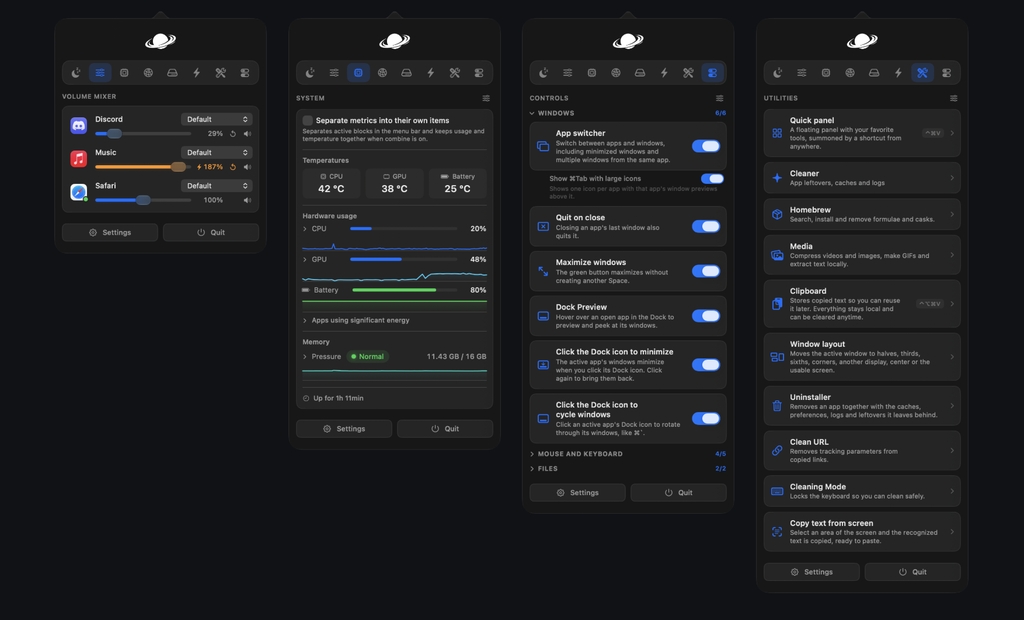
Vorssaint (developed under the vorssaint-utils project) solves this fragmentation by consolidating more than forty everyday macOS utilities into a single, native Swift application. Available via the official Vorssaint homepage and maintained openly on the Vorssaint Utils GitHub repository, the software acts as a modular Swiss Army knife designed exclusively for Apple Silicon Macs.
Core Architectural Principles of Vorssaint
Understanding why Vorssaint outperforms traditional all-in-one suites requires examining its three foundational engineering commitments:
- True Resource Modularity: Unlike bloated utility suites that keep every background daemon running simultaneously, Vorssaint isolates each tool on its internal Features page. When you toggle a module off—such as the clipboard manager or fan controller—the underlying process stops completely, consuming zero CPU cycles and zero memory.
- Strict Local-First Privacy: Vorssaint requires no user account, collects no telemetry, and embeds zero analytics SDKs. Network activity occurs strictly when explicitly triggered by user-facing actions, such as checking for application updates, managing Homebrew packages, or running an on-demand network speed test.
- Just-in-Time Permission Hardening: Rather than demanding blanket system access on first launch, Vorssaint aligns macOS privacy grants one-to-one with active modules. If you disable a feature that requires Screen Recording or Accessibility access, Vorssaint flags the unused permission in its settings so you can revoke it immediately.
Core Feature Modules: What Can Vorssaint Replace?
To maximize searchability and help you audit your current software stack, the table below maps Vorssaint’s built-in modules directly against the standalone paid or freemium utilities they replace:
| Vorssaint Module Category | Key Built-In Tools | Standalone Apps Replaced |
|---|---|---|
| Everyday & AI Tools | Dynamic Island, AI Agent Monitor (Claude, Codex, Copilot, OpenCode), Command Bar, Scratchpad | NotchNook, Raycast/Alfred (core actions), standalone token trackers |
| Window & Dock Management | Window Snapping, App Switcher with thumbnails, Dock Preview, Quit on Close, Green-button Maximize | Rectangle, Magnet, AltTab, DockDoor, Swift Quit |
| Sound & Audio Control | Per-App Volume Mixer, Live Equalizer, Audio Device Priority, Output Switcher, Mic Mute | SoundSource, Background Music, eqMac |
| Mouse & Keyboard Fixes | Independent Scroll Direction, Smooth/Linear Scrolling, Disable Acceleration, Super Key, Text Snippets | MOS, Scroll Reverser, LinearMouse, Karabiner-Elements (basic hyperkey), TextExpander |
| Capture & Media Creation | Scrolling Screenshots, Dual-Track Screen Recording, Offline OCR, Color Picker, Local Media Compressor | CleanShot X, TextSniper, Sip, Permute, Clop |
| System & Storage Care | Live Telemetry (CPU/GPU/RAM/Temp), Custom Fan Curves, App Uninstaller, Cache Cleaner, Homebrew Updater | iStat Menus, TG Pro, AppCleaner, Pearcleaner, Cork |
System Requirements and Pre-Installation Checklist
Before installing Vorssaint, verify that your workstation meets the hardware and operating system baseline. Because Vorssaint relies on modern Apple frameworks and low-level hardware sensors, legacy Intel architectures are not supported.
- Processor Architecture: Apple Silicon (
arm64— M1, M2, M3, M4, or newer). - Operating System: macOS 14 Sonoma or newer.
- Privileges: Local administrator rights to move the app to
/Applicationsand approve macOS Privacy and Security prompts.
Verifying Hardware Compatibility via Terminal
You can confirm your machine qualifies in under five seconds by running the following check in the macOS Terminal:
sw_vers -productVersion && uname -mIf the output displays a version number of 14.0 or higher followed by arm64, your Mac is ready for deployment.
Step-by-Step Guide to Installing Vorssaint on macOS
Vorssaint supports three official installation paths. Choose the method that best aligns with how you manage software updates on your machine.
Method 1: Install via Homebrew Cask (Recommended)
Using Homebrew is the fastest and cleanest way to deploy Vorssaint. It downloads the official Apple-notarized binary and integrates seamlessly with standard package update workflows.
- Open your Terminal application.
- Execute the Homebrew cask installation command:
brew install --cask vorssaint- Launch the application directly from the command line or Spotlight:
open -a VorssaintMethod 2: Direct Disk Image (DMG) Installation
If you prefer not to use a package manager, you can install the signed release bundle manually:
- Visit the official Vorssaint website or the Releases section on GitHub.
- Download the latest
.dmginstaller file. - Double-click the downloaded disk image, drag
Vorssaint.appinto your/Applicationsfolder, and launch it from Finder. - If macOS Gatekeeper flags a manually downloaded or older build, navigate to System Settings -> Privacy & Security, scroll down to the Security section, and click Open Anyway.
Method 3: Building from Source
For security researchers, developers, or contributors who want to inspect the Swift codebase and compile their own binary, Vorssaint requires only the Xcode Command Line Tools:
git clone https://github.com/vorssaint/vorssaint-utils.git
cd vorssaint-utils
./build.sh --install
The build.sh --install script automatically compiles the source code, assembles the application bundle, copies it into /Applications, and launches the utility.
How to Configure and Use Vorssaint for Maximum Productivity
Once the Vorssaint icon appears in your macOS menu bar, the initial configuration takes less than five minutes. Follow these structured workflows to tailor the app to your daily routine.
1. Curating Your Active Modules and Permissions
On first launch, open Vorssaint’s Features dashboard. Instead of enabling everything at once, start by activating only the tools that solve your immediate annoyances.
When you toggle a feature on, Vorssaint will request the exact macOS permission required for that specific task:
- Accessibility (
System Settings -> Privacy & Security -> Accessibility): Required for Window Layout snapping, the App Switcher, Dock Preview, mouse scroll inversion, Finder Cut-and-Paste (Cmd+X), and Quit on Close. - Screen Recording (
System Settings -> Privacy & Security -> Screen Recording): Required to render live window thumbnails in Dock Preview and the App Switcher, as well as for the Screenshot, OCR, and Screen Recording tools. Note that macOS requires you to quit and reopen Vorssaint after toggling Screen Recording on. - System Audio Recording (
System Settings -> Privacy & Security -> Screen & System Audio Recording): Required only if you enable the Per-App Volume Mixer, Live Equalizer, or dual-track audio capture during screen recordings.
Check Settings -> Permissions inside Vorssaint at any time to audit your active grants. If you later turn off a feature, Vorssaint highlights the orphaned permission so you can switch it off in macOS System Settings.
2. Setting Up the Dynamic Island and AI Agent Tracker
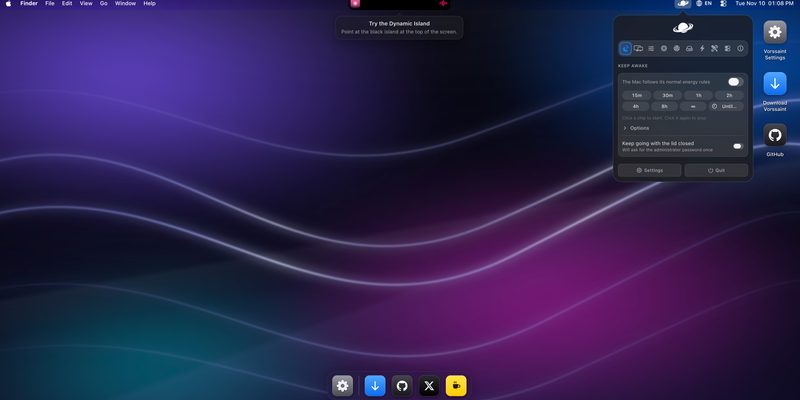
One of Vorssaint’s standout capabilities for software engineers and creators is its interactive Dynamic Island, which builds an expandable hub around the MacBook camera notch (or simulates one at the top of external displays and notchless Macs).
- Media and Daily Controls: Pin a compact Now Playing music controller with real-time lyrics and an audio equalizer, alongside quick countdown timers, calendar events, a floating camera mirror for pre-call checks, and a Markdown-ready Scratchpad.
- Real-Time AI Agent Monitoring: Navigate to Settings -> Dynamic Island -> Content -> AI Agents to turn on live tracking for Claude (via Claude Code), Codex, OpenCode, and GitHub Copilot. Without opening a browser or CLI dashboard, you can hover over the notch to view current token consumption, estimated API costs, active models, plan limit reset timers, and multi-account
CODEX_HOMEcards. Vorssaint even triggers a subtle alert the moment a long-running background coding task finishes.
3. Mastering the Command Bar, Quick Panel, and Radial Menu
Rather than hunting through menu bar icons, bind Vorssaint’s three rapid-invocation launchers to ergonomic shortcuts:
- Command Bar: Press your assigned global hotkey to open a unified search field. From here, you can switch open windows, search local files, paste from your local clipboard history, expand text snippets, run unit conversions, or execute custom shell scripts.
- Quick Panel (
Ctrl+Cmd+V): Summons a floating palette populated with your most-used toggles—such as locking the keyboard and screen for Cleaning Mode, toggling Keep Awake so your Mac never sleeps during a build, or hiding desktop icons before a presentation. - Radial Menu: Hold a custom modifier or mouse button to open a contextual action wheel directly around your cursor, giving instant access to file shelves, color pickers, and app-specific shortcuts.
4. Fixing External Mice, Trackpads, and Audio Routing
If you dock your MacBook to an external monitor with a standard multi-button PC mouse and external audio interface, enable these four precision modules:
- Independent Scroll & Acceleration Fixes: Enable Invert Mouse Scrolling to use standard wheel direction on your external mouse while keeping natural scrolling on your MacBook trackpad. Turn on Linear Scrolling and Disable Mouse Acceleration for pixel-accurate cursor movement, and enable Side Buttons to restore Back/Forward navigation in Finder and web browsers.
- Hardware Debounce and Super Key: If a mechanical keyboard or aging mouse switch registers accidental double-clicks, enable the Extra Click Filter and Key Debounce. You can also map
Caps Lockas a Super Key (Cmd+Ctrl+Opt+Shift) to create conflict-free global shortcuts. - Per-App Volume Mixer and Priority Routing: Open the Sound module to set individual volume levels for Spotify, Slack, and your browser, and configure Audio Device Priority so macOS automatically routes calls to your studio microphone instead of defaulting to AirPods or monitor speakers.
- Bluetooth on Sleep: Enable this energy toggle so your Mac automatically disables Bluetooth the moment you close the lid, preventing wireless headphones in your backpack from staying connected and draining your laptop battery.
Troubleshooting Common Installation and Permission Issues
If an enabled module appears unresponsive after an update or manual build, walk through these three quick remediation steps:
- Refresh Stuck macOS TCC Permissions: Open System Settings -> Privacy & Security, locate the corresponding permission category (such as Accessibility), and toggle Vorssaint off and back on. If you compiled the app from source yourself, remove the old entry using the minus (
-) button and re-add/Applications/Vorssaint.appso macOS recognizes the new code signature. - Clear Quarantine Attributes on Manual Builds: If a custom-built binary refuses to launch, clear the extended quarantine flag in Terminal:
xattr -dr com.apple.quarantine "/Applications/Vorssaint.app"- Perform a Clean Reset: If you ever need to wipe all preferences or reset permissions cleanly, run the repository’s built-in
./Tools/uninstall.shscript before reinstalling via Homebrew.