Key Takeaways
Hypit turns video creation into an agent-driven, editable workflow, letting tools such as Claude Code and Codex analyze a reference video, rebuild its structure, and generate reusable variants instead of producing one-off clips.
What Is Hypit?
Hypit is an open-source video-authoring system designed primarily for AI coding agents. Instead of treating AI video generation as a single text-to-video request, Hypit gives an agent a structured language, runtime, components, and production workflow for building complete videos.
The basic idea is simple: give your coding agent a reference video or describe the video you want. Hypit helps the agent represent the footage, dialogue, captions, B-roll, graphics, effects, audio, and timing as an editable composition. Much of that timing can be anchored to words in the script rather than fixed timestamps, which makes it easier to replace dialogue or create variations without manually rebuilding every edit.
That makes Hypit particularly interesting for repeatable formats such as:
- Short-form social videos and viral-format remixes
- UGC-style marketing videos and talking heads
- Podcast and interview clips
- Product and affiliate videos
- Localized versions of existing creatives
- Code-rendered motion graphics
- Large sets of variations based on one composition
The official source is available in the Hypit GitHub repository.
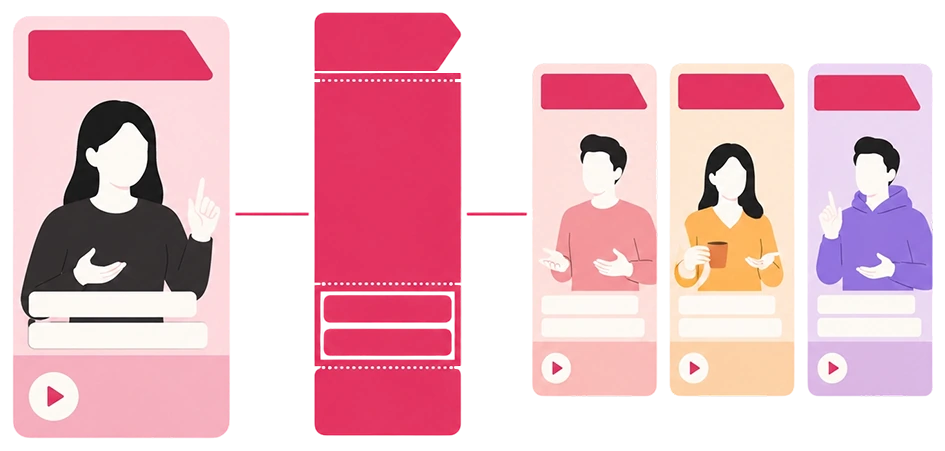
Hypit differs from many AI video generators because the output is not only an encoded video. The project itself remains editable and rerunnable, allowing an agent to modify individual elements and reuse previously generated material.
Why Hypit’s Workflow Is Different
Most generative video tools revolve around prompts: submit a description, generate a clip, inspect the result, and regenerate when something needs to change.
Hypit approaches the problem more like software production.
A Hypit project can preserve the script, media, visual components, generation results, runtime choices, and editing decisions as files. The documentation describes several important file types:
.svmlrepresents the script, media, components, and composition..svsstores reusable recipes and styling behavior..svrundefines what source, outputs, and targets should be used for a particular execution.- Build Results preserve generated outputs and information from completed executions.
This architecture matters when producing variants. Suppose you have a successful 20-second product ranking video. Instead of asking an AI model to recreate the entire video from scratch for every product, the agent can preserve the composition and change only the presenter, product, hook, language, call to action, or selected media.
That is closer to having an AI video engineer than simply having a video-generation prompt box.
How to Install Hypit
For ordinary agent users, installation is intentionally lightweight. You do not need to clone the GitHub repository just to start making videos.
You need a coding-agent environment that supports Agent Skills, such as Claude Code or Codex. Then run:
npx skills add hypit-ai/hypit -gThis globally installs the Hypit Skill. The Skill contains the production knowledge the agent uses when working on videos. When you first use it, the agent checks whether the Hypit executable is available and can help prepare the required executable tools.
You can also ask your agent to check the installed executable:
hypit version --checkHypit’s framework itself can be used without paying Hypit per render, but external coding agents and generation services may have their own pricing. Video, image, speech, and transcription models are separate from the core authoring system, so you can select hosted services, supply your own API credentials, or use suitable local capabilities.
Installing from source for development
Developers who want to modify Hypit itself have additional requirements. The current development documentation specifies Node.js 22.15 or newer and pnpm 10.33.x as the core requirements. Python, uv, FFmpeg, and other tools are used for particular local media or transcription workflows rather than every development task.
After cloning the repository, the documented development workflow is:
corepack enable
pnpm install --frozen-lockfile

pnpm check
pnpm test
For most creators, marketers, and agent users, however, installing the Skill is the much simpler path.
How to Create Your First Video with Hypit
Once the Skill is installed, open an empty folder or existing project in your coding agent.
There are two main ways to begin.
Clone the structure of a reference video
Give the agent the video file and explain what should change:
/hypit Use this video as a reference: /path/to/video.mp4.

Replace the product with my product while keeping the opening hook,
ranking format, caption style, and overall pacing.
The agent can analyze the reference, develop a creative direction, and determine how the footage, captions, graphics, sound, and timing contribute to the format. Spoken videos can use word-level transcription so visual events can be related to specific parts of the dialogue.
A more specific request might look like:
/hypit Clone this video: /path/to/reference.mp4.

Keep the three-stage reveal structure.
Replace the presenter.
Rewrite it for a developer audience.
Use my product screenshots as B-roll.
Make the final video vertical.
This is where Hypit’s structured workflow becomes useful: the format can remain recognizable while individual creative variables change.
Start without a reference video
A source video is optional. You can simply describe what you want:
/hypit Create a 20-second vertical ranking video comparing five AI tools.

Use fast karaoke-style captions, a strong first-second hook,
product screenshots as B-roll, and a clear CTA at the end.
Hypit can then help the agent create the workflow from scratch rather than reverse-engineering an existing video.
Choosing AI Models and Managing Generation Costs
Hypit is not tied to one image, video, speech, or transcription model.
The agent first determines what the project needs. A workflow might require transcription for a reference video, generated images for B-roll, synthetic video for a presenter, or no generative model at all if the visuals can be produced through code and existing media.
The official workflow recommends agreeing on the service, scope, and budget before paid generation begins. Once approved, the agent can generate the required material while simultaneously developing captions, graphics, and other parts of the composition.
This separation between authoring and generation is worth understanding. Hypit manages the video workflow; model providers create particular assets.
For example, a project could theoretically combine:
Reference video
      |
      v
Transcription / analysis
      |
      v
Script + composition
      |
      +----> Existing footage
      +----> Generated images
      +----> Generated video
      +----> Voice or audio
      |
      v
Captions + graphics + timing
      |
      v
Editable Hypit project
      |
      v
Final rendered video
That architecture also means generation models are not mandatory for every project. Code-rendered visuals, existing assets, captions, graphics, and motion can form a complete composition without requesting newly generated footage.
Editing and Previewing Videos with Hypit Studio
Hypit also includes Studio, a browser-based interface for inspecting an editable project.
For a project with a run file such as build.svrun, start Studio with:
cd /path/to/my-video
hypit studio --run build.svrun
Open the address printed in the terminal. The default Studio server port is 5179 unless another port is specified.
Studio provides a video preview, timeline, source files, generated artifacts, and an Inspector for properties exposed by components. You can move through frames, inspect words and graphics on the timeline, adjust supported properties, and have supported changes written back into the underlying project files.
There is also a Comments view for timestamped feedback. Comments are saved into the project’s FEEDBACK.json, which means both a human reviewer and the coding agent can work through feedback while keeping it connected to specific moments in the video.
This creates a useful human-agent loop:
Agent builds video
      ↓
Human previews in Studio
      ↓
Human adds comments or edits
      ↓
Agent revises project
      ↓
New build reuses suitable assets
      ↓
Final export
Instead of repeatedly describing visual problems through chat, you can inspect the actual composition and give more precise feedback.
When Should You Use Hypit?
Hypit makes the most sense when repeatability matters.
For a one-off cinematic AI clip, a conventional text-to-video generator may be simpler. Hypit becomes more compelling when you want a format that can be edited, automated, localized, or reused dozens of times.
A marketing team could create one successful advertisement structure and generate variants for different hooks and products. A creator could keep a podcast-short format and swap episodes. An international team could adapt the same composition to multiple languages. Developers can go further by creating custom components or integrating model providers into the runtime.
The central idea is straightforward: treat video as a reusable program rather than a disposable render.
For AI-agent workflows, that is what makes Hypit notable. The agent is not merely prompting another model. It can understand a reference, build structured source files, generate or reuse media, render the composition, inspect the result, respond to feedback, and create new variants from the same underlying project.