 By
How Alexandrie Packs an Offline-Capable Wiki Into Four Containers
Most self-hosted wikis hit one of two walls. Either they bundle heavy enterprise search and collaboration engines that chew through gigabytes of RAM on a small VPS, or they go blank the moment your laptop drops off Wi-Fi. Alexandrie takes a middle road: your browser keeps a local cache of pages and queued edits so you can keep writing on a flight, then syncs those changes to a single Go API backed by MySQL 8.0 and optional S3 storage.
Everything runs in four Docker containers. That compact footprint makes Alexandrie appealing for homelabs and small engineering teams, yet several design shortcuts carry real operational limits. Knowing where offline sync drops failed edits, why server search skips shared notes, and which auth flags are missing from the default Compose file will save you hours during setup.
Inside the four-container stack
Alexandrie’s entire server stack fits into docker-compose.yml across four services connected over an internal bridge network:
| Service | Default Port | Persistent Volumes | Responsibility |
|---|---|---|---|
| Nuxt Frontend | 8200 | — | Hybrid SSR landing pages and client-side workspace SPA |
| Go / Gin Backend | 8201 | — | REST API, auth cookies, permissions, migrations, ZIP backups |
| MySQL 8.0 | 3307 → 3306 | mysql_data | Unified tree hierarchy, user accounts, FULLTEXT index |
| RustFS (S3) | 9000 | rustfs_data, rustfs_logs | Optional object storage for uploads, avatars, and 24-hour ZIPs |
Startup stays hands-off because the Go backend embeds its default settings and SQL migrations straight into the compiled binary. When the API container boots, it checks MySQL and applies any pending schema migrations automatically before accepting traffic. Unless you mount a custom config.toml via CONFIG_PATH, it falls back to those built-in defaults.
Inside MySQL, Alexandrie avoids separate tables for workspaces, folders, documents, and uploaded file entries. Instead, all four item types live in one recursive tree table where each record links back to its parent row. That keeps sidebar tree rendering uniform, though deleting a top-level workspace or category cascades directly in SQL and wipes every nested document and attachment underneath it. Rather than using auto-incrementing database keys, the backend assigns its own time-ordered 64-bit IDs for users, sessions, and tree items.
Offline queuing, Markdown rendering, and sync limits
When you open http://localhost:8200, the Nuxt frontend splits its rendering in two. Public landing pages use server-side rendering (SSR) for fast initial loads, while everything under /dashboard/** runs strictly as a client-side single-page application (SPA). Browser JavaScript is mandatory for all authenticated workspace work, and that client boundary lets a Workbox PWA service worker handle caching once the app loads.
During normal browsing, the service worker precaches the app shell and static assets. For HTML navigation, API responses (up to 1,000 cached pages and 1,000 API responses), and CDN media, it uses a network-first strategy with a 3-second timeout. If browser storage fills up, cached CDN entries are purged automatically. Translation bundles use stale-while-revalidate for instant language switching, while backup downloads bypass the service worker so large ZIP streams never clog the cache.
Offline editing works because creating, updating, or deleting a note does not require an immediate server response. When a request hits a network failure, the frontend saves that pending change locally via localforage. Once the browser fires an online event—or the next time the workspace loads—the client replays those queued changes one by one against the Go API.
There is an important catch in how that replay works. Alexandrie has no CRDTs or three-way conflict merging across devices, and it clears the local queue before sending the pending items sequentially. If a replayed request fails again due to a network drop, it goes back into localforage. If the backend rejects a replayed request with a non-network error (such as a 4xx validation error or 5xx server failure), failed creation (POST) requests log an error to the browser console, whereas failed update (PUT) or delete (DELETE) requests are dropped from the cleared queue without throwing or re-queuing.
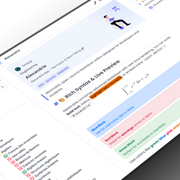
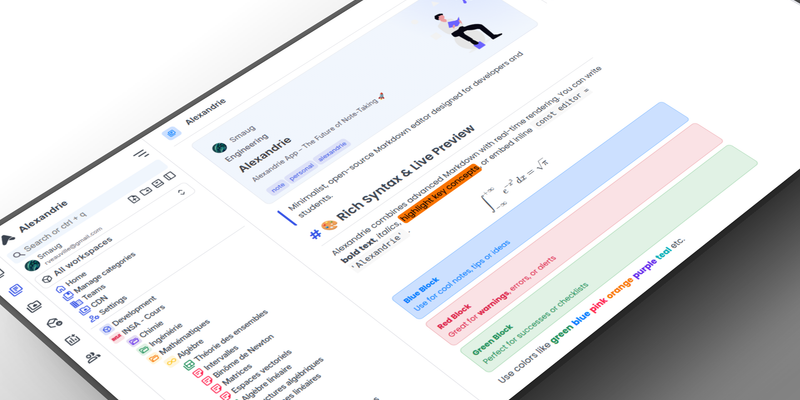
In the editor itself, Alexandrie pairs CodeMirror 6 with markdown-it to support KaTeX math, syntax-highlighted code blocks, interactive checkboxes, custom callout containers, Mermaid diagrams, and browser-based voice dictation. Mermaid diagrams render completely offline using the bundled renderer. Draw.io diagrams are the exception. Clicking to edit a Draw.io diagram opens an external embed.diagrams.net iframe inside the modal, so even on a self-hosted server, creating or editing Draw.io diagrams requires internet access in your browser before the exported SVG+XML file saves back to S3.
Storage, backups, and security boundaries
One practical touch in Alexandrie’s design is that RustFS (or any S3-compatible endpoint) is optional at boot. Leave the MINIO_* environment variables blank and the Go backend still starts and serves notes normally from MySQL. Only media uploads, user avatars, and server-side ZIP backups return errors until object storage is configured.
When object storage is enabled, default limits cap individual uploads at 20 MB and total uploads per user at 1 GB, both tunable via a custom config.toml mounted at CONFIG_PATH. Exported ZIP backups follow two steps:
- The backend fetches the user’s documents and S3 files, builds the ZIP archive in backend RAM, and uploads it to a private
<MINIO_BUCKET>-backupsbucket with a 24-hour expiration rule. - The API returns a 24-hour presigned download link straight from S3 while tracking backup job status in backend memory.
Because the archive is built in RAM before upload, exporting accounts packed with large attachments will temporarily spike backend memory usage.
Before exposing Alexandrie outside localhost, pay close attention to its upload and session defaults.
Uploaded attachments and avatars land in MINIO_BUCKET. At startup, the backend attempts to configure that bucket for anonymous public read access (s3:GetObject)—logging a warning and continuing if an S3 provider like Garage rejects bucket policy updates. Upload checks look at the client-supplied multipart Content-Type header rather than inspecting file signatures (magic bytes), and uploaded SVGs can contain active content. Since attachment URLs are public, always serve CDN_URL from a separate origin than FRONTEND_URL so static uploads can never share session cookies with the web app.
For authentication, the Go router restricts credentialed cross-origin (CORS) requests strictly to the exact FRONTEND_URL origin. It stores HS256 JWT access tokens (30-minute default expiry) and refresh tokens (7-day cookie expiry, backed by 30-day database session records) in HttpOnly cookies. Note that .env.example and docker-compose.yml both default ALLOW_UNSECURE=true, which disables the Secure cookie flag; set it to false on any HTTPS deployment.
Inside the workspace, two additional rules govern content and access. Before saving compiled note HTML, the backend sanitizer strips <script> tags and event handlers while explicitly allowing style attributes, <style> blocks, form controls, and <iframe> embeds so rich Markdown features keep working. That widens the embedded-content surface on shared or public notes compared to strict plain-Markdown renderers. Meanwhile, every workspace, category, and note enforces five permission levels (None, Read, Write, Admin, and Owner): Write allows edits, Admin is required to delete, share, or change permissions, and global application admins automatically bypass per-item ownership checks across the instance.
Quick setup and five configuration gotchas
Standing up a local test instance takes four commands using the repository’s template files:
curl -O https://raw.githubusercontent.com/Smaug6739/Alexandrie/main/.env.example
curl -O https://raw.githubusercontent.com/Smaug6739/Alexandrie/main/docker-compose.yml
cp .env.example .env
docker compose up -d
Once the containers are healthy, open http://localhost:8200. When you need to update images or inspect logs later, run docker compose pull and docker compose logs -f --tail=100.
Before putting .env behind a reverse proxy, replace the placeholder secrets (JWT_SECRET, MYSQL_PASSWORD, and RUSTFS_SECRET_KEY) and enable secure cookies. Generate a real signing key with openssl rand -hex 32, then update .env:
Before (.env.example defaults):
FRONTEND_URL=http://localhost:8200
API_URL=http://localhost:8201
CDN_URL=<default-local-s3-url>
ALLOW_UNSECURE=true
JWT_SECRET=<default-placeholder>
MYSQL_PASSWORD=<default-placeholder>
RUSTFS_SECRET_KEY=<default-placeholder>
After (production HTTPS example with isolated CDN origin):
FRONTEND_URL=https://notes.example.com
API_URL=https://api-notes.example.com
CDN_URL=https://cdn-notes.example.com/alexandrie
COOKIE_DOMAIN=.example.com
ALLOW_UNSECURE=false
JWT_SECRET=<output-of-openssl-rand-hex-32>
MYSQL_PASSWORD=<strong-mysql-password>
RUSTFS_SECRET_KEY=<strong-rustfs-secret>
Even after sorting out TLS and secrets, five deployment quirks regularly catch first-time setups off guard.
1. Admin accounts need ADMIN_ACCOUNTS plus a restart
The quick-start flow makes it look like registering at http://localhost:8200 gives you a primary owner account. It does not—every self-registered user starts as a standard non-admin account. To promote yourself, copy your 64-bit user ID, add ADMIN_ACCOUNTS=<your-id> to the backend environment (the variable is omitted from .env.example and docker-compose.yml by default), and restart the backend container. At startup, the backend promotes listed IDs and revokes global admin rights from any account not on that list. Also keep in mind that admin docs mention a 15-minute access token lifetime, whereas the backend default is 30 minutes (1800 seconds).
2. Docker Compose drops most OIDC and login-hide flags
Alexandrie supports up to 10 OIDC identity providers via OIDC_1_CONFIG_URL, OIDC_1_CLIENT_ID, OIDC_1_CLIENT_SECRET, and OIDC_1_PROVIDER_NAME (up to OIDC_10_*), using /login/oidc/callback as the redirect URI. Direct LDAP is not built in; the supported path is fronting LDAP with Keycloak or Authentik over OIDC. However, docker-compose.yml forwards CONFIG_DISABLE_NATIVE_LOGIN to the backend service while passing only CONFIG_DISABLE_LANDING and CONFIG_DISABLE_SIGNUP to the frontend by default—omitting the frontend’s CONFIG_DISABLE_NATIVE_LOGIN, CONFIG_HIDE_NATIVE_LOGIN, and CONFIG_OIDC_PROVIDER_AUTO_REDIRECT flags, as well as OIDC_1_* on the backend. On top of that, .env.example, the docs, and the login UI disagree on the exact flag name for hiding the native login form, so setting CONFIG_HIDE_NATIVE_LOGIN alone leaves the form visible without a manual fix.
3. OIDC state lives in RAM and bypasses CONFIG_DISABLE_SIGNUP
Because the backend stores OIDC authorization state tokens in backend RAM rather than a shared database or cache, running multiple backend replicas without sticky sessions breaks OIDC callbacks. Also note that CONFIG_DISABLE_SIGNUP=true only blocks native registration. Users signing in through a configured OIDC provider for the first time are still provisioned automatically.
4. SMTP is optional and strictly scoped
Native accounts support TOTP two-factor authentication (including admin-enforced 2FA) and recovery codes without any mail server configured. Setting SMTP_HOST, SMTP_MAIL, SMTP_MAIL_FROM, and SMTP_PASSWORD is only needed for password-reset emails and admin-created user invitations. Leave those blank and those two flows silently skip or fail.
5. Server search skips shared team notes
MySQL FULLTEXT search only queries documents owned directly by the authenticated user. Notes shared with you by teammates stay searchable client-side across loaded metadata (title, description, and tags), not across full document bodies via server search.
Where the architecture draws its lines
Alexandrie keeps its four-container footprint light by skipping distributed consensus, job queues, and dedicated search clusters. Automated tests in the repository cover core behaviors like CORS origin isolation, 64-bit ID generation, and authentication lifecycles, while leaving full multi-container integration to real deployment verification.
For a homelab or small team on a single host, that trade-off works well: you get fast Markdown editing, genuine offline queuing, and S3-backed ZIP exports without heavy resource overhead. Just go in knowing the boundaries baked into the current design—no multi-device CRDT conflict merging, no multi-replica OIDC without sticky sessions, no offline Draw.io editor, and no server-side full-text search across notes shared by teammates.