AI image tools are having a moment. New model, new claims. Sharper. Faster. Smarter. So the question isn’t whether these tools are impressive. It’s which one is worth your time.
We’re comparing three of the biggest names: GPT Image 2.5, GPT Image 2, and Seedream 5.0 Pro. We’ll get into how each one performs, what it’ll cost you, and which one makes sense for your workflow.
Here’s something annoying. Each model is presented in a different app or API. Want to test all three? Get ready to juggle logins, re-enter prompts, and track three different pricing plans just to compare results.
This is where Edimakor comes in. Edimakor brings these top-tier image models into one platform. You don’t need three tabs open or three subscriptions running. You can generate, compare, and edit with any of these models in one place, and switch between them in seconds.
Quick Comparison: GPT Image 2.5 vs GPT Image 2 vs Seedream 5.0 Pro
Below is a quick look at GPT Image 2.5, GPT Image 2, and Seedream 5.0 Pro: who built them, what each one is genuinely good at, and who they’ll work best for.
| Feature | GPT Image 2.5 | GPT Image 2 | Seedream 5.0 Pro |
|---|---|---|---|
| Developer | OpenAI | OpenAI | ByteDance |
| Released | September 2026 | April 2026 | July 8, 2026 |
| Main strength | Reference fidelity, precise editing | General-purpose generation, reasoning-based prompts | Layer separation, dense text, regional edits |
| Speed | Up to 50% lower latency than GPT Image 2 | Moderate | Fast for design-heavy tasks |
| Best for | Product photos, brand assets, multi-turn edits | Everyday creative generation | Infographics, posters, UI mockups |
GPT Image 2.5 is the newest of the three. It builds on GPT Image 2 with faster output and steadier edits. GPT Image 2 is still solid for general use, especially if you like its prompt style. Seedream 5.0 Pro, on the other hand, leans hard into structured design work think posters, product sheets, and anything with a lot of text.
Deep-Dive Comparison: Same Prompt Test
Numbers only tell half the story, look at how each model handles the same task, broken into three tests.
Test 1: Image Quality & Photorealism
This test focuses on lighting, skin texture, and how real a scene feels. GPT Image 2.5 preserves distinctive features from reference images while producing natural lighting and richer textures. That makes it a strong pick for portraits and product shots where small details matter.
GPT Image 2 still holds up well for descriptive prompts, especially UI-style scenes with clear layout instructions. Seedream 5.0 Pro tends to produce a more polished, commercial-ready first draft, which is useful for campaign and poster work where the image needs to look finished right away.
Test 2: Rendering & Typography
Text inside images is where most AI models fall apart. This is a key differentiator.
GPT Image 2.5 made real gains here. Infographic accuracy improved, though very dense small text can still take more than one try. Seedream 5.0 Pro is for structured layouts, local edits, annotations, and multilingual text, making it a natural fit for posters and infographics packed with copy. In one head-to-head test, GPT Image 2 came out ahead on readable infographic text and cleaner e-commerce copy, while Seedream stayed closer to the original product sketch.
Test 3: Editing & Reference Image Control
This is about how well a model handles local edits without messing up the rest of the image.
GPT Image 2.5 is designed to change one element- a product, a background, a line of text- while the rest of the frame holds steady. It also supports up to 16 reference images and multi-turn editing that stays consistent across rounds.
Seedream 5.0 Pro takes a different approach. It accepts up to 10 reference images and is built for region-precise editing with annotation frames, plus multi-source compositing, meaning it can blend elements from several images into one scene. If your work involves layered designs or transparent assets, Seedream has the edge.
Pricing, API Access & Availability
Cost matters, especially if you’re generating images at scale.
Let’s talk pricing, and fair warning, it’s not as simple as one image, one price. GPT Image 2.5 runs on a token-based system instead of a flat rate. $5 per million text-input tokens, $8 per million image-input tokens, and $30 per million image-output tokens. A standard 1024×1024 image at high quality costs $0.05, while lower-quality drafts cost a fraction of a cent.
You can also run it through the API in two ways. GPT-Image-2.5 Flare is built for speed and volume, ideal if you’re generating a lot of images fast. GPT-Image-2.5 Sunburst trades some of that speed for precision, better suited to detailed edits where every pixel needs to count.
GPT Image 2 uses a similar token-based system but at higher rates, since it needs more output tokens to reach comparable quality levels.
Seedream 5.0 Pro is priced from $0.045 per image on OpenRouter, and it’s also available through platforms like Dreamina, Lumina, and ModelArk depending on whether you want a no-code interface or developer-level API access.
The takeaway: these three models are accessible through APIs and third-party platforms, but pricing structures differ, so test your use case before committing to one.
How to Choose the Correct Model
Still not sure which one fits your workflow? A simple breakdown
Choose GPT Image 2.5 when:
You need high-fidelity results from reference photos; think branded content, product mockups, or recurring characters. It’s also the right pick for fast, iterative work, since it cuts generation latency by up to half compared to GPT Image 2. If you’re doing multi-turn edits and need earlier changes to carry through cleanly, this is your model.
For example, a brand running weekly product photo variations would see the biggest payoff here, since every edit stays consistent without redoing the whole shot.
Choose GPT Image 2 when:
You’re running lighter, one-off generation tasks and don’t need the newest editing tools. It’s still capable for descriptive, detailed prompts and works well for teams already built around its existing workflow. It’s a solid fit if your team already has prompts and processes tuned to this model and switching would cost more than it’s worth.
Choose Seedream 5.0 Pro when:
Your project involves dense text, multilingual layouts, or design work that needs layer separation. It’s the strongest option for infographics, posters, and product sheets where structure and text accuracy matter more than raw photorealism.
Run GPT Image 2.5, GPT Image 2, and Seedream 5.0 Pro in Edimakor
You don’t have to pick just one model and stick with it forever.
Edimakor AI image generator gives you access to all three models inside one platform. Instead of managing separate accounts, API keys, or browser tabs, you generate, compare, and refine images from a single dashboard.
How it works:
- Open Edimakor and select the AI Image Generator tool. You’ll see a model selector right at the top of the workspace.
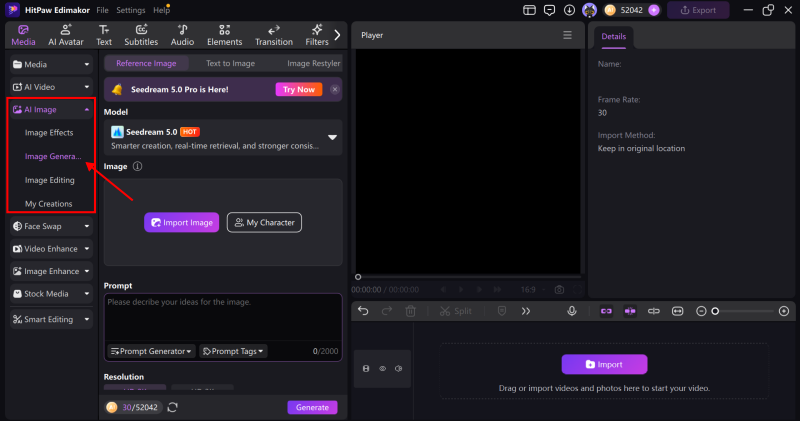
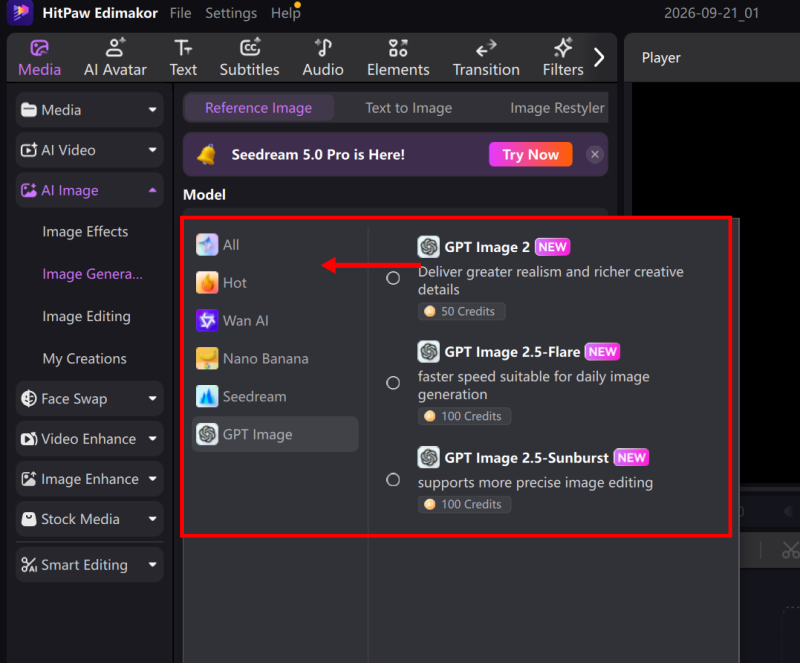
- Pick your model. Choose GPT Image 2.5 for reference-heavy edits, GPT Image 2 for general generation, or Seedream 5.0 Pro for text-heavy design work.
- Enter your prompt and reference images. Edimakor’s interface lets you upload references directly, no separate uploader needed.
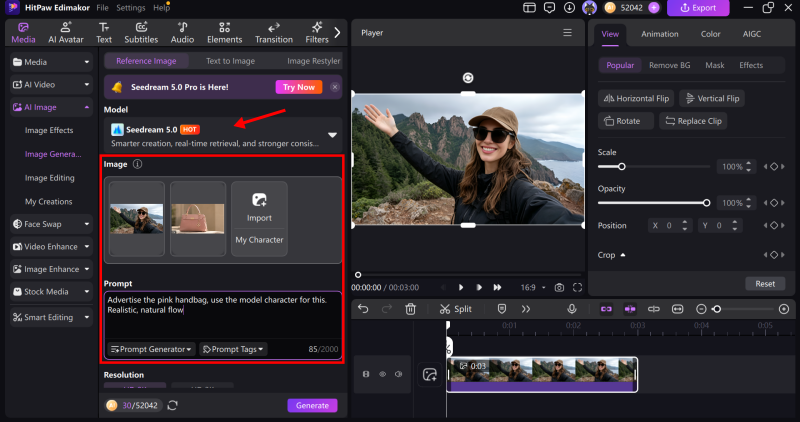
- Generate and compare. Run the same prompt across multiple models side by side to see which output best fits your project.
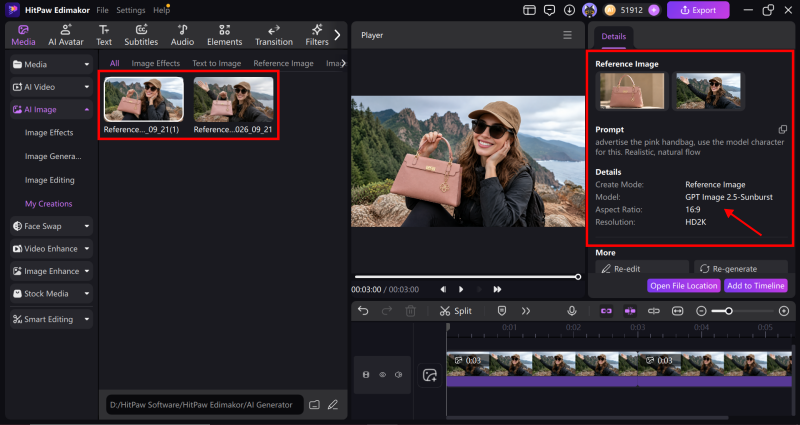
- Edit and export. Once you’ve got the image you want, use Edimakor’s built-in editing tools to fine-tune it and export it in the format you need.
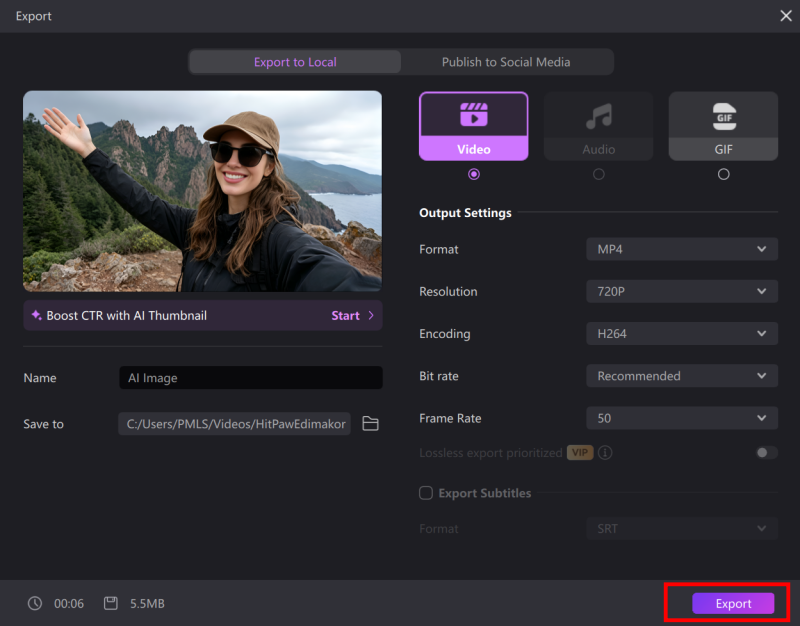
This workflow saves real time. You don’t have to relearn a new interface every time you want to test a different model.
Stop Switching Tools: Try Them All in Edimakor
GPT Image 2.5, GPT Image 2, and Seedream 5.0 Pro each bring something different. GPT Image 2.5 leads on reference fidelity and speed. GPT Image 2 still holds its own for everyday tasks. Seedream 5.0 Pro dominates when text and layout precision matter most.
Switching between apps, one login at a time, adds friction you don’t need. Setting up a separate API for every model costs time and money you could spend creating.
Edimakor solves that problem. It’s the ultimate hub for AI image generation: one platform, every top model, zero tab-switching.
Stop juggling tools and download Edimakor for free! Start creating with GPT Image 2.5, GPT Image 2, and Seedream 5.0 Pro today.