 By
Ghidra headless analysis: from binary import to repeatable jobs
Key Takeaways
Ghidra is an extensible software reverse engineering suite for interactive and automated analysis. Its Headless Analyzer can import files into a project and run analysis scripts from the command line, which makes it useful for repeatable triage. Decompiled output remains an analyst aid, not a promise of original source code; review the project’s security advisories before choosing a release.
What Ghidra gives a reverse engineer
Ghidra brings disassembly, assembly, decompilation, graphing, and scripting into one unified framework. The project supports multiple processor instruction sets and executable formats, running in a desktop graphical interface or in automated command-line modes. Java and Python are the documented development routes for custom user scripts and extensions. Those core framework capabilities are explicitly defined in the README; they provide analysis primitives rather than a guarantee that every compiled binary decompiles cleanly into its original source.
Under the hood, Ghidra unifies program data within a database structure coupling a .gpr project file with a .rep data folder. The disassembly subsystem translates machine code into an intermediate P-code representation via processor specifications written in the SLEIGH language. From this P-code graph, subsequent analyzers trace control flow, reconstruct calling conventions, resolve data references, and supply abstract syntax trees to the decompiler.
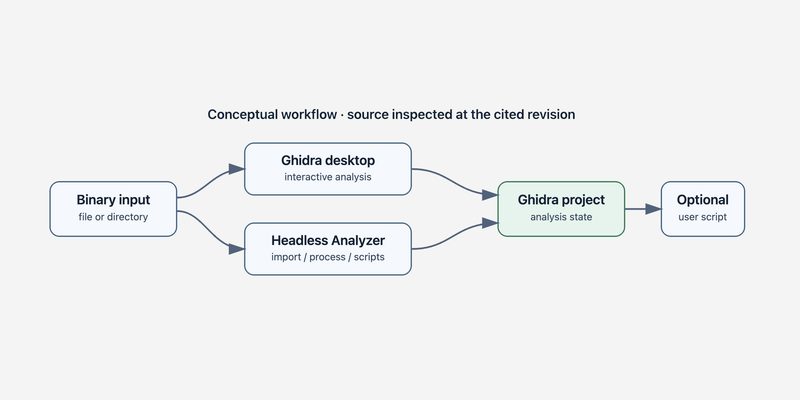
The operational choice centers on your target workflow. Use the interactive CodeBrowser when inspecting an unfamiliar program interactively, reviewing control flow graphs, or manually renaming structures. Use the Headless Analyzer when a workload requires batch importing files, running unattended analysis pipelines, or executing custom scripts without launching desktop GUI windows. Ghidra’s CLI launcher accepts a local project location and project name or a remote Ghidra Server URL, alongside flexible import and processing options (Headless Analyzer command reference).
| Operational Dimension | Interactive CodeBrowser (GUI) | Headless Analyzer (analyzeHeadless) |
|---|---|---|
| Launch Command | ghidraRun desktop launcher | support/analyzeHeadless CLI script |
| Execution Surface | Interactive single-analyst session with graphical layout | Batch CLI execution without requiring X11 display |
| Project Storage | Interactive project browser with persistent user workspace | Local directory or remote ghidra:// server URL |
| Script Automation | Script Manager window with real-time console feedback | CLI arguments (-preScript, -postScript, -scriptPath) |
| Resource Footprint | Full desktop UI heap allocation and rendering threads | Configurable -max-cpu worker threads and timeout limits |
| Primary Use Case | In-depth exploratory reversing and manual layout edits | High-volume malware triage and CI/CD artifact checks |
Start with an official release
For an initial analysis workflow, start with an official prebuilt multi-platform release. At the reviewed revision, the repository requirements specify a 64-bit JDK 25 and an official distribution archive named with the convention ghidra_<version>_<release>_<date>.zip downloaded from the GitHub releases page. The distribution must be extracted into a dedicated clean directory. You launch the interactive suite via ./ghidraRun on Linux and macOS, or ghidraRun.bat on Windows (installation steps). Avoid downloading GitHub’s automatically generated “Source Code” archive when looking for an executable release.
The repository also includes a comprehensive build-from-source pipeline, but this workflow is intended for framework development and custom native module compilation. The source build requires JDK 25, Gradle 9.1 or later, Python 3.9 through 3.15, and platform-specific native C/C++ compiler tools to compile the decompiler binary and SLEIGH compiler. The documented gradle buildGhidra task bundles the compiled distribution into build/dist/ (build requirements). For everyday reverse engineering and batch analysis scripting, using the prebuilt release avoids compiling native binaries locally.
In environments where Python scripting is preferred over Java, the release distribution also packages PyGhidra. PyGhidra bridges CPython runtimes with the Ghidra API, providing an alternative launcher at ./support/pyghidraRun (support\pyghidraRun.bat on Windows). Regardless of whether you execute through Java or Python, verify that JAVA_HOME points to a compatible 64-bit JDK 25 installation before launching scripts.
Run a batch import
After extracting the official release, the headless analysis engine is located inside the support directory. The command grammar requires a project directory location and project name, followed by operational directives such as -import and -recursive (launcher and options, launcher path). The underlying parser handles arguments defined in its command specification, matching options for inputs, logging, and concurrency (CLI argument parser). For example, to import a directory of binaries into a local project:
GHIDRA_HOME="$HOME/ghidra-release"
PROJECT_DIR="$HOME/ghidra-projects"
SAMPLE_DIR="$HOME/samples"

"$GHIDRA_HOME/support/analyzeHeadless" \
  "$PROJECT_DIR" SampleProject \
  -import "$SAMPLE_DIR" -recursive \
  -analysisTimeoutPerFile 300 \
  -max-cpu 4 \
  -log "$PROJECT_DIR/headless.log"
This snippet illustrates a local project import; it demonstrates CLI syntax and flags without assuming specific analysis results or runtime execution. Always review your installed release’s support/analyzeHeadlessREADME.html for complete flag details and platform specifics. On Windows environments, execute analyzeHeadless.bat from PowerShell or Command Prompt.
A critical design choice in headless automation is selecting between -import and -process. The -import option ingests raw binaries from the filesystem into the Ghidra project database and triggers auto-analyzers. In contrast, -process operates on program files that already exist within the project structure, making it ideal for running secondary analysis passes or targeted scripts without re-importing the original files. Additional flags provide lifecycle governance: -readOnly prevents accidental state modifications to existing projects, -deleteProject deletes temporary project files after execution, and -noanalysis imports files while deferring analysis passes until a custom script prepares memory maps or symbol tables.
When extending analysis with custom logic, the headless runner provides -preScript, -postScript, and -scriptPath. Pre-scripts execute immediately after binary loading but before Ghidra’s automated analyzers run, whereas post-scripts execute after all auto-analyzers finish. In Java, scripts extend GhidraScript and implement run() throws Exception. The framework injects active context variables directly into the script instance, including currentProgram, currentAddress, currentLocation, and currentSelection (script contract). By combining -postScript with custom exporters, analysts can automate string dumping, API reference collection, and cyclomatic complexity scoring across large binary corpora.
Why decompiler output needs review
Ghidra’s decompiler produces a high-level C-like representation of compiled machine instructions, but this output is an analytical reconstruction rather than original source code. In the framework’s architecture, DecompInterface manages a persistent native decompiler process for a target program, caching initialization data and automatically respawning the native subprocess if an unexpected fault occurs (decompiler interface contract). Because decompilation operates over heuristically simplified P-code graphs, calling programs must inspect res.decompileCompleted() and check res.getErrorMessage() before trusting the returned syntax tree.
The decompiler applies data flow transformations, dead code elimination, and stack frame analysis to simplify assembly instructions. While this produces readable pseudocode, optimizations can obscure compiler-inserted idioms, collapse variable scopes, or infer incorrect structure alignments when debug symbols are stripped. For instance, indirect control flow jumps, tail-call optimizations, and packed struct definitions can produce ambiguous pseudocode constructs that misrepresent underlying execution logic.
Consequently, treat decompiler output as a navigational hypothesis. Always cross-reference high-level statements against disassembled opcodes, cross-references, type definitions, and raw byte values before making definitive vulnerability or malware attribution claims. When a function fails to decompile or returns an error, examine the analyzer diagnostics rather than assuming the code block is unreachable or benign. Document your analysis options, preserve original binary samples in immutable storage, and verify inferred calling conventions against standard ABI specifications.
Security and adoption notes
The repository README warns that certain Ghidra versions contain known vulnerabilities and instructs operators to review the project’s Security Advisories prior to deployment (security advisory notice). In automated triage pipelines processing untrusted binaries, malicious samples may attempt to exploit parser defects or memory corruption bugs in third-party file format loaders. Run batch headless jobs inside isolated containers or disposable virtual machines with strict network boundaries and resource quotas.
From a licensing perspective, the repository’s Developer Guide defines Apache License 2.0 as the primary framework license while documenting that secondary licenses apply to bundled third-party libraries (licensing notes). Any GPL-licensed code within the project is isolated in the top-level GPL/ directory as a standalone module. Teams redistributing Ghidra extensions or bundling headless analyzers into commercial workflows must audit the licenses/ directory to ensure full compliance with upstream third-party terms.
Ghidra is an exceptional solution when engineering teams need a comprehensive reverse engineering platform supporting diverse architectures, collaborative server repositories, and scriptable batch automation. However, for specialized tasks such as single-format header inspection or lightweight ELF section extraction, dedicated command-line utilities like readelf or objdump offer lower overhead. For Ghidra deployments, start with an official prebuilt release and a curated test binary, validate headless execution flags, and build out automated triage scripts once your evidence collection requirements are clearly defined.