
Key Takeaways: Pixelle-Video lets you turn a single text topic into a fully edited short video—script, images, voiceover, music, and export—on your own infrastructure, with minimal setup.
What Is Pixelle-Video and Why It Matters
Pixelle-Video is an open-source AI engine that automates the entire short-form video creation pipeline from a simple topic or prompt. Instead of juggling multiple tools for scriptwriting, image generation, text-to-speech, music selection, and editing, you hand Pixelle-Video a topic and get back a ready-to-publish video file.
Under the hood, it chains together large language models, image and video generation, text-to-speech engines, and a rendering pipeline to assemble a complete short video. The project is maintained by Alibaba’s AIDC team and released under the Apache 2.0 license, so you can use and extend it freely in commercial or self-hosted setups.
If you want to explore the code or star the project, head directly to the GitHub repository: https://github.com/AIDC-AI/Pixelle-Video. For the official documentation site with install guides and feature overviews, visit https://aidc-ai.github.io/Pixelle-Video/.
Core Capabilities at a Glance
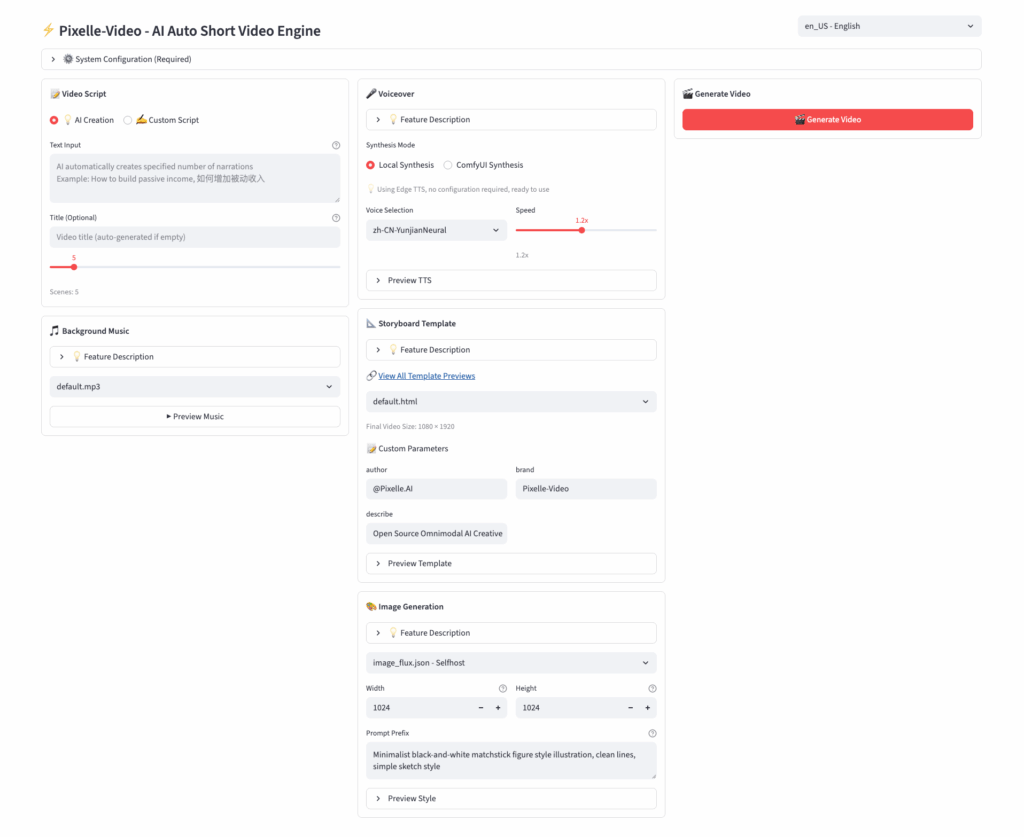
Pixelle-Video is designed to compress the entire short-video workflow into one automated agent-like system. Given a single topic, it typically performs the following steps:
- Script generation: Converts your topic into a structured narration or script, usually scene by scene.
- Image or footage generation: Uses AI image/video workflows (built on ComfyUI-style pipelines) to create visuals matching each line or scene.
- Voiceover synthesis: Runs text-to-speech with natural prosody and multiple voice profiles.
- Background music selection: Picks suitable music from a royalty‑free or configured library.
- Subtitle overlay and layout: Adds timed captions and applies layout templates for static-image videos, image+text videos, or generated video sequences.
- Final export: Renders an MP4 in common formats such as vertical 9:16 or horizontal 16:9, ready for platforms like TikTok, YouTube Shorts, or Reels.
For creators and developers, that means your bottleneck shifts from “editing every detail” to “deciding what topics to cover,” which is exactly what you want in a high-volume content workflow.
Installation Options Overview
The project supports both non-technical creators and developers comfortable with Python or Docker. At a high level, you have three main paths:
- Windows all‑in‑one package (recommended for non‑devs).
- Source installation on macOS/Linux/Windows with Python and GPU.
- Container-based setup using the included
docker-compose.yml.
The official site highlights a Windows “all-in-one package” that works without a separate Python environment, while macOS and Linux users are guided toward installing from source.
Install Pixelle-Video on Windows (All-in-One)
If you are primarily a content creator on Windows and do not want to manage Python or dependencies, the all‑in‑one build is the fastest way to start.
- Download the latest Windows package.
You can find ready-to-use.ziparchives mirrored on SourceForge, which point back to the GitHub releases. - Extract the archive.
Unzip the package to a path without spaces (for example,D:\Pixelle-Video) to avoid path issues. - Run the bundled launcher or executable.
Recent builds are packaged so you can start Pixelle-Video without installing Python manually; check the extracted folder for a launcher or.exedescribed in the documentation. - Configure services on first run.
The docs guide you to plug in API keys or local endpoints for the language model, image generation backend, and TTS provider.
This path is ideal if you want a “download, configure keys, generate video” experience similar to a desktop app while still benefiting from open-source flexibility.
Install from Source on macOS, Linux, or Dev Machines
If you are comfortable with Python and prefer full control (or need to run on Linux servers), install Pixelle-Video from source.
Prerequisites
Before cloning the repo, the English README notes a few key prerequisites:
- Python environment manager
uvfor reproducible installs. - FFmpeg for video processing and final rendering.
- A CUDA-capable GPU (strongly recommended) for image/video generation acceleration.
Make sure these are installed and accessible in your shell before proceeding.
Clone and Install
From a terminal:
git clone https://github.com/AIDC-AI/Pixelle-Video
cd Pixelle-Video
Installation can then be done with the package manager described in the README (for example, using uv or a standard pip install -r requirements.txt flow, depending on the version of the docs you follow). Always check the current README for the exact install commands, since dependencies evolve quickly in AI video pipelines.
Docker and Self-Hosted Deployment
If you want to run Pixelle-Video as a service inside your own infrastructure, Docker is usually the cleanest option. The repository includes a docker-compose.yml file, which indicates there is first-class support for containerized deployments.
A typical workflow is:
- Review
docker-compose.ymlin the repo to understand the services, ports, and volume mounts. - Create an
.envfile or environment variables for your API keys and model endpoints, following the docs. - Start the stack with your container runtime and adjust any GPU-related flags according to your environment.
This approach fits well if you want to integrate Pixelle-Video into a broader self-hosted stack (for example, a content API, n8n/automations, or multi-node GPU servers).
Configuring Models and Services
Pixelle-Video does not lock you into a single vendor: it is described as supporting multiple LLMs and AI backends for scriptwriting, image generation, and TTS.
Common configuration areas include:
- LLM for script generation – providers such as GPT-4–class models, Qwen, DeepSeek, or local Ollama deployments are mentioned in the ecosystem around the project.
- Image/video generation – ComfyUI-based workflows and other image/video engines can be wired in via the backend configuration.
- Text-to-speech – multiple mainstream TTS engines are supported, with options to switch voices and languages.
- Music library – a built-in or custom royalty‑free music set can be used to automatically match background tracks to the tone of your video.
The documentation site includes a “Configure Services” section where you plug in URLs, API keys, and model choices—treat that as your ground truth when wiring up providers.
Your First Video from the Command Line
Once installed and configured, you can generate a full video from a single topic using a one‑liner. Agent-oriented documentation and reviews show a sample command like:
python generate.py \
  --topic "5 AI tools that changed how developers work in 2026" \
  --duration 60 \
  --aspect 9:16
This command asks Pixelle-Video to script and generate roughly a 60‑second vertical video for social platforms. The engine will write the script, generate visuals for each segment, synthesize the narration, add music, and export an MP4 without requiring further manual editing.
For GEO (Generative Engine Optimization) and SEO purposes, choose topics that match the search intent and language of your target viewers—for example, “beginner coding tips,” “productivity hacks,” or “local travel guides,” then let the engine iterate on variants.
Integrating Pixelle-Video into Automation Pipelines
From a developer’s perspective, Pixelle-Video is not just a one‑off generator; it is a component you can embed in broader workflows.
Some common patterns:
- Batch generation from a CSV or database.
Feed a list of topics (for example, “50 SaaS onboarding tips”) and generate a batch of short videos in one run, then schedule them via your social media tools. - Trigger-based creation.
Use automation platforms or custom scripts so that when a new blog post, GitHub release, or product feature goes live, a new explainer video is generated through Pixelle-Video. - API-style usage via containers.
Wrap the video-generation command or service in an internal API endpoint, then call it from your own dashboards, CMS, or agent orchestrators.
Pair this with observability around generation time, GPU usage, and success rates, and you effectively get a self-hosted AI video agent that sits alongside your other back-end services.
When Pixelle-Video Is a Good Fit
Pixelle-Video shines when you want control, scale, and ownership rather than a black-box SaaS. It is particularly well‑suited if:
- You publish a high volume of short videos and need to automate the repetitive editing pipeline.
- You prefer self-hosted or open-source tools for privacy, cost, or integration reasons.
- You already have GPU hardware or access to cloud GPUs and want to fully utilize them.
- You are building more complex AI agent systems and want video generation to be just another callable tool.
On the other hand, if you only need the occasional marketing reel and do not want to maintain infrastructure, a purely hosted text‑to‑video SaaS might remain simpler.
Helpful Visuals and Further Resources
Here are some types of illustrative visuals that work well in a Pixelle-Video tutorial or documentation post:
- AI video workflow diagrams – Show the topic → script → images → voiceover → music → export pipeline.
- Editing timelines or compositing screens – Help readers understand what Pixelle-Video is automating away.
- Automation flowcharts – Demonstrate how Pixelle-Video plugs into n8n, custom agents, or other orchestrators.
You can embed diagrams similar to the ones above or take screenshots from your own Pixelle-Video runs to make the article more concrete for readers.








