
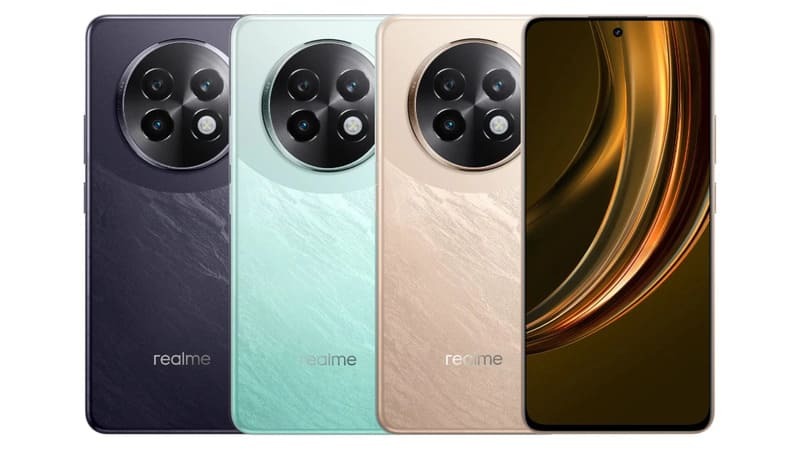
The smartphone boasts a sleek design with dimensions of 165.6 x 76.1 x 7.8 mm and a lightweight build of 190 g, ensuring comfortable handling. It features a Hybrid Dual SIM setup and is IP64-rated, providing dust and water resistance for added durability.
The display is a 6.72-inch IPS LCD panel with a 120Hz refresh rate, delivering smooth visuals. With a resolution of 1080 x 2400 pixels and a pixel density of 392 ppi, it offers sharp and vibrant images. The screen has a peak brightness of 580 nits, making it usable in various lighting conditions.
Under the hood, the device runs on Android 14 with Realme UI 5.0 and is powered by the MediaTek Dimensity 6300 chipset. The octa-core CPU and Mali-G57 MC2 GPU ensure efficient multitasking and moderate gaming performance. Storage options include 128GB or 256GB with 8GB or 12GB of RAM, and a microSDXC card slot for expandable storage.
The camera system includes a 50 MP main sensor with OIS and an additional lens, offering features like HDR and panorama. The 16 MP front camera supports 1080p video recording, ensuring decent selfies and video calls.
A 5000 mAh battery supports 45W fast charging, reaching 50% in 30 minutes. Connectivity options include Wi-Fi, Bluetooth 5.3, GPS, and USB Type-C 2.0. Realme 13 5G comes with stereo speakers, and a 3.5mm jack, and is available in Speed Green and Dark Purple colors.
Prerequisites & Preparation
- Backup Data: Flashing will completely wipe all data on your device. Back up important files and settings before proceeding.
- Battery Level: Ensure your device has at least 50% battery to prevent shutdown during the flashing process.
- USB Driver & Tools: Install the correct USB drivers for your brand and prepare the flashing tool (Odin for Samsung, SP Flash Tool/QPST for Qualcomm/MTK, etc.).
CAUTION: Flashing official firmware carries a risk of bricking your device. Proceed with caution and at your own risk. addROM is not responsible for any damage caused to your device.
Download Stock ROM & Firmware
Global / General
| File Type | Firmware / Build | Region / Model | OS Version | Download Link |
|---|---|---|---|---|
| Stock ROM | EX01 | Global / General | Android 11 | Google Drive |
How to Flash Firmware / Stock ROM
To flash the stock firmware on your Realme device using SP Flash Tool, follow these steps:
- Download and install the MTK USB Drivers on your computer.
- Download and extract the SP Flash Tool.
- Launch
Flash_tool.exeas administrator. - Click on the Scatter-loading button and select the Android scatter file (
.txt) from the extracted firmware folder. - Click the Download button.
- Power off your device completely, hold the Volume Down or Volume Up button, and connect it to the computer via USB cable.
- The flashing process will start automatically. Wait for the green “Download OK” checkmark to appear.








