 By
By Beadbox: A Native GUI for Git-Backed Beads Issue Tracking
Beadbox turns your beads-powered, git-backed issue tracker into a fast, native dashboard that lives alongside your code.
Key concepts: git-backed, local-first issue tracking
Beads is a distributed, git-backed graph issue tracker that stores issues directly in a project’s repository instead of a remote SaaS database. Issues live inside a hidden .beads/ directory as a local SQLite database and a text-based issues.jsonl log that is the only file committed to Git. This design lets issues branch, merge, and travel with code, giving both developers and AI agents persistent task memory across sessions and machines.
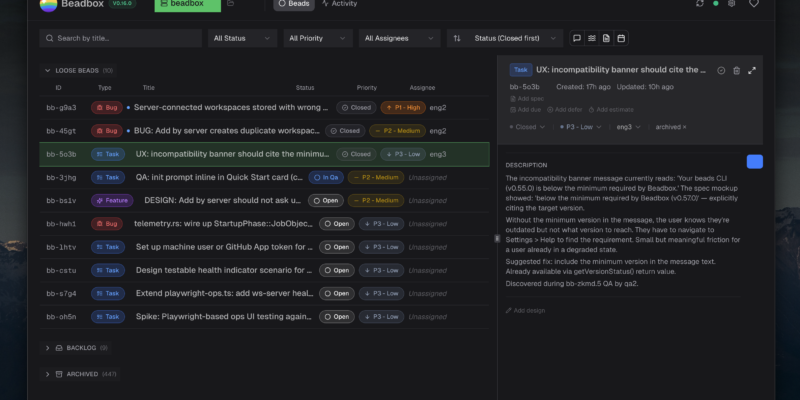
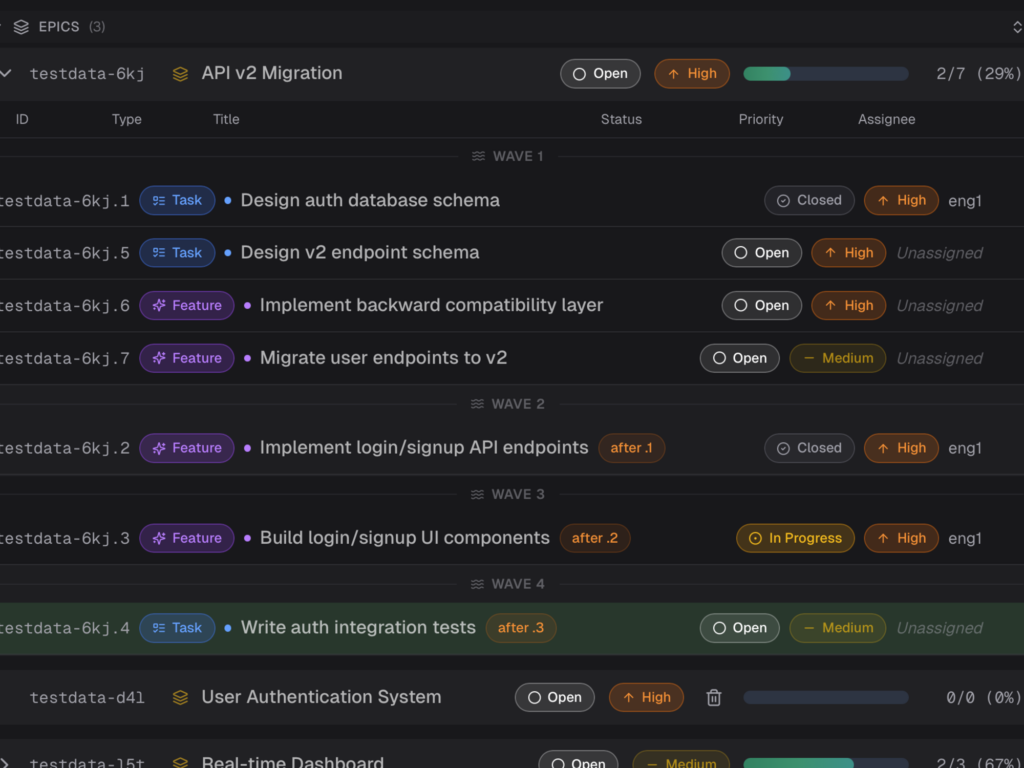
Beadbox is a native desktop GUI for that beads workspace, providing real-time visibility into every task, dependency, and handoff across your project and agent fleet. Instead of scrolling logs or running CLI commands, teams can see epics, subtasks, blockers, and activity in a visual dashboard that updates as the .beads/ directory changes.
Why Beadbox instead of traditional hosted trackers
Traditional hosted tools like Jira, Linear, and GitHub Issues keep all project state in a remote database keyed by ticket IDs, which do not naturally follow your Git branches. When you branch to experiment, revert, or hotfix, your task list stays flat, forcing manual mapping between code and tickets and making it difficult for agents to keep context. Beads inverts this by treating Git as the source of truth: issues are versioned with your code so that every branch carries its own plan and dependency graph.
Beadbox builds on this by offering a native, cross-platform dashboard for those git-backed beads workspaces. It watches the .beads/ directory for changes and streams them into a UI that shows a live dependency tree, keyboard-first editing, and per-agent activity feeds on a single screen. For AI-heavy teams, this replaces “agent theater” dashboards with an operational view of what is in flight, blocked, or ready to execute.
How git-backed issue tracking works with beads
At the core of beads is a local SQLite database stored in .beads/beads.db that holds all issues, relationships, and metadata. A background daemon mirrors changes from this database into an append-only issues.jsonl text file so that Git sees small, mergeable diffs instead of opaque binary blobs. When collaborators pull from the remote repository, their local daemon replays those JSONL events back into their own beads.db, keeping everyone’s view consistent while letting Git handle branching and merging.
Issues themselves form a dependency-aware graph, not just a flat backlog. Commands like bd create, bd dep add, and bd ready let agents and humans create tasks, wire up dependencies, and query for “ready” work with no open blockers, which is crucial for long-horizon AI workflows. Because everything is stored in the repo, agents can crash, restart, or move across machines and still pick up the next ready task by querying beads instead of chat history.
Beadbox as the ideal GUI for beads
Beads itself is CLI-centric and optimized for AI agents, which is powerful but not ergonomic for humans who want a dense, visual overview of project state. Beadbox fills that gap by acting as a native desktop dashboard that speaks beads’ language while presenting the data as issues, epics, dependency trees, and live activity feeds. It reads directly from .beads/, so there is no cloud account, separate database, or sync layer to manage beyond your existing Git workflows.
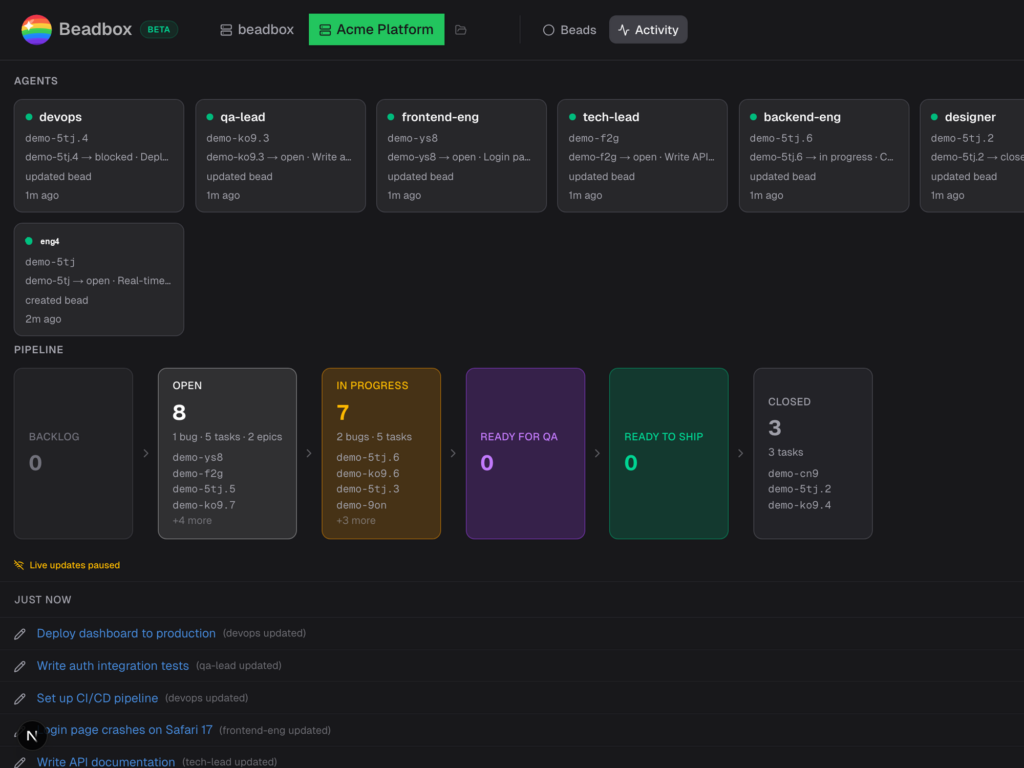
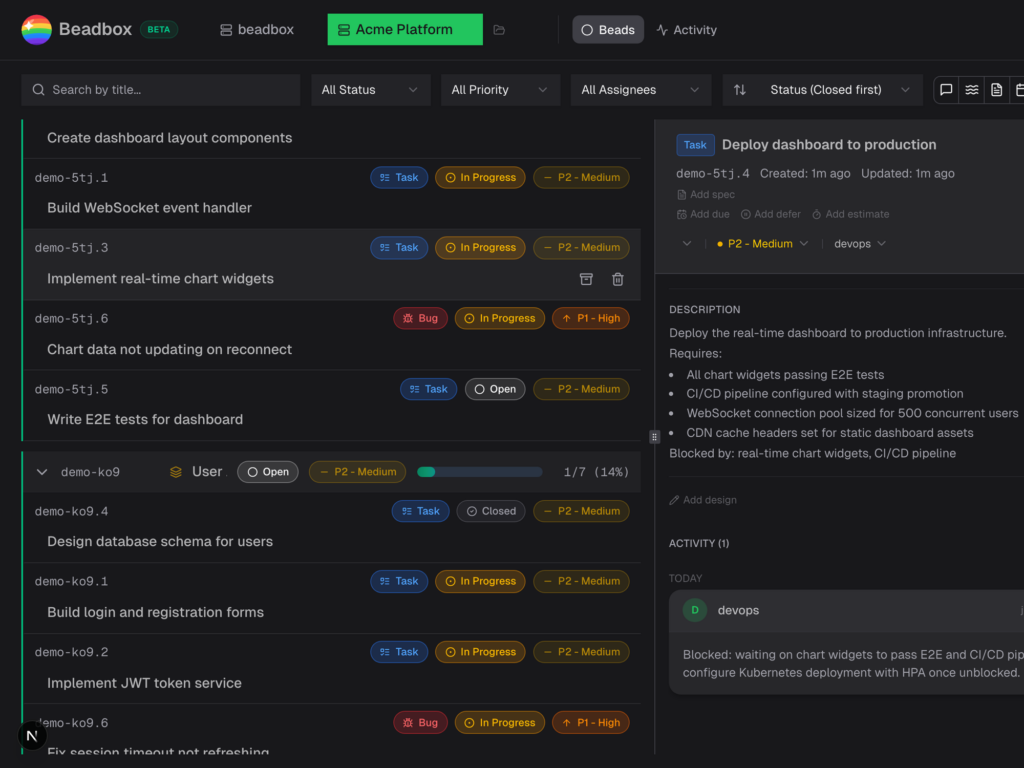
In practice, this means Beadbox can show per-agent cards, pipelines from open through QA to closed, and a real-time log of every status change as the beads daemon and CLI modify the underlying workspace. Keyboard-first navigation (for example, j/k to move, / to search, Enter to open, Escape to close) keeps it as fast as a terminal while still giving you the spatial and hierarchical cues of a modern issue tracker.
Inside the Beadbox architecture: Tauri, Next.js, and React
Beadbox runs as a native desktop application built on Tauri, which embeds a lightweight Rust core plus the operating system’s WebView instead of bundling a full Chromium runtime. This yields a much smaller footprint than Electron-style apps while still allowing the UI to be written in web technologies. The Beadbox bundle is larger than a minimal Tauri app because it deliberately embeds a Node.js runtime, but it still remains significantly smaller than a comparable Electron application.
Under the hood, Tauri launches a Next.js server as a sidecar process that handles server-side rendering, React Server Components, server actions, and the WebSocket layer Beadbox uses for real-time updates from .beads/. The Tauri WebView then points at this local Next.js server, giving Beadbox access to the full React ecosystem and rapid UI iteration while keeping rendering in a dedicated, native WebView process that does not compete with browser tabs for resources. The result is a UI that can expand large epic trees, filter across big backlogs, and switch workspaces without the jank associated with many browser-based issue trackers.
Installing Beadbox and beads
Beadbox is distributed as a native installer for macOS, Windows, and Linux, and is free while in beta. It expects the beads CLI (bd) to be installed, since that tool initializes and manages the .beads/ workspace in each repository. Beads itself can be installed via npm, Homebrew, or Go across macOS, Linux, Windows, and FreeBSD.
Installing beads (CLI prerequisite)
To install beads globally with npm:
npm install -g @beads/bdTo install beads using Homebrew on macOS or Linux:
brew install beadsOr build it from source using Go:
go install github.com/steveyegge/beads/cmd/bd@latestThese commands install the bd binary, which you can then use in any Git repository. Once installed, initialize beads inside a project by changing into the repository and running:
cd your-project
bd init
This creates the .beads/ directory and initial database files in your repo, which Beadbox will later detect.
Installing Beadbox on macOS
On macOS, the simplest path is via Homebrew:
brew tap beadbox/cask && brew install --cask beadboxThis installs Beadbox as a standard macOS app that you can launch from Spotlight or your Applications folder. Alternatively, the Beadbox website offers separate Apple Silicon and Intel downloads in DMG form if you prefer direct installers.
Installing Beadbox on Windows
For Windows, Beadbox is distributed as a setup executable that you can download from the Beadbox website. Run the installer, follow the standard Windows setup flow, and you will get a Start Menu entry and desktop shortcut for Beadbox. Ensure that Git and the beads CLI are present on your system so that Beadbox can attach to .beads/ workspaces in your repositories.
Installing Beadbox on Linux
Linux users have a few options depending on their distribution and preferences. Beadbox provides both an AppImage and a .deb package that can be downloaded from the site; AppImage works across most distributions, while the .deb is suited for Debian and Ubuntu-based systems.
In addition, there is a convenience script for macOS and Linux:
curl -fsSL https://raw.githubusercontent.com/beadbox/beadbox/main/scripts/install.sh | bashThis script installs Beadbox into the appropriate location for your platform. As with other platforms, make sure beads is installed and that you have Git repositories where you want to use Beadbox.
First-run workflow: wiring Beadbox to your repos
Once installed, Beadbox scans for existing .beads/ workspaces and can show them immediately, with no import step or account creation. If you already use beads, simply open Beadbox and select the relevant workspace; your issues, dependencies, and activity history will appear as soon as the app connects to the .beads/ directory. Because the data is local and Git-backed, nothing leaves your machine unless you push to a remote repository.
If you are new to beads, Beadbox walks you through initializing your first workspace. The usual pattern is to create or clone a Git repository, run bd init from the terminal, and then open Beadbox; it detects the new .beads/ folder and presents a guided experience for creating your first epics and tasks. From there, you can start integrating beads commands into your AI agent prompts so that they create and update issues as they work.
Everyday usage: issues, labels, and dependencies
With a workspace open, the primary view in Beadbox is a live issue dashboard driven by the beads graph. Epics and tasks appear in a tree that exposes the full dependency structure, including which items are blocking others and what percentage of each epic is complete. Agents and humans can continue to use the bd CLI to create issues, update statuses, and wire up dependencies; Beadbox reflects those changes in milliseconds by watching the .beads/ directory and streaming updates over WebSocket.
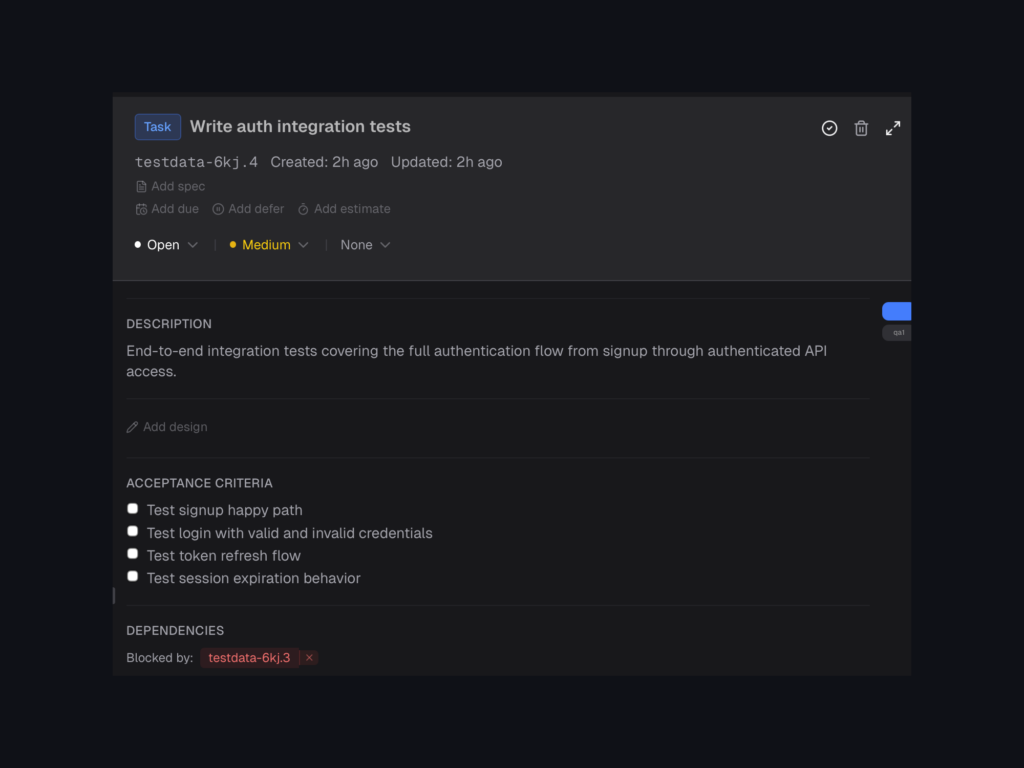
Priority, type, and other metadata from beads are rendered as labels and fields in the UI, allowing you to visually scan for P0 items, QA tasks, or specific workstreams. Keyboard-first controls make it easy to navigate, reprioritize, reassign, and edit descriptions without leaving the home row, which keeps power users in flow while still giving a fully visual overview. Because Beadbox is a thin layer over beads, any structure you encode in the CLI—epics, linked tasks, tags—becomes immediately navigable in the GUI.
Git workflows: branching, merging, and syncing with remotes
One of the biggest advantages of git-backed issue tracking is that branches carry their own tasks and plans. When you create a feature branch and use beads to break work into sub-tasks, those issues live in the branch’s .beads/ history; when you merge back to main, Git merges both code and issues together, preserving the narrative of what happened. Beadbox simply follows along by reading whatever .beads/ state is present in the currently-checked-out branch.
Syncing issues with teammates is just normal Git: commit the updated issues.jsonl file along with your code, push to the remote, and your collaborators will receive the latest task graph on their next pull. Their beads daemon imports those JSONL updates into their local SQLite database, and Beadbox on their machine updates the UI as soon as the underlying .beads/ data changes. There is no separate “sync” button in Beadbox because Git remains the single mechanism for sharing state.
When Beadbox fits in your toolchain
Beadbox is particularly well-suited for teams leaning into AI coding agents, long-running refactors, or multi-repo programs where hosted trackers struggle to convey branch-local context. By marrying beads’ git-native, dependency-aware issue tracking with a fast Tauri + Next.js + React UI, it offers a local-first alternative to browser-bound SaaS boards without giving up modern ergonomics. For developers and DevOps engineers who already live in Git, Beadbox provides a way to see and manage the entire project plan directly from the same machine and repository where the code lives.