
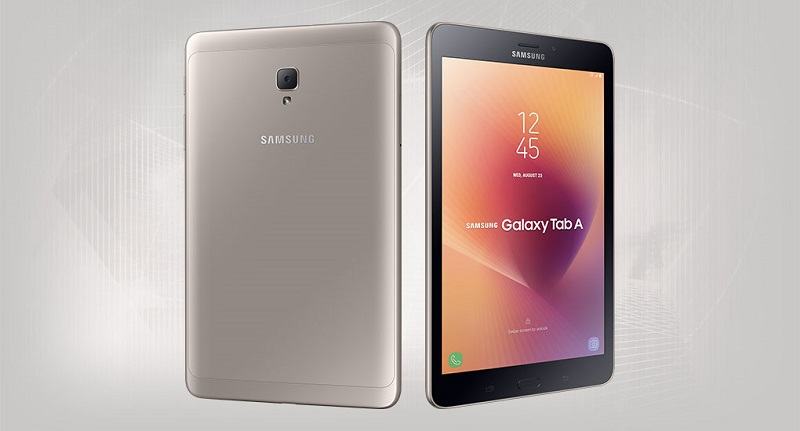
The Samsung Galaxy Tab A 8.0 (2017) is crafted from a unibody metal design, providing a premium feel in hand with gently curved and refined edges, along with a metal back cover.
The device features an 8-inch TFT display with a resolution of 1280 x 800 pixels, offering vibrant and realistic image quality.
The Samsung Galaxy Tab A 8.0 (2017) comes equipped with an 8MP rear camera with an f/1.9 aperture, supporting Full HD video recording and several professional photography modes similar to those found on smartphones, such as HDR, Pro mode, and panorama.
Powered by the Snapdragon 425 chipset, the tablet includes 2GB of RAM and 16GB of internal storage, expandable via a microSD card slot. Additionally, the device supports 4G connectivity right out of the box.
Prerequisites & Preparation
- Backup Data: Flashing will completely wipe all data on your device. Back up important files and settings before proceeding.
- Battery Level: Ensure your device has at least 50% battery to prevent shutdown during the flashing process.
- USB Driver & Tools: Install the correct USB drivers for your brand and prepare the flashing tool (Odin for Samsung, SP Flash Tool/QPST for Qualcomm/MTK, etc.).
CAUTION: Flashing official firmware carries a risk of bricking your device. Proceed with caution and at your own risk. addROM is not responsible for any damage caused to your device.
Download Stock ROM & Firmware
Samsung Galaxy Tab A 8.0 (2017) (SM-T385):
| File Type | AP / PDA Build (Binary) | Region (CSC) | OS Version | Download Link |
|---|---|---|---|---|
| Combination | COMBINATION | FA70 | – | Google Drive | AFH | OneDrive | DropBox |
| Combination | COMBINATION | FA70 | – | Google Drive | AFH | OneDrive | DropBox |
| Combination | COMBINATION | FA70 | – | Google Drive | AFH | OneDrive | DropBox |
| Combination | COMBINATION | FA70 | – | Google Drive | AFH | OneDrive | DropBox |
| Stock (full) | T385DXU4CUH2 | XSA | Android 9 (One UI 1) | Google Drive | OneDrive |
| Stock (full) | T385DXU3CTH2 | XSA | Android 9 (One UI 1) | Google Drive | OneDrive |
| Stock (full) | T385DXU3BSE3 | XSA | – | Google Drive | OneDrive |
| Stock (full) | T385DXU2BRK3 | XSA | – | Google Drive | OneDrive |
| Stock (full) | T385DVU1ARF1 | XSA | – | Google Drive | OneDrive |
Samsung Galaxy Tab A 8.0 (2017) (SM-T385C):
| File Type | AP / PDA Build (Binary) | Region (CSC) | OS Version | Download Link |
|---|---|---|---|---|
| Combination | COMBINATION | FA70 | – | Google Drive | AFH | OneDrive | DropBox |
| Combination | COMBINATION | FA70 | – | Google Drive | AFH | OneDrive | DropBox |
| Combination | COMBINATION | FA70 | – | Google Drive | AFH | OneDrive | DropBox |
| Stock (full) | T385CZHS5BUD1 | TGY (Hong Kong) | – | Google Drive | OneDrive |
| Stock (full) | T385CZHU4BSL1 | TGY (Hong Kong) | – | Google Drive | OneDrive |
| Stock (full) | T385CZHU3BSH1 | TGY (Hong Kong) | – | Google Drive | OneDrive |
| Stock (full) | T385CZHU2BSA2 | TGY (Hong Kong) | – | Google Drive | OneDrive |
| Stock (full) | T385CZHU1ARG1 | TGY (Hong Kong) | – | Google Drive | OneDrive |
Samsung Galaxy Tab A 8.0 (2017) (SM-T385M):
| File Type | AP / PDA Build (Binary) | Region (CSC) | OS Version | Download Link |
|---|---|---|---|---|
| Combination | COMBINATION | FA70 | – | Google Drive | AFH | OneDrive | DropBox |
| Combination | COMBINATION | FA70 | – | Google Drive | AFH | OneDrive | DropBox |
| Combination | COMBINATION | FA70 | – | Google Drive | AFH | OneDrive | DropBox |
| Combination | COMBINATION | FA70 | – | Google Drive | AFH | OneDrive | DropBox |
| Stock (full) | T385MUBU3CUE1 | ZTO | Android 9 (One UI 1) | Google Drive | OneDrive |
| Stock (full) | T385MUBS3BSD1 | ZTO | – | Google Drive | OneDrive |
| Stock (full) | T385MUBU2BRL2 | ZTO | – | Google Drive | OneDrive |
| Stock (full) | T385MUBU2ARF1 | ZTO | – | Google Drive | OneDrive |
| Stock (full) | T385MUBU1ARC1 | ZTO | – | Google Drive | OneDrive |
Samsung Galaxy Tab A 8.0 (2017) (SM-T385K)
| File Type | AP / PDA Build (Binary) | Region (CSC) | OS Version | Download Link |
|---|---|---|---|---|
| Combination | Updating… | – | ||
| Stock (full) | T385KKKS2CUD2 | KTC (South Korea (KT Corporation)) | Android 9 (One UI 1) | Google Drive | OneDrive |
| Stock (full) | T385KKKU1CTH4 | KTC (South Korea (KT Corporation)) | Android 9 (One UI 1) | Google Drive | OneDrive |
| Stock (full) | T385KKKU1BSF2 | KTC (South Korea (KT Corporation)) | – | Google Drive | OneDrive |
Samsung Galaxy Tab A 8.0 (2017) (SM-T385L)
| File Type | AP / PDA Build (Binary) | Region (CSC) | OS Version | Download Link |
|---|---|---|---|---|
| Combination | Updating… | – | ||
| Stock (full) | T385LKLS2CUD2 | LUC (South Korea (LG Uplus)) | Android 9 (One UI 1) | Google Drive | OneDrive |
| Stock (full) | T385LKLU1CTH3 | LUC (South Korea (LG Uplus)) | Android 9 (One UI 1) | Google Drive | OneDrive |
| Stock (full) | T385LKLU1BSF2 | LUC (South Korea (LG Uplus)) | – | Google Drive | OneDrive |
Samsung Galaxy Tab A 8.0 (2017) (SM-T385S)
| File Type | AP / PDA Build (Binary) | Region (CSC) | OS Version | Download Link |
|---|---|---|---|---|
| Combination | Updating… | – | ||
| Stock (full) | T385SKSS2CUD2 | SKC (South Korea (SK Telecom)) | Android 9 (One UI 1) | Google Drive | OneDrive |
| Stock (full) | T385SKSU1CTH2 | SKC (South Korea (SK Telecom)) | Android 9 (One UI 1) | Google Drive | OneDrive |
| Stock (full) | T385SKSU1BSF2 | SKC (South Korea (SK Telecom)) | – | Google Drive | OneDrive |
How to Flash Firmware / Stock ROM
To flash the firmware or combination files onto your device, please refer to our detailed step-by-step flashing guides. For Samsung devices, you can follow our Odin guide: [TUTS] How to use Samsung Odin tool to flash firmware/ROM for Samsung Devices. For other brands, prepare the compatible flashing tool (such as SP Flash Tool, Fastboot, QPST, or ResearchDownload) specifically required for your device chipset.









All the links are down, where else could I find them? I need the ones for SM-T385M
Hello, I have updated the download link again. You can try downloading again. Thank you