
Key Takeaway:
Headroom is an open‑source context compression layer that slashes LLM token usage for your AI agents by up to 60–95% while keeping answer quality intact, making your coding agents faster, cheaper, and more scalable
What is Headroom?
Headroom is an open‑source “context optimization layer” that sits between your AI agent’s orchestrator and the LLM API, intercepting everything the model is about to read and compressing it before the prompt is sent. Instead of dumping full tool outputs, logs, JSON blobs, file contents, and RAG chunks straight into the context window, Headroom rewrites them into compact, information‑dense representations that preserve meaning while cutting tokens.
In benchmarks on tasks like code search, incident debugging, and issue triage, Headroom delivers 60–95% token reduction with equal or even slightly better accuracy on standard evals such as GSM8K and TruthfulQA. It is built by Tejas Chopra (Netflix) and offered as a Python/TypeScript library, a drop‑in proxy, and an MCP server so it can plug into most modern agent stacks.

Why AI agents need context compression
Modern coding agents like Claude Code, Cursor, GitHub Copilot CLI, and Codex often stream huge tool outputs, multi‑MB logs, and long search results directly into frontier models, quickly blowing through both context windows and budget. In real‑world traces, up to 90% of those tokens are redundant bloat—repeated code, boilerplate logs, or irrelevant RAG chunks that do not change the answer.
This has three direct pain points:
- Escalating token costs: As your agents run more tools and handle bigger repos, API bills climb sharply.
- Context window pressure: Important facts get pushed out by noisy context, leading to hallucinations or forgotten constraints.
- Latency and instability: Larger prompts mean slower responses and more cache misses; models often re‑print large code blocks or logs over and over.
Headroom solves this by compressing everything before it hits the LLM, preserving full originals in a local CCC (Compressed Context Repository) store so they can be retrieved on demand.
How Headroom works
Instead of being another agent or a replacement for your LLM/RAG stack, Headroom is a thin layer that focuses purely on cleaning and compressing context. It supports several strategies optimized for different content types: specialized compressors for JSON (SmartCrusher), code (AST‑aware compression), and prose/logs (semantic summarization and deduplication).
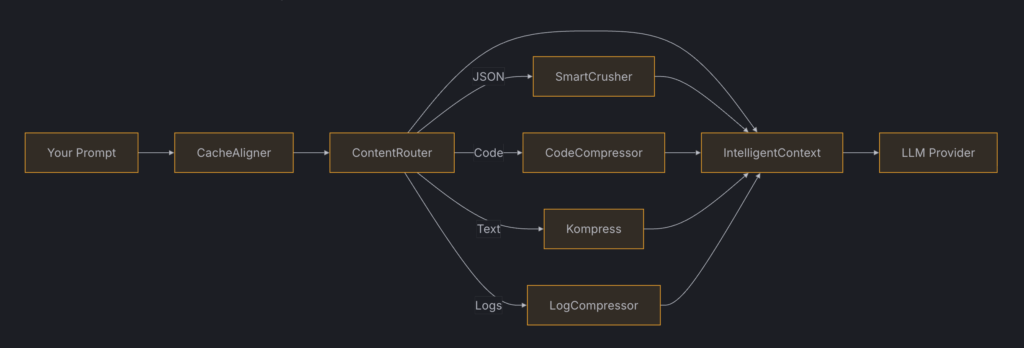
The key ideas:
- Interception: Headroom sits between your agent and the LLM, intercepting outbound messages (tool results, logs, files, RAG chunks, chat history).
- Compression: It rewrites those payloads into compressed forms that retain structure and key information while dropping redundancy and low‑signal text.
- Reversible CCR store: Originals are written to a local CCR store; if the model needs full detail, it calls a retrieval tool (
headroom_retrieve) to pull back the raw content.
Because compression is reversible and local‑first, you get strong cost savings without losing debuggability or visibility into what the model actually saw.
Installation options
Headroom is intentionally flexible: you can drop it into an existing stack with almost no code changes, or wire it deeply into your orchestration layer.
Install the Python library via pip
For Python‑based agents or when you want to integrate with LiteLLM or custom orchestration, install Headroom as a library:
pip install headroom-aiIf you are using LiteLLM as your provider abstraction, you can install both together:
pip install headroom-ai litellmHeadroom exposes callbacks that plug directly into LiteLLM, compressing messages before they reach any of the 100+ supported providers.
Install and run the proxy
If you prefer zero or minimal code changes, you can run Headroom as a proxy and point your agents at it. Install the proxy extras and start a local instance:
pip install "headroom-ai[proxy]"

headroom proxy --host 127.0.0.1 --port 8787
Then configure your agent or orchestrator to send requests via that proxy URL; for example, in an OpenClaw plugin config you might use:
{
  "config": {
    "proxyUrl": "https://headroom.example.com:8787"
  }
}
There is also a global CLI install path via Node if you prefer npm tooling:
npm install -g headroom-ai
headroom proxy --host 127.0.0.1 --port 8787
Optional: Headroom Desktop for macOS
If you are on macOS and want a purely GUI‑driven experience, there is a separate open‑source Headroom Desktop project that bundles Headroom with a menu‑bar app. Installation there is the typical macOS flow: download the latest .dmg, drag Headroom to Applications, and launch it to walk through setup.
Quick start: wrap your coding agent
One of the simplest ways to use Headroom is to “wrap” an existing coding agent like Claude Code with a single CLI command. The headroom wrap subcommand reads your agent’s configuration, inserts the compression layer, and routes traffic through the proxy automatically.
A typical workflow:
- Install Headroom with proxy support and ensure the CLI is available.
- Run the wrapper, for example:
headroom wrap claude- Start using Claude Code (or another supported agent) as usual; their tool calls, logs, and file reads are now compressed transparently.
Real‑world traces show that wrapping agents this way can produce dramatic savings: in code search scenarios, Headroom reduced 100 result payloads from around 17,765 tokens down to 1,408 (about 92% fewer) while preserving behavior. Similar reductions were observed in SRE incident debugging and GitHub issue triage workloads.
Using Headroom as a library with LiteLLM
If you are building your own orchestrator on top of LiteLLM, you can treat Headroom as a pre‑prompt filter. After installing both packages, you register Headroom as a callback that compresses messages before they go out to providers.
Conceptually, your code looks like:
from litellm import completion
from headroom import HeadroomCompressor

compressor = HeadroomCompressor(...)

messages = build_agent_messages(tool_outputs, logs, files)
compressed = compressor.compress_messages(messages)

resp = completion(
    model="gpt-4o-mini",
    messages=compressed
)
Headroom’s integration point lets you keep your orchestration logic while centralizing compression in one place. Because it works across all LiteLLM‑supported providers, you can benefit from context compression whether you are calling OpenAI, Anthropic, Google, or local models.
Cross‑agent memory and headroom learn
Headroom is not only about shrinking tokens; it also helps your agents remember what they have already learned, especially around failed tool calls and recurring mistakes.
The headroom learn command analyzes your Claude Code conversation history, identifies failed tool calls, then correlates them with the successful attempts that eventually fixed the issue. It writes those corrections into structured files like CLAUDE.md (project‑level facts) and MEMORY.md (behavioral patterns), which Claude Code and other agents can automatically load on the next session.
In one dataset of roughly 1,960 Claude Code sessions, this process surfaced around 1,200 preventable failures and about 1 million tokens of wasted retries and error outputs, as well as 22 incorrect file paths that could now be persisted as correct mappings. Over time, this turns transient debugging pain into durable, sharable memory across agents.
Best practices for using Headroom in production
To get the most out of Headroom in a real AI workflow, treat it as a core infra component rather than a side experiment.
- Start with the proxy: If you already run multiple agents or tools, the proxy route gives you coverage with minimal refactoring and lets you measure token savings quickly.
- Enable CCR and retrieval: Always keep reversible compression turned on so you can inspect originals and allow the LLM to fetch full detail when needed.
- Benchmark on your workload: Re‑run a week of real logs, code search sessions, or RAG flows through Headroom to quantify token reduction and confirm answer parity before rolling out widely.
- Pair with memory: Use
headroom learnor similar flows so that compression and cross‑agent memory work together: less waste in the prompt, fewer repeated mistakes across sessions.
Because Headroom runs locally and is open‑source, it fits well into self‑hosted or privacy‑sensitive environments where you cannot send your logs or repos to external optimization services.
When you should adopt Headroom
Headroom is most valuable when your bottlenecks are context size, latency, or token cost—not when the underlying model simply lacks capability. If your current pain is “Claude/GPT keeps forgetting earlier files because logs and search results spam the context,” Headroom is likely to pay for itself quickly in stability and savings.
On the other hand, if you are mainly experimenting with small prompts or single‑shot calls, you may not feel the benefits until your workflows become more agentic and tool‑heavy. As soon as you start chaining tools, streaming logs, and pushing against context limits, adding Headroom between your orchestrator and the LLM is one of the highest‑leverage optimizations you can make.








