
Key Takeaways: InkOS is a multi-agent, production-grade AI system that can autonomously plan, write, audit, and revise full-length novels while keeping you in control through a powerful CLI and web studio.
What is InkOS?
InkOS is an autonomous novel-writing AI agent system designed to take over the full lifecycle of fiction creation: planning, drafting, auditing, revising, and exporting complete books. It supports multiple genres such as xuanhuan (fantasy), wuxia, urban, and sci‑fi, and can handle continuation, side stories, fanfiction, and style imitation.
Instead of being “just a model wrapper”, InkOS orchestrates a fleet of specialized agents—planner, writer, auditor, reviser, radar, architect, and more—to keep continuity, style, and long-term story intent under control. Human review gates are built in, so while the AI handles most of the heavy lifting, you stay in charge of key decisions.
You can explore the project here:
Key building blocks: CLI, Studio, and TUI
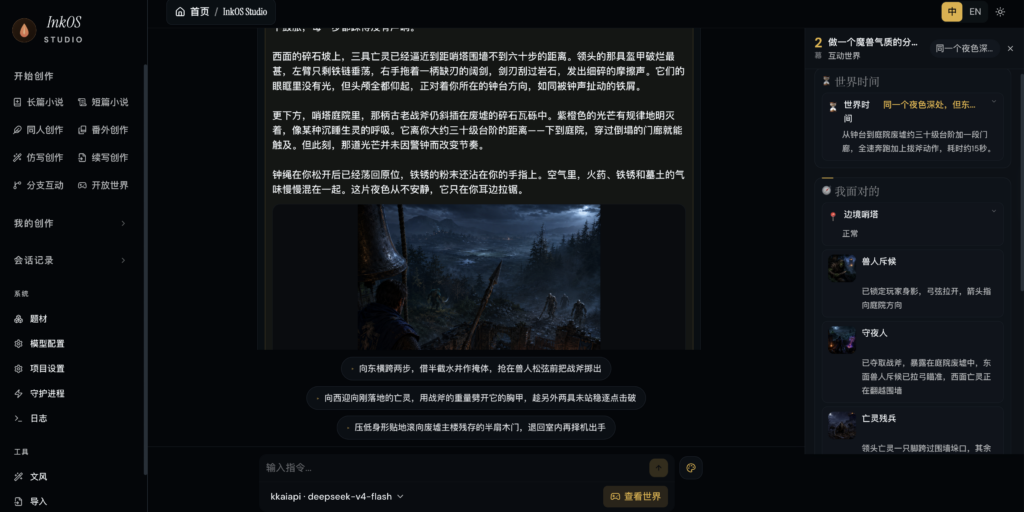
InkOS Studio: Web workstation
InkOS Studio 2.0 is a local web workstation you start simply by running inkos inside a project directory. It visualizes everything the CLI can do—book management, chapter review and editing, real-time writing progress, market radar, analytics, AI detection, style analysis, topic management, guardian process control, and “truth file” editing.
Studio also includes an assistant panel wired to the same interaction engine as the CLI and OpenClaw, so you can drive complex operations—rename entities, write chapters, audit, export—via natural language chat.

InkOS TUI: Full-screen terminal UI
Running inkos tui launches a full-screen terminal dashboard built with Ink + React. It offers conversational creation, slash-command completion, themes, and bilingual UI, while sharing the same interaction core as Studio and the OpenClaw skill.
CLI: Scriptable and agent-friendly
The CLI is the backbone of InkOS: it exposes atomic commands like plan chapter, compose chapter, draft, audit, revise, and write next for fine-grained control and integration into external agents or automation scripts. Every command supports --json output, making it easy to orchestrate InkOS from your own tools.


Installing InkOS
InkOS is published as an npm package, so installation is straightforward for Node.js developers and writers comfortable with the terminal.
Global installation via npm
npm i -g @actalk/inkosThis installs the inkos CLI globally. You can then run inkos --help to confirm the installation and inspect available commands.
Setting up your first project
To initialize a new novel project and start Studio:
inkos init my-novel
cd my-novel
inkos
These commands create a project directory, scaffold configuration files, and launch the local web Studio on the default port (typically 4567).
Configuring LLM providers: Studio vs. CLI
InkOS 2.0 introduces a clear split between visual configuration for Studio and environment-based configuration for CLI, daemons, and deployments.
Studio service configuration (recommended for local writing)
Studio uses a graphical “Model Configuration” screen where you:
- Choose a provider (Google Gemini, Moonshot, MiniMax, Zhipu, Baichuan, DeepSeek, OpenRouter, Ollama, custom endpoint, etc.).
- Paste an API key and test the connection.
- Select a model and save the service configuration.
- Return to the book page and start writing.
At runtime, Studio only uses:
provider bank defaults
→ services / current service / defaultModel in inkos.json
→ service API key in .inkos/secrets.json
Even if ~/.inkos/.env or project .env exist, Studio does not let them override service, model, base URL, or API key. Keys stay in .inkos/secrets.json and are not written into inkos.json, keeping configuration and secrets cleanly separated.
CLI / daemon / deployment via env
For terminal batch jobs, servers, CI, Docker, and background daemons, you can configure InkOS with environment variables or global config.
Global config helper:
inkos config set-global \
  --provider <openai|anthropic|custom> \
  --base-url <API_URL> \
  --api-key <YOUR_API_KEY> \
  --model <MODEL_NAME>
Or direct env files:
INKOS_LLM_PROVIDER=custom
INKOS_LLM_BASE_URL=https://api.moonshot.cn/v1
INKOS_LLM_API_KEY=sk-...
INKOS_LLM_MODEL=kimi-k2.5

# Optional
INKOS_LLM_SERVICE=moonshot
INKOS_LLM_TEMPERATURE=0.7
INKOS_LLM_THINKING_BUDGET=0
INKOS_DEFAULT_LANGUAGE=zh
INKOS_LLM_EXTRA_top_p=0.9
The CLI composes configuration in this order:
Studio/project service config
→ .inkos/secrets.json
→ global ~/.inkos/.env
→ project .env
→ current process env
→ CLI parameters
That means CLI can reuse Studio’s service and keys but still override them via env or command-line flags when needed.
Multi-model routing per agent
To balance quality and cost, you can assign different models to different internal agents—for example, Writer on a creative model, Auditor on a cheaper but precise one, and Radar on a local model.
inkos config set-model writer <model> --provider <provider> --base-url <url> --api-key-env <ENV_VAR>
inkos config set-model auditor <model> --provider <provider>
inkos config show-models
Unconfigured agents fall back to the global model.
Basic writing workflow: From zero to your first book
Creating your first book
A typical starting flow for a long-form novel might look like:
inkos book create --title "Heaven-Devouring Demon Emperor" --genre xuanhuan
inkos write next "Heaven-Devouring Demon Emperor"
inkos status
inkos review list "Heaven-Devouring Demon Emperor"
inkos review approve-all "Heaven-Devouring Demon Emperor"
inkos export "Heaven-Devouring Demon Emperor" --format epub
Here, write next runs the full pipeline (plan → compose → write → audit → configured revision), creating a new chapter with governance, continuity checks, and optional automatic revision.
Short stories and sales packages
InkOS Short lets you generate complete short works—full text, outline, audit log, sales copy, and cover prompts—either via Studio or CLI.
inkos short run \
  --direction "Urban short story, marriage plot twist, female lead strikes back with evidence" \
  --chapters 12 \
  --chars 1000
Outputs land in shorts/<story-name>/final/ and include full.md, sales-package.md, cover-prompt.md, plus cover.png if a cover service is configured.
Cover generation
You can generate standalone covers for existing titles without re-running the text pipeline:
# In Studio chat (natural language)
Generate a short story cover for "The Day She Signed the Divorce Papers, He Went Mad with Regret", leaning towards modern urban style with a strong plot twist.
InkOS writes covers/<title>/cover-prompt.md and covers/<title>/cover.png, and you can iteratively refine the cover prompt via chat to regenerate improved covers.
Three main usage modes
1. One-click pipeline
For fully automated chapters:
inkos write next "My Novel"
inkos write next "My Novel" --count 5
This goes through input governance (plan → compose → write), then audit and revision once by default. If you prefer the older prompt-assembly behavior, set:
{
  "inputGovernanceMode": "legacy"
}
in inkos.json.
2. Atomic commands (scriptable)
For external agents or custom scripts, use atomic commands:
inkos plan chapter "My Novel" --context "This chapter focuses on the conflict between master and disciple" --json
inkos compose chapter "My Novel" --json
inkos draft "My Novel" --context "This chapter focuses on the conflict between master and disciple" --json
inkos audit "My Novel" 31 --json
inkos revise "My Novel" 31 --json
Each command performs one step and returns structured JSON you can chain or analyze.
3. Natural-language agent mode
For conversational control:
inkos agent "Help me write an urban cultivation novel where the main character is a programmer"
inkos agent "Write the next chapter, focusing on the conflict between master and disciple"
inkos agent "First scan market trends, then create a new book based on the results"
InkOS exposes ~18 tools (write_draft, plan_chapter, compose_chapter, audit_chapter, revise_chapter, scan_market, create_book, update_author_intent, and more), and the LLM decides which to call and in what order.
Continuity, “anti-AI flavor”, and truth files
InkOS takes continuity and “human-like” prose seriously.
Multi-dimensional auditing
A continuity auditor checks each chapter across 33 dimensions: character memory, resource continuity, foreshadowing, outline deviation, pacing, emotional arcs, and more. It also detects “LLM flavor” (high-frequency phrases, monotonous sentence patterns, over-summary) and can trigger targeted anti-detect revisions.
Long-term memory and truth files
Each book maintains seven “truth files” such as current_state.md, particle_ledger.md, pending_hooks.md, chapter_summaries.md, subplot_board.md, emotional_arcs.md, and character_matrix.md to track world state, resources, foreshadowing, subplots, emotions, and character interactions. These have been migrated to structured JSON under story/state/*.json with Zod validation, while markdown projections remain for human review.
If a character suddenly knows information they never witnessed, or uses a weapon that was previously lost, the auditor flags it and forces a fix or human review.
Input governance control surface
InkOS exposes author intent and current focus via editable markdown:
story/author_intent.md– long-term goals of the book.story/current_focus.md– near-term focus for the next 1–3 chapters.
Chapter-level artifacts like chapter-XXXX.intent.md, context.json, rule-stack.yaml, and trace.json document each chapter’s goals, context selection, rule stack, and compilation trace.
Integration with OpenClaw and other agents
InkOS ships as an OpenClaw skill, so compatible agents (Claude Code, OpenClaw itself, etc.) can call it directly.
To install via ClawHub:
clawhub install inkosThen, instead of invoking low-level commands, agents can use the shared interaction entry:
inkos interact --json --message "Continue the current book, tighten up the pacing a bit more"The response JSON includes the parsed request, assistant reply, updated interaction session, execution state, pending decisions, and recent events, making it ideal as a back-end engine for your own agent systems.
Why InkOS matters for serious fiction creators
InkOS is built for people who care about long-term story quality, continuity, and production workflows—not just “generate some text.” With multi-agent orchestration, strong auditing, LLM routing, Studio/TUI/CLI surfaces, and fanfic and import capabilities, it can power everything from original epics to canon-friendly side stories and style-matched spin‑offs.
If you’re a developer-writer or studio looking to industrialize novel production while still retaining human control, InkOS offers a deep, extensible foundation that you can script, self-host, and integrate with your own agent ecosystems.








