
 By
By LiteLLM: One OpenAI-Compatible Gateway for 100+ LLMs
Key Takeaway: LiteLLM gives you a single OpenAI-compatible gateway to route, monitor, and control 100+ LLMs from one API.
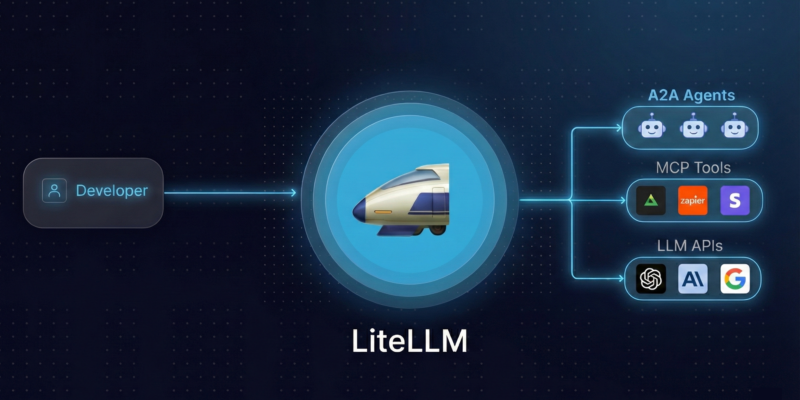
LiteLLM is an open-source AI gateway and Python SDK that lets you call over 100 language models—OpenAI, Anthropic, Azure, Bedrock, Vertex AI, Hugging Face, Ollama, and more—using a unified OpenAI-style API.
Instead of wiring each provider’s bespoke SDK and endpoints, you send standard OpenAI-format requests and let LiteLLM handle translation, routing, retries, and logging behind the scenes.
Under the hood, LiteLLM offers two main ways to integrate:
- A Python SDK you import directly into your apps.
- An AI Gateway / Proxy server that exposes an OpenAI-compatible HTTP API which any language or client can use.
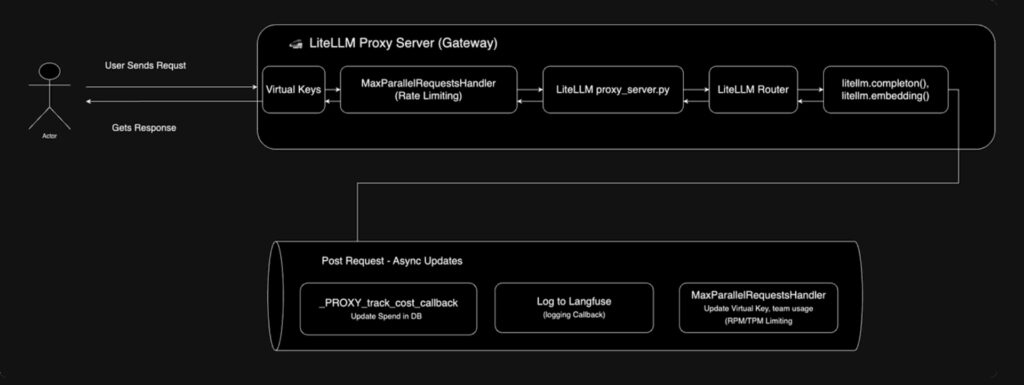
For a visual overview, see the LiteLLM AI Gateway request-flow diagram:
Why LiteLLM Matters for Modern AI & Agent Stacks
Modern AI apps rarely rely on a single LLM provider: you might prototype on OpenAI, use Anthropic for reasoning, Mistral for cost-sensitive tasks, and Ollama/local models for privacy-sensitive workloads.
Maintaining custom wiring, keys, and error handling for each provider quickly becomes a reliability and observability nightmare.
LiteLLM addresses this by centralizing three key concerns:
- Unified API surface: Everything speaks OpenAI format (
/v1/chat/completions,messages,model), regardless of the actual provider or model. - Centralized control: Rate limiting, virtual API keys, budgets, and spend tracking live in one place, at the gateway.
- Operational resilience: Built-in retries, fallbacks across model groups, and integration with logging/observability tools.
If you’re building agent platforms, internal AI gateways, or multi-tenant tools (e.g., Open WebUI, dashboards), LiteLLM effectively becomes your “LLM load balancer + billing layer” sitting between clients and actual model providers.
LiteLLM Architecture in Plain English
At a high level, the LiteLLM ecosystem looks like this:
- Clients (OpenAI SDKs, HTTP clients, other frameworks) send OpenAI-format requests to your LiteLLM Gateway endpoint.
- The AI Gateway / Proxy handles authentication, virtual keys, rate limiting, and routing.
- The gateway calls the LiteLLM SDK, which translates the request to the underlying provider’s API (OpenAI, Azure, Anthropic, Ollama, etc.).
- Responses are normalized back into the OpenAI-style shape and returned to the client, with usage and spend logged to the database and observability tools.
This separation lets you evolve provider choices and routing logic without touching application code—as long as clients speak OpenAI, they can talk to LiteLLM.
Installation Paths: SDK vs AI Gateway
LiteLLM supports two primary installation modes, which you can combine in the same stack.
SDK Mode (Python Library)
Use this when you want a direct library inside your Python services or notebooks:
- Install the SDK (example with
piporuv):
pip install litellm
# or
uv add litellm- Set provider API keys as environment variables, such as
OPENAI_API_KEY,ANTHROPIC_API_KEY, or provider-specific keys. - Call models via
litellm.completion()using provider-prefixed model names (e.g.,openai/gpt-4o,anthropic/claude-3,ollama/llama3).
SDK mode is ideal when you control the code and want simple translation, retries, and logging without a separate network hop.
AI Gateway / Proxy Mode
The AI Gateway is a standalone HTTP service that exposes an OpenAI-compatible API your apps can call from any language.
- Install the gateway tooling (CLI) on your host:
uv tool install 'litellm[proxy]'- Create a configuration file (for example,
config.yaml) describing models and global settings:
model_list:
 - model_name: gpt-4o-mini
   litellm_params:
     model: openai/gpt-4o-mini
     api_key: os.environ/OPENAI_API_KEY

general_settings:
 master_key: sk-1234
 database_url: postgresql://llmproxy:dbpassword9090@db:5432/litellm
This declares a public-facing model alias (gpt-4o-mini), points to the underlying provider model, and wires in a Postgres database for tracking spend and usage.
- Start the gateway:
litellm --config /path/to/config.yaml
# Proxy running, typically on http://0.0.0.0:4000
From here, any OpenAI client can call your gateway simply by pointing base_url to the proxy instead of api.openai.com.
For a visual reference of the gateway UI and swagger docs, see:

Basic Usage: LiteLLM as a Python SDK
Once installed, the SDK keeps your code extremely close to the native OpenAI client style:
import os
import litellm

os.environ["OPENAI_API_KEY"] = "sk-..."  # or other provider key

response = litellm.completion(
    model="openai/gpt-4o",
    messages=[
        {"role": "user", "content": "Explain LiteLLM in one sentence."}
    ],
)

print(response.choices[0].message["content"])
Key points:
- Model routing via prefixes:
openai/,anthropic/,azure/,bedrock/,vertex_ai/,ollama/, etc., tell LiteLLM which provider to hit. - Consistent response shape: text is always at
response.choices[0].message["content"], regardless of provider. - Built-in retries / fallbacks: using the router features, you can define model groups that automatically retry on backup models if the primary fails.
This is particularly powerful for agent frameworks, where you can parameterize model and swap providers without rewriting tools or prompts.
Basic Usage: LiteLLM as an OpenAI-Compatible Gateway
With the proxy running, many clients “just work” by changing the base URL and API key.
1. Configure models via YAML
A minimal config.yaml might look like:
model_list:
  - model_name: my-gpt4
    litellm_params:
      model: openai/gpt-4o
      api_key: os.environ/OPENAI_API_KEY

general_settings:
  master_key: sk-proxy-master-key
You can extend this with multiple models and providers, spend guardrails, and custom guardrails.
2. Start the proxy
litellm --config config.yamlThe gateway now accepts OpenAI-style traffic on the configured host/port.
3. Call the gateway with OpenAI clients
Using the OpenAI Python client v1+:
import openai

client = openai.OpenAI(
    api_key="sk-proxy-master-key",
    base_url="http://0.0.0.0:4000"  # LiteLLM Gateway
)

response = client.chat.completions.create(
    model="my-gpt4",
    messages=[{"role": "user", "content": "What models are you routing to?"}],
)

print(response.choices[0].message.content)
Or simply via curl:
curl --location 'http://0.0.0.0:4000/chat/completions' \
  --header 'Authorization: Bearer sk-proxy-master-key' \
  --header 'Content-Type: application/json' \
  --data '{
    "model": "my-gpt4",
    "messages": [
      {"role": "user", "content": "Hello from LiteLLM gateway"}
    ]
  }'
Behind the scenes, the gateway authenticates the virtual key, enforces rate limits and budgets, routes to the appropriate provider, and logs token usage and cost.
Self-Hosting LiteLLM with Containers and Cloud Runtimes
LiteLLM is designed to be self-hostable and cloud-agnostic:
- Containerized deployments: Official images are published to container registries like GHCR; you can run them on Docker, Kubernetes, or serverless container platforms.
- Database-backed analytics: When you configure a Postgres connection, the gateway tracks per-key usage and spend, giving you a proper billing and governance layer for internal teams or SaaS clients.
- Cloud templates: Community templates (for example, Azure Container Apps + Postgres) provide ready-to-deploy setups for production gateways.
The docs include production guidance and minimum resource recommendations, along with benchmark comparisons against other AI gateways.
Production Features: Keys, Budgets, Guardrails, and Observability
Beyond simple routing, LiteLLM’s gateway mode includes a rich feature set for production AI workloads:
- Virtual keys & teams: Create per-user or per-team API keys, each with its own model access, quotas, and budgets.
- Rate limiting: Enforce global, per-key, and per-user rate limits (RPM/TPM) to protect downstream providers and your wallet.
- Guardrails: Configure pre- and post-call guardrails (e.g., content filters) via providers like Bedrock, Lakera, or others.
- Logging & tracing: Integrate with tools like Langfuse, MLflow, or other logging backends to capture latency, token usage, and error metrics.
- Admin UI: A built-in web UI lets you manage keys, view metrics, and adjust model settings without editing YAML by hand.
These capabilities make LiteLLM a strong foundation for internal LLM platforms, agent backends, and multi-tenant developer APIs.
Next Steps
To dive deeper and start using LiteLLM in your own stack, begin with:
- GitHub repo – BerriAI/litellm: code, issues, examples, and community discussions.
- Official documentation: getting started, provider matrix, gateway quickstart, and configuration recipes.
From there, you can iterate: start with the Python SDK in a single service, then graduate to a full AI Gateway powering multiple microservices, agents, and user-facing apps—all speaking the same, simple OpenAI-compatible API.








