Key Takeaways: LMCache attaches to your existing LLM engine as a KV cache layer, reusing past computation to slash latency and GPU usage for long-context and RAG workloads.
What is LMCache?
LMCache is an open‑source key‑value (KV) cache layer that sits between your LLM serving engine and storage, designed to reduce time‑to‑first‑token (TTFT) and increase throughput, especially in long‑context scenarios. Instead of recomputing attention KV tensors for repeated text (prompts, conversation history, retrieved chunks), LMCache extracts, stores, and reuses those KV caches across GPU, CPU, disk, and even remote backends like object storage. By plugging LMCache into engines like vLLM and SGLang, teams have reported 3–10× lower latency and significant GPU cycle savings for workloads such as multi‑round chat and retrieval‑augmented generation (RAG).
LMCache grew out of large‑scale systems research at the University of Chicago and is now developed as a production‑grade open‑source project under the Apache 2.0 license.
Why KV cache matters for LLM serving
Every transformer layer in an LLM maintains key and value tensors for past tokens so it can attend to them when generating new tokens. For long prompts, multi‑turn conversations, and RAG pipelines with repeated retrieved chunks, recomputing these KV tensors for every request wastes GPU time and memory. KV caching addresses this by storing intermediate attention data; LMCache goes further by turning that KV cache into a reusable, transportable “memory tensor” that can be searched, offloaded, and shared across requests and even across serving instances.
In practice, this means your LLM can skip recomputation for any reused text span—not just strict prefixes—reducing TTFT while freeing GPU capacity for genuinely new tokens.
LMCache architecture and key features
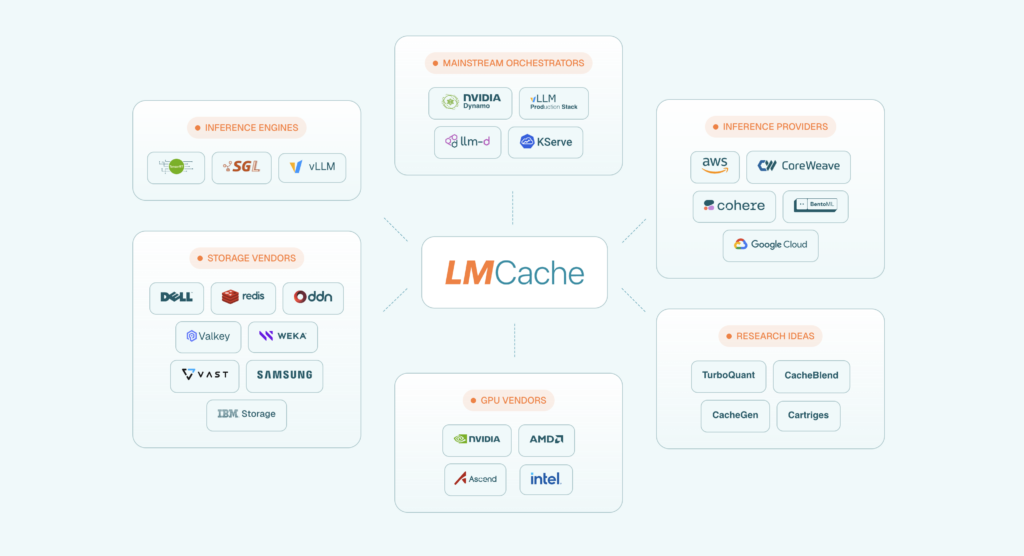
LMCache is designed as a modular caching middleware that integrates with multiple inference engines and storage tiers.
Pluggable KV cache layer
LMCache wraps around your LLM server rather than replacing it, exposing a simple API for engines to look up and inject cached KV chunks. Engines compute identifiers for token sequences (for example, hashes of token spans) and query LMCache for matching KV entries before running full prefilling. On a cache hit, LMCache returns existing KV tensors, which the engine injects into its own attention cache, skipping the heavy compute for those tokens.
Multi‑tier storage: GPU, CPU, disk, and beyond
KV cache is expensive in GPU memory, so LMCache supports tiered storage across GPU memory, CPU RAM, disk, and specialized backends. Hot KV chunks can stay on GPU for maximum speed, while warm or cold chunks are offloaded to CPU or disk, and larger deployments can extend this to remote stores such as distributed file systems or object storage. This tiering lets you retain long‑term KV cache for frequently reused context (like knowledge bases in RAG) without blowing up GPU memory.
Non‑prefix reuse and disaggregated prefilling
Unlike simple prefix caching, LMCache supports non‑prefix reuse, meaning it can detect and reuse KV segments for any repeated spans of text, not just leading prefixes. It also supports “disaggregated prefilling” with vLLM, where KV computation for long prompts can happen on separate nodes or earlier in the pipeline and be reused across many generation requests. This enables architectures where a shared KV cache service feeds multiple front‑end LLM servers, improving overall cluster utilization.
Observability and management
LMCache exposes management and observability endpoints so operators can inspect cache hit rates, storage tier usage, and per‑workload benefits. Its roadmap explicitly aims to serve as a “habitat” for KV‑related research like compression, compaction, blending, and new codecs, bringing these techniques into a unified production layer.
Installing LMCache
LMCache targets Linux systems with NVIDIA GPUs for production use, alongside vLLM or other supported engines.
Installing the Python package
The core distribution is available on PyPI, and the simplest path is:
pip install lmcacheThis installs the LMCache Python package, including core modules and vLLM integration hooks. You should run this inside the same environment where your LLM engine (for example, vllm) is installed, using a compatible CUDA and PyTorch stack as documented in LMCache’s installation guide.
If you encounter “undefined symbol” or version mismatch errors, the LMCache docs provide troubleshooting steps and recommended vLLM versions.
Installing vLLM with LMCache support
To see LMCache in action quickly, use vLLM’s examples that are wired to LMCache.
Install vLLM and LMCache together:
pip install vllm lmcacheFor some setups, vLLM’s documentation recommends installing from a specific version or branch that is known to work with the current LMCache release, so always verify against the LMCache quickstart or vLLM’s LMCache example page.
Running LMCache as a standalone cache service
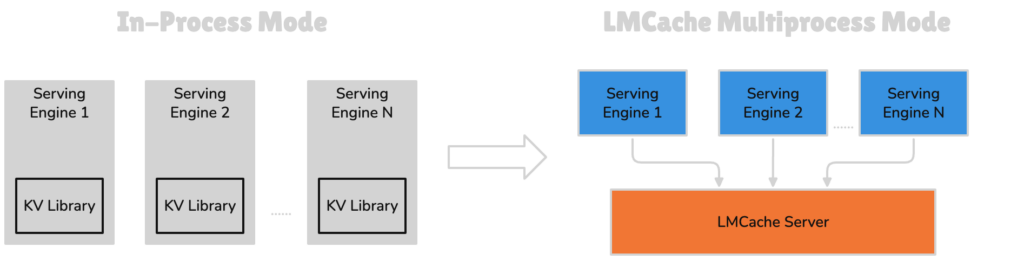
LMCache can run in‑process with your engine or as a separate cache service via lmcache-server.
Starting lmcache-server
The lmcache-server repo exposes a simple command‑line entry point:
python3 -m lmcache_server.server localhost <port> <storage>localhostspecifies the bind host.<port>is any available port for the cache server.<storage>configures where KV cache persists: empty or"cpu"for in‑memory, or a path likeremote_disk/to use a disk directory.
This lets you run LMCache as a separate process that multiple LLM servers can share, enabling KV cache reuse across horizontally scaled vLLM instances.
Choosing storage backends
For quick experiments, an in‑memory CPU backend is fine; for production, you will likely configure:
- GPU tier for hot KV segments via engine integration.
- CPU as primary LMCache memory tier.
- Disk or networked storage for durable, large KV datasets.
The LMCache docs and blog walk through concrete topologies, including GPU‑rich single nodes and disaggregated cache clusters.
Using LMCache with vLLM: A quickstart flow
The typical integration pattern with vLLM looks like this.
1. Start LMCache (optional server mode)
You can either:
- Run LMCache in‑process via Python imports, or
- Start an external
lmcache-serverprocess and point vLLM to it via configuration.
For a simple demo, server mode might be:
python3 -m lmcache_server.server localhost 9000 cpuThis runs a CPU‑backed LMCache service on port 9000.
2. Configure vLLM to use LMCache
In vLLM, load a model as usual but enable LMCache in its configuration or example script; the vLLM docs include specific flags and environment variables for this. At a high level, the engine’s request handling pipeline is augmented so that, before running full prefilling on a prompt, it:
- Computes identifiers for prompt segments (for example, token sequence hashes).
- Looks up these identifiers in LMCache.
- Injects any returned KV tensors into the model’s attention cache.
- Computes new KV only for cache misses.
This process is transparent to the caller: your application still sends prompts to vLLM and receives responses, but the engine now skips redundant computation using LMCache.
3. Observe performance gains
In multi‑turn chat and RAG examples, vLLM + LMCache has demonstrated 3–10× reductions in TTFT and significant GPU cycle savings due to reused KV segments. You can monitor hit rates and cache usage through LMCache’s observability endpoints or by instrumenting vLLM’s metrics, depending on your deployment.
Using LMCache with other engines
While vLLM is the most mature integration today, LMCache also supports SGLang and is designed to work with other engines over time.
- With SGLang, LMCache provides KV cache offloading, moving rarely used KV data off GPU while leaving frequently reused segments close to the model.
- Support for additional engines (like TensorRT‑LLM) is on the roadmap, and LMCache exposes a generic integration guide for engine authors who want to add cache lookups and writes around their attention kernels.
If you are implementing a custom engine, LMCache’s integration docs describe how to:
- Compute deterministic content identifiers.
- Lookup and inject KV cache from LMCache.
- Stream new KV segments back asynchronously after inference.