
 By
By Local Deep Research: Self‑Hosted AI That Actually Does the Reading For You
Key Takeaway: Local Deep Research turns your machine into a private, AI‑powered research assistant that deeply reads the web, papers, and your own documents, then returns fully cited reports you control.
What Is Local Deep Research?
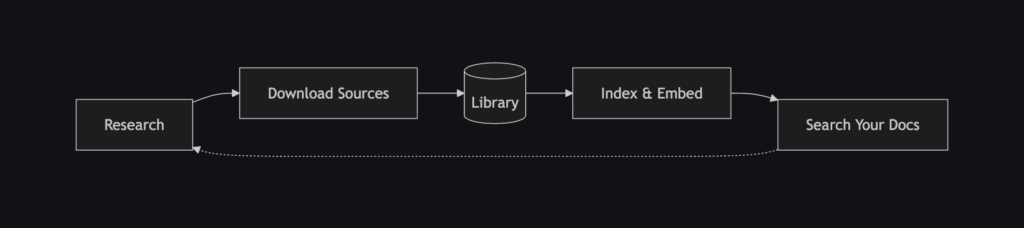
Local Deep Research (LDR) is an open‑source, AI‑powered research assistant designed for deep, iterative research rather than quick one‑shot answers. It breaks complex questions into sub‑queries, searches multiple sources in parallel (web, academic databases, and your own documents), and then synthesizes results into structured, fully cited reports.
Unlike SaaS tools, LDR is built to run entirely on your own hardware with Ollama plus SearXNG, so you keep control of your data and can choose any combination of local and cloud models. It targets researchers, engineers, students, and knowledge workers who want Google‑level reach with the transparency and reproducibility of real citations—not black‑box chat.
You can explore the project on GitHub here: https://github.com/LearningCircuit/local-deep-research. github
Why Local Deep Research Is Different
Most “AI search” tools focus on speed and convenience, but trade away control, transparency, and often your data. LDR flips that priority: privacy, verifiability, and extensibility come first.
Key design goals include:
- Run locally by default – Full stack (LLM, search, storage) can be self‑hosted with Ollama and SearXNG, so no raw queries or documents have to leave your network.
- Systematic research workflow – LDR explicitly decomposes questions, runs focused searches, cross‑checks sources, and aggregates results, more like a human research assistant than a chatbot.
- Full‑stack transparency – From source URLs to benchmark scores, you can inspect how conclusions are reached, and you control which models and search engines are used.
For developers and research‑heavy teams, that means you can wire LDR into your knowledge base, analytics stack, or agents without surrendering sensitive context to third‑party services.
Feature Overview for SEO & GEO
From an SEO and Generative Engine Optimization angle, Local Deep Research is essentially an “AI research OS” covering four major areas.
- Research modes – Quick summaries, detailed research, full report generation with table of contents, and document analysis for your own PDFs and notes.
- Advanced capabilities – LangChain integration, REST and HTTP APIs, benchmarking tools, analytics dashboards, and real‑time progress via WebSockets.
- Rich search sources – Academic engines (arXiv, PubMed, Semantic Scholar), general web (Wikipedia, SearXNG), technical (GitHub, Elasticsearch), news, and custom sources like your local files or vector databases.
- Model flexibility – Use local LLMs via Ollama (Llama 3, Mistral, Gemma, DeepSeek) or cloud providers like OpenAI, Anthropic, Google Gemini, and OpenRouter’s model hub.
Security, Privacy, and Performance Highlights
LDR treats research data as something to secure, not to harvest. It encrypts per‑user databases with SQLCipher (AES‑256), uses a zero‑knowledge architecture for passwords, and supports HMAC‑based integrity checks. Each user has an isolated, encrypted database, which is crucial in multi‑user setups or small teams.
On the performance side, LDR reports around 95 percent accuracy on the SimpleQA benchmark using GPT‑4.1‑mini with SearXNG and its “focused iteration” strategy, and strong early results on deeper benchmarks like xbench‑DeepSearch. With tuned configs, local models can approach similar quality, especially when combined with good retrieval and search settings.
Quick Start with Docker (Recommended)
The easiest way to get Local Deep Research running is via Docker or Docker Compose. This gives you a self‑contained stack with the web UI, Ollama, and SearXNG wired together.
Option 1: Basic Docker Run
On a Linux machine with Docker installed, you can follow the three‑step sequence from the README:
# Step 1: Run Ollama for local models
docker run -d -p 11434:11434 --name ollama ollama/ollama
docker exec ollama ollama pull gpt-oss:20b

# Step 2: Run SearXNG for web search
docker run -d -p 8080:8080 --name searxng searxng/searxng

# Step 3: Run Local Deep Research
docker run -d -p 5000:5000 --network host \
  --name local-deep-research \
  --volume "deep-research:/data" \
  -e LDR_DATA_DIR=/data \
  localdeepresearch/local-deep-research
After about 30 seconds, you can open http://localhost:5000 to access the LDR web interface.
Option 2: One‑Command Docker Compose
If you prefer Docker Compose (CPU‑only stack across platforms), the project provides a ready‑made docker-compose.yml:
curl -O https://raw.githubusercontent.com/LearningCircuit/local-deep-research/main/docker-compose.yml && docker compose up -dThis pulls and runs a full environment—Ollama, SearXNG, and Local Deep Research—wired together with sensible defaults.
For GPU‑accelerated deployments with NVIDIA on Linux, the README includes an alternate compose file that adds GPU runtime flags, so your local models can run faster and handle larger context windows.
Option 3: Install as a Python Package
If you want tighter integration with your own Python codebase or a non‑Docker environment, you can install LDR as a regular Python package.
# 1. Install the core package
pip install local-deep-research

# 2. Run SearXNG in Docker for search
docker pull searxng/searxng
docker run -d -p 8080:8080 --name searxng searxng/searxng

# 3. Install Ollama and pull a model
# (from https://ollama.ai)
ollama pull gemma3:12b

# 4. Build frontend assets for the web UI
# (inside the local_deep_research installation directory)
npm install
npm run build

# 5. Start the web interface
python -m local_deep_research.web.app
If you only plan to use the Python or HTTP APIs (no web UI), you can skip the frontend build step and just run the backend module.
Using the Web UI for Deep Research
Once the services are running, the web UI at http://localhost:5000 becomes your control center.
From there you can:
- Log in and create a user account.
- Configure LLM backends (local Ollama models or cloud APIs).
- Choose search engines and add local document sources.
- Start Quick Summary or Detailed Research workflows on any topic.
A typical research flow:
- Enter a question like “How do retrieval‑augmented generation systems compare to classical search in enterprise settings?”
- Select a research mode (Quick Summary for a fast answer, or Detailed Research for a longer, multi‑section report).
- Optionally pick which sources to prioritize (e.g., arXiv, PubMed, GitHub, or your internal docs).
- Watch the live progress view as LDR iteratively searches, reads, and writes its report.
When it finishes, you can export results as Markdown or PDF and store them in your knowledge base or share with your team.
Python API: Automating Research Workflows
For automation, LDR exposes a Python API that makes it easy to run research jobs from scripts, notebooks, or backend services.
A minimal example from the README:
from local_deep_research.api import LDRClient, quick_query

# One-line research
summary = quick_query("username", "password", "What is quantum computing?")
print(summary)

# Reuse a client across multiple calls
client = LDRClient()
client.login("username", "password")
result = client.quick_research("Latest advances in quantum computing")
print(result["summary"])
At a higher level, you can use quick_summary with LangChain retrievers to plug LDR into your own vector stores (FAISS, Chroma, Pinecone, Weaviate, Elasticsearch, and more).
from local_deep_research.api import quick_summary

result = quick_summary(
    query="What are our deployment procedures?",
    retrievers={"company_kb": your_retriever},
    search_tool="company_kb",
)
This pattern is ideal for enterprise setups where you want LDR to act as a smart interface over your internal documentation and wikis.
HTTP API: Integrating with Any Stack
If your stack isn’t Python‑centric, you can use the HTTP API with any language that can send HTTP requests.
A typical flow is:
- Create a session and log in via the web auth endpoints (with CSRF protection).
- Fetch a CSRF token for API calls.
- Start a research job with a JSON payload that includes the query and optional configuration.
You can then poll for results or use WebSockets for live updates, depending on your use case and how tightly you want to integrate LDR into an existing UI or agent system.
Benchmarking, Analytics, and Rate Limiting
LDR ships with benchmarking utilities that let you reproduce or extend its reported performance on datasets like SimpleQA and xbench‑DeepSearch.
Example CLI commands include:
# Run SimpleQA benchmark
python -m local_deep_research.benchmarks --dataset simpleqa --examples 50

# Inspect and reset rate limiting state
python -m local_deep_research.web_search_engines.rate_limiting status
python -m local_deep_research.web_search_engines.rate_limiting reset
The built‑in analytics dashboard helps you track model usage, latency, search engine performance, and costs (for cloud providers), making it easier to tune your configuration over time.
When to Use Local Deep Research
Local Deep Research shines in scenarios where you need:
- Serious research depth rather than quick, shallow answers.
- Strict privacy for queries and documents (e.g., legal, medical, internal R&D).
- Extensibility to plug in your own retrievers, search engines, and evaluation pipelines.
For a more narrative overview of how LDR fits into the broader local‑AI ecosystem, you can also check community write‑ups like this article: LearningCircuit Local Deep Research overview.
If you want an AI that actually does the reading, cites its sources, respects your data, and runs on your own hardware, Local Deep Research is one of the most complete self‑hosted options available today.








