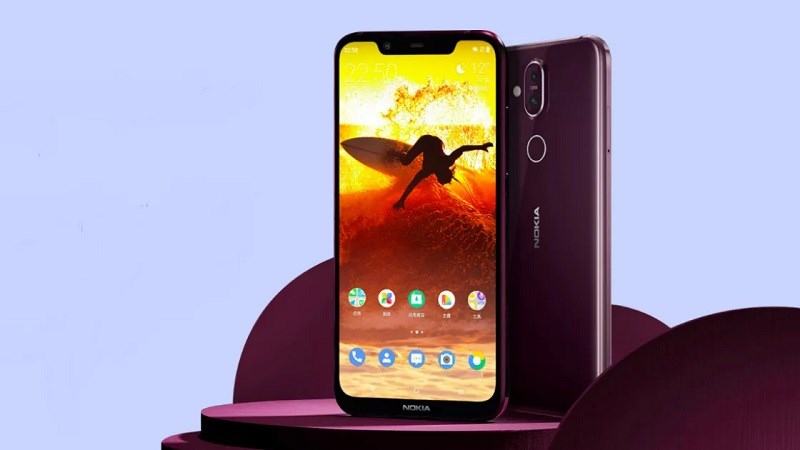
With a 20 MP selfie camera and 12 MP + 13 MP dual-camera system, this phone lets you click gorgeous shots, even when the lighting conditions are dim. The front camera features an Adaptive Sensor Technology that gives you the power of four pixels in one. Thanks to the AI-powered Imaging feature and Studio-style Lighting, you can take gorgeous portraits.
This adaptive edge-to-edge display ensures that the colours are accurate and your content is visible, even when the sun is blazing bright. Furthermore, thanks to the HDR10 support, you can enjoy videos in crisp details and rich colours. The Android 9 Pie OS comes with an Adaptive Brightness feature that understands your brightness preferences and adjusts the settings automatically.
Powered by a high-performing, AI-powered Qualcomm Snapdragon 710 processor, the Nokia 8.1 keeps your smartphone experience seamless – so, binge-watch TV shows, play games and do much more without experiencing any lag.
This OS leverages the power of artificial intelligence so that you can get more done from the Nokia 8.1. This OS adapts to your usage so that you can keep the show running smoothly for long. The 3500-mAh battery and Adaptive Battery feature give you up to 2 days of battery life so that you have the power to do more. Thanks to the 18 W fast-charging feature, you can power up the phone in no time.
Prerequisites & Preparation
- Backup Data: Flashing will completely wipe all data on your device. Back up important files and settings before proceeding.
- Battery Level: Ensure your device has at least 50% battery to prevent shutdown during the flashing process.
- USB Driver & Tools: Install the correct USB drivers for your brand and prepare the flashing tool (Odin for Samsung, SP Flash Tool/QPST for Qualcomm/MTK, etc.).
CAUTION: Flashing official firmware carries a risk of bricking your device. Proceed with caution and at your own risk. addROM is not responsible for any damage caused to your device.
Download Stock ROM & Firmware
Global / General
| File Type | Firmware / Build | Region / Model | OS Version | Download Link |
|---|---|---|---|---|
| Stock ROM | PNX-124F-0-00CN-B05.NBx.rar | Global / General | – | Google Drive |
| Stock ROM | PNX-124B-0-00WW-B01.NBx.rar | Global / General | – | Google Drive |
| Stock ROM | PNX-2636-0-00WW-B01 | Global / General | – | Google Drive |
| Stock ROM | PNX-2636-0-00CN-B01 | Global / General | – | Google Drive |
| Stock ROM | PNX-431A-0-00WW-B01.zip | Global / General | – | Google Drive |
| Stock ROM | PNX-6210-0-00WW-B01.zip | Global / General | – | Google Drive |
| Stock ROM | PNX-6190-0-00WW-B01.zip | Global / General | – | Google Drive |
| Stock ROM | PNX-430B-0-00WW-B02.zip | Global / General | – | Google Drive |
| Stock ROM | PNX-415B-0-00WW-B03.zip | Global / General | – | Google Drive |
Additional Files & Tools
- PNX-3020-0-0UWW-B03.nb0.rar
- PNX-515B-0-00WW-B03.nb0.rar
- PNX-431A-0-00WW-B01.nb0.rar
- PNX-7190-0-00WW-B01.nb0.rar
- PNX-259J-0-00WW-B01.nb0.rar
- PNX-124A-0-00CN-B05.nb0.rar
- PNX-259A-0-00WW-B05.nb0.rar
- PNX-415B-0-00WW-B03_QPST.rar
- PNX-415F-0-00WW-B01_600WW_OS10_20200101_QPST.rar
- PNX-2590-0-00WW-B03_QPST.rar
- PNX-530E-0-00WW-B01_600RU_OS10_20200601_QPST.rar
- PNX-259A-0-00WW-B05(IN)_QPST.rar
- PNX-3020-0-0UWW-B03(RU)_QPST.rar
- QPST_2.7.496.1.zip
- OneDrive
- MediaFire
- Backup
How to Flash Firmware / Stock ROM
To flash the stock firmware on your Nokia device using Online Service Tool (OST LA), follow these steps:
- Download and install the Nokia USB Drivers on your computer.
- Download and install the Online Service Tool (OST LA) (preferably the patched version).
- Extract the downloaded stock ROM firmware (usually in
.nb0or.mlfformat). - Launch
OnlineUpdateTool.exefrom the installation directory (typicallyC:\Program Files (x86)\OST LA). - Power off your device completely. Hold the Volume Down button and connect the device to the computer via USB cable to enter Download Mode (Fastboot Mode).
- In OST LA, click the browse button (…) and select the extracted firmware file (
.nb0or.mlf). - Click the Next button.
- Wait for the flashing process to complete. The device will automatically reboot once finished.