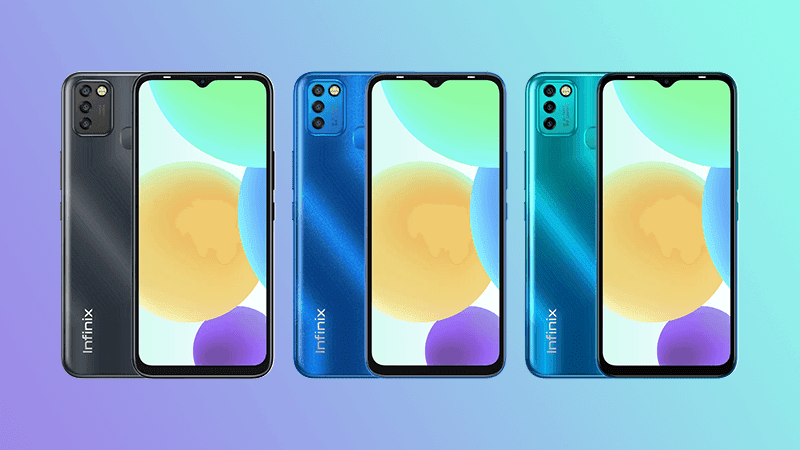
The Infinix SMART 6 HD smartphone is powered by a 12 nm Helio A22 2.0 GHz Quad core processor that allows you to witness smooth operational capabilities. Also, it features up to 2 GB of RAM, an additional 2 GB of virtual RAM and up to 32 GB of memory variant to ensure fast response time and seamless multitasking. Moreover, it comes with Dual 4G SIM slot that supports VoLTE and VoWiFi calling and a dedicated SD card slot which helps to upgrade the internal storage space of up to 512 GB, to give you an unmatched storage experience.
Featuring an immersive 16.76 cm (6.6) HD+ Drop notch display with narrow bezel and 20.5:9 aspect ratio, this mobile phone offers an uninterrupted viewing experience, without any flickers. It is also equipped with a 90.66% Screen to body ratio that helps in edge to edge access to the screen. And with 500 nits of brightness and 1500:1 contrast ratio, you can have a captivating viewing experience.
Boasting a powerful 5000 mAh battery, this mobile phone offers you with up to 30.79 hrs 4G Talk-time, 39.37 hrs Music Playback, 26.62 hrs Video Playback, 170.94 hrs Music and more without significant interruptions. Also, it sports a Power Marathon Technology that helps to extend your battery capability by up to 25%.
The 8 MP AI rear Camera with f2.0 big aperture and Double LED flash of this smartphone allows you to capture professional grade photos.Moreover, the rear camera is incorporated with Auto Scene detection which diagnoses up to 18 different outdoor conditions and helps in taking realistic photographs. Moreover, it comes with additional features like Time Lapse, Video, AI CAM, Beauty, Portrait, and Panorama mode, to further enhance the pictures. Equipped with a 5 MP AI selfie, f/2.0 aperture and a dedicated Single LED flash, this smartphone helps you to capture impressive selfie images, thus letting your friends feel amazed by the top-quality photos. And, with features such as, AI Time Lapse, Video , AI CAM, Beauty, Portrait, and more, you can further intensify the beauty of your images.
Prerequisites & Preparation
- Backup Data: Flashing will completely wipe all data on your device. Back up important files and settings before proceeding.
- Battery Level: Ensure your device has at least 50% battery to prevent shutdown during the flashing process.
- USB Driver & Tools: Install the correct USB drivers for your brand and prepare the flashing tool (Odin for Samsung, SP Flash Tool/QPST for Qualcomm/MTK, etc.).
CAUTION: Flashing official firmware carries a risk of bricking your device. Proceed with caution and at your own risk. addROM is not responsible for any damage caused to your device.
Download Stock ROM & Firmware
Global / General
| File Type | Firmware / Build | Region / Model | OS Version | Download Link |
|---|---|---|---|---|
| Stock ROM | Stock ROM | Global / General | – | Google Drive |
| Stock ROM | Stock ROM | Global / General | – | Google Drive |
| Stock ROM | Stock ROM | Global / General | – | Google Drive |
| Stock ROM | Stock ROM | Global / General | – | Google Drive |
| Stock ROM | Stock ROM | Global / General | – | Google Drive |
| Stock ROM | Stock ROM | Global / General | – | Google Drive |
| Stock ROM | Stock ROM | Global / General | – | Google Drive |
| Stock ROM | Stock ROM | Global / General | – | Google Drive |
| Stock ROM | Stock ROM | Global / General | – | Google Drive |
| Stock ROM | Stock ROM | Global / General | – | Google Drive |
| Stock ROM | Stock ROM | Global / General | – | Google Drive |
| Stock ROM | Stock ROM | Global / General | – | Google Drive |
| Stock ROM | Stock ROM | Global / General | – | Google Drive |
| Stock ROM | Stock ROM | Global / General | – | Google Drive |
| Stock ROM | Stock ROM | Global / General | – | Google Drive |
| Stock ROM | Stock ROM | Global / General | – | Google Drive |
| Stock ROM | Stock ROM | Global / General | – | Google Drive |
| Stock ROM | Stock ROM | Global / General | – | Google Drive |
| Stock ROM | Stock ROM | Global / General | – | Google Drive |
| Stock ROM | Stock ROM | Global / General | – | Google Drive |
| Stock ROM | Stock ROM | Global / General | – | Google Drive |
| Stock ROM | Stock ROM | Global / General | – | Google Drive |
| Stock ROM | Stock ROM | Global / General | – | Google Drive |
| Stock ROM | Stock ROM | Global / General | – | Google Drive |
| Stock ROM | Stock ROM | Global / General | – | Google Drive |
| Stock ROM | Stock ROM | Global / General | – | Google Drive |
| Stock ROM | Stock ROM | Global / General | – | Google Drive |
How to Flash Firmware / Stock ROM
To flash the stock firmware on your Infinix device using SP Flash Tool, follow these steps:
- Download and install the MTK USB Drivers on your computer.
- Download and extract the SP Flash Tool.
- Launch
Flash_tool.exeas administrator. - Click on the Scatter-loading button and select the Android scatter file (
.txt) from the extracted firmware folder. - Click the Download button.
- Power off your device completely, hold the Volume Down or Volume Up button, and connect it to the computer via USB cable.
- The flashing process will start automatically. Wait for the green “Download OK” checkmark to appear.