Key Takeaways
Open Code Review combines deterministic Git-aware pipelines with LLM agents to deliver focused, repository-aware code reviews without handing the entire workflow over to an unconstrained AI coding agent.
Open Code Review, also called OpenCodeReview or OCR, is an open-source, AI-powered command-line code reviewer from Alibaba. It began as an internal Alibaba code review assistant before being released publicly under the Apache-2.0 license. Rather than simply sending a pasted diff to an LLM and asking for comments, OCR analyzes Git changes, selects relevant files, applies review rules, gives review agents controlled access to repository context, and produces structured findings tied to specific code locations.
Developers can explore the Open Code Review GitHub repository or use the official Open Code Review website for project documentation.
The core use case is straightforward: run ocr review inside a Git repository and let the tool inspect your current changes. But OCR can also compare branches, review an individual commit, scan complete files without relying on a diff, output machine-readable JSON, and participate in automated CI/CD workflows.
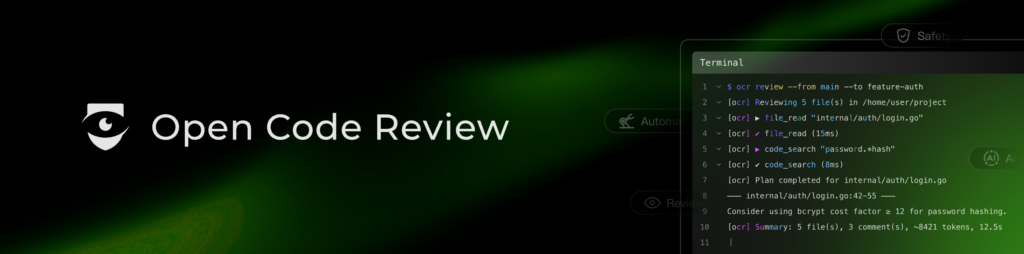
That makes Open Code Review useful both as a developer-side “second reviewer” before opening a pull request and as an automated reviewer inside a team development workflow.
Why Open Code Review Is Different from a Generic AI Coding Agent
A conventional coding agent is usually given broad repository access and a prompt such as “review this pull request.” The model then decides what files to inspect, how much context to retrieve, which tools to call, and when it has done enough. That flexibility is powerful, but it can also make repeated reviews less predictable.
Open Code Review deliberately splits those responsibilities between conventional software logic and AI. Its deterministic pipeline handles tasks such as file filtering, rule matching, grouping related changes, comment positioning, and post-review processing. LLM-powered sub-agents focus on the parts where reasoning is valuable: understanding a change, retrieving relevant context, following dependencies, and deciding whether a potential issue deserves a comment.
The architecture can be summarized as three stages: rule-guided dispatch, grounded file review, and independent reflection. The review agent receives a constrained set of code-oriented tools rather than unrestricted shell access, while a later reflection step checks candidate findings before final output. Related files can also be grouped and processed concurrently instead of forcing one giant agent conversation to absorb an entire pull request.
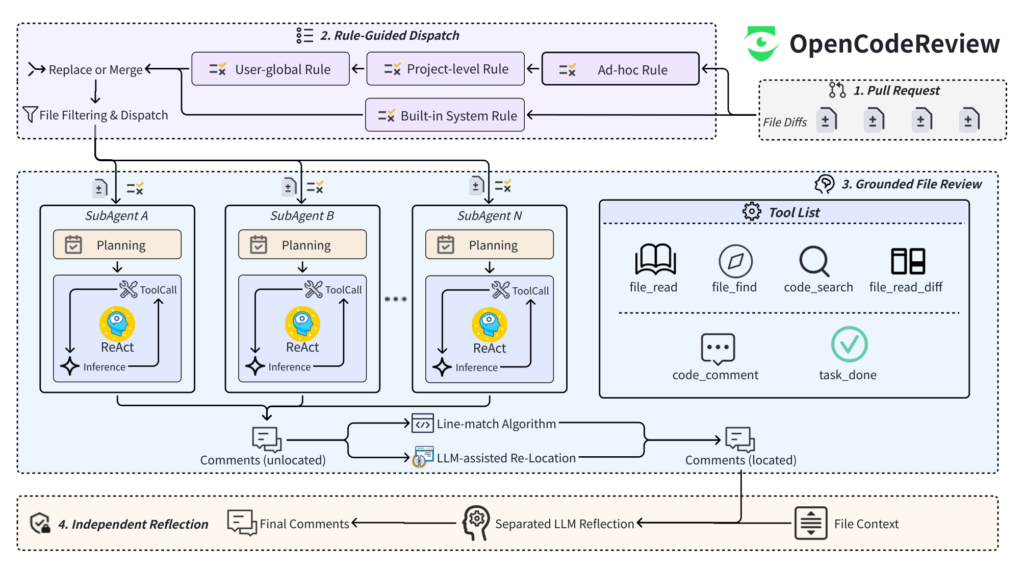
The practical takeaway is that Open Code Review is not merely an LLM prompt packaged as a CLI. It is a purpose-built review pipeline in which the model operates inside engineering constraints.
How to Install Open Code Review
For the standard NPM installation, the official quick-start documentation requires Git 2.41 or newer and Node.js 18 or newer. You will normally also need credentials for an LLM provider, although OCR’s delegation mode can let a compatible host coding agent perform the actual inference instead.
The simplest installation is:
npm install -g @alibaba-group/open-code-reviewThen confirm that the ocr command is available:
ocr version
ocr --help
NPM is not the only deployment option. The project also provides package-manager installation, platform installation scripts, downloadable static binaries, and source builds. The static binary route does not require Node.js, which can be useful for CI runners or machines where you want a smaller runtime footprint.
On Linux or macOS, the official installer can be run with:
curl -fsSL https://open-codereview.ai/install.sh | shThe script detects supported Linux/macOS architectures, downloads the appropriate release, and verifies its checksum.
On Windows PowerShell:
irm https://open-codereview.ai/install.ps1 | iexThe Windows installer supports modern PowerShell environments and installs the OCR binary into a user-accessible location.
Open Code Review is therefore better thought of as a local CLI or CI utility than as a server application that must be launched through Docker.
How to Configure an LLM Provider
After installation, configure the model that will perform the review:
ocr config provider
ocr config model
The first command opens an interactive provider setup workflow; the second selects the model associated with that provider. You can then verify connectivity with:
ocr llm testOCR stores its user-level configuration under ~/.opencodereview/config.json. The interactive setup can collect the API endpoint and credentials, save the configuration, and test whether the selected model is reachable.
The provider layer is intentionally flexible. Built-in configuration covers multiple commercial model services, while custom OpenAI-compatible and Anthropic-compatible endpoints are supported as well. That means teams can point OCR at compatible gateways or self-hosted infrastructure; the documentation even provides a local Ollama-style configuration example, provided the chosen model supports the tool-calling behavior OCR requires.
This separation is important for enterprise adoption: Open Code Review supplies the review workflow, but you retain control over which compatible model endpoint performs inference.
How to Run Your First AI Code Review
Move into a Git repository containing changes and run:
cd your-project
ocr review
In its default workspace mode, OCR reviews staged, unstaged, and untracked changes in the working tree. This is particularly convenient before committing or opening a pull request.
To review the changes introduced by a feature branch relative to its base branch, use range mode:
ocr review --from main --to feature-branchTo focus on one commit:
ocr review --commit abc123Before spending model tokens on a potentially large review, you can inspect what OCR plans to process:
ocr review --previewThe preview is especially useful after configuring include/exclude patterns because it lets you verify the review scope before inference begins.
Open Code Review is not limited to Git diffs. Its scan command reviews complete files, which is useful for auditing an unfamiliar directory or examining code for which no meaningful historical diff exists:
ocr scan
ocr scan --path internal/agent
For downstream automation or another AI agent, request structured output instead of human-oriented terminal text:
ocr review --format json --audience agent > review.jsonOCR also persists review sessions, allowing interrupted range or commit reviews to be resumed rather than restarted from scratch.
How to Customize Reviews for Your Codebase
A generic code reviewer can identify common defects, but useful production review also depends on local conventions: architecture rules, security requirements, framework-specific pitfalls, forbidden dependencies, concurrency assumptions, and team-specific practices.
Open Code Review addresses this with a layered rule system. Rules can come from built-in defaults, a user-global configuration, a version-controlled project rule at .opencodereview/rule.json, or an ad-hoc rule supplied for a particular invocation. More specific rules take precedence over broader defaults, letting a repository encode its own review policy without discarding the CLI’s general capabilities.
Rules can also define file targeting through include and exclude patterns. That means, for example, a team can focus review on production source files while excluding generated artifacts, or apply specialized requirements only to authentication, database, API, or infrastructure code.
This is one of OCR’s strongest features for repeatable team use: instead of pasting the same long code-review prompt into an AI assistant for every pull request, the review policy can live alongside the project and be applied consistently.
How to Add Open Code Review to CI/CD and AI Agent Workflows
Once local reviews are working, OCR can be moved into pull-request automation. The official project provides integration guidance for GitHub Actions, GitLab CI, GitFlic CI, and Gerrit. A typical pipeline checks out the pull request, installs OCR, injects LLM credentials through CI secrets, reviews the appropriate commit or branch range, and publishes the resulting findings.
GitHub users can also use the project’s reusable action rather than constructing the entire workflow manually. Because results can be emitted as JSON, OCR can function as a review engine underneath custom bots, quality gates, dashboards, or other automation.
The project additionally supports integrations with coding-agent environments such as Claude Code, Codex, Cursor, and OpenCode. Its delegation mode changes the division of labor: OCR performs deterministic work such as selecting files and resolving review rules, while the host coding agent uses its own LLM to conduct the actual review. That can remove the need to configure a separate OCR API credential when an existing agent environment already provides model access.
Is Open Code Review Worth Using?
Open Code Review is most compelling for developers and teams that want AI code review without treating a general-purpose coding agent as an unrestricted black box. Its combination of Git-native review modes, repository exploration, configurable LLM backends, project-specific rules, structured output, resumable sessions, full-file scanning, and CI integration makes it suitable for everything from pre-commit checks to automated pull-request review.
Its design also makes an important distinction: the best AI development tool does not necessarily give the model maximum autonomy. For repetitive engineering tasks such as code review, constraining file selection, context retrieval, rule application, and output validation can make the AI component more focused and operationally predictable. Open Code Review turns that idea into a practical, open-source CLI that can sit alongside the Git workflows developers already use.