 By
By OpenCLI Architecture: Converting Web and Electron Apps into CLIs
Key Takeaways:
- OpenCLI provides a unified automation interface bridging logged-in Chrome browser sessions and Electron desktop applications into CLI commands for engineers and AI agents.
- By coupling a local daemon listening on TCP port 19825 with the Chrome Browser Bridge extension, the tool drives Chrome DevTools Protocol commands inside a dedicated automation window without exporting user credentials off-device or requiring cloud browser infrastructure.
- For remote orchestration, SSH reverse port forwarding allows remote sandbox environments to control the developer workstation browser over local loopback interfaces.
Why web automation requires decoupling session state from execution
AI agents assisting in software development frequently need to interact with internal web platforms lacking public APIs or guarded by multi-factor authentication. Standard headless automation tools like Puppeteer or Selenium spin up fresh browser profiles, forcing engineers to maintain brittle automated login scripts or store long-lived credentials in shell environment variables.
Sharing browser sessions with autonomous agents introduces important boundary trade-offs. OpenCLI addresses this by keeping its control channel bound to the local loopback daemon. Domain-scoped cookies can be returned to the CLI when requested for download pipelines, allowing file fetches without exporting the full user profile to third-party cloud services.
| OpenCLI Execution Pathway | Transport Mechanism | Data Access & Credentials | Operational Caveats & Scope |
|---|---|---|---|
| Chrome Browser Bridge | Local WebSocket (ws://127.0.0.1:19825/ext) | CDP tab control; domain-scoped cookies | Requires extension installed and Chrome running |
| Electron App Adapter | Internal CDP debugging port connection | Window access and DOM manipulation | Target application must enable remote debugging |
| Web Service Adapter (Public API) | Direct HTTP REST protocol | Configured tokens or service API keys | Applicable only to platforms with public APIs |
| Remote Orchestration (SSH Tunnel) | SSH Reverse Port Forwarding | Forwards daemon port 19825 to remote host | Governed by remote sshd config and host access |
The project source code is distributed under the Apache-2.0 license specified at LICENSE L1-L30.
Local loopback daemon and the browser bridge protocol
The core component of OpenCLI is a Node.js daemon process acting as an intermediary between terminal commands and the Chrome extension.
As declared in src/constants.ts L1-L25, this communication interface is fixed to a deterministic port:
DEFAULT_DAEMON_PORT = 19825: The daemon binds strictly to loopback interface127.0.0.1:19825.- Rejection of port overrides: The project deliberately rejects custom port environment variables to maintain alignment between the Chrome extension and host CLI processes.
[Terminal / AI Agent]
         │
         │ (HTTP / CLI Subcommands)
         ▼
[OpenCLI Daemon] ──(ws://localhost:19825/ext)
(Port 19825)                  │
                              │
                              ▼
                   [Chrome Extension Bridge]
                              │
                              │ (Chrome DevTools Protocol)
                              ▼
                   [Dedicated Automation Window]
                   (Reuses Existing Session State)
The protocol definition in extension/src/protocol.ts L1-L30 covers 15 explicit action types structured across functional categories:
- Navigation and observation:
navigate,tabs,frames,screenshot, andclose-window. - Dynamic execution:
execruns JavaScript within the page context. - Synthetic interactions:
click,fill,hover,press,scroll, andupload. - Session management:
eval,session-close, andping.
Under the hood, incoming CLI invocations are transformed into framed JSON messages sent across the local WebSocket bridge. The extension intercepts these messages in its background service worker and translates them into appropriate CDP method calls directed at target tab targets.
For network inspection, tab network capture records request and response activity on the attached tab via CDP Network.getResponseBody as shown in extension/src/cdp.ts L890-L930. Heartbeat pings and exponential backoff (2 to 5 seconds) support automatic reconnection when the daemon restarts, preventing orphaned socket connections while maintaining terminal responsiveness.
Content extraction pipeline and adapter ecosystem
Extracting web pages for LLM consumption requires filtering visual clutter, inline scripts, and tracking markup to avoid exhausting context window limits.
The content pipeline in browser extract is implemented in src/browser/extract.ts L33-L73. The extraction process clones the DOM tree, removes script tags, style elements, hidden nodes, and extraneous attributes, then converts cleaned HTML into Markdown using Turndown. The cleaner preserves semantic block structures such as headers, lists, and code blocks while discarding presentation wrappers and nested division hierarchies. For long-form text, OpenCLI integrates Mozilla Readability to isolate the article body, paired with Turndown GFM plugins for tables and formatted code fences.
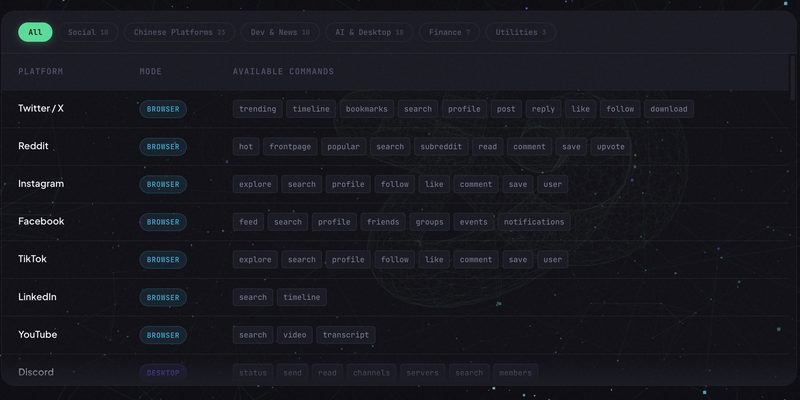
Beyond browser tabs, OpenCLI extends control into desktop Electron applications such as Slack, Discord, and VS Code. Because Electron applications run an embedded Chromium content module, they can expose their internal DevTools listener by starting with the --remote-debugging-port configuration flag. By attaching directly to these Electron debugging endpoints, the OpenCLI daemon drives desktop app windows with identical protocol primitives, eliminating the need for dedicated desktop accessibility drivers.
Security boundaries and remote reverse tunnel orchestration
The Chrome Browser Bridge extension declares its operating scope in extension/manifest.json L6-L18. The manifest requests 8 system permissions (debugger, tabs, cookies, activeTab, alarms, storage, tabGroups, downloads) alongside host permission <all_urls> for CDP attachment and cookie retrieval. The extension control channel connects solely to the loopback daemon, transmitting no telemetry to remote analytics services.
Daemon HTTP endpoints require a safety header to differentiate valid internal requests from drive-by web requests. Because local browser tabs could theoretically attempt cross-origin HTTP requests against localhost endpoints, the daemon enforces request origin validation. Under src/daemon.ts L271-L294, while /ping remains unauthenticated to allow basic liveliness checks, all operational endpoints reject requests missing the X-OpenCLI header with an HTTP 403 Forbidden response:
# Verify local daemon status with required security header
curl -fsS -H 'X-OpenCLI: 1' http://127.0.0.1:19825/status
Passing -fsS ensures that error responses produce visible non-zero exit codes in CI scripts rather than silently outputting an error JSON payload.
When orchestrating headless CI/CD pipelines or cloud agents, developers can expose their local workstation browser using SSH reverse tunnels as outlined in docs/guide/remote-orchestration.md L36-L44:
# Forward local daemon port to a remote agent host over SSH
ssh -N -o ExitOnForwardFailure=yes -R 127.0.0.1:19825:127.0.0.1:19825 user@remote-agent-server
The flag -o ExitOnForwardFailure=yes guarantees that if port 19825 is already bound on the remote server, SSH exits immediately with an error rather than silently continuing without port forwarding. Binding behavior on the destination server depends on GatewayPorts in sshd_config. When configured with default no, port 19825 on the remote host binds strictly to its local loopback interface, restricting automation access to authorized processes on that machine.
Practical installation and agent automation workflows
To set up OpenCLI, developers require Node.js 18+ and the Chrome Browser Bridge extension installed from the Chrome Web Store. With Chrome running and the extension enabled, verify connectivity:
# Check connectivity between the daemon and browser extension
opencli doctor
Per command definitions in src/cli.ts L840-L849, browser subcommands require a positional session name. The following script demonstrates opening a target URL, extracting content, and taking a screenshot:
# Initialize a named session identifier
SESSION="audit-session"

# Open the target URL inside the dedicated automation window
opencli browser "$SESSION" open "https://github.com/jackwener/opencli"

# List active tabs within the session
opencli browser "$SESSION" tab list

# Extract clean markdown from the article container
opencli browser "$SESSION" extract --selector "article"

# Capture a full-length page screenshot
opencli browser "$SESSION" screenshot ./repo-view.png --full-page

# Close the session and release browser resources
opencli browser "$SESSION" close
According to src/cli.ts L1175-L1180, passing --full-page captures the complete scrollable page rather than only the current viewport.
OpenCLI provides a practical approach to developer automation: driving established local browser sessions through a secure loopback control channel eliminates the overhead of fragile headless login workflows while keeping session management under developer control.