
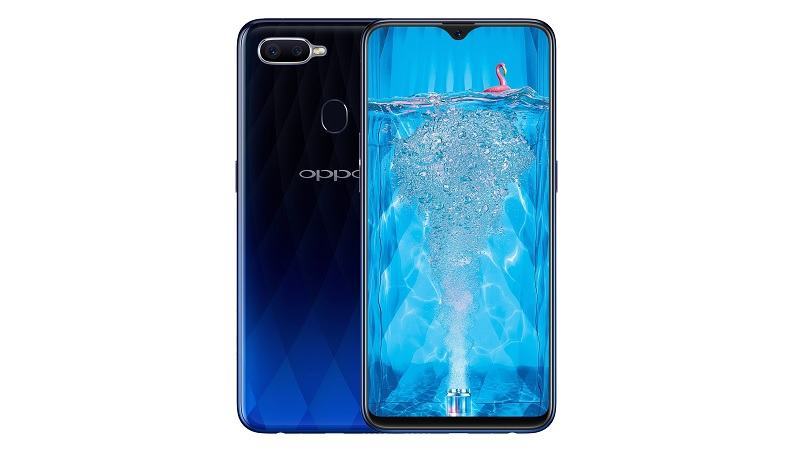
As the latest OPPO phone featuring groundbreaking VOOC charging technology, the OPPO F9 is also endowed with many standout features such as a unique gradient back design, a waterdrop fullscreen display, and a portrait camera with perfect AI integration.
Prerequisites & Preparation
- Backup Data: Flashing will completely wipe all data on your device. Back up important files and settings before proceeding.
- Battery Level: Ensure your device has at least 50% battery to prevent shutdown during the flashing process.
- USB Driver & Tools: Install the correct USB drivers for your brand and prepare the flashing tool (Odin for Samsung, SP Flash Tool/QPST for Qualcomm/MTK, etc.).
CAUTION: Flashing official firmware carries a risk of bricking your device. Proceed with caution and at your own risk. addROM is not responsible for any damage caused to your device.
Download Stock ROM & Firmware
Global / General
| File Type | Firmware / Build | Region / Model | OS Version | Download Link |
|---|---|---|---|---|
| Stock ROM | 221110-001 | Global / General | Android 11 | Google Drive | OneDrive |
| Stock ROM | d476e2a9 | Global / General | Android 11 | Google Drive | OneDrive |
| Stock ROM | 2814bab0 | Global / General | Android 11 | Google Drive | OneDrive |
| Stock ROM | eafc720e | Global / General | Android 11 | Google Drive | OneDrive |
| Stock ROM | eafc720e | Global / General | Android 11 | Google Drive | OneDrive |
| Stock ROM | eafc720e | Global / General | Android 11 | Google Drive | OneDrive |
| Stock ROM | dc96092d | Global / General | Android 11 | Google Drive | OneDrive |
| Stock ROM | c0c9d675 | Global / General | Android 11 | Google Drive | OneDrive |
| Stock ROM | c0c9d675 | Global / General | Android 11 | Google Drive | OneDrive |
| Stock ROM | c0c9d675 | Global / General | Android 11 | Google Drive | OneDrive |
| Stock ROM | a1f19367 | Global / General | Android 11 | Google Drive | OneDrive |
| Stock ROM | a1f19367 | Global / General | Android 11 | Google Drive | OneDrive |
OTA
| File Type | Firmware / Build | Region / Model | OS Version | Download Link |
|---|---|---|---|---|
| Stock ROM | CPH1823EX_11_OTA_0200_all_KQk1AfKkf1ms.ozip | OTA | Android 11 | Google Drive | OneDrive |
| Stock ROM | CPH1823EX_11_OTA_0170_all_lmJ2mLLNVHFi.ozip | OTA | Android 11 | Google Drive | OneDrive |
| Stock ROM | CPH1823EX_11_OTA_0140_all_odbPQx6BFM1j.ozip | OTA | Android 11 | Google Drive | OneDrive |
| Stock ROM | CPH1823EX_11_OTA_0130_all_s46ajCGdxQ6G.ozip | OTA | Android 11 | Google Drive | OneDrive |
| Stock ROM | CPH1823EX_11_OTA_0110_all_obvC9TuW2ITa_local.ozip | OTA | Android 11 | Google Drive | OneDrive |
| Stock ROM | CPH1823EX_11_OTA_0050_all_NUMz2Glb2rfI_local.ozip | OTA | Android 11 | Google Drive | OneDrive |
Additional Files & Tools
How to Flash Firmware / Stock ROM
To flash the stock firmware on your OPPO device using SP Flash Tool, follow these steps:
- Download and install the MTK USB Drivers on your computer.
- Download and extract the SP Flash Tool.
- Launch
Flash_tool.exeas administrator. - Click on the Scatter-loading button and select the Android scatter file (
.txt) from the extracted firmware folder. - Click the Download button.
- Power off your device completely, hold the Volume Down or Volume Up button, and connect it to the computer via USB cable.
- The flashing process will start automatically. Wait for the green “Download OK” checkmark to appear.







bro,do you by any chance have the CPH1823_EX_11_F.19_221110-001_DATABASE_AP file?
nice
thanks
Very bad service…. Not working… On f9pro… Search and again make a tutorial for f9pro.
please me for user password
need id passowd
Very Very Nice working addrom.com team.
need id paasword for download tool
come on whatsapp i have full solution +919837805340
I am addrom user
your contant number for give id password tool