
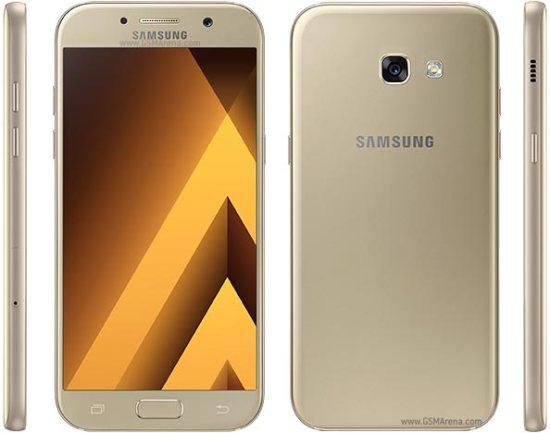
This is the official Stock ROM (Firmware) Collection for various combination rom for Samsung Galaxy A5 2017 SM-A520 models. These official ROMs are essential for repairing software issues, fixing bootloops, or restoring your smartwatch or smartphone to factory default.
Prerequisites & Preparation
- Backup Data: Flashing will completely wipe all data on your device. Back up important files and settings before proceeding.
- Battery Level: Ensure your device has at least 50% battery to prevent shutdown during the flashing process.
- USB Driver & Tools: Install the correct USB drivers for your brand and prepare the flashing tool (Odin for Samsung, SP Flash Tool/QPST for Qualcomm/MTK, etc.).
CAUTION: Flashing official firmware carries a risk of bricking your device. Proceed with caution and at your own risk. addROM is not responsible for any damage caused to your device.
Download Stock ROM & Firmware
SAMSUNG GALAXY A5 2017 (SM-A520F)
| File Type | AP / PDA Build (Binary) | Region (CSC) | OS Version | Download Link |
|---|---|---|---|---|
| G | COMBINATION | A520FXXUGATK1.zip | – | Google Drive | OneDrive |
| F | COMBINATION | A520FXXUFATH2.zip | – | Google Drive | OneDrive |
| E | COMBINATION | A520FXXUEATD1.zip | – | Google Drive | OneDrive |
| D | COMBINATION | A520FXXUDATB1.zip | – | Google Drive | OneDrive |
| C | COMBINATION | A520FXXUCASL1.zip | – | Google Drive | OneDrive |
| B | COMBINATION | A520FXXUBASF1.zip | – | Google Drive | OneDrive |
| 8 | COMBINATION | A520FXXU8ASB1.zip | – | Google Drive | OneDrive |
| 7 | COMBINATION | A520FXXU7ARJ1.zip | – | Google Drive | OneDrive |
| 6 | COMBINATION | A520FXXU6ARH1.zip | – | Google Drive | OneDrive |
| 5 | COMBINATION | A520FXXU5ARG2.zip | – | Google Drive | OneDrive |
| 4 | COMBINATION | A520FXXU4ARA4.zip | – | Google Drive | OneDrive |
| 3 | COMBINATION | A520FXXU3ARA3.zip | – | Google Drive | OneDrive |
| 2 | COMBINATION | A520FXXU2AQK2.zip | – | Google Drive | OneDrive |
| 1 | COMBINATION | A520FXXU1AQC2.zip | – | Google Drive | OneDrive |
SAMSUNG GALAXY A5 2017 (SM-A520W)
| File Type | AP / PDA Build (Binary) | Region (CSC) | OS Version | Download Link |
|---|---|---|---|---|
| 6 | COMBINATION | A520WVLU6ASB1.zip | – | Google Drive | OneDrive |
| 5 | COMBINATION | A520WVLU5ARI1.zip | – | Google Drive | OneDrive |
| 4 | COMBINATION | A520WVLU4ARH2.zip | – | Google Drive | OneDrive |
| 3 | COMBINATION | A520WVLU3ARH1.zip | – | Google Drive | OneDrive |
| 2 | COMBINATION | A520WVLU2ARA1.zip | – | Google Drive | OneDrive |
SAMSUNG GALAXY A5 2017 (SM-A520X)
| File Type | AP / PDA Build (Binary) | Region (CSC) | OS Version | Download Link |
|---|---|---|---|---|
| F | COMBINATION | FA60 | – | Google Drive | AFH | OneDrive |
| E | COMBINATION | FA60 | – | Google Drive | AFH | OneDrive | Google Drive |
| D | COMBINATION | FA60 | – | Google Drive | AFH | OneDrive | Google Drive |
| 1 | COMBINATION | FA60 | – | Google Drive |
SAMSUNG GALAXY A5 2017 (SM-A520L)
SAMSUNG GALAXY A5 2017 (SM-A520S)
SAMSUNG GALAXY A5 2017 (SM-A520K)
How to Flash Firmware / Stock ROM
To flash the firmware or combination files onto your device, please refer to our detailed step-by-step flashing guides. For Samsung devices, you can follow our Odin guide: [TUTS] How to use Samsung Odin tool to flash firmware/ROM for Samsung Devices. For other brands, prepare the compatible flashing tool (such as SP Flash Tool, Fastboot, QPST, or ResearchDownload) specifically required for your device chipset.








hi bro u have combination sm-a520 S /L/K
Chao ban co Combaination file SM-A520 S/L/K Level 3 khong?
Level 3 hiện tại mình không có rồi 🙂
HI, CAN YOU PLEASE HELP ME WITH COMBINATION ROM FOR A 5 2017, SM A520W, SW – VERSION A520WVLS2BRC1? THIS WILL BE AWESOME.
You can use combination rom (binary 2): COMBINATION_OYA_FA60_A520WVLU2ARA1.rar (481M) | LINK MAX SPEED
i have a520w bit 5? how i can do?
thx for the combination file! nice work. Sorry for the double post…
a520 F u7?
Yes, i updated
u7 Any one?
a520f u7 combination need urgent
Sr man,
Now, i don’t have u7
a520f bit 7 combination pls
combination for a520fxxu6crh1 plz?
U5 FIX File.
Thk.
There Is no note I see.
Well, should I flash full stock firmware after combination? Or some Specific portions
if you want to bypass FRP, you need to flash the combination firmware, then bypass FRP by ADB tool. Final you flash the stock firmware and done
Please upload a Video as you do usually
Thanks!
Combination A520FXXU5ARG2 – md5 error! Binary is invalid.
I try to rename file, and delete “.md5” – but odin dont make nothing .
give me resolve , please !!
how i can flash stock firmware?
i flash combination rom with bootloader 6, after can’t downgrade(((
@@ you don’t read my note? You can try flash stock firmware binary 5, but you only select AP and CSC files
which one?
Do i have to download all firmware for a520f?
Oh no, You just download one of them
Hv files for A7 2017 plz help
Hey you, it’s here 😀
(COLLECTION) COMBINATION ROM FOR SAMSUNG GALAXY A7 (2017)