
Quick takeaways: Open WebUI is a self-hosted AI platform with a web interface for Ollama and OpenAI-compatible APIs. The official README documents Python 3.11 pip installation and several Docker paths. For Docker, the README warns that mounting open-webui:/app/backend/data is crucial to avoid losing the database.
What is Open WebUI?
Open WebUI is a self-hosted AI platform designed to provide a user-friendly interface for LLM usage. Its README describes offline operation and support for LLM runners such as Ollama and OpenAI-compatible APIs.
It is useful when you want an internal AI chat interface, a frontend for Ollama, or a self-hosted dashboard for OpenAI-compatible endpoints.
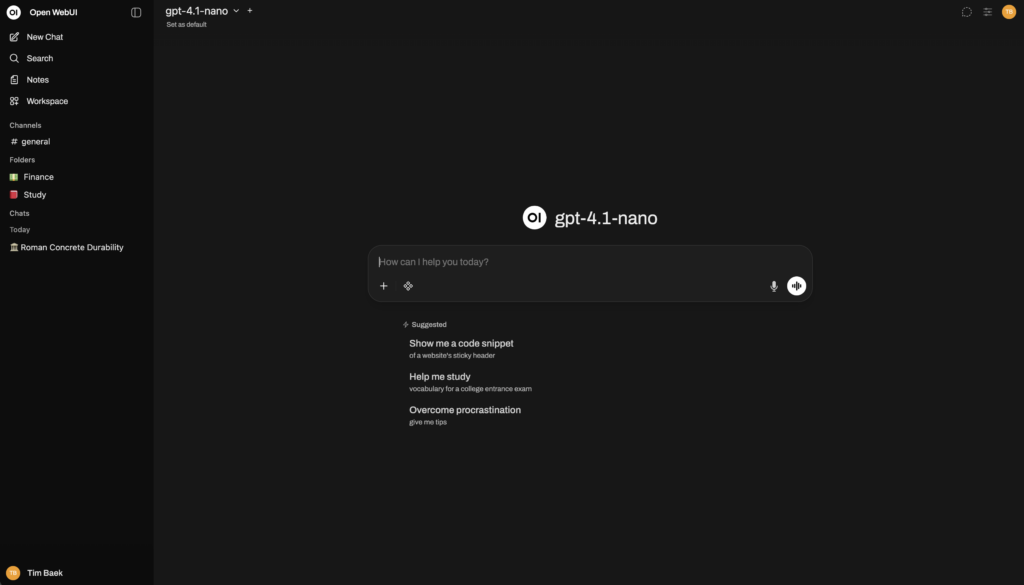
When should you use Open WebUI?
Use Open WebUI when you want a web UI for Ollama, conversation management, a self-hosted AI dashboard, or a practical interface for local and remote model providers.
Do not expose it publicly until accounts, HTTPS, backups, environment variables, and API access are properly configured.
Prerequisites
For pip installation, the README says to use Python 3.11 to avoid compatibility issues. For Docker, you need Docker and an available host port. For CUDA images, the README mentions the Nvidia CUDA container toolkit on Linux/WSL.
If Ollama runs on the same host, the documented Docker command uses –add-host=host.docker.internal:host-gateway so the container can reach host services.
Install with pip
The official README documents:
pip install open-webuiThen start the server:
open-webui serveThe README says the server is available at:
http://localhost:8080For cleaner dependency management, use a virtual environment or Docker.
Run Docker with Ollama on the same host
The default Docker command from the README is:
docker run -d -p 3000:8080 --add-host=host.docker.internal:host-gateway -v open-webui:/app/backend/data --name open-webui --restart always ghcr.io/open-webui/open-webui:mainOpen:
http://localhost:3000Keep the -v open-webui:/app/backend/data mount. The README warns that it is required to persist the database and avoid data loss.
Connect to Ollama on another server
If Ollama is on another server, the README says to set OLLAMA_BASE_URL:
docker run -d -p 3000:8080 -e OLLAMA_BASE_URL=https://example.com -v open-webui:/app/backend/data --name open-webui --restart always ghcr.io/open-webui/open-webui:mainReplace https://example.com with your real Ollama endpoint or internal gateway, and secure it before remote access.
Run with OpenAI API only
For OpenAI API usage only, the README provides:
docker run -d -p 3000:8080 -e OPENAI_API_KEY=REPLACE_WITH_YOUR_KEY -v open-webui:/app/backend/data --name open-webui --restart always ghcr.io/open-webui/open-webui:mainDo not commit real API keys. Use environment variables or a secret manager for production.
Use the bundled Ollama image
CPU-only bundled Ollama:
docker run -d -p 3000:8080 -v ollama:/root/.ollama -v open-webui:/app/backend/data --name open-webui --restart always ghcr.io/open-webui/open-webui:ollamaGPU bundled Ollama:
docker run -d -p 3000:8080 --gpus=all -v ollama:/root/.ollama -v open-webui:/app/backend/data --name open-webui --restart always ghcr.io/open-webui/open-webui:ollamaUse GPU flags only after confirming the Docker GPU runtime and drivers are ready.
Verification
Check that the open-webui container is running, the UI loads at http://localhost:3000 or http://localhost:8080 depending on your install path, the open-webui volume exists, and the UI can reach Ollama or your OpenAI-compatible API.
If Ollama models do not appear, inspect OLLAMA_BASE_URL and host networking. A container cannot always reach 127.0.0.1 on the host without the right configuration.
Common issues
Forgetting the /app/backend/data volume can lead to database loss. Keep the official volume mount.
Ollama connection failures are often caused by a wrong OLLAMA_BASE_URL or host networking assumptions.
CUDA images require the correct NVIDIA container stack. Use the main or CPU bundled image if you do not need GPU acceleration yet.
Safety and legal notes
The README says Open WebUI includes multiple licenses, including the Open WebUI License with a branding preservation requirement and older contributions under their respective licenses. Review LICENSE and LICENSE_HISTORY for commercial or redistribution use.
Protect admin accounts, API keys, uploaded files, and chat logs. Do not publish an internal AI dashboard without HTTPS and access control.
FAQ
Does Open WebUI require Ollama?
Not always. The README documents both Ollama support and an OpenAI API only Docker path.
Should I install with pip or Docker?
Pip is documented for Python 3.11. Docker is usually easier for a persistent self-hosted setup because volumes and container lifecycle are explicit.
Why is the Docker volume important?
The README warns that mounting open-webui:/app/backend/data is crucial for database persistence and avoiding data loss.








