
Agent Orchestrator revolutionizes software engineering by orchestrating fleets of parallel AI coding agents in isolated git worktrees that autonomously handle CI fixes, merge conflicts, code reviews, and PR lifecycles, enabling engineering teams to achieve unprecedented development velocity with minimal human oversight.
Agent Orchestrator is an advanced, open-source orchestration layer designed specifically for managing fleets of parallel AI coding agents within your codebase. Built to address persistent development bottlenecks—such as time-consuming manual CI failure debugging, repetitive merge conflict resolution, and back-and-forth code review cycles—it empowers software engineers, AI developers, and engineering managers to scale workflows efficiently.
At its core, the tool plans high-level tasks, spawns specialized agents each operating in its own isolated git worktree and branch, and lets them execute autonomously. These agents read code, write tests, create pull requests, react to CI logs, address reviewer feedback, and even escalate only when human judgment is required. You supervise everything from a unified local dashboard, reducing context-switching and accelerating iteration.
Key capabilities include agent-agnostic support for tools like Claude Code, Codex, or Aider; runtime flexibility with tmux or Docker; and tracker compatibility across GitHub, Linear, and beyond. Whether you run a solo side project or lead a large engineering organization, Agent Orchestrator transforms reactive debugging into proactive, self-healing development. For the latest updates and community contributions, explore the official repository at https://github.com/ComposioHQ/agent-orchestrator.
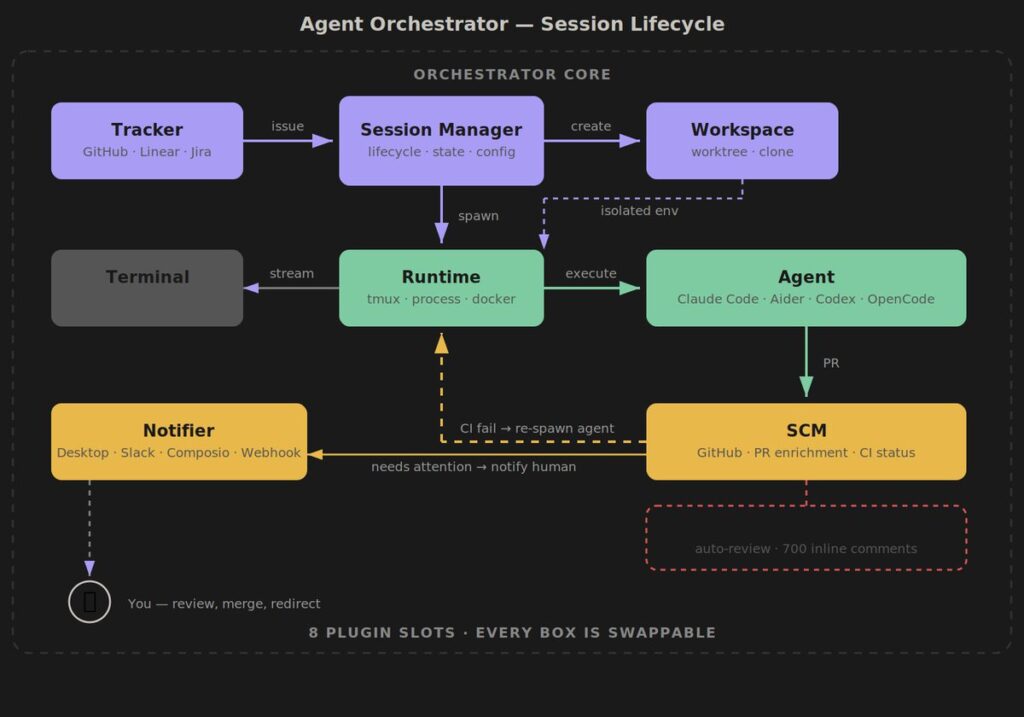
Core Features of Agent Orchestrator
The platform stands out through its event-driven reaction system and plugin architecture. Agents operate independently yet remain coordinated via a central orchestrator that routes feedback loops automatically. CI failures trigger log delivery to the responsible agent for up to two retry attempts. Reviewer change requests prompt immediate code updates, with escalation timers ensuring timely human involvement only when needed.
Isolation via git worktrees prevents interference between agents, while the dashboard provides real-time visibility into sessions, PR statuses, and agent activities. Configuration lives in a simple YAML file, allowing customization of defaults for runtime, agent type, notifier preferences, and power management settings. The modular plugin system supports seven defined interfaces, making it straightforward to extend support for new agents, terminals, or notification channels without forking the core.
These features collectively eliminate the most tedious parts of modern software delivery, letting teams focus on architecture and innovation rather than maintenance.
Installation Guide
Setting up Agent Orchestrator is straightforward and requires only standard developer tools. Follow these steps to get the orchestrator running locally on your machine.
Prerequisites
Before installation, verify the following:
- Node.js version 20 or higher
- Git version 2.25 or higher
- tmux (for the default runtime)
- GitHub CLI (gh) for seamless PR and repository interactions
On macOS, install tmux with:
brew install tmuxOn Linux distributions using apt:
sudo apt install tmuxEnsure your terminal supports these tools and that you have write permissions in your chosen project directories.
Step 1: Global Installation via NPM
The fastest method uses the official NPM package. Open your terminal and run:
npm install -g @aoagents/aoIf you encounter permission errors (EACCES), prefix with sudo or follow NPM’s official guidance for global package permissions. Once complete, verify the installation:
ao --versionThis command confirms the CLI is ready and displays the current version.
Step 2: Alternative Installation from Source
Contributors or users preferring the bleeding-edge version should clone the repository:
git clone https://github.com/ComposioHQ/agent-orchestrator.git
cd agent-orchestrator
bash scripts/setup.sh
The setup script handles dependency installation and builds all packages automatically. This method also prepares the environment for local development or plugin creation.
Step 3: Post-Installation Verification
After either method, test basic functionality by running:
ao config-helpThis displays the full schema for the configuration file, ensuring everything is correctly installed. The orchestrator is now ready for use with any local or remote repository.
Configuration Essentials
Agent Orchestrator auto-generates an agent-orchestrator.yaml file on first run with sensible defaults. Open this file in your project root to customize behavior:
port: 3000

defaults:
  runtime: tmux
  agent: claude-code
  workspace: worktree
  notifiers: [desktop]

reactions:
  ci-failed:
    auto: true
    action: send-to-agent
    retries: 2
  changes-requested:
    auto: true
    action: send-to-agent
    escalateAfter: 30m
Adjust ports, default agents, or reaction policies as needed. For advanced setups, refer to the example configuration included in the repository at https://github.com/ComposioHQ/agent-orchestrator.
Practical Usage Guide
Once installed, Agent Orchestrator shifts from setup to active orchestration. The workflow centers on a single command that launches both the dashboard and background orchestrator.
Initializing the Orchestrator
Navigate to your target project or specify a remote repository:
cd ~/your-project
ao start
Alternatively, start directly from a GitHub URL:
ao start https://github.com/your-org/your-repoThe command opens the interactive dashboard at http://localhost:3000. From here, you add additional projects with ao start /path/to/another-repo. Each project receives its own session prefix for easy identification.
Planning Tasks and Spawning Parallel Agents
Within the dashboard, define high-level tasks using natural language prompts. The orchestrator agent interprets these, breaks them into subtasks, and spawns individual worker agents. Each worker receives:
- An isolated git worktree
- A dedicated branch
- Full codebase context
- Tool access for editing, testing, and committing
Agents operate concurrently, enabling true parallel development across features, bug fixes, or refactors. The system automatically creates PRs once agents complete their assigned work.
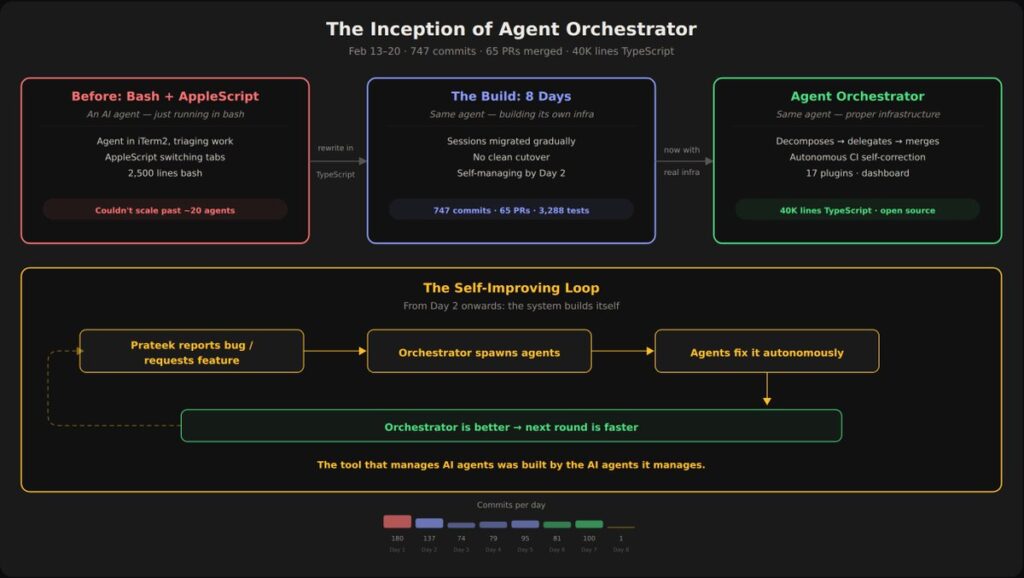
Autonomous Operations and Feedback Loops
Autonomy shines in reactive scenarios. When CI pipelines fail, the orchestrator routes failure logs directly to the originating agent. The agent analyzes output, applies fixes, and re-runs tests—up to the configured retry limit. Merge conflicts are managed through worktree isolation, with agents resolving them before PR updates.
For code reviews, incoming comments trigger the same loop: the agent receives context, proposes changes, and pushes updates. Approved and green PRs can auto-merge or notify you via desktop, Slack, or custom webhooks. Human intervention occurs only for final sign-off or escalated issues, dramatically reducing review cycles.
Monitor everything live in the dashboard, which includes terminal sessions, agent logs, and PR status. Exit gracefully with Ctrl+C to release system resources and idle-sleep prevention on macOS.
Best Practices for Production Workflows
To maximize value, start small with a single repository and gradually increase agent concurrency. Assign agents to narrow scopes to maintain focus. Regularly review reaction policies in the YAML file to balance automation with oversight. Combine with your existing CI/CD pipelines for end-to-end autonomy.
Teams using Agent Orchestrator report significant reductions in manual toil, faster feature delivery, and higher code quality through consistent agent-driven testing and reviews. As your codebase grows, the orchestrator scales effortlessly by spawning additional isolated agents without shared-state conflicts.
In summary, Agent Orchestrator delivers a production-ready solution for autonomous, parallel AI development. By following this guide, you can install, configure, and deploy it within minutes, unlocking a new era of self-improving engineering workflows. Dive in today and experience the future of agentic coding orchestration.








