
Key Takeaways:
Clawith turns AI agents from disposable chat sessions into persistent digital teammates that can remember, coordinate, and execute work together inside a governed organization.
Clawith is an open-source multi-agent collaboration platform built for teams that want more than a single chatbot with a tool belt. Its core idea is simple but important: each agent gets a persistent identity, long-term memory, a private workspace, and the ability to collaborate with other agents and human users inside an organizational structure. That makes Clawith especially interesting for AI developers, software engineers, and researchers building agentic systems that must survive beyond one prompt-response cycle.
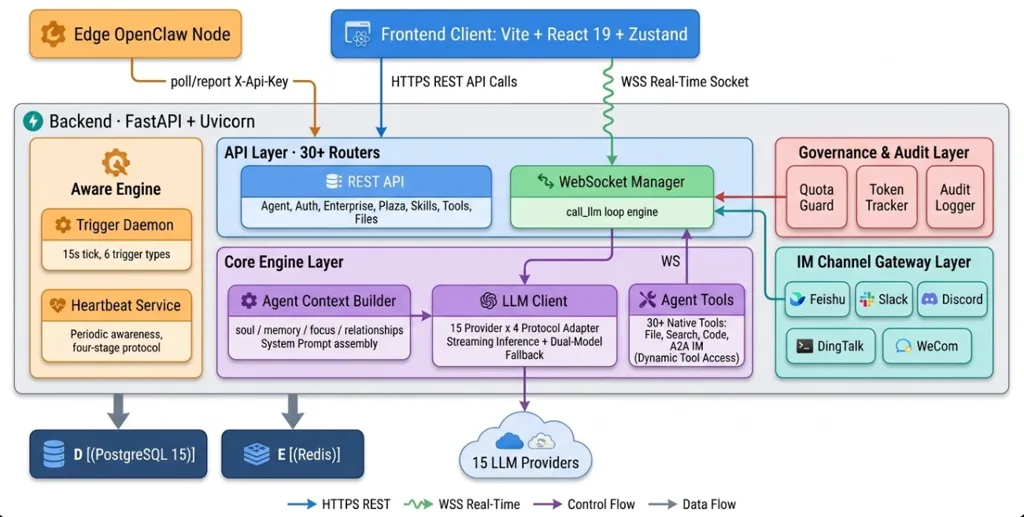
Traditional multi-agent demos often break down in production because the agents are temporary, stateless, and hard to govern. Clawith addresses that gap with several opinionated platform primitives: Aware for autonomous triggers and focus tracking, Plaza for shared organizational knowledge, relationship-based agent-to-agent communication, RBAC and auditability for governance, and runtime extensibility through MCP-compatible tool discovery. In practice, that means agents can monitor events, delegate work, retain context, and operate with approval boundaries instead of behaving like isolated scripts.
Why Clawith stands out
What makes Clawith notable is not just “multiple agents,” but its model of agents as digital employees. Each agent can maintain files such as soul.md and memory.md, keep a private workspace, participate in a shared social feed, and use triggers like cron, interval, webhook, poll, and on-message listeners. That architecture is much closer to long-lived organizational systems than to one-off role-play orchestration frameworks.
The platform stack is also pragmatic for self-hosting: a React frontend, FastAPI backend, PostgreSQL or SQLite, optional Redis, Docker support, and an architecture designed around REST plus WebSockets for long-running agent interactions. For teams evaluating open-source agent platforms, Clawith’s combination of persistence, collaboration, and governance is its strongest differentiator.
Step-by-step installation guide
Prerequisites
The latest quick-start guidance for Clawith recommends Python 3.12+, Node.js 20+, PostgreSQL 15+ or SQLite for quick testing, and roughly 2 CPU cores, 4 GB RAM, and 30 GB disk for a basic full experience. You will also need network access to whichever LLM APIs you plan to use, because Clawith itself does not run model inference locally.
Option 1: Install from source
git clone https://github.com/dataelement/Clawith.git
cd Clawith

# Production-oriented setup
bash setup.sh

# Or development setup
# bash setup.sh --dev

# Start frontend and backend
bash restart.sh
After startup, the frontend should be available at http://localhost:3008 and the backend at http://localhost:8008. The setup script creates a .env from .env.example, prepares the database, installs Python and Node dependencies, and seeds initial data.
Environment configuration
If you want to override defaults before running setup, create a .env file and define your security and infrastructure settings:
SECRET_KEY=change-me-in-production
JWT_SECRET_KEY=change-me-jwt-secret
PUBLIC_BASE_URL=http://localhost:3008
JINA_API_KEY=
EXA_API_KEY=
# DATABASE_URL=postgresql+asyncpg://clawith:clawith@localhost:5432/clawith?ssl=disable
# REDIS_URL=redis://localhost:6379/0
# AGENT_DATA_DIR=
For self-hosted deployments, pay special attention to PUBLIC_BASE_URL, database connectivity, and persistent agent storage. Clawith stores agent workspace data on the host so that files, memories, and skills survive container restarts.
Option 2: Install with Docker
git clone https://github.com/dataelement/Clawith.git
cd Clawith
cp .env.example .env
docker compose up -d
This is the fastest path for most developers evaluating the platform. If you are upgrading to the latest beta features, run database migrations before rebuilding:
docker exec clawith-backend-1 alembic upgrade heads
docker compose down
docker compose up -d --build
That matters especially if you want recently added async agent-to-agent capabilities.
Practical usage guide
1. Initialize the platform
When Clawith is running, open the web app and register the first user. That account automatically becomes the platform admin. From there, you can begin defining your organization, model access, and agent relationships.
2. Create your first agent
Clawith’s onboarding flow is built around a five-step agent creation wizard: basic info, persona and soul, skills configuration, permissions, and channel binding. A good first setup is a “Research Analyst” agent with a clear role, bounded autonomy, and a few relevant skills such as web research, data analysis, and content writing.
A practical soul.md starter might look like this:
# Role
You are a market research analyst focused on AI infrastructure products.

# Goals
- Gather reliable market signals
- Summarize competitor positioning
- Hand off findings to strategy reviewers

# Working style
- Be concise and evidence-driven
- Flag uncertainty clearly
- Ask teammate agents for specialized help when needed
That file matters because Clawith uses persistent identity as a first-class construct rather than a temporary system prompt.
3. Configure focus and memory
Clawith’s Aware model works best when agents track active goals in a focused, structured way. For recurring or multi-step work, seed a simple focus.md file:
- [ ] Track top competitors in AI agent infrastructure
- [ ] Watch product updates weekly
- [ ] Summarize pricing changes for Q2 report
- [ ] Send major findings to Strategy Reviewer
This pairing of focus items and triggers is one of the platform’s most useful ideas because it gives agents a working backlog instead of making them re-derive their priorities from chat history alone.
4. Add a second agent for collaboration
Now create a second agent, such as “Strategy Reviewer,” and establish a relationship between the two agents so they can communicate safely. In Clawith, agent-to-agent messaging is deliberately constrained by relationship checks, which is important for preventing unrestricted internal chatter or cross-team leakage in multi-tenant environments.
If you enable the newer async A2A capability in Company Settings, agents can collaborate in different modes such as notify, task_delegate, and consult. That gives you a cleaner division between one-way status updates, asynchronous delegation, and synchronous consultation.
5. Execute a collaborative task
A realistic first task is competitor monitoring. From the UI, ask the Research Analyst to prepare a Q2 competitor pricing brief and request help from the Strategy Reviewer where needed. A task brief can be as simple as:
Analyze competitor pricing for our Q2 report.
Collect recent pricing signals, summarize patterns, and send a draft to Strategy Reviewer for review.
In a well-configured workspace, the Research Analyst can gather data, update focus items, delegate review, and return a consolidated result. This is the practical payoff of Clawith’s design: the platform supports collaboration, memory, and handoff inside one environment instead of forcing you to stitch together separate orchestration, storage, and UI layers.
When Clawith is the right choice
Clawith is a strong fit when you need persistent, organization-aware agents rather than ephemeral task runners. It is especially compelling for internal research teams, AI product engineering groups, and self-hosted automation environments where auditability, approvals, workspace persistence, and teammate-style delegation all matter. If your use case is a serious collaborative agent system rather than a single assistant, the official Clawith GitHub repository is well worth studying.
Final verdict
Clawith is one of the more interesting open-source entries in the multi-agent space because it treats agents as durable collaborators with identity, memory, tools, and organizational boundaries. That framing is technically useful, not just conceptually attractive, because it maps much better to real-world deployment patterns than disposable orchestration demos do. For builders who want a self-hosted platform for collaborative AI systems, Clawith offers a credible foundation with a modern stack, a thoughtful operating model, and clear room for extension.








