Key Takeaways
ClawLess delivers a complete serverless browser-based runtime that lets Claw AI Agents execute Node.js code, install packages, edit files, and interact with a terminal entirely client-side — delivering enterprise-grade security and zero infrastructure costs through WebContainers-powered isolation.
ClawLess represents a fundamental shift in how developers deploy and interact with AI agents. Traditional AI agent frameworks require backend servers, persistent cloud infrastructure, and ongoing maintenance costs. ClawLess eliminates all of that by running everything directly inside the browser using WebContainers — a technology that brings a full Node.js environment to the client side via WebAssembly.
Built on the open GitAgent standard, ClawLess turns any modern browser into a powerful, sandboxed execution environment for Claw AI Agents. Whether you are experimenting with autonomous coding agents, building automated workflows, or testing agent behaviors in a controlled setting, ClawLess provides the runtime foundation without a single line of server code.
This article walks you through everything you need to know: what ClawLess is, why it matters, how to install and configure it, and how to start running sophisticated Claw AI Agents in minutes.
What is ClawLess and Why It Matters for AI Agents
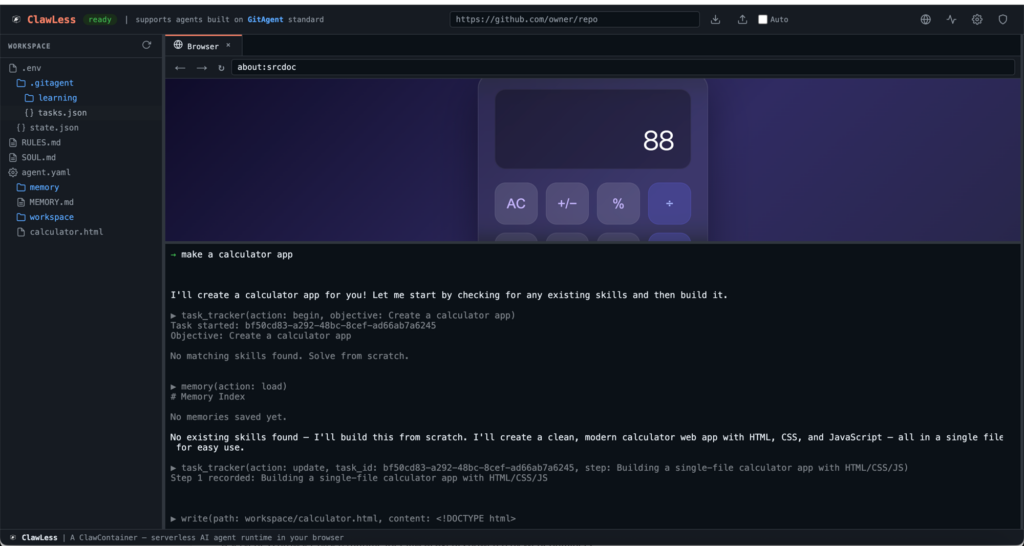
ClawLess is a serverless, browser-based runtime specifically designed for Claw AI Agents. It leverages WebContainers to create a virtualized Node.js operating system that runs entirely in the browser. This means your AI agents can perform real tasks — installing npm packages, writing files to a virtual filesystem, executing processes, and even generating outputs like PowerPoint presentations — all without ever touching a remote server or your host machine.
The core innovation lies in its complete isolation. Every agent operates inside a WASM sandbox with no access to the underlying operating system. This approach solves one of the biggest challenges in AI agent adoption: security and trust. Developers and enterprises can now experiment with powerful agents while maintaining strict boundaries through built-in policy engines and comprehensive audit logging.
For open-source enthusiasts and self-hosted advocates, ClawLess aligns perfectly with the movement toward local-first and privacy-focused AI tools. No vendor lock-in, no cloud bills, and full control over the execution environment make it an ideal choice for developers building the next generation of autonomous agents.
How ClawLess Works Under the Hood
At its heart, ClawLess uses WebContainers to emulate a complete Linux-like environment inside the browser. WebContainers translate Node.js and Linux system calls into WebAssembly instructions that modern browsers can execute at near-native speeds.
When you launch a Claw AI Agent through ClawLess, the runtime boots a fresh container instance. The agent receives:
- A virtual filesystem for reading and writing files
- A full-featured terminal powered by xterm.js
- A code editor based on Monaco (the same engine behind VS Code)
- Direct access to over 3.4 million npm packages
Network calls are intelligently intercepted, and all operations pass through a declarative policy engine defined in simple YAML. Every action — from process spawning to file modifications and git operations — is logged in a detailed audit trail.
This architecture ensures that even the most capable AI agents remain fully contained. The agent can generate code, install dependencies like pptxgenjs, create complex documents, and preview results live — all while staying completely isolated.
Key Features That Set ClawLess Apart
ClawLess packs enterprise-ready capabilities into a lightweight browser runtime:
- Full WebContainer Sandboxing
A true Node.js environment with process execution, file I/O, and package management — all running client-side. - Monaco Editor and xterm.js Terminal
Multi-tab file editing and a fully functional PTY terminal for interactive agent sessions. - YAML Policy Engine
Define exactly what agents can and cannot do using glob patterns for files, processes, and network access. - Complete Audit Logging
Every event is tracked and filterable, providing full observability into agent behavior. - GitHub Integration
Clone, commit, and push repositories directly through the browser using the GitHub API. - Plugin System and Templates
Extend functionality with lifecycle hooks and bootstrap agents from ready-made YAML templates. - Multi-Provider AI Support
Seamlessly connect to Anthropic, OpenAI, and Google models by simply providing API keys.
These features combine to create a development experience that feels like a full IDE and runtime environment, yet requires nothing more than a browser tab.
Getting Started: Installation and Setup
Setting up ClawLess is straightforward and requires only Node.js and a modern browser.
Prerequisites
- Node.js (version 18 or higher recommended)
- npm or yarn
- A modern browser with WebContainer support (Chrome, Edge, or Firefox with experimental flags if needed)
Local Development Installation
Clone the repository and start the development server:
git clone https://github.com/open-gitagent/clawless.git
cd clawless
npm install
npm run dev
Open your browser and navigate to the local development URL. The runtime will boot automatically, giving you immediate access to the full ClawLess environment.
Using ClawLess as a Dependency
For integration into your own projects, install the SDK package:
npm install clawcontainerThis lightweight package provides the ClawContainer class, allowing you to embed the full runtime into any web application.
Running Your First Claw AI Agent
Once installed, launching an agent takes just a few lines of code.
SDK Quick Start
import { ClawContainer } from 'clawcontainer';

const container = new ClawContainer('#app-container', {
  template: 'gitclaw',
  env: {
    ANTHROPIC_API_KEY: 'your-anthropic-key-here',
    CLAWLESS_MODEL: 'claude-sonnet-4-20250514'
  }
});

await container.start();

container.on('ready', () => {
  console.log('ClawLess runtime is ready for your AI agent');
});
Environment Variables
Configure AI providers and model preferences easily:
| Variable | Purpose |
|---|---|
| ANTHROPIC_API_KEY | Anthropic Claude models |
| OPENAI_API_KEY | OpenAI GPT models |
| GOOGLE_AI_API_KEY | Google Gemini models |
| CLAWLESS_MODEL | Specific model selection |
Runtime state persists in localStorage, so your workspace survives page refreshes during development sessions.
Try the Interactive Playground
For a no-code experience, visit the official playground at https://play.clawless.io. Define agent policies in YAML, click “Go,” and watch a complete Claw AI Agent boot directly in your browser. This is the fastest way to experience the power of serverless agent execution.
Mastering Security with Policies and Audits
Security is non-negotiable when working with autonomous AI agents. ClawLess provides two powerful tools for control.
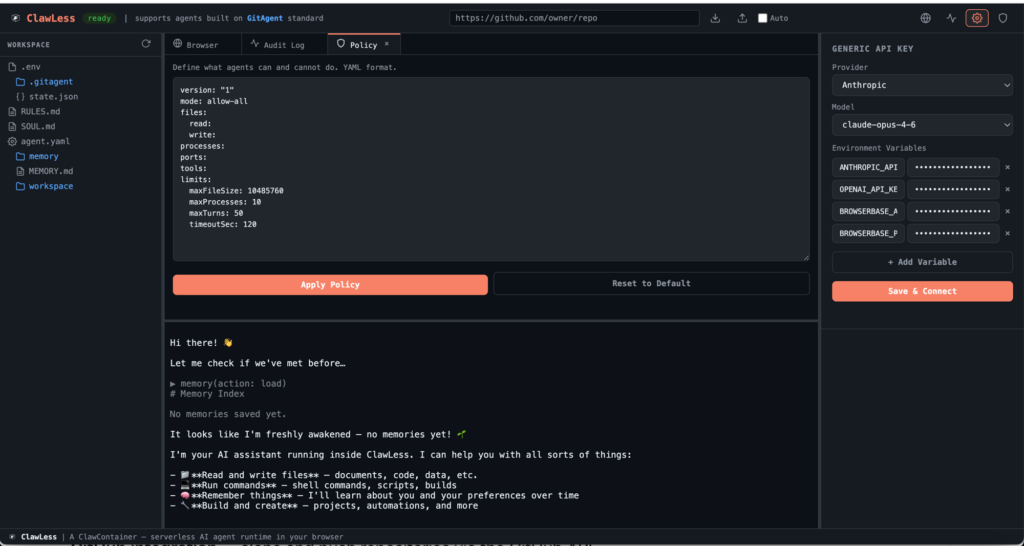
The Policy Engine
Write declarative rules in YAML to restrict file access, block dangerous processes, or limit network calls. Policies use glob patterns, making them both powerful and intuitive.
Audit Logging
Every action taken by the agent is automatically recorded. Review process executions, file modifications, network requests, and git operations in a clean, filterable interface.
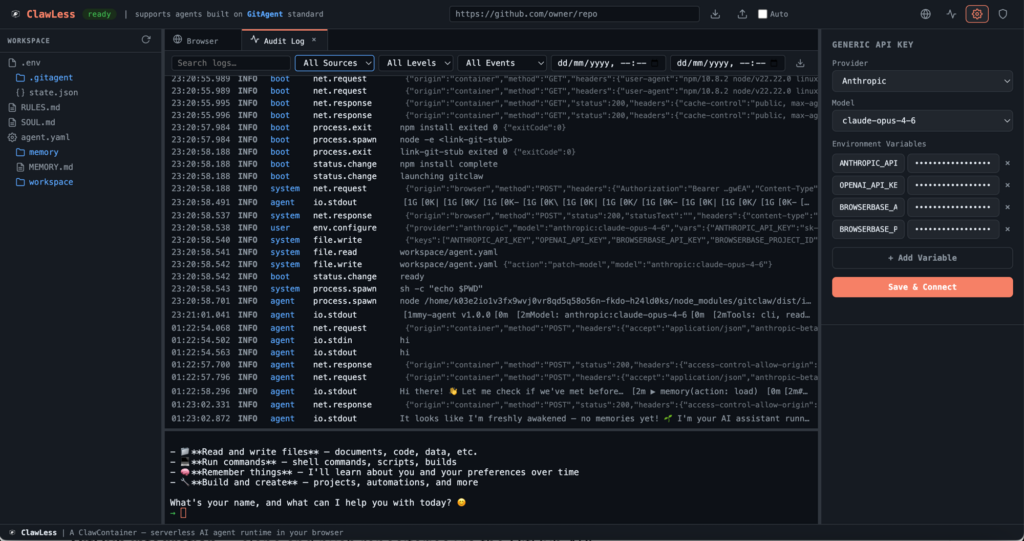
These features give developers and security teams complete visibility and control without sacrificing the flexibility that makes AI agents valuable.
Real-World Examples and Use Cases
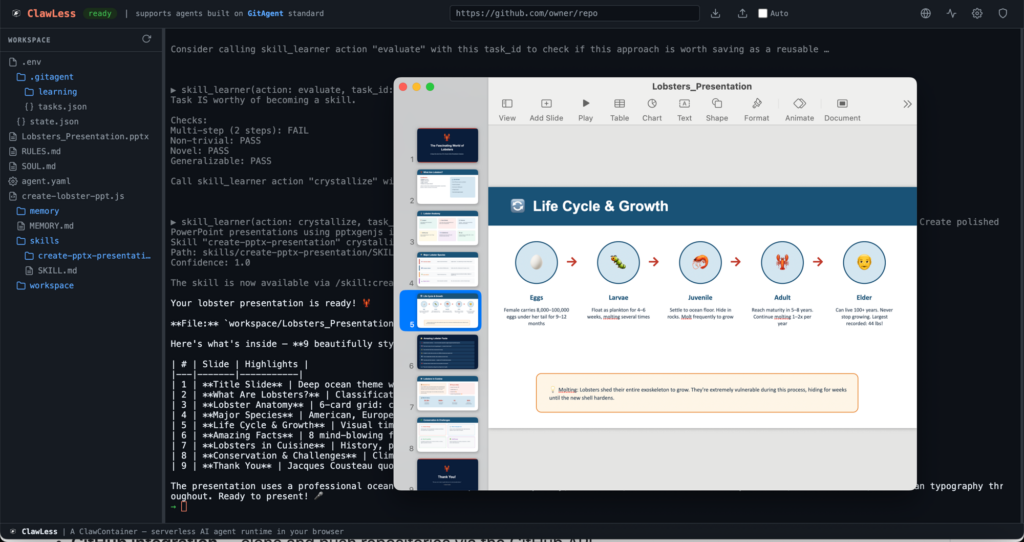
ClawLess shines in practical scenarios. One compelling demonstration involves an agent installing the pptxgenjs package, generating a professional nine-slide PowerPoint presentation complete with charts, images, and custom styling — all executed entirely in the browser.
Other common use cases include:
- Rapid prototyping of web applications with live preview
- Automated code generation and refactoring workflows
- Data processing pipelines that leverage the full npm ecosystem
- Educational tools for teaching AI agent behavior in controlled sandboxes
Because everything runs locally, these workflows scale effortlessly across any device with a browser.
Advanced Capabilities and Extensibility
ClawLess goes beyond basic execution with its plugin system and template marketplace (planned for future releases). Developers can hook into lifecycle events to add custom monitoring, logging, or integration logic.
The template system allows teams to version-control agent configurations in Git, ensuring consistent behavior across projects and team members.
Limitations to Consider
While powerful, ClawLess has some natural constraints inherent to browser-based runtimes:
- Performance depends on the host device’s resources
- Persistent storage across browser sessions is limited to localStorage (with persistent filesystem improvements on the roadmap)
- Network capabilities are subject to browser security policies
- Very large package installations may take longer due to browser download limits
The project roadmap includes multi-agent orchestration, cloud deployment options, and enhanced debugging tools to address these areas over time.
Conclusion: The Future of Browser-Native AI Agents
ClawLess proves that powerful AI agents no longer require complex server infrastructure. By combining WebContainers, robust security primitives, and a delightful developer experience, it opens new possibilities for self-hosted, privacy-first AI development.
Whether you are an individual developer exploring autonomous agents, a startup building internal tools, or an enterprise evaluating secure AI runtimes, ClawLess offers a compelling path forward.
Start exploring today by visiting the official GitHub repository at https://github.com/open-gitagent/clawless. For the latest updates and documentation, check the project homepage at https://www.clawless.io. Clone the repo, run your first agent, and experience the freedom of truly serverless AI agents running in your browser.
The era of browser-native AI agents has arrived — and ClawLess is leading the way.