
 By
By ComfyUI: The Most Powerful Open-Source Diffusion Model GUI with a Node-Based Interface
Key Takeaways: ComfyUI is the industry-standard open-source GUI for diffusion models — a fully offline, self-hosted, node-based pipeline builder that supports every major image, video, audio, and 3D generation model, runs on any GPU brand or CPU, and ships as a one-click desktop app or a flexible Python installation.
What Is ComfyUI?
ComfyUI is a modular, graph-based graphical interface, API server, and execution backend for diffusion models. Where most AI image tools offer a simple prompt-and-generate interface, ComfyUI exposes the entire generation pipeline as a visual graph of interconnected nodes — each node representing a discrete operation such as loading a model, encoding a prompt, sampling latents, decoding to pixels, or applying post-processing. Connecting these nodes in different configurations produces different pipelines, and those pipelines can be saved, shared, and reloaded as JSON files or extracted directly from generated image metadata.
ComfyUI runs on Windows, Linux, and macOS, supports hardware from NVIDIA, AMD, Intel Arc, Apple Silicon, Ascend NPUs, Cambricon MLUs, and plain CPU, and is fully offline by design — the core will never download anything unless explicitly instructed. Its official website is comfy.org.
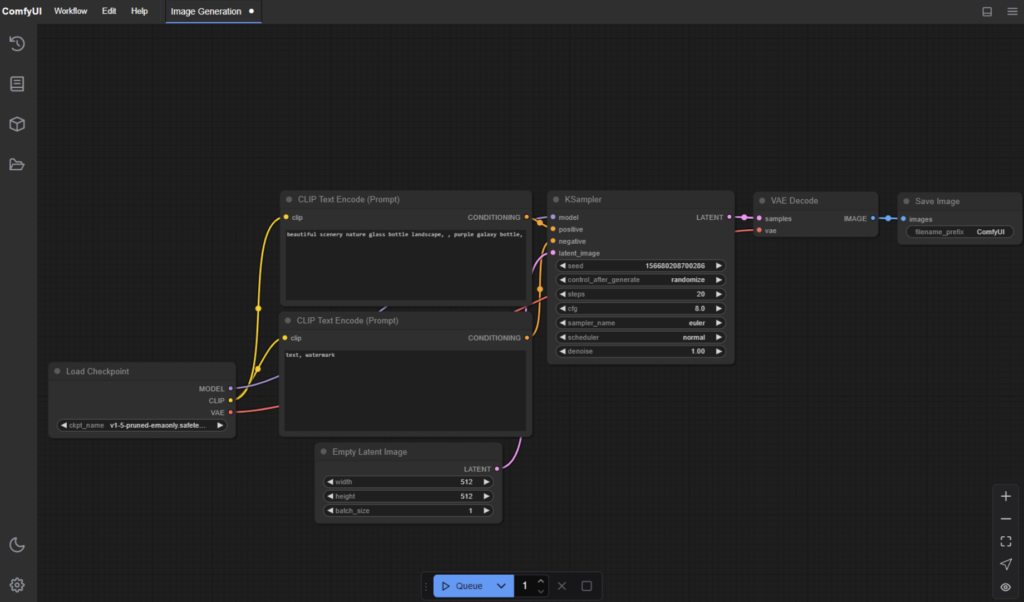
Why ComfyUI Stands Apart
The node interface is the defining characteristic of ComfyUI, but the deeper advantage is execution efficiency. ComfyUI’s asynchronous queue system only re-executes the parts of a workflow that have changed between runs. If only the prompt text changes, only the CLIP encoding and downstream sampling nodes re-execute — the model load and VAE decode nodes are cached. This makes iteration dramatically faster than tools that re-run the full pipeline on every generation.
Smart memory management allows ComfyUI to run large models on GPUs with as little as 1 GB of VRAM through automatic layer offloading. On systems with more memory, it maximizes throughput by keeping more of the model resident. CPU-only inference is also supported via the --cpu flag, at reduced speed.
Workflows embedded in generated PNG, WebP, and FLAC files mean that every output carries its full reproducible pipeline — seeds, model names, node configuration — and any of those files can be dragged back into the interface to reload the exact workflow that produced it.
Supported Models and Capabilities
Image Generation Models
ComfyUI natively supports the full history of Stable Diffusion and modern frontier image models:
- SD1.x, SD2.x, SDXL, SDXL Turbo, Stable Cascade, SD3 and SD3.5
- Flux and Flux 2 (Black Forest Labs)
- Flux Kontext (image editing)
- HunyuanDiT, Hunyuan Image 2.1
- HiDream, HiDream E1.1
- Pixart Alpha and Sigma, AuraFlow, Lumina Image 2.0
- Qwen Image and Qwen Image Edit, Z Image, Omnigen 2
Beyond raw generation, ComfyUI supports ControlNet and T2I-Adapter, inpainting with both regular and dedicated inpainting models, LoRAs (regular, LoCon, LoHA), Hypernetworks, Textual Inversion embeddings, LCM models, GLIGEN spatial conditioning, area composition, upscaling via ESRGAN, SwinIR, and Swin2SR, and full model merging.
Video, Audio, and 3D Models
ComfyUI’s model support extends well beyond image generation:
- Video: Stable Video Diffusion, Mochi, LTX-Video, Hunyuan Video, Hunyuan Video 1.5, Wan 2.1, Wan 2.2
- Audio: Stable Audio, ACE Step
- 3D: Hunyuan3D 2.0
This breadth means a single ComfyUI installation serves as the unified backend for multimodal generative workflows.
Installation Guide
Option 1: Desktop Application
The fastest path to a running ComfyUI. Download the installer from comfy.org/download. The desktop app is available for Windows and macOS and handles Python, PyTorch, and all dependencies automatically.
Option 2: Windows Portable Package
For users who want the latest commits without an installer, download the portable build directly from the GitHub releases page:
- NVIDIA (CUDA 13.0, Python 3.13):
ComfyUI_windows_portable_nvidia.7z - NVIDIA (CUDA 12.6, Python 3.12, supports older 10-series GPUs):
ComfyUI_windows_portable_nvidia_cu126.7z - AMD (experimental):
ComfyUI_windows_portable_amd.7z
Extract with 7-Zip and run the included launcher. Place model checkpoints in ComfyUI\models\checkpoints.
Option 3: comfy-cli
For a managed, cross-platform installation via the command line:
pip install comfy-cli
comfy install
comfy-cli handles Python environment setup, PyTorch installation for the detected hardware, and repository cloning.
Option 4: Manual Installation
For full control on any operating system:
# Clone the repository
git clone https://github.com/Comfy-Org/ComfyUI.git
cd ComfyUI

# Install dependencies (after installing PyTorch — see below)
pip install -r requirements.txt

# Run
python main.py
Python 3.13 is well supported. Python 3.12 is recommended if any custom node dependencies have issues with 3.13.
GPU-Specific PyTorch Setup
Install the correct PyTorch build for your hardware before running pip install -r requirements.txt:
NVIDIA (CUDA 13.0):
pip install torch torchvision torchaudio --extra-index-url https://download.pytorch.org/whl/cu130AMD (Linux, ROCm 7.1):
pip install torch torchvision torchaudio --index-url https://download.pytorch.org/whl/rocm7.1AMD RDNA 3 (Windows/Linux, experimental):
pip install --pre torch torchvision torchaudio --index-url https://rocm.nightlies.amd.com/v2/gfx110X-all/AMD RDNA 4 (RX 9000 series):
pip install --pre torch torchvision torchaudio --index-url https://rocm.nightlies.amd.com/v2/gfx120X-all/Intel Arc (XPU):
pip install torch torchvision torchaudio --index-url https://download.pytorch.org/whl/xpuApple Silicon (macOS): Install PyTorch nightly following the Apple Developer Metal guide, then run python main.py.
Model Organization
ComfyUI uses a structured directory layout under models/:
| Directory | Contents |
|---|---|
models/checkpoints | Main model files (.ckpt, .safetensors) |
models/vae | Standalone VAE files |
models/loras | LoRA, LoCon, LoHA files |
models/embeddings | Textual inversion / embedding files |
models/controlnet | ControlNet model files |
models/upscale_models | ESRGAN, SwinIR, and other upscalers |
models/vae_approx | TAESD decoder files for live previews |
To share models with another Stable Diffusion interface already installed on the system, rename extra_model_paths.yaml.example to extra_model_paths.yaml and edit it to point to the existing model directories. This eliminates the need to duplicate large model files.
ComfyUI-Manager
ComfyUI-Manager is the official extension for discovering, installing, updating, and removing custom nodes. It is bundled with recent versions and activated at launch:
# Install manager dependencies (if not already installed)
pip install -r manager_requirements.txt

# Launch ComfyUI with the Manager enabled
python main.py --enable-manager
With the Manager active, a dedicated panel appears in the interface for browsing the full catalogue of community custom nodes, installing them with one click, and checking for updates.
Running ComfyUI
The standard launch command is:
python main.pyThe web interface is served at http://127.0.0.1:8188 by default.
Useful Launch Flags
| Flag | Purpose |
|---|---|
--cpu | Force CPU inference (no GPU required) |
--enable-manager | Activate ComfyUI-Manager |
--preview-method taesd | Enable high-quality generation previews |
--preview-method auto | Enable automatic preview method selection |
--disable-api-nodes | Disable optional paid API model integrations |
--front-end-version Comfy-Org/ComfyUI_frontend@latest | Use the latest daily frontend build |
--tls-keyfile key.pem --tls-certfile cert.pem | Enable HTTPS |
--listen | Make the server accessible on the local network |
For TAESD previews, download the four decoder files (taesd_decoder.pth, taesdxl_decoder.pth, taesd3_decoder.pth, taef1_decoder.pth) from the TAESD repository and place them in models/vae_approx/.
Using the Node Interface
Building and Navigating Workflows
The canvas opens with a default text-to-image workflow already loaded. Nodes can be added by double-clicking any empty area on the canvas to open the node search palette. Connect node outputs to node inputs by dragging between their respective sockets. Connections carry typed data — models, latents, images, conditioning — and ComfyUI enforces type compatibility to prevent invalid connections.
Only nodes that are reachable from an output node and have complete inputs will execute. Nodes can be muted (Ctrl+M) to bypass them without deleting connections, or bypassed (Ctrl+B) to route connections through as if the node were absent.
Essential Keyboard Shortcuts
| Shortcut | Action |
|---|---|
Ctrl + Enter | Queue current workflow for generation |
Ctrl + Alt + Enter | Cancel current generation |
Ctrl + S | Save workflow as JSON |
Ctrl + O | Load workflow from JSON |
Ctrl + Z / Ctrl + Y | Undo / Redo |
Ctrl + G | Group selected nodes |
Double-click | Open node search palette |
. | Fit entire graph to view |
Space + drag | Pan the canvas |
Loading Workflows From Generated Images
Any PNG, WebP, or FLAC file produced by ComfyUI contains the full workflow and seed as embedded metadata. Drag the file directly onto the ComfyUI canvas, or use Ctrl+O to load it, to restore the exact pipeline that produced it. This makes sharing and reproducing results trivial.
Use Cases
ComfyUI’s architecture makes it applicable across a wide range of professional and research scenarios:
- Production image pipelines: Studios and individual creators build multi-stage workflows combining upscalers, inpainting, ControlNet, and LoRA conditioning that would be impossible to replicate in simpler UIs.
- Video generation workflows: The support for Hunyuan Video, Wan 2.2, LTX-Video, and Mochi makes ComfyUI the primary interface for running local open-source video diffusion models.
- Automated batch processing: ComfyUI’s API server accepts JSON workflow payloads over HTTP, enabling automated generation pipelines driven by external scripts, web applications, or CI/CD systems.
- Research and model evaluation: Researchers use the node interface to construct precise, reproducible experiments — varying individual pipeline components, samplers, or conditioning while keeping all other variables constant.
- Custom model deployment: Organizations running private fine-tuned models self-host ComfyUI as the serving layer, exposing its API to internal applications without any external dependency.
- Multimodal workflows: A single workflow can chain image generation, video generation, and audio generation nodes, producing coordinated multimedia output from a single queue submission.
Extension and Development Ideas
ComfyUI’s custom node system is the basis of a large ecosystem. Several directions are immediately accessible:
- Custom node development: Any Python class that implements the ComfyUI node interface can be installed via ComfyUI-Manager and exposed in the visual graph. This is the standard path for integrating new models, post-processors, or external API calls into the pipeline.
- API-driven automation: ComfyUI’s HTTP API accepts workflow JSON directly, enabling workflows to be submitted programmatically from Python scripts, web backends, or any HTTP client — making ComfyUI a viable headless generation server.
- Model path federation: The
extra_model_paths.yamlconfiguration allows ComfyUI to serve as a unified frontend for models distributed across multiple directories or existing Stable Diffusion installations. - TLS and network deployment: Enabling TLS with a signed certificate and the
--listenflag makes ComfyUI accessible as a shared generation server on a private network or behind a reverse proxy. - Workflow templating systems: The JSON workflow format is machine-readable, making it practical to generate workflows programmatically — for example, populating templates with dynamic prompts or model selections from an external database.
Conclusion
ComfyUI has become the reference standard for local diffusion model pipelines for good reason. The node interface exposes the full generative process in a way that no fixed-UI tool can match, the execution engine is engineered for efficiency, and the hardware support covers every platform serious users are likely to run. Whether the goal is a simple text-to-image workflow, a complex multi-stage video pipeline, or a headless API server for a production application, ComfyUI provides the primitives to build it.
GitHub: https://github.com/Comfy-Org/ComfyUI
Official Website: https://www.comfy.org/
Desktop Download: https://www.comfy.org/download
Example Workflows: https://comfyanonymous.github.io/ComfyUI_examples/
Documentation: https://docs.comfy.org/
Community Discord: https://comfy.org/discord
License: GPL-3.0