
Key Takeaways
DS2API is the lightweight, high-concurrency Go middleware that instantly turns DeepSeek’s web capabilities into production-ready OpenAI-, Claude-, and Gemini-compatible APIs you can self-host with Docker in minutes, complete with multi-account rotation and enterprise controls.
DeepSeek delivers some of the most capable open-weight models available today, yet many developers struggle with its web-only interface or rate-limited official endpoints. DS2API solves this problem elegantly by acting as a universal protocol translator. It accepts requests in the exact formats expected by the OpenAI SDK, Anthropic SDK, Google Gemini SDK, LangChain, LlamaIndex, and virtually any other client, then forwards them to DeepSeek while handling authentication, streaming, tool calling, and load balancing behind the scenes.
Whether you want to run a private AI gateway for your team, integrate DeepSeek into existing enterprise tooling, or simply gain full control over your inference stack, DS2API gives you that power without writing custom adapters or managing multiple services.
What Makes DS2API Stand Out
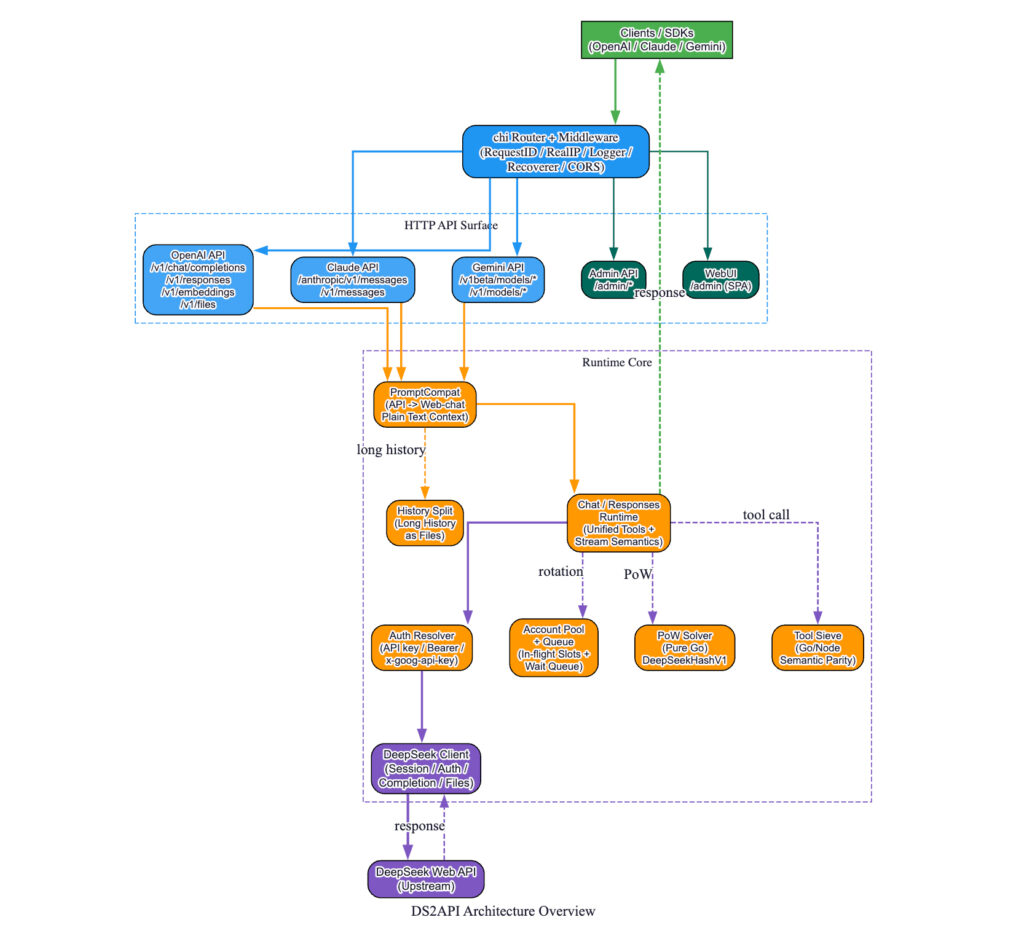
DS2API is written entirely in Go (with a small React admin panel) and ships as a single binary or Docker image. It supports three major protocol surfaces simultaneously:
- OpenAI-compatible endpoints (
/v1/chat/completions,/v1/responses, embeddings, files) - Claude-compatible endpoints (
/anthropic/v1/messages) - Gemini-compatible endpoints (
/v1beta/models/...:generateContent)
Additional highlights include native DeepSeek PoW solving in pure Go, automatic multi-account rotation with token refresh, per-account concurrency limits plus waiting queues, structured tool calling with anti-leak protection, and a beautiful bilingual WebUI for monitoring and configuration.
The project is actively maintained on GitHub and already powers production workloads for developers who need reliable, private access to DeepSeek models.
Why Self-Host DS2API?
Running your own instance gives you several decisive advantages:
- Privacy & Compliance – All traffic stays inside your infrastructure; no data leaves your network.
- Cost Control – Use your own DeepSeek accounts and avoid third-party proxy markups.
- Reliability – Built-in account pooling and queue management prevent 429 errors during peak usage.
- Flexibility – Switch between
deepseek-v4-flash,deepseek-v4-pro, vision models, and thinking modes using familiar aliases such asgpt-4.1orclaude-sonnet-4-6. - Observability – Real-time admin API and WebUI let you inspect live conversations, test accounts, and hot-reload configuration.
Installation Guide – Choose Your Preferred Method
Prerequisites
- Docker & Docker Compose (recommended) or a Linux/macOS/Windows machine with Go 1.26+
- At least one DeepSeek account (email or mobile login)
- A strong admin key for protecting the management interface
Option 1: Docker (Recommended for Most Users)
git clone https://github.com/CJackHwang/ds2api.git
cd ds2api
cp .env.example .env
cp config.example.json config.json
Edit config.json to add your DeepSeek credentials and desired client API keys. Then start the service:
docker compose up -d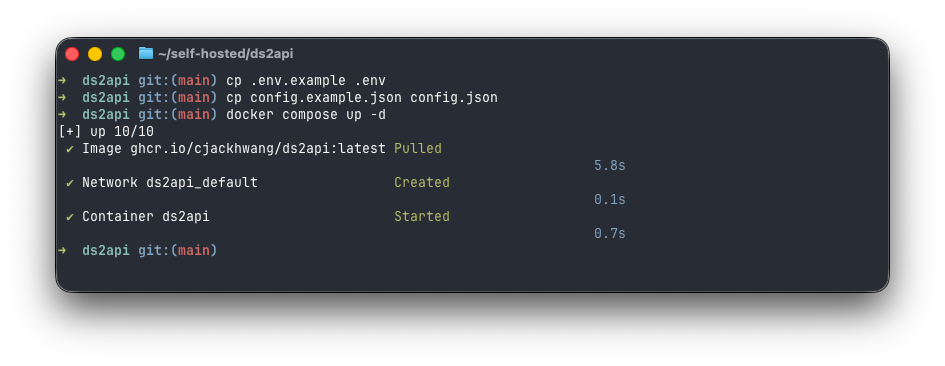
The container exposes port 5001 on the host. Visit http://localhost:5001/admin to access the WebUI.
Health checks are available at /healthz and /readyz for orchestration tools such as Kubernetes or Portainer.
Option 2: Pre-built Binary (Fastest Local Start)
Download the latest release for your platform from the GitHub Releases page, extract, copy the example config, and run:
./ds2apiNo external dependencies required.
Option 3: From Source
git clone https://github.com/CJackHwang/ds2api.git
cd ds2api
cp config.example.json config.json
go run ./cmd/ds2api
The build process automatically compiles the React WebUI when Node.js is present.
Option 4: Vercel Serverless (Zero-Infra Option)
Fork the repository, import into Vercel, set the required environment variables (DS2API_ADMIN_KEY and base64-encoded DS2API_CONFIG_JSON), and deploy. The included Node.js edge function handles streaming responses perfectly.
Essential Configuration
The heart of DS2API lives in config.json. Key sections include:
keys/api_keys– Client-facing Bearer tokensaccounts– Array of DeepSeek login credentials (supports multiple for rotation)model_aliases– Map friendly names to actual DeepSeek modelsruntime– Concurrency limits, queue sizes, token refresh intervalsthinking_injection– Automatically append thinking prompts when needed
Environment variables override any JSON value, making containerized deployments trivial.
Using DS2API in Practice
OpenAI SDK Example (Python)
from openai import OpenAI

client = OpenAI(
    base_url="http://localhost:5001/v1",
    api_key="your-ds2api-key-here"
)

response = client.chat.completions.create(
    model="deepseek-v4-pro",   # or gpt-4.1 alias
    messages=[{"role": "user", "content": "Explain quantum computing in simple terms"}],
    stream=True
)

for chunk in response:
    print(chunk.choices[0].delta.content or "", end="")
Claude SDK Example
import anthropic

client = anthropic.Anthropic(
    base_url="http://localhost:5001/anthropic",
    api_key="your-ds2api-key-here"
)

message = client.messages.create(
    model="claude-sonnet-4-6",
    max_tokens=1024,
    messages=[{"role": "user", "content": "Write a haiku about self-hosted AI"}]
)
print(message.content[0].text)
Gemini SDK Example
import google.generativeai as genai

genai.configure(
    api_key="your-ds2api-key-here",
    transport="rest",
    client_options={"api_endpoint": "http://localhost:5001/v1beta"}
)

model = genai.GenerativeModel("gemini-2.5-pro")
response = model.generate_content("Tell me a story about a helpful middleware")
print(response.text)
Tool Calling & Structured Output
DS2API correctly parses and forwards tool calls in both XML and JSON formats while protecting against prompt injection. Set tool_choice: "required" and watch the streaming deltas arrive exactly as your client expects.
Checking Live Status
curl http://localhost:5001/admin/queue/status \
  -H "Authorization: Bearer your-admin-key"
Managing Your Instance with the WebUI
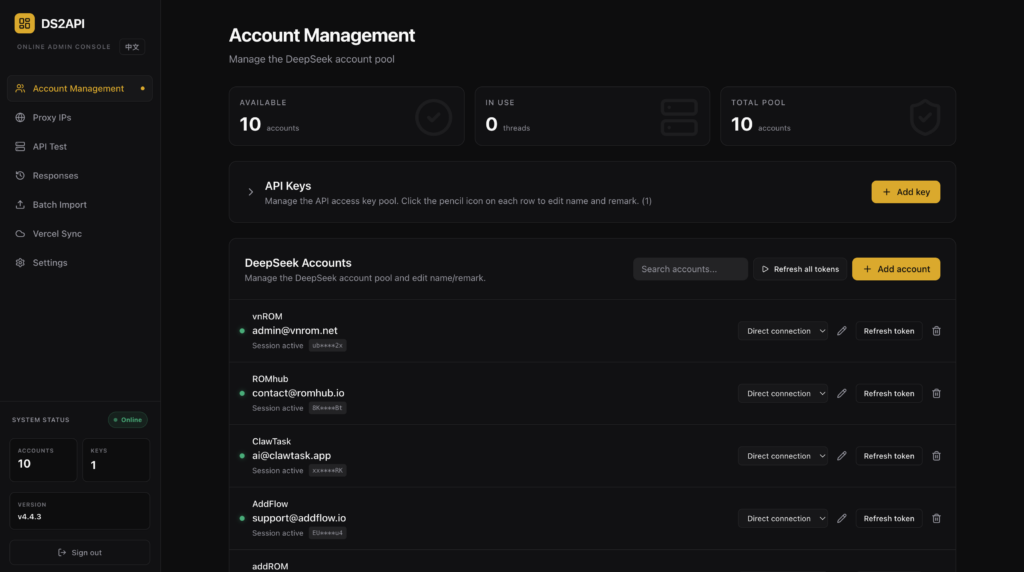
Point your browser to http://your-server:5001/admin. The React SPA offers:
- Live conversation history
- Real-time account health checks
- Configuration editor with hot reload
- Session cleanup tools
- Bilingual interface (English / 中文) and dark mode
No more digging through logs—everything you need to operate DS2API at scale lives in one beautiful dashboard.
Performance & Best Practices
- Default per-account concurrency is 2; increase carefully based on your DeepSeek plan.
- Enable automatic session cleanup in
config.jsonto keep memory usage low. - Use the built-in PoW solver—it adds only milliseconds of latency while satisfying DeepSeek’s proof-of-work requirements.
- For production, place DS2API behind a reverse proxy (Caddy or Nginx) with TLS and rate limiting.
- Monitor
/readyzin your load balancer to drain connections gracefully during restarts.
Conclusion – Start Building Today
DS2API removes the friction between DeepSeek’s exceptional models and the tools you already love. Whether you deploy it on a Raspberry Pi for personal use or on a Kubernetes cluster for your entire organization, you gain a future-proof, standards-compliant AI gateway that respects your data and your budget.
The project is fully open source under a permissive license. Star it, fork it, and contribute at: https://github.com/CJackHwang/ds2api
Ready to get started? Clone the repository, spin up Docker, and make your first request in under five minutes. Your self-hosted DeepSeek experience just leveled up.
Happy building!








