Key Takeaways
Ever Gauzy is a self-hostable, open-source business management platform that combines ERP, CRM, HRM, project management, recruiting, invoicing, and employee time tracking in one extensible TypeScript application.
What Is Ever Gauzy?
Ever Gauzy is an open-source business management platform designed to bring functions that would normally live in several SaaS products into a single system. It covers Enterprise Resource Planning (ERP), Customer Relationship Management (CRM), Human Resource Management (HRM), Applicant Tracking (ATS), project and task management, employee time tracking, productivity monitoring, accounting, invoicing, inventory, and reporting.
The project is developed primarily in TypeScript. Its stack includes a Node.js/NestJS backend, an Angular frontend, Nx and Lerna for its monorepo, and database tooling including TypeORM and MikroORM. It can also expose REST and GraphQL APIs, making Gauzy useful as a headless business-management backend as well as a complete web application.
You can explore the source code in the Ever Gauzy GitHub repository or visit the Ever Gauzy website.
One of Gauzy’s distinguishing ideas is transparency. The project originally grew from a system intended to help an IT agency connect employee work, revenue, expenses, billing, and profit sharing. It later expanded into the broader ERP/CRM/HRM platform available today.
Why Choose Ever Gauzy?
Ever Gauzy is particularly interesting when you want more control than a conventional hosted business SaaS provides. Because the project is self-hostable, organizations can operate the application and its supporting services on infrastructure they control rather than depending entirely on a third-party SaaS account. The repository provides Docker Compose configurations, source-based development instructions, desktop applications, and production deployment options including Kubernetes.
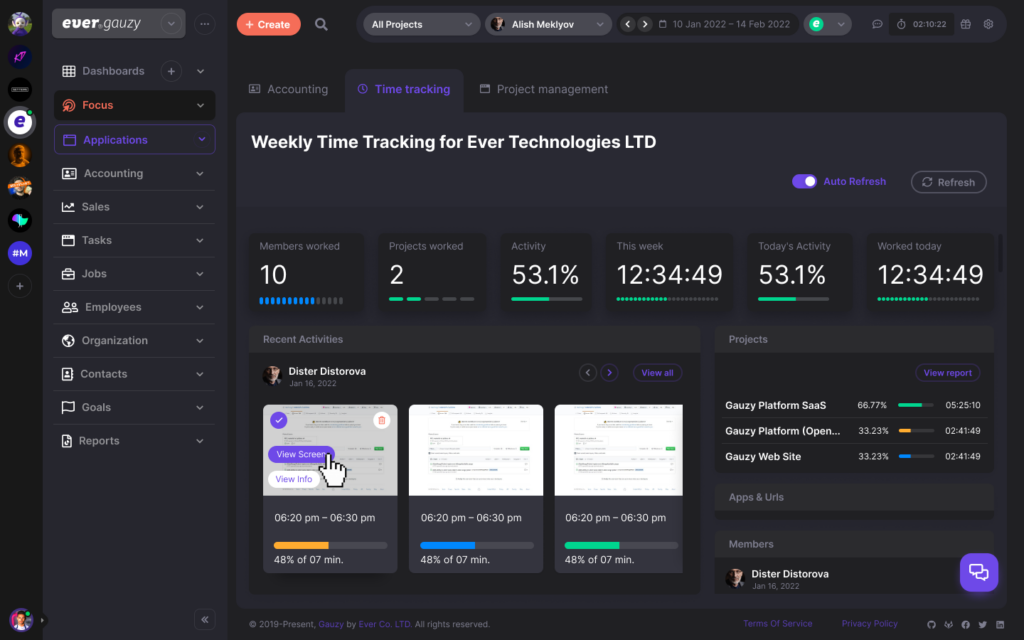
The feature set is unusually broad. A team can manage employees and contractors, customers and leads, projects and tasks, timesheets, schedules, expenses, invoices, payments, time off, inventory, organizational departments, permissions, reports, and integrations from the same platform.
Gauzy is therefore most compelling for software agencies, consulting businesses, remote teams, startups, freelancers, and small-to-medium organizations that want to connect people, projects, tracked time, customers, and financial operations rather than maintaining separate systems for each function.
The source repository is licensed under GNU AGPL version 3. Anyone planning substantial modifications or a proprietary commercial deployment should review the license obligations and Gauzy’s available commercial licensing options before deployment.
Install Ever Gauzy with Docker Compose
For evaluating Gauzy, Docker Compose is the simplest place to start. The project currently requires Docker Compose v2.20 or newer for its Compose-based setup. The repository provides separate configurations for demo use, production-style infrastructure, local image builds, and infrastructure-only deployments.
Clone the repository:
git clone https://github.com/ever-co/ever-gauzy.git
cd ever-gauzy
Start the lightweight demo configuration:
docker-compose -f docker-compose.demo.yml upThe current demo Compose configuration launches a PostgreSQL database together with the Gauzy API and web application using prebuilt container images. The API is exposed on port 3000, while the web application is available on port 4200.
Once the containers are running, open:
http://localhost:4200For the repository’s seeded demo environment, the documented Super Admin credentials are:
Email: [email protected]
Password: admin
These credentials are strictly appropriate for local evaluation and must not be treated as production credentials.
To stop the stack, use:
docker-compose -f docker-compose.demo.yml downFor a persistent production-oriented Compose deployment, Gauzy also provides docker-compose.yml. Unlike the small demo stack, that configuration includes a larger infrastructure environment with components such as PostgreSQL, Redis, OpenSearch, MinIO, Cube, and Zipkin.
Install Ever Gauzy from Source for Development
Running from source is preferable when you intend to customize Gauzy, build plugins, change the user interface, contribute patches, or work directly with its backend.
The current installation documentation targets Node.js LTS releases such as Node.js 22 or 24 and Yarn 1.22.x. The project is structured as an Nx/Lerna monorepo, so its bootstrap process installs and links packages across the workspace.
Install Yarn if necessary:
npm install -g yarnClone and bootstrap Gauzy:
git clone https://github.com/ever-co/ever-gauzy.git
cd ever-gauzy
yarn bootstrap
For local configuration, you can copy the environment template:
cp .env.sample .envThen start both the backend and frontend:
yarn startBy default, the web UI runs at:
http://localhost:4200and the API runs at:
http://localhost:3000/apiDuring an initial development startup, Gauzy can seed the database with the minimum data needed to use the application. The repository also exposes yarn seed for reseeding and yarn seed:all for generating a much larger demo dataset; destructive seed commands should never be casually executed against production data.
For development and demos, Gauzy can operate with a local database configuration, while the project recommends PostgreSQL for production workloads.
How to Use Ever Gauzy After Installation
The easiest way to understand Gauzy is to think in terms of a business workflow rather than individual screens.
Start by configuring your organization and its basic business settings. From there, create employees or contractors, departments and teams, customers or clients, and the projects those people will work on. Gauzy’s data model supports multiple organizations as well as organizational teams, clients, vendors, roles, permissions, and employee records.
Next, connect work to projects. Create projects and tasks, assign people, and use Gauzy’s time-management features to record time against that work. Time tracking is one of the platform’s core capabilities, alongside timesheets, employee activity monitoring, and productivity reporting.
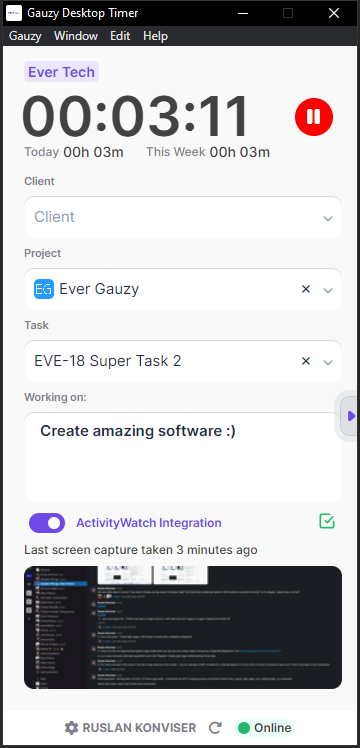
Employees that primarily need time tracking can use the dedicated Gauzy Desktop Timer. The project describes the timer as an employee-focused application supporting time and activity tracking, including screenshots and activity monitoring, without requiring workers to use every ERP or accounting feature in the main application.
Once projects and tracked time are flowing through the system, you can connect the operational data to Gauzy’s financial features, including expenses, estimates, invoices, payments, income tracking, billing, and reporting. CRM functions can meanwhile handle contacts, leads, customers, and sales pipelines.
That combination is where Gauzy becomes more than a timer or project manager: the same platform can represent who performed the work, what project they worked on, how much time was recorded, which customer owns the project, and how the work affects billing and financial reporting.
Production and Security Notes
A demo installation should not simply be exposed to the public internet.
The production .env.compose file intentionally leaves critical authentication secrets empty. Before running the production configuration, generate unique values for JWT_SECRET, JWT_REFRESH_TOKEN_SECRET, JWT_VERIFICATION_TOKEN_SECRET, and EXPRESS_SESSION_SECRET. Current Gauzy code is designed to refuse a normal production startup when those secrets remain empty or use known insecure defaults.
For example, generate random secrets with:
openssl rand -hex 64Run that command separately for each secret rather than reusing one value.
You should also replace default database credentials, set API_BASE_URL and CLIENT_BASE_URL to your real HTTPS domains, restrict ALLOWED_ORIGINS to trusted origins, configure SMTP if you need invitations or password-reset emails, and choose appropriate persistent storage. Gauzy supports local storage as well as S3-style configurations, while Redis, OpenSearch, and related infrastructure can be enabled for production-oriented caching, search, analytics, and scalability.
Although Docker Compose provides a convenient deployment path, the Gauzy repository explicitly recommends Kubernetes for production workloads and includes references to Kubernetes, Terraform, Helm, DigitalOcean, and other deployment approaches.
Is Ever Gauzy Right for You?
Ever Gauzy is worth considering when you want an open-source, self-hosted alternative to assembling separate ERP, CRM, HR, project-management, invoicing, and employee time-tracking services. Its breadth is its biggest advantage: teams can connect operational and financial data instead of maintaining isolated applications for every department.
That breadth also means Gauzy is a substantial platform rather than a tiny single-container utility. The demo stack is easy to explore, but a serious deployment introduces databases, authentication secrets, storage, email, caching, search, observability, backups, upgrades, and potentially Kubernetes. Organizations should therefore evaluate both the product features and the operational work required to own a self-hosted business platform.
For developers, agencies, and technically capable teams that value extensibility and data control, however, Gauzy offers something unusual: a TypeScript-based business platform that can begin as a local Docker deployment and grow into a customized ERP/CRM/HRM stack backed by APIs, desktop tools, and cloud-native infrastructure.