Key Takeaways: Hallmark bolts onto Claude Code, Cursor, and Codex to turn AI‑generated UIs into opinionated, structurally varied designs that actually look human‑made.
Hallmark is one of the first “design skills” built specifically for AI coding assistants, teaching them how to produce frontends that feel crafted instead of obviously generated. If you ship landing pages, product UIs, or dashboards from Claude Code, Cursor, or Codex, Hallmark gives you a reusable rule‑set to enforce typography, layout, and visual variety without manually fighting every AI default.
- GitHub repo: https://github.com/Nutlope/hallmark
- Homepage / live demo: https://www.usehallmark.com
What Hallmark actually is
Hallmark is an open‑source design skill that you install into AI coding assistants like Claude Code, Cursor, and Codex. Instead of being a UI library or component kit, it is a rule‑set (defined in SKILL.md plus references) that steers the model’s prompts and outputs, making the generated UI code follow a strict, anti‑slop design system. The skill is opinionated, short on purpose, and focuses on structural variety—different page shapes and hierarchies—rather than just swapping colors on the same tired layout.
Under the hood, Hallmark picks a macrostructure for each brief, applies one of more than twenty themes, and runs dozens of “slop gates” and a pre‑emit self‑critique before allowing the AI to hand code back to you.
Why AI UIs need an anti‑slop layer
Most generic LLM‑generated UIs share the same fingerprints: pill buttons, gray‑on‑gray cards, low‑contrast text, and a three‑column hero with identical spacing. They often ignore accessibility, overuse shadows and gradients, and repeat identical layouts across completely different products, which makes your app or landing page look like a generic “AI website template.” Hallmark’s goal is to push Claude Code, Cursor, and Codex away from these on‑distribution defaults by encoding a curated set of modern frontend aesthetics and hard constraints.
Instead of telling the model “make it pretty,” Hallmark tells it which layout archetypes to use, what typographic scales are acceptable, how to handle motion and state, and when to refuse common anti‑patterns.
Core ideas: Themes, macrostructures, and slop gates
Hallmark works through a few key mechanisms that are worth understanding before you install it.
Twenty‑plus themes and structural variety
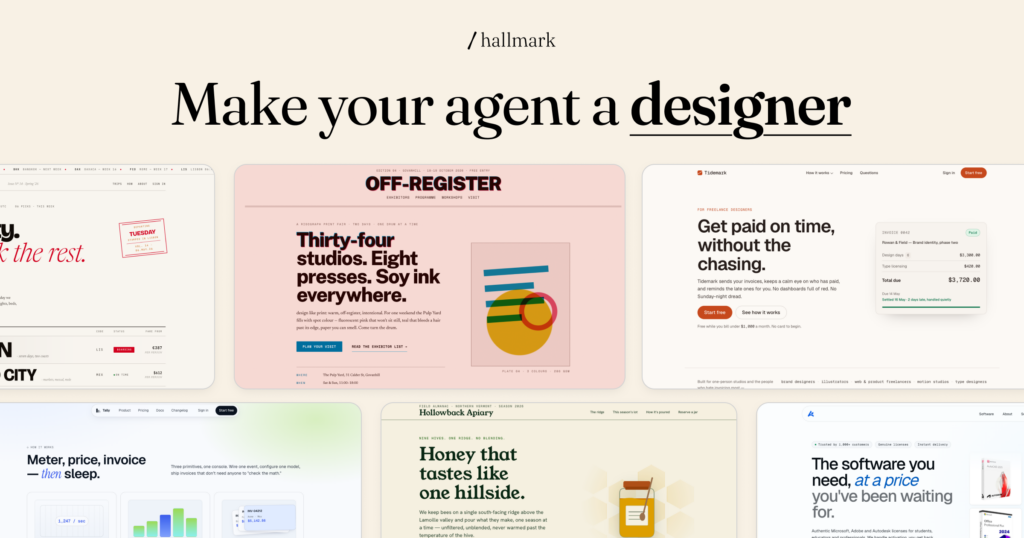
Hallmark ships with over twenty themes—each a bundle of color, typography, and spacing decisions—that can be applied across different page types. You can cycle themes in the live demo (press T on the Hallmark preview site) to see how the same content gets different “skins” while still respecting underlying rules like contrast and hierarchy. More importantly, Hallmark chooses from a library of macrostructures—hero‑first, nav‑heavy, content‑primary, app‑shell, and so on—so two pages for two briefs actually feel like different sites, not reskins.
60+ slop test gates and self‑critique
Before a page is considered “done,” Hallmark runs dozens of checks on typography caps, color contrast, spacing, focus rings, nav/footer layout, and other common AI mistakes. If any of these gates fail—for example, text is too small, contrast is too low, or the layout repeats a known anti‑pattern—Hallmark blocks the output and asks the model to correct issues before handing code back. This is followed by a pre‑emit critique step where the model is forced to review its own design against Hallmark’s rule‑set, catching issues that simple linting would miss.
Installing Hallmark
Hallmark is distributed as a Claude/Cursor/Codex skill, with both a one‑line installer and manual install paths.
Quick install via npx
The simplest way to install or update Hallmark is with the skills CLI:
npx skills add nutlope/hallmarkRun the same command again any time you want to update to the latest version of Hallmark.
This works across environments that speak the skills.sh format and will fetch SKILL.md plus its references into the correct location for your tools.
Manual install for Claude Code, Cursor, and Codex
If you prefer to manage files yourself or are working offline, you can copy the skill files into the appropriate directories.
Hallmark’s rule‑set lives in SKILL.md and a references/ folder:
# Claude Code
~/.claude/skills/hallmark/

# Cursor (VS Code-based)
# Use the body of SKILL.md only, no frontmatter
.cursor/rules/hallmark.mdc

# Codex (personal/global)
~/.codex/skills/hallmark/

# Codex (project-scoped)
.codex/skills/hallmark/
You can either download from GitHub as a zip or clone the repo and copy these files into place.
Local preview and live demo
Before wiring the skill into your assistant, it helps to play with the visual output.
Official demo and theme cycling
The easiest way to see Hallmark in action is the official live demo:
- Live preview: https://www.usehallmark.com
There, you can cycle through themes (press T), inspect different macrostructures, and see how Hallmark handles common layouts like marketing pages, app shells, and content hubs.
Serving the demo locally
If you clone the repository, Hallmark ships with a small static preview site under the site directory.
From that folder, you can run:
cd site
python3 -m http.server 4173
# → open http://localhost:4173
Once the page loads locally, you can also use T to cycle themes and query parameters (like ?theme=studio) to deep link into specific visual styles.
These previews make great illustrative images for your own docs or blog posts. You can capture screenshots of different themes and refer to them as “Hallmark theme gallery” or “Hallmark macrostructure examples.”
Using Hallmark in Claude Code
Once installed, Hallmark becomes an optional skill you can invoke inside Claude Code.
Default design flow
The default behavior is optimized for new pages—greenfield designs.
A typical prompt inside Claude Code might look like:
"Use the Hallmark skill to design a marketing landing page for a privacy‑first vector database aimed at backend engineers."When Hallmark is active, Claude Code will:
- Pick a macrostructure that matches the brief (for example, hero + feature grid + social proof).
- Choose a theme that fits the tone and audience (for example, darker palette with monospace accents for dev tools).
- Generate the layout and component structure, enforcing Hallmark’s rules on typography, spacing, and contrast.
- Run slop gates and a pre‑emit critique before returning the final code.
The result is JSX/HTML/CSS (or Tailwind/utility CSS, depending on your prompt) that already follows an opinionated design system instead of generic boilerplate.
Using Hallmark’s verbs: audit, redesign, and study
Beyond the default “design from scratch” mode, Hallmark exposes three explicit verbs you can use in your prompts.
hallmark audit: Diagnose existing UIs
hallmark audit is for when you already have a UI and want a design critique rather than new code.
Typical workflow:
- Paste your existing React/HTML code into Claude Code.
- Prompt: “Run
hallmark auditon this UI and give me a punch list of issues only, no code changes.” - Hallmark scores the page against its anti‑pattern list and reports where it fails gates: typography, contrast, layout balance, motion, focus states, and so on.
This mode is great when you trust your component system but want a structured, opinionated checklist of improvements that go beyond generic “make it cleaner” feedback.
hallmark redesign: Reskin without breaking IA
hallmark redesign keeps your content and information architecture but rebuilds the visual layer.
Prompt pattern:
“Using hallmark redesign, keep all copy and semantics but rebuild this dashboard with a distinct visual fingerprint.”Hallmark will:
- Preserve hierarchy, semantics, and layout semantics.
- Apply a new macrostructure and theme.
- Update spacing, typography, and components to pass slop gates.
This is ideal for de‑templating AI‑generated UIs or refreshing older products without rethinking flows.
hallmark study: Extract design DNA
hallmark study is about learning from existing designs rather than critiquing or reskinning them.
Workflow:
- Provide a URL or screenshot of a site you like.
- Ask Claude Code to run
hallmark studyon it. - Hallmark extracts a portable “design DNA” description—spacing system, type scales, color usage, component patterns.
Optionally, it emits a design.md file summarizing this DNA so you can reuse it in other tools (Cursor, v0, Bolt, etc.) or as a reference for future projects.
This keeps you from blindly copying CSS; instead, you adopt structured rules that Hallmark can apply to new briefs.
Using Hallmark in Cursor and Codex
Cursor and Codex integrate Hallmark slightly differently but follow the same conceptual flow.
- In Cursor, Hallmark lives as a rules file at
.cursor/rules/hallmark.mdc, influencing how the “AI edit” and “generate UI” commands structure layout and styles. - In Codex, it installs as a skill under
~/.codex/skills/hallmark/(global) or.codex/skills/hallmark/(per project), guiding Codex’s design decisions when you explicitly invoke it in prompts.
You still use the same verbs—default design, audit, redesign, and study—but adjust the invocation syntax according to each tool’s skill system.