
Key Takeaways
Hermes WebUI delivers complete CLI parity for the powerful Hermes Agent in a responsive, mobile-friendly browser interface, enabling effortless session management, workspace browsing, voice input, and secure remote access without ever opening a terminal.
Understanding Hermes Agent and the Need for a Modern Interface
Hermes Agent is an autonomous, self-improving AI agent developed by Nous Research that runs persistently on your server or VPS. It features layered memory, automatic skill generation, cron-based scheduling, and support for dozens of tools including web search, browser automation, code execution, vision, and multi-model reasoning. Users interact with it through terminal commands, messaging apps like Telegram or Discord, or now—thanks to community innovation—through a full-featured web interface.
While the command-line experience is powerful, many users want the convenience of a graphical chat interface that works equally well on desktop and mobile. That is exactly what Hermes WebUI provides: a lightweight, dark-themed (with multiple theme options), single-page application that gives you nearly 1:1 feature parity with the Hermes CLI while adding intuitive visual controls.
View the official Hermes Agent project to learn more about the underlying agent technology.
Why Hermes WebUI Stands Out
Hermes WebUI was built specifically for Hermes Agent users who want the flexibility of web and mobile access. It automatically discovers your existing Hermes Agent installation, requires no additional configuration in most cases, and supports the same multi-provider model ecosystem (OpenAI, Anthropic, Google, DeepSeek, OpenRouter, Ollama, and custom endpoints).
Advanced Chat Experience
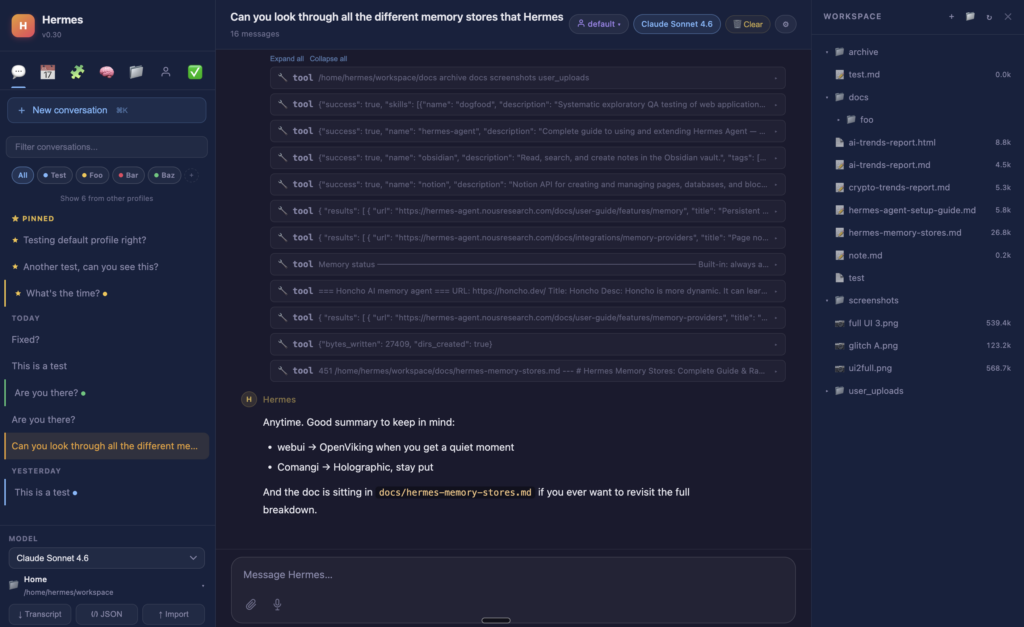
The core chat interface streams responses in real time using Server-Sent Events (SSE). You get inline tool-call cards that expand to show reasoning, Mermaid diagram rendering, code syntax highlighting, file attachments, message editing, retry functionality, and context-usage indicators. Voice input via the Web Speech API lets you dictate messages directly from your phone or laptop microphone.
Robust Session Management
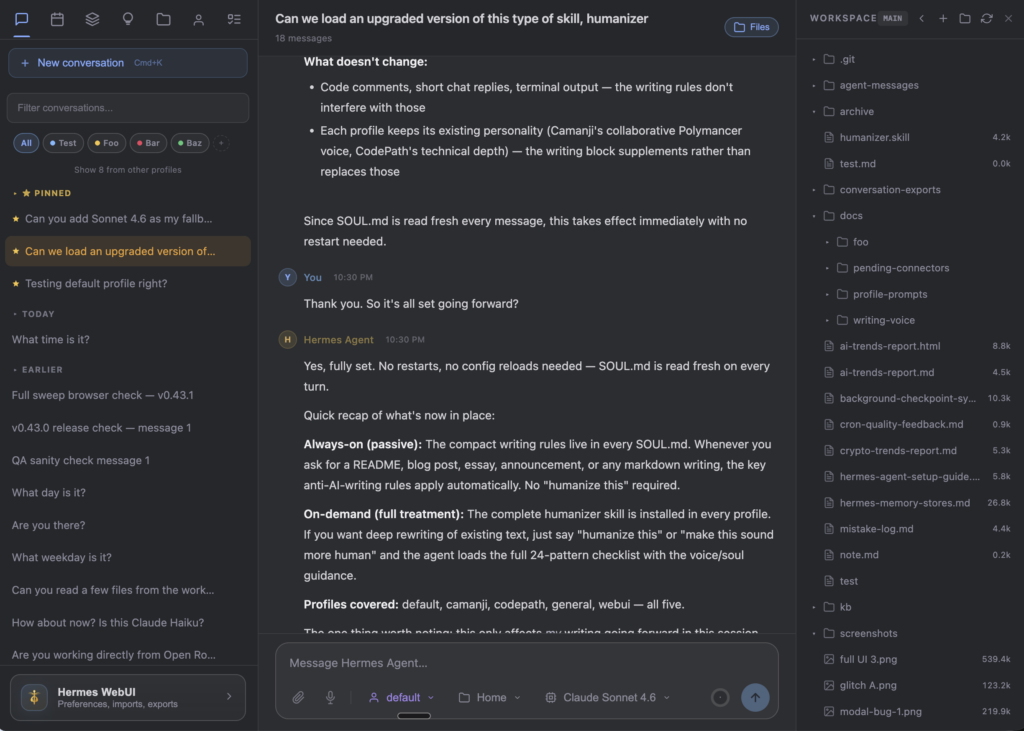
Create, rename, duplicate, pin, archive, or organize sessions by projects and tags. Sessions are grouped by date, searchable, and exportable as Markdown or JSON. The interface tracks token usage and estimated costs per session, helping you stay in control of API spend.
Powerful Workspace File Browser
A resizable three-panel layout includes a full directory tree with breadcrumb navigation. Preview text files, code, Markdown, and images inline. Edit files directly in the browser, create new ones, delete items, or download binaries. Git integration highlights repository status automatically.
Mobile-First and Remote-Ready Design
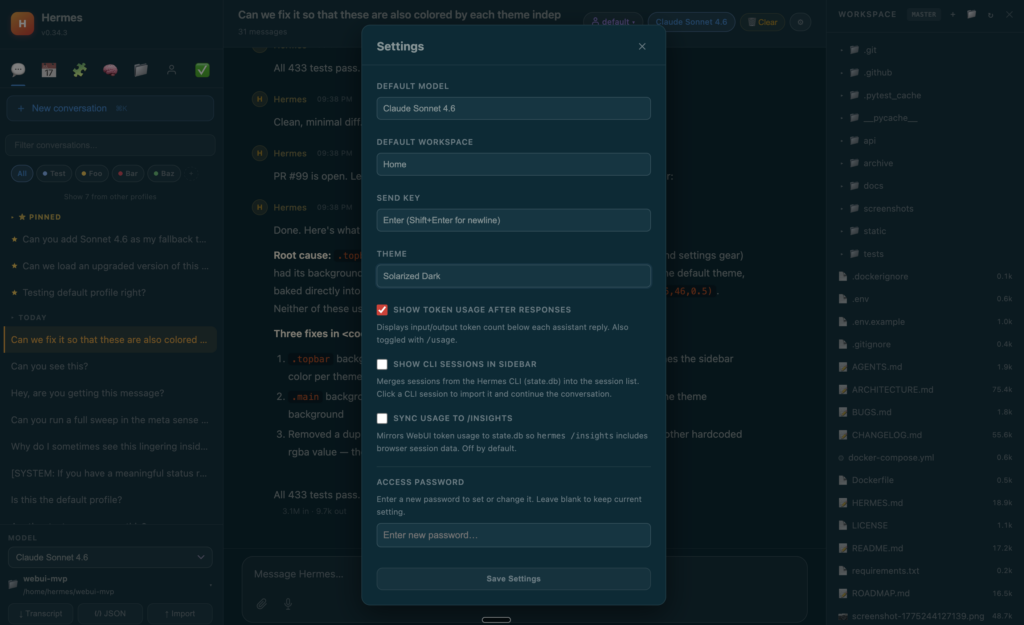
The interface is fully responsive with a hamburger sidebar, touch-friendly controls, and slide-over file panels. On phones it feels native. For remote access, simply set up an SSH tunnel or use Tailscale to reach your server from anywhere. Optional password protection using HMAC-signed cookies keeps everything secure.
Themes, Profiles, and Extensibility
Choose from seven built-in themes (including OLED-optimized dark mode) or create custom ones. Switch between multiple model profiles instantly from the composer footer. Slash commands like /help, /model, and /workspace provide quick keyboard-driven control. The Hermes Control Center centralizes preferences, system information, tasks, skills, memory, and todos.
Step-by-Step Installation Guide
Getting Hermes WebUI running takes only a few minutes whether you prefer native Python or Docker.
Prerequisites
- A working Hermes Agent installation (the WebUI auto-detects it).
- Python 3 on Linux, macOS, or WSL2 (native Windows is not supported).
- For Docker: Docker and Docker Compose installed.
Native Installation (Fastest for Most Users)
Open your terminal and run:
git clone https://github.com/nesquena/hermes-webui.git
cd hermes-webui
python3 bootstrap.py
Or simply execute ./start.sh. The bootstrap script checks for Hermes Agent, installs any missing Python dependencies, starts the server on port 8787, and opens your browser automatically.
For background daemon management, use the included control script:
./ctl.sh start
./ctl.sh status
./ctl.sh logs
./ctl.sh restart
./ctl.sh stop
Docker Deployment (Recommended for Production and Isolation)
Pull the official image and run with a single command:
docker pull ghcr.io/nesquena/hermes-webui:latestFor a complete setup with proper volume permissions:
git clone https://github.com/nesquena/hermes-webui.git
cd hermes-webui
cp .env.docker.example .env
docker compose up -d
Access the interface at http://localhost:8787. Environment variables in .env let you set a password (HERMES_WEBUI_PASSWORD), change the port, or override the Hermes Agent directory.
Multi-container setups are also documented for advanced users who run Hermes Agent in a separate container.
Remote and Mobile Access
To reach your WebUI from a phone or another network:
- Enable password protection in
.env. - Set
HERMES_WEBUI_HOST=0.0.0.0. - Create an SSH tunnel:
ssh -N -L 8787:127.0.0.1:8787 user@your-server-ip- Or install Tailscale on both server and phone for zero-config secure access.
The interface works beautifully in any modern mobile browser.
Getting Started: Your First Hermes WebUI Session
After installation, the first visit launches an onboarding wizard that guides you through model provider configuration if needed. Select your preferred LLM profile, then start chatting immediately.
The left sidebar lists all sessions with search and filtering. The central pane is your chat area. The right pane shows the workspace file browser. Drag the dividers to resize panels to your liking.
Try these quick actions:
- Type
/helpto see available slash commands. - Attach files by dragging or using the paperclip icon.
- Use the microphone button for voice input.
- Click any tool-call card to inspect reasoning steps.
- Switch themes or profiles from the footer dropdown.
Sessions persist across browser refreshes and even survive brief network interruptions thanks to recent offline-recovery improvements.
Advanced Tips for Maximum Productivity
- Multi-Provider Workflows: Create separate profiles for different models (e.g., a fast local Ollama profile for simple tasks and a powerful Anthropic profile for complex reasoning). Switch instantly without restarting anything.
- Mobile Workflow Optimization: On your phone, use the slide-over workspace panel to browse and edit files while chatting. Voice input works reliably on both iOS and Android browsers.
- Security Best Practices: Always set a strong password when exposing the interface beyond localhost. The application includes security headers, CSRF protection, and a 20 MB upload limit.
- Performance Tuning: For large workspaces, the file browser intelligently lazy-loads directories. Token-usage indicators help you monitor costs in real time.
- Backup and Portability: Export important sessions as Markdown or JSON. The entire state lives in
~/.hermes/webui-mvp/by default, making migration straightforward.
Who Should Use Hermes WebUI?
Anyone running Hermes Agent who values convenience will benefit. Developers who want to review code changes visually, researchers managing long-running experiments, power users who prefer chatting from their phone while the agent works on a VPS, and teams that need organized session history all find Hermes WebUI transformative.
Compared with generic chat frontends, Hermes WebUI offers deeper integration: native support for tool-call visualization, session bridging with the CLI, per-profile token tracking, and workspace awareness that no other interface currently matches.
Conclusion: Start Using Hermes WebUI Today
Hermes WebUI removes the last barrier between you and the full power of Hermes Agent. Whether you are on a laptop in the office or checking progress from your phone on the go, you now have a beautiful, fast, and feature-complete interface that feels native everywhere.
Installation is trivial, the learning curve is gentle thanks to the onboarding wizard and slash commands, and the community continues to ship frequent improvements.
Ready to upgrade your Hermes Agent experience? Clone the repository and launch it in the next five minutes.
Get started with Hermes WebUI on GitHub
The future of personal autonomous agents is self-hosted, persistent, and now beautifully accessible from any screen. Hermes WebUI makes that future available today.








