Key Takeaways:
holaOS turns your computer into a persistent, shared workspace where humans and AI agents collaborate with memory, tools, and apps that don’t reset between runs.
What Is holaOS?
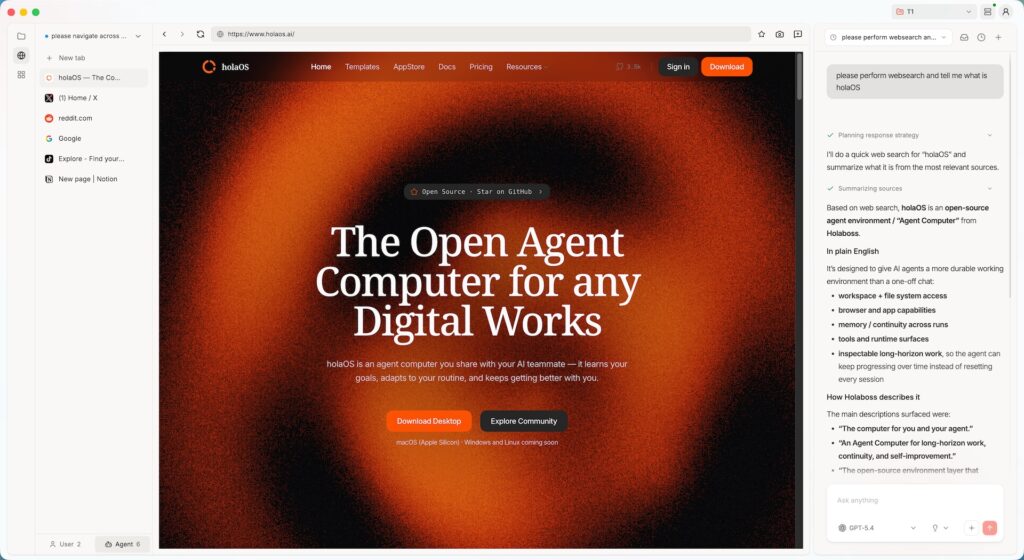
holaOS is an open-source “Agent Computer” designed to give AI agents a real, persistent working environment rather than a one-off prompt-and-response sandbox. Instead of treating agents as stateless functions, holaOS wraps them in a desktop runtime with memory, tools, applications, and durable state so they can work over days, weeks, or months on long-horizon tasks.
At a high level, you can think of holaOS as an operating system for agents: it defines the workspace contract, how memory is stored and surfaced, how tools and apps are exposed, and how work is packaged so it can be resumed, shared, or inspected later. This makes it a strong fit for complex workflows like continuous research, large codebases, operations runbooks, multi-step automation, and other digital work that doesn’t fit into a single “run this script once” pattern.
Why holaOS Matters Now
Most current AI “agents” live inside chat interfaces or ephemeral orchestration frameworks—great for short tasks, poor for continuity. Context is wiped after each run, so they can’t reliably remember why a decision was made last month or maintain complex, long-lived state across executions.
holaOS leans into the opposite philosophy: long-horizon work, continuity, and self-improvement are first-class design goals. By giving agents a persistent environment with structured runtime and memory surfaces, holaOS makes it possible to build systems that accumulate context and evolve over time instead of starting from zero on every task.
Core Concepts And Architecture
The Agent Computer Model
holaOS reimagines the computer as a shared environment where humans and agents operate side by side with access to the same browser, files, and apps. Rather than scattering work across separate tools, browsers, and terminals, holaOS centralizes everything into one inspectable, coherent workspace.
Under the hood, holaOS provides:
- A runtime layer that executes agent workflows and coordinates tools and apps.
- Memory surfaces where agents can write and read long-term context, not just short prompts.
- Continuity artifacts (logs, state snapshots, workspace templates) that make work durable and reusable across runs and machines.
Holaboss Desktop On Top Of holaOS
The open-source environment layer, holaOS, powers Holaboss Desktop, a desktop application that gives operators a visual interface to install, inspect, and run workspaces. Holaboss Desktop is built with Electron, which allows holaOS to offer a local, desktop-native experience while still leveraging the Node.js ecosystem.
In practice, you use Holaboss Desktop to:
- Browse and install agent workspaces.
- Start and monitor long-running tasks.
- Inspect state, logs, and memory to understand what agents are doing.
Getting Started: Prerequisites
Before installing holaOS, you should have:
- A modern macOS system (current open-source desktop path is macOS-first, with Windows/Linux support evolving).
- Basic command-line familiarity (Terminal usage, running scripts, cloning repos).
- An up-to-date Node.js and npm environment if you plan to develop or extend workspaces locally.
Because holaOS is under active development, it’s a good idea to check the official resources for the latest platform support and requirements:
- Official homepage: https://www.holaos.aiholaos
- GitHub repository: https://github.com/holaboss-ai/holaOSskillsllm
One-Line Install (Recommended)
For most users, the quickest way to get started is with the official install script from the holaOS repository. This script handles installing prerequisites like git and Node.js (if missing), cloning or updating the repo, preparing the desktop runtime, and optionally launching the app.
Run the following command in your terminal:
curl -fsSL https://raw.githubusercontent.com/holaboss-ai/holaOS/main/scripts/install.sh | bash -s -- --launchThis command will:
- Download and run the official holaOS install script.
- Install core dependencies (such as
gitand a supported Node.js/npm version) if they aren’t already present on your system. - Clone or update the
holaboss-ai/holaOSrepo into your home directory (by default~/holaboss-ai, unless you override with--dir). - Install desktop dependencies, prepare the local runtime bundle, and, with
--launch, start the desktop app once everything is ready.
If Electron cannot open or the desktop app fails to launch, the install script will stop after verification and tell you the next manual steps (for example, running the desktop dev command directly).
Manual Installation From Source
If you prefer more control or want to contribute to the project, you can install holaOS manually using the GitHub repository.
Step 1: Clone The Repository
git clone https://github.com/holaboss-ai/holaOS.git
cd holaOS
This gives you the full source code, including the desktop application and runtime tools.
Step 2: Install Desktop Dependencies
From the repository root, install dependencies for the desktop app (the exact commands may use npm, pnpm, or another package manager, as documented in the repo). A common pattern looks like:
npm install
# or
pnpm install
Check the README for the latest preferred package manager and scripts.
Step 3: Create A Local Environment File
The project provides a template environment file for the desktop app that you can copy and adjust to your machine or provider settings.
cp desktop/.env.example desktop/.envIn most cases, you can start by keeping this file close to the template and only changing values you explicitly need (for example, API keys or provider configuration).
Step 4: Prepare The Local Runtime Bundle
holaOS includes a command to prepare a local runtime bundle for the desktop, staging all the pieces the Agent Computer needs.
npm run desktop:prepare-runtime:localThis step builds the local runtime environment so agents can execute with the right tools, memory surfaces, and workspace configuration.
Step 5: Start The Desktop App In Development Mode
Once dependencies are installed, the environment is configured, and the runtime bundle is prepared, you can start the desktop app:
npm run desktop:devThis will launch the Holaboss Desktop application on your machine, backed by the holaOS environment you just prepared.
First Run: Exploring Your Agent Workspace
When Holaboss Desktop launches, you’ll see a workspace-centric view rather than just a chat window. A workspace in holaOS typically bundles:
- Instructions and goals for one or more agents.
- Tools and apps they can access (browser, file system, APIs, custom tools).
- Memory surfaces and state that persist across sessions.
On a first run, a typical workflow is:
- Open or install a workspace (for example, a coding assistant, research agent, or operations runbook).
- Set a clear task (“Refactor this module,” “Monitor these dashboards,” “Summarize and track these documents”).
- Let the agent work while you observe actions, inspect logs, and jump in where human judgment is needed.
Because state is durable, you can close the app, come back later, and the agent still “remembers” what it was doing and why. This is the key distinction from stateless, one-off agents.
Building And Sharing Your Own Workspaces
For developers and power users, one of the most compelling aspects of holaOS is the ability to package up entire AI work environments into portable templates. A workspace template can include instructions, tools, apps, memory and state layouts—essentially everything an agent needs to perform a specific class of work.
This unlocks several powerful patterns:
- Reusable internal playbooks – Turn your best workflows into sharable agent workspaces for teammates.
- Cross-ecosystem sharing – Share or publish workspaces so others can install them on their own holaOS setups.
- Long-running services – Run agents that continuously watch repositories, documents, or dashboards and surface insights over time.
As the ecosystem grows, you can expect more ready-made workspaces and examples in the holaOS GitHub repository and docs.
Tips For Self-Hosted And DevOps-Friendly Setups
Given your self-hosted and automation-friendly stack, holaOS can fit nicely alongside tools like Docker, n8n, and your existing API-first infrastructure:
- Isolate dependencies – Use Node version managers or containers so holaOS and its runtime tools don’t conflict with other projects on the same machine.
- Observe like a service – Treat agents like services: log their behavior, monitor failures, and wire critical signals into your existing observability stack.
- Integrate via tools – Expose internal APIs, automation endpoints, or webhooks as tools within a workspace so agents can act across your broader system.
As holaOS matures, expect more official guidance on containerized deployments and deeper automation hooks in the docs and issues.
Where To Go Next
To continue exploring and keep your article aligned with the latest capabilities:
- Visit the official homepage: https://www.holaos.aiholaos
- Dive into the code and issues: https://github.com/holaboss-ai/holaOS
- Read the broader Holaboss documentation for philosophy, architecture, and advanced workflows.
With holaOS wired into your toolkit, you can start treating agents less like disposable scripts and more like persistent teammates embedded directly into your digital workspace.