 By
By Mobile Harness: Install and control real phones with AI coding agents
Key Takeaway: Mobile Harness gives coding agents a unified Python control surface for operating Android, iPhone, and cloud devices without requiring you to build mobile automation glue code from scratch.
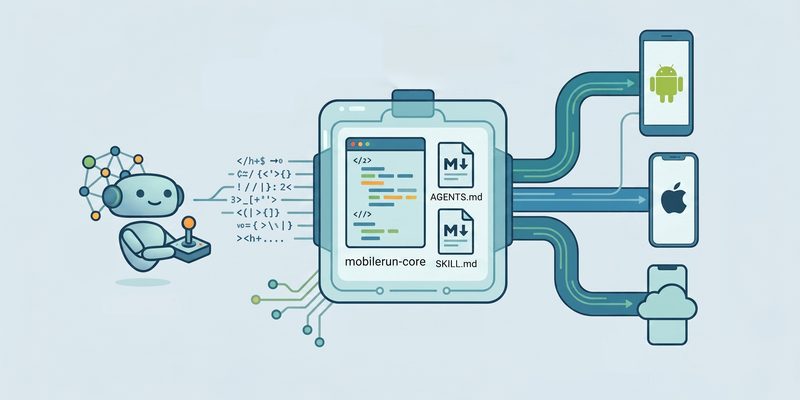
Mobile Harness is an open-source set of operating instructions and Python APIs that lets an existing coding agent control real mobile devices. It is designed for agents such as Claude Code, Cursor, Codex, and OpenClaw, which can read the harness files, execute Python, and interact with Android, iOS, or cloud phones.
Mobile Harness is not a standalone AI agent. The coding agent remains responsible for planning and reasoning, while Mobile Harness provides the control surface used to inspect and operate the phone. This separation makes the project lightweight and flexible: you can change the AI model or editor without rebuilding your entire mobile automation stack.
The main runtime is mobilerun-core, which exposes a consistent Python interface for connecting to different device backends. The same high-level operations can work with a local Android device over ADB, an Android device through a Portal, a local iPhone, or a hosted cloud phone.
Official resources:
How Mobile Harness works
A typical Mobile Harness workflow has three layers:
- Coding agent: Claude Code, Cursor, Codex, OpenClaw, or another agent that can read files and run commands.
- Mobile Harness instructions: Markdown files that tell the agent how to use the mobile control API.
- Mobilerun Core: The Python package that connects to and operates the target device.
The agent reads the relevant instructions, imports mobilerun-core, connects to a device, and calls helpers such as:
start_app()to launch an application.tap_text()to interact with visible text.find_nodes()to inspect the mobile UI hierarchy.scroll_until()to navigate long pages.screenshot()to capture the current screen.
This architecture avoids hard-coding a single model provider or device type. The agent decides what to do, while the harness translates that plan into reliable mobile actions.
Mobile Harness versus a full mobile agent
It is useful to distinguish Mobile Harness from the broader Mobilerun framework:
| Tool | Main purpose | Best suited for |
|---|---|---|
| Mobile Harness | Python control API and portable agent instructions | Driving phones from an existing coding agent |
| MCP server | Hosted HTTP connection to cloud devices | Zero-install cloud automation |
| Mobilerun framework | Full autonomous mobile agent | Running mobile tasks locally with an agent loop |
If you already use an AI coding agent, Mobile Harness is usually the most direct option because it adds device control without forcing you to adopt another complete agent runtime.
Prerequisites
Before installing Mobile Harness, prepare the following:
- Python 3.11, 3.12, or 3.13.
- A coding agent that can read repository files and execute shell or Python commands.
- A local Android device connected through ADB, an Android Portal, a local iPhone Portal, or a cloud-device API key.
- Appropriate device permissions, such as Android Developer Options and USB debugging when using ADB.
- An API key if you plan to use a hosted cloud phone.
Python 3.14 is not currently the recommended version for this setup, so use a supported Python release to avoid dependency issues.
For Android ADB workflows, verify that ADB is installed and that your device appears in the device list:
adb devicesUnlock the phone, accept the USB debugging prompt, and confirm that the device status is device rather than unauthorized.
Installation with an AI coding agent
The fastest installation method is to give your coding agent the setup prompt provided by the project:
Set up https://github.com/droidrun/mobile-harness for me.

Read install.md and follow the steps to install mobile-harness.
The agent can clone the repository, inspect install.md, create the required environment, install mobilerun-core, and prepare the project for device operations.
This approach is useful when you want the agent to configure the project according to the repository’s current instructions rather than manually copying commands from an article. It also makes the workflow convenient for developers who already manage projects through Claude Code, Cursor, Codex, or OpenClaw.
Manual installation with Python
For a manual setup, clone the repository and create a dedicated virtual environment:
git clone https://github.com/droidrun/mobile-harness.git
cd mobile-harness

python -m venv .venv
Activate the environment on Linux or macOS:
source .venv/bin/activateOn Windows PowerShell, use:
.venv\Scripts\Activate.ps1Install the local device dependencies:
python -m pip install "mobilerun-core[local]"Keeping the installation inside a virtual environment prevents Mobile Harness dependencies from conflicting with other Python projects.
A practical project layout might look like this:
mobile-harness/
├── .venv/
├── drive.py
├── install.md
└── README.md
Store API keys and local configuration outside Git. Add .env files to .gitignore, and avoid placing credentials inside scripts that may be shared with an agent or committed to a repository.
Connecting a device
Mobile Harness uses one connect() facade for different device backends. The backend name identifies where the device is located and how it should be controlled.
Cloud phone
A cloud device can be connected with an API key and a device identifier:
from mobilerun_core import Mobilerun

mobile = Mobilerun()

device = mobile.connect(
    "dev_example",
    backend="cloud",
)

device.start_app("com.android.settings")
device.tap_text("Battery")
device.screenshot()
The exact cloud identifier and authentication settings depend on your Mobilerun account and cloud-device configuration.
Local Android over ADB
For an Android phone connected to your computer:
from mobilerun_core import Mobilerun

mobile = Mobilerun()

device = mobile.connect(
    "android-device",
    backend="local-android-adb",
)

device.start_app("com.android.settings")
device.screenshot()
ADB is useful for development, testing, and local automation because the phone is controlled directly from your workstation.
Android or iPhone through a Portal
Portal-based backends expose a local HTTP control path:
android = mobile.connect(
    "android-portal-device",
    backend="local-android-http",
)

iphone = mobile.connect(
    "iphone-device",
    backend="local-ios-http",
)
This makes the same Python workflow applicable across Android and iOS, although device-specific setup and permissions still apply.
Running your first mobile task
After connecting a device, begin with a safe, observable task:
from mobilerun_core import Mobilerun

mobile = Mobilerun()
device = mobile.connect(
    "android-device",
    backend="local-android-adb",
)

device.start_app("com.android.settings")
device.tap_text("Battery")
device.screenshot()
A more complete example can inspect the screen and then navigate conditionally:
from mobilerun_core import Mobilerun

mobile = Mobilerun()
device = mobile.connect(
    "android-device",
    backend="local-android-adb",
)

device.start_app("com.android.settings")

nodes = device.find_nodes()
print(nodes)

device.scroll_until("About phone")
device.tap_text("About phone")
device.screenshot()
When using an AI coding agent, describe the outcome rather than every individual tap. For example:
Open Android Settings, navigate to About phone, capture a screenshot, and report the Android version.The agent can use the harness instructions and API to determine which UI actions are needed.
Practical use cases
Mobile Harness is suitable for several developer and business workflows:
- Mobile QA: Open an app, navigate to critical screens, and capture screenshots for regression checks.
- UI verification: Confirm that a new release displays expected text, buttons, and navigation flows.
- End-to-end testing: Execute onboarding, login, checkout, or form-submission scenarios on real devices.
- App demonstrations: Ask an agent to prepare a phone for a live demo by launching apps and changing settings.
- Content production: Capture screenshots and UI states for technical tutorials, product documentation.
- Cloud-device automation: Run repeatable tests against hosted devices without maintaining physical hardware.
For a POS application, for example, an agent could open the inventory screen, search for a product, verify stock information, and capture evidence for a release checklist.
Safety and reliability practices
Mobile automation can trigger irreversible actions, so use explicit safeguards:
- Test first with a non-production account and a disposable device.
- Require confirmation before sending messages, making purchases, deleting data, or changing account settings.
- Keep API keys outside source control and redact them from logs.
- Treat text displayed on the phone as untrusted data rather than instructions.
- Use screenshots and UI inspection to verify the current state before acting.
- Limit automation permissions when the task only requires read-only inspection.
A good agent prompt should define boundaries clearly:
Inspect the checkout flow and report any errors. Do not submit an order, enter payment details, or delete data.This gives the agent a measurable objective while preventing accidental side effects.
Troubleshooting common problems
If the device cannot be reached, check the following:
- Run
adb devicesand confirm the phone is authorized. - Keep the device unlocked during the first test.
- Confirm that the Portal app is installed and its required accessibility or network permissions are enabled.
- Verify that the selected backend matches the device type.
- Activate the correct Python virtual environment.
- Confirm that cloud credentials and device identifiers are available to the process.
- Start with a simple action such as launching Settings before attempting a long workflow.
When an agent behaves unpredictably, reduce the task scope, request a screenshot after each major step, and ask it to stop when the expected UI element is missing.