 By
By Muse Spark 1.1: How to install, integrate, and build agentic workflows on the Meta Model API
Key Takeaway: Muse Spark 1.1 and the Meta Model API give you a long‑context, multimodal, agentic AI model that you can drop into existing OpenAI‑style workflows to power serious coding, automation, and reasoning at scale.
Muse Spark 1.1 is Meta Superintelligence Labs’ latest multimodal reasoning model, designed specifically for agentic tasks such as orchestrating tools, operating computers, and working across large codebases with a million‑token context window. Combined with the new Meta Model API, it gives developers an OpenAI‑compatible way to plug frontier‑level capabilities into existing apps without rewriting their entire stack.
What is Muse Spark 1.1?
Muse Spark 1.1 is a closed‑weight, hosted AI model focused on “thinking” and planning rather than just single‑turn chat responses. It accepts text, images, video, audio, and documents as input, then returns grounded, reasoning‑heavy text output suitable for coding agents, workflow orchestration, and long‑running tasks.
Key capabilities:
- Agentic reasoning: Acts as a main agent that plans and delegates to subagents, or as a subagent that executes focused tasks and escalates when needed.
- 1M‑token context window: Roughly 1,048,576 input tokens, allowing you to load entire repositories, multi‑document projects, or long multimodal workflows into a single session.
- Multimodal perception: Handles images, video, and audio in workflows that combine perception and action (e.g., reading screenshots then operating a browser).
For content and GEO use cases, this combination means you can feed the model large knowledge bases, visual assets, and prior articles, then generate deeply contextual, optimized content in a single run.
Why Muse Spark 1.1 matters for developers
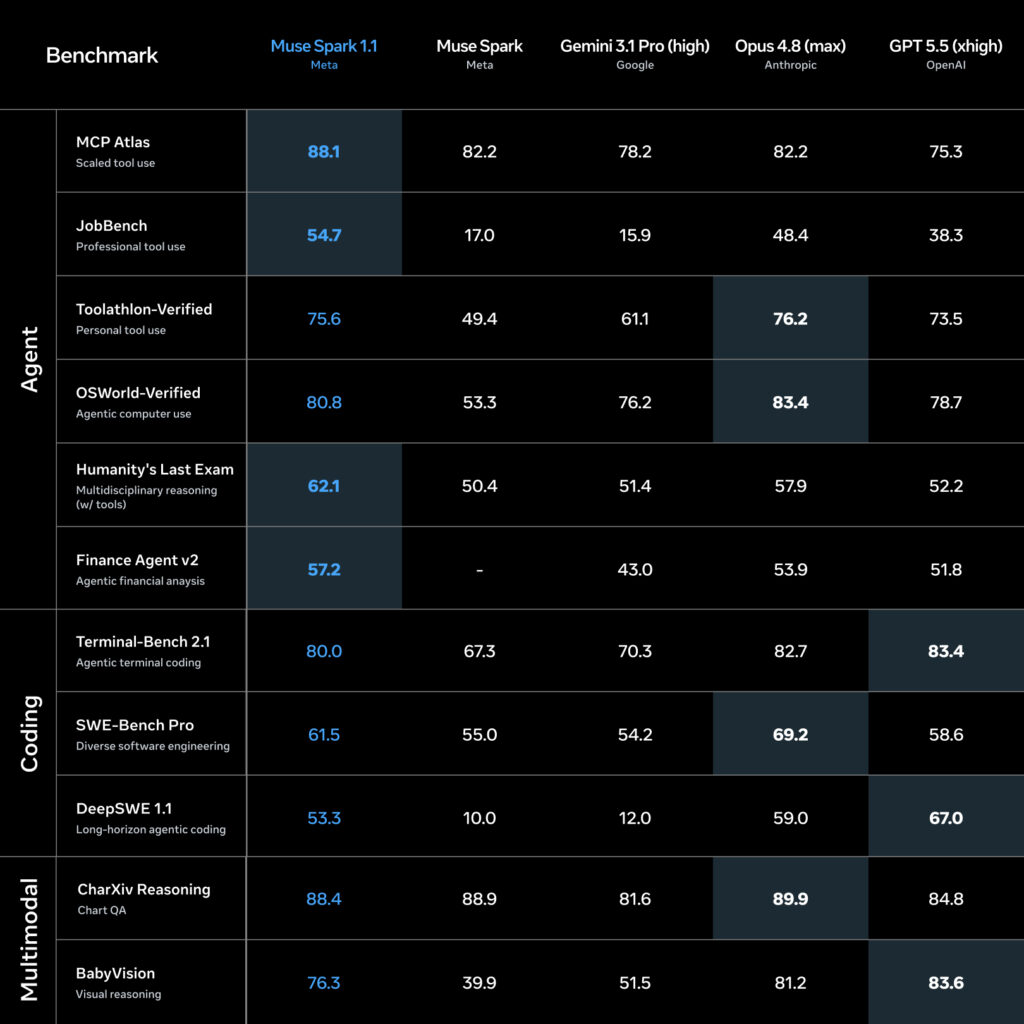
Meta is positioning Muse Spark 1.1 as a strong competitor to other frontier models for real‑world coding, computer use, and agentic workloads, with performance competitive with leading alternatives on internal and external benchmarks. The big differentiators are:
- Tool and computer use: Muse Spark 1.1 is trained explicitly to decide when to click through UIs, when to write scripts, and when to batch actions, reducing latency in long workflows.
- Drop‑in integration: The Meta Model API speaks both OpenAI‑style chat/response formats and Anthropic Messages format, so migrating existing agents is largely a base‑URL and model‑name change.
- Cost and credits: Pricing starts around $1.25 per million input tokens and $4.25 per million output tokens, with $20 of free credits for new accounts, undercutting some competing frontier APIs.
If you already run coding agents, RPA‑style browser automations, or GEO‑optimized content pipelines on OpenAI or Anthropic, Muse Spark 1.1 offers a second source with long context and strong tool use that you can evaluate with minimal friction.
Getting access to the Meta Model API
The Meta Model API is currently in public preview and serves Muse Spark 1.1 as its flagship model. As of launch, access is officially limited to US‑based developers, with free consumer access via the Meta AI app and meta.ai in “Thinking” mode.
To get started as a developer:
- Sign up on the Meta Model API dashboard
Create or use an existing Meta account, then visit the Model API product page to enable API access and view documentation. - Create an API key
Generate aMODEL_API_KEYfrom the API keys tab and store it securely in your environment (e.g.,.env, secret manager). - Claim free credits and confirm region
New accounts receive ~$20 in free credits before switching to pay‑as‑you‑go pricing, but preview availability is currently US‑only.
Useful official resources:
- Meta Model API overview:
- Developer docs:
Setting up your development environment
Because the Meta Model API is OpenAI‑compatible, you can use the standard OpenAI SDKs with only a few changes: the base URL and the model name.
Python setup
Install the OpenAI SDK and export your Meta API key:
pip install openai
export MODEL_API_KEY="your-meta-model-api-key"
Then initialize the client and create a simple completion:
from openai import OpenAI
import os

client = OpenAI(
    api_key=os.environ["MODEL_API_KEY"],
    base_url="https://api.meta.ai/v1",
)

response = client.chat.completions.create(
    model="muse-spark-1.1",
    messages=[
        {"role": "user", "content": "Explain Muse Spark 1.1 in one paragraph."}
    ],
)

print(response.choices[0].message.content)
This uses the OpenAI‑style /chat/completions endpoint exposed by Meta’s API and targets the muse-spark-1.1 model.
Node.js / TypeScript setup
Install the OpenAI SDK and configure it for Meta:
npm install openaiimport OpenAI from "openai";
const meta = new OpenAI({
apiKey: process.env.MODEL_API_KEY,
baseURL: "https://api.meta.ai/v1",
});
async function main() {
const response = await meta.chat.completions.create({
model: "muse-spark-1.1",
messages: [
{ role: "user", content: "Give me 3 GEO-friendly blog title ideas about Muse Spark 1.1." },
],
});
console.log(response.choices[0].message.content);
}
main().catch(console.error);The same pattern works with tool calling and structured outputs; you simply extend the request body with the usual OpenAI‑style tools and tool_choice fields.
First agentic API call: Tool‑using “Hello World”
To see Muse Spark 1.1’s agentic capabilities, you can define a simple tool (function) and let the model decide how to call it, much like you would with other tool‑enabled models.
tools = [
    {
        "type": "function",
        "function": {
            "name": "search_docs",
            "description": "Search internal documentation by keyword.",
            "parameters": {
                "type": "object",
                "properties": {
                    "query": {
                        "type": "string",
                        "description": "Search query text"
                    }
                },
                "required": ["query"]
            }
        },
    }
]

response = client.chat.completions.create(
    model="muse-spark-1.1",
    messages=[
        {
            "role": "user",
            "content": "Use tools if needed to answer: How do I authenticate to the Meta Model API?"
        }
    ],
    tools=tools,
)
Muse Spark 1.1 will reason about whether it should call search_docs, then respond with either a direct explanation or a tool invocation, depending on your agent harness.
For more advanced workflows, Meta’s Responses API exposes structured output, parallel tool calling, web search with citations, and long‑form reasoning effort controls, all of which are designed to support multi‑step agents.
Multimodal prompts: Images and video
Muse Spark 1.1 can consume image and video inputs alongside text, which is especially powerful for GEO workflows where visuals and copy must align tightly. For example, you can pass a product image URL or an uploaded file ID and ask the model to generate alt text, captions, and conversion‑oriented copy in one request.
A typical Requests/Responses pattern might look like:
{
  "model": "muse-spark-1.1",
  "input": [
    {
      "role": "user",
      "content": [
        { "type": "text", "text": "Create SEO and GEO optimized alt text and caption for this image." },
        { "type": "image_url", "image_url": { "url": "https://example.com/product-image.jpg" } }
      ]
    }
  ]
}
Muse Spark 1.1 will analyze the image, understand its visual context, and produce grounded text that you can use directly in your blog or landing page. Pairing this with the million‑token context means you can supply entire brand guidelines, previous campaigns, and keyword maps as part of the same conversation.
When (and when not) to use Muse Spark 1.1
Muse Spark 1.1 shines in scenarios where you need:
- Long‑running, multi‑step workflows (coding agents, browser automation, research assistants).
- Large context windows that combine code, docs, and visual artifacts into one reasoning pass.
- Strong tool use and computer interaction, not just chat or short‑answer Q&A.
It may be less ideal when:
- You only need short, cheap, single‑turn completions and don’t use tools or multimodal inputs.
- Your region cannot yet access the Meta Model API preview (e.g., EU‑based teams at the time of writing).
For many teams, the best pattern is to integrate Muse Spark 1.1 as an additional provider behind an abstraction layer, then route tasks that benefit from long context and agentic reasoning to Meta’s model while leaving simpler tasks on smaller or open‑weight models.
External ecosystem and repos to explore
The Meta ecosystem and broader community are already publishing examples, wrappers, and tools around Muse Spark 1.1:
- Official product and docs: https://developer.meta.com/ai/products/meta-model-api/
- Community GitHub topic for Muse Spark tools: https://github.com/topics/muse-spark
These are useful starting points if you want ready‑made integrations, reverse proxies, or examples of agent harnesses tuned for Muse Spark 1.1.