
Key Takeaways: Open Design turns any coding-agent CLI you already have on your laptop into a senior-designer-style artifact engine, complete with 132 skills, 150 brand systems, and BYOK at every layer – no SaaS subscription, no vendor lock-in.
What is Open Design?
When Anthropic released Claude Design, it changed what people thought an LLM could do. Instead of writing prose, it shipped polished design artifacts – pitch decks, landing pages, posters – through a clean artifact-first loop. The catch: it stayed closed-source, paid-only, cloud-only, locked to Anthropic’s models and Anthropic’s skills. No self-host. No swap-in-your-own-agent. No way to deploy your own version.
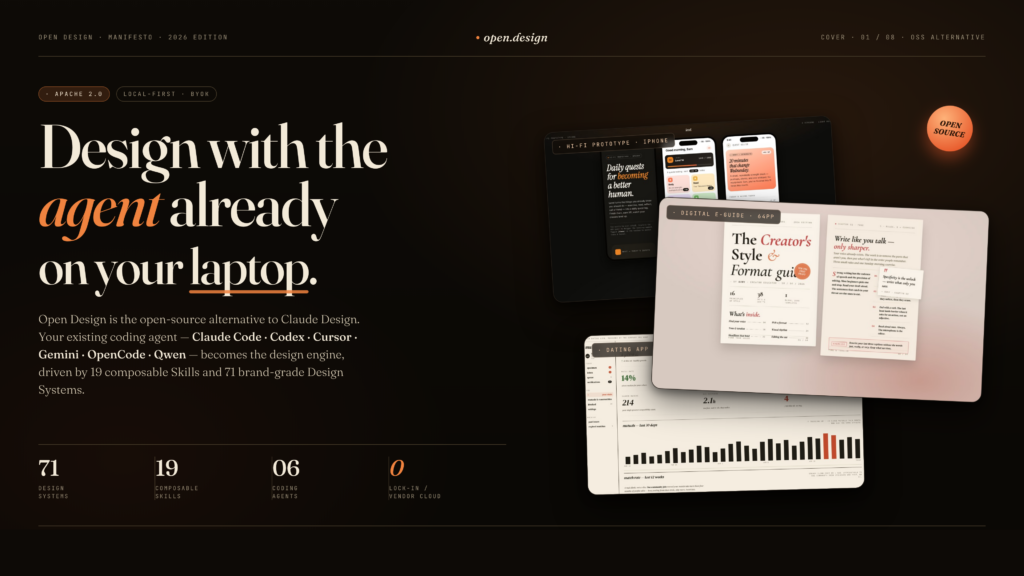
Open Design is the open-source response. It is a local-first, BYOK (bring your own key) toolkit published on GitHub at nexu-io/open-design with a hosted homepage at open-design.ai. The clever trick is that Open Design does not ship its own agent. It auto-detects up to 16 coding-agent CLIs already on your PATH – Claude Code, Codex, Devin for Terminal, Cursor Agent, Gemini CLI, OpenCode, Qwen Code, Qoder, GitHub Copilot CLI, Hermes, Kimi, Pi, Kiro, Kilo, Mistral Vibe, DeepSeek TUI – and wires them into a deterministic, skill-driven design workflow. No CLI installed? An OpenAI-compatible BYOK proxy runs the same loop without spawning a subprocess.
The result is a web app plus local daemon that delegates the hard thinking to the strongest model you already have, while enforcing senior-designer behavior: discovery before pixels, curated visual directions, on-disk project folders with seed templates and self-check checklists, and a five-dimensional critique pass before any artifact ships.
Why Open Design stands out
A long list of “AI design” tools have shipped in the past two years. Open Design earns its place by being genuinely open at every layer.
Your agent, your key, your machine. Sixteen coding-agent CLIs are auto-detected on PATH and swappable with one click. If you do not use a CLI, the BYOK proxy at /api/proxy/{anthropic,openai,azure,google,ollama,senseaudio}/stream lets you paste a baseUrl, apiKey, and model and run the same loop with the provider of your choice. SSRF and internal-IP requests are blocked at the daemon edge.
150 brand-grade design systems, built-in. The repo ships with 129 systems out of the gate – two hand-authored starters plus 70 product systems modeled on Linear, Stripe, Vercel, Airbnb, Tesla, Notion, Anthropic, Apple, Cursor, Supabase, Figma, Xiaohongshu, and many more – plus 57 design skills from the awesome-design-skills collection.
132 composable skills. Twenty-seven prototype-mode skills (web prototype, SaaS landing, dashboard, mobile app, gamified app, social carousel, magazine poster, sprite animation, motion frames, wireframe sketch, PM spec, engineering runbook, finance report, HR onboarding, invoice, kanban board, team OKRs) plus four deck-mode skills (guizang-ppt, simple-deck, replit-deck, weekly-update). The picker groups them by scenario: design, marketing, operation, engineering, product, finance, HR, sales, personal.
Five curated visual directions. When no brand is specified, the agent picks one of five schools – Editorial / Monocle, Modern Minimal, Warm Soft, Tech Utility, Brutalist Experimental – each shipping a deterministic OKLch palette and font stack.
Media generation alongside design. GPT-Image-2 (Azure or OpenAI) for posters, avatars, infographics, and illustrated maps. Seedance 2.0 for cinematic 15-second text-to-video and image-to-video. HyperFrames for HTML-to-MP4 motion graphics. A gallery of 93 ready-to-replicate prompts ships in prompt-templates/.
Five real export formats. HTML with inline assets, PDF via browser print (deck-aware), PPTX driven by the agent through a skill, ZIP archives, and Markdown.
Installing Open Design
Open Design is a Next.js 16 web app with a local TypeScript daemon. Installation is straightforward but has a few prerequisites.
Prerequisites
You will need Node.js around version 24 and pnpm 10.33.x. The daemon handles subprocess management, agent detection, and the BYOK proxy, so it needs a real Node runtime – not just a browser tab.
Install from source
The recommended path is to clone and run with pnpm tools-dev:
git clone https://github.com/nexu-io/open-design.git
cd open-design
corepack enable
corepack pnpm --version
pnpm install
pnpm tools-dev run web
That single command brings up both the daemon and the Next.js web layer in the foreground. Open your browser at the URL printed in the terminal and the app is ready.
Useful sidecar commands for day-to-day work:
pnpm tools-dev run web– start daemon and web in the foregroundpnpm tools-dev start web– start everything in the backgroundpnpm tools-dev status– see what is runningpnpm tools-dev stop– stop all processes cleanly
Windows users should consult the native troubleshooting notes in the repository, since some agent CLIs and shell integrations differ from macOS and Linux.
Deploying to Vercel
The web layer is Next.js 16 App Router with React 18 and TypeScript, so it is fully Vercel-deployable. The catch is that the local daemon is where agent spawning, file writing, and proxy normalization happen. For a pure cloud setup, use the BYOK proxy mode without spawning local CLIs, or follow the tunnel deployment recipe in the docs to keep the daemon local while exposing the web layer publicly.
Configure BYOK once
In the settings panel, paste your provider details and choose the protocol:
- Anthropic-compatible (Claude API)
- OpenAI-compatible (most major providers)
- Azure OpenAI
- Google Gemini
- Ollama Cloud
- SenseAudio (adds
generate_imageandgenerate_videotools that write rendered artifacts straight into the project workspace)
The daemon normalizes all of these back into the same chat stream the rest of the app consumes.
Using Open Design day to day
The workflow is intentionally opinionated. Every fresh brief follows the same loop.
Step 1 – Type your brief
In the chat surface, type something like make me a magazine-style pitch deck for our seed round or design a landing page for a developer-focused observability product. Open Design does not start improvising pixels immediately.
Step 2 – Answer the discovery form
Before any model touches a single artifact, an interactive <question-form id="discovery"> pops up. It locks in your surface (web, deck, poster), audience, tone, and brand context. This is the part that separates Open Design from “AI tries to design something” – it enforces the senior-designer habit of asking the right questions first.
Step 3 – Pick a visual direction
If you have not supplied a brand, the agent surfaces the five curated schools – Editorial / Monocle, Modern Minimal, Warm Soft, Tech Utility, Brutalist Experimental – each with a deterministic OKLch palette and font stack. Pick one and the rest of the project is anchored to it.
Step 4 – Watch the live TodoWrite plan
The daemon streams a real TodoWrite plan into the UI as the agent reasons. A real on-disk project folder is created with a seed template, layout library, and self-check checklist. The agent reads these pre-flight files before generating anything.
Step 5 – Live preview in a sandboxed iframe
Within seconds, a single <artifact> renders inside a sandboxed iframe (vendored React 18 + Babel, borrowed from the open-codesign loop). The live agent panel shows todos, tool calls, and an interruptible generation control so you can stop and redirect at any point.
Step 6 – Critique and iterate
Before the artifact is finalized, the agent runs a five-dimensional self-critique against its own output: Philosophy, Hierarchy, Detail, Function, and Innovation. You can also invoke the critique and tweaks skills manually to push the design further. Anti-AI-slop checklists from the bundled huashu-design philosophy and the P0/P1/P2 deck checklists from the guizang-ppt skill enforce quality.
Step 7 – Export
When the artifact is ready, export it in any of the five supported formats:
- HTML with inline assets, for embedding or hosting
- PDF via browser print, with deck-aware pagination
- PPTX driven by the agent through a skill, for clients who only open PowerPoint
- ZIP for the full project bundle
- Markdown for docs-as-code workflows
Who Open Design is for
This project is a strong fit for several audiences. Founders building pitch decks who already pay for Claude Pro or Cursor and do not want yet another subscription. Indie developers and side-project builders shipping landing pages, social carousels, and product reveals on their own infrastructure. Product managers and engineering managers generating internal docs – PM specs, engineering runbooks, weekly updates, team OKRs – through the same composable skill catalog. Designers and design-curious developers who want a real artifact-first workflow with palettes, layout libraries, and self-critique built in.
If your team is already standardized on Figma and Adobe with a mature design system, Open Design is not a replacement for production tooling. But for the prototype-to-pitch loop where speed and consistency matter more than pixel-perfect handoff, it is the most ambitious open-source attempt at the artifact-first design surface so far.
Final thoughts
Open Design proves that the artifact-first design loop pioneered by Claude Design does not need to be closed source, cloud only, or single vendor. By delegating the model layer to the coding-agent CLI you already trust, enforcing senior-designer discipline through skills and critiques, and shipping 150 brand-grade design systems out of the box, the project gives you the same loop on your laptop, with your key, under your license.
Star the GitHub repository, visit open-design.ai, clone the repo, and run pnpm tools-dev run web. The next pitch deck, landing page, or magazine-style poster you ship can come straight from the agent you already pay for – minus the lock-in.








