
OpenClaw Zero Token turns your existing web logins for ChatGPT, Claude, Gemini, DeepSeek and other models into a unified, self-hosted AI gateway so you can run powerful agents without paying for API tokens.
The API token problem for Open Source AI
The mainstream way to consume large language models today is through paid APIs from OpenAI, Anthropic, Google, and other vendors, typically priced per token and gated behind credit cards and strict rate limits. For developers running complex AI agents, batch workflows or 24/7 assistants, these token-based costs can quickly grow from a few dollars to hundreds per month, especially when you add retrieval, tool-calling and long-context usage. This pricing model also creates friction for experimentation: every new model you try requires API keys, billing setup and careful cost monitoring instead of simply logging in and building. Open source AI and self-hosted AI platforms promise more control, but they usually still depend on the same paid APIs or require you to host your own GPU-heavy models, which is not practical for many individuals or small teams.
OpenClaw Zero Token tackles this pain point with a different philosophy: instead of paying for developer APIs, it reuses the free (or low-cost) web UIs you are already signed into, wrapping them into a standard, programmable gateway that your AI agents can call like a normal LLM backend. The result is a “No API Token AI” workflow that feels like a regular multi-model gateway from the agent’s point of view, but behind the scenes it is driving browser sessions rather than talking directly to billable APIs.
What is OpenClaw Zero Token?
OpenClaw Zero Token is a fork of the popular open source AI gateway project OpenClaw, specialized for running “zero-token” AI workloads by controlling official web frontends via Playwright and Chrome DevTools instead of calling paid APIs. Technically, it launches a local Chrome instance in debug mode, attaches to the browser’s debugging port, and uses automation scripts to capture cookies and bearer tokens once you have logged into sites like ChatGPT, Claude, DeepSeek or Gemini in the browser. Those captured credentials are stored locally and fed into a local gateway process, which in turn exposes a unified HTTP interface and Web UI that your agents and tools can talk to just like any other LLM provider. Because the traffic is routed through the same hidden web endpoints that power the official chat interfaces, you effectively get “free” or flat-rate usage limited primarily by the web product’s own fair-use and anti-abuse policies rather than the stricter, metered developer APIs.
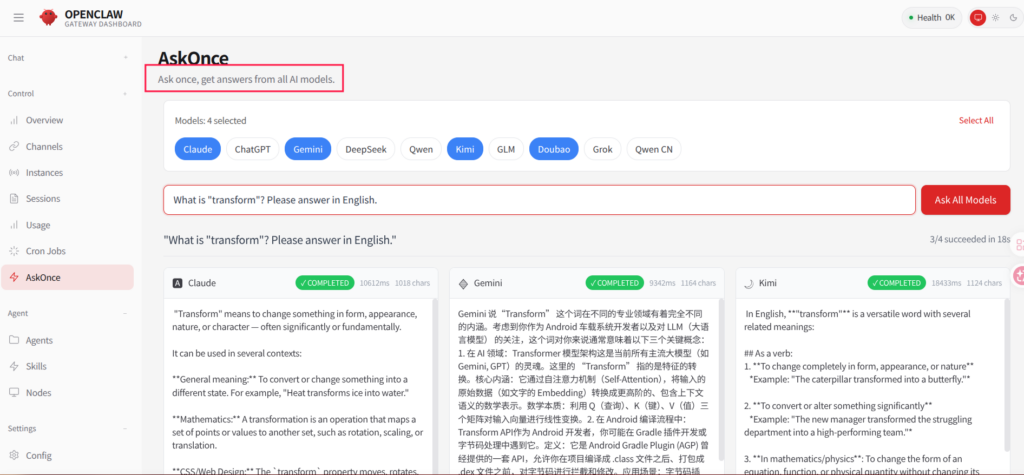
Crucially, Zero Token inherits OpenClaw’s strong agent features such as native tool calling, sandboxed execution, and the AskOnce multi-model concurrent querying mode, so you are not trading developer ergonomics for cost savings. In practice this means you can build serious self-hosted AI automations—code refactoring loops, log analyzers, research agents, or chat assistants—while only paying for the consumer-grade web subscriptions (if any) of the models you already use, rather than separate API plans.
Supported AI models and providers
Out of the box, OpenClaw Zero Token can drive a broad set of mainstream LLM web frontends, covering both international and Chinese ecosystems. According to the official documentation and community articles, currently tested and supported platforms include: DeepSeek Web, ChatGPT Web, Claude Web, Gemini Web, Tongyi Qianqian (international and domestic versions), Kimi, Doubao, Grok, Zhipu “Qingyan” (Wisdom Spectrum Qingyin, both intl and cn), Manus APIs and several others. The project treats each of these as a “provider” that can be configured in the gateway, so your agents can switch between them by changing a model identifier (for example deepseek-web, claude-web, chatgpt-web, gemini-web) rather than touching browser logic directly.
Because Zero Token is maintained as an active fork, new providers can be added by implementing authentication modules and stream processors for additional web UIs, which allows the gateway to keep up with newly released proprietary models. At the same time, standard OpenClaw functionality such as bridging to local LLMs or Docker-model runners remains available, so you can mix “no API token” web-driven models with local open source models behind a single unified self-hosted AI gateway.
Core features for Open Source and self‑hosted AI
From a capabilities perspective, OpenClaw Zero Token reads like a full-featured self-hosted AI platform rather than a simple proxy.
- API token–free aggregation: it aggregates more than ten domestic and international models through browser sessions, avoiding developer API billing entirely for supported providers.
- Native tool calling in web mode: because web UIs do not expose the standard tools field found in OpenAI-style APIs, Zero Token injects a system prompt with XML-based tool descriptions and parses
<tool_call>tags in the streaming output to dispatch local commands likeexec,read_file,list_dir,browser, andapply_patch. - AskOnce multi-model concurrent questioning: a single prompt can be fan-out to multiple configured models, with their answers displayed side-by-side for comparison in the console or Web UI, which is ideal for prompt engineering and model evaluation.
- Local-only credential storage: captured cookies and bearer tokens are written into local state directories such as
.openclaw-zero-state/auth.jsonand are never uploaded or checked into Git repositories, minimizing the risk of credential leakage. - Web UI and CLI/TUI: users can interact via a browser-based chat UI (HTTP endpoint on localhost) or a terminal TUI launched with
node openclaw.mjs tui, both of which can target any configured model and tools. - Security sandboxing and workspace restrictions: you can lock AI tool calls to a specific workspace directory so even powerful tools like
execandapply_patchcannot touch system files or privileged paths.
For open source AI enthusiasts, this combination effectively gives you a self-hosted AI platform with agent tooling, without forcing you to host foundation models yourself or commit to vendor-specific APIs.
Installing OpenClaw Zero Token on your own machine
The Zero Token branch is designed primarily for self-hosted use on your local machine or a development server, with a Node.js and pnpm-based build pipeline. The official guides recommend running on Linux (or WSL2 on Windows) with a recent Node.js and pnpm, plus Google Chrome installed for browser automation.
Prerequisites
Before you start, ensure the following are installed and working on your system:
- Node.js 22.12.0 or later.
- pnpm 9.0.0 or later as your package manager.
- Git for cloning the repository.
- The latest version of Google Chrome, which will be launched in debug mode.
On Windows, it is strongly recommended to use WSL2 so that you can follow the Linux-style shell scripts provided by the project without friction.
Clone and build the project
Use Git and pnpm to fetch and compile the codebase:
git clone https://github.com/linuxhsj/openclaw-zero-token.git
cd openclaw-zero-token

# install dependencies
pnpm install

# build gateway and UI
pnpm build
pnpm ui:build
After this step, the core gateway and Web UI assets are compiled locally, ready to be wired to your browser session and started as a self-hosted AI service.
Capture browser credentials (zero‑token magic)
The next stage is where OpenClaw Zero Token differentiates itself from traditional API-based setups. Instead of asking for API keys, it starts Chrome in remote debugging mode and uses Playwright to capture your authenticated session once you log in through the normal web flow.
- Start Chrome in debug mode using the helper script:
./start-chrome-debug.sh
This launches Chrome listening on the debugging port (typically 9222) and you must keep both the terminal and the browser window open. - In the opened Chrome instance, manually visit the AI sites you plan to use (for example
https://chat.deepseek.com/,https://chat.openai.com/,https://claude.ai/,https://gemini.google.com/) and complete the usual login or QR-code flow. - Open a second terminal (leaving the debug Chrome running) and start the web authentication onboarding wizard:
./onboard.sh webauth- Follow the interactive prompts to choose the provider (such as “DeepSeek Browser Login” or “Claude Web Login”) and the automation mode. The script listens to browser traffic through Playwright, intercepts headers and cookies, and saves the necessary credentials into local configuration files for the gateway to reuse.
- Repeat the
./onboard.sh webauthflow for each additional platform you want to drive via Zero Token.
At this point you have converted your browser logins into persistent, local credentials that the gateway can safely use as an internal “No API Token AI” backend.
Start the gateway and Web UI
With credentials in place, you can bring up the self-hosted AI gateway and start using it like any other OpenClaw instance.
./server.sh startBy default, this will launch the local Web UI on http://127.0.0.1:3001, where you can chat with models, inspect conversations, and orchestrate agents through a browser interface. If you prefer working from the terminal, you can launch the TUI as follows:
node openclaw.mjs tuiInside the TUI, you can switch models at any time with commands like /model claude-web or /model deepseek-web, and invoke AskOnce to get side-by-side responses from multiple providers.
Optional: containerizing with Docker
While the Zero Token fork itself is documented primarily for direct Node.js usage, it is structurally compatible with the Docker-based gateway patterns of the main OpenClaw project. If you want an isolated, reproducible environment, you can build your own Docker image from the fork’s source in a similar fashion to the official OpenClaw Dockerfile, mounting a volume for /data or the .openclaw-zero-state directory to persist configuration and credentials across restarts. For production-style deployments on a VPS or homelab, you should additionally apply the Docker security hardening recommendations from the upstream OpenClaw docs—especially around firewall rules and access to the Chrome debugging port—because Zero Token relies heavily on browser automation.
Real‑world usage patterns and scenarios
Once everything is running, OpenClaw Zero Token lets you treat your browser-backed models as if they were normal LLM endpoints in an open source AI gateway. The most compelling scenarios highlighted in the documentation and community posts fall into three broad categories:
- Zero-cost codebase maintenance and refactoring: combine tools like
read_file,list_dir, andapply_patchwith web-driven models to let the AI inspect entire directories of source code, propose refactors, and apply patches locally, all without consuming API tokens. - Prompt and model evaluation with AskOnce: prompt engineers can send a single prompt to multiple models (e.g. DeepSeek, Claude and ChatGPT) simultaneously, then compare their outputs on one screen to decide which model is best suited for a particular workflow.
- 24/7 automated assistant in a controlled environment: operations teams can configure agents that periodically run
execcommands to check servers or use thebrowsertool to log into internal dashboards, scrape reports and generate summaries, behaving like a zero-token, self-hosted automation platform.
Because everything runs on your own infrastructure and uses your browser logins, you retain full control over where data flows, which is attractive for self-hosted AI setups where privacy and governance matter.
Pros, cons and security considerations
From a cost and capability standpoint, OpenClaw Zero Token is extremely attractive: it delivers a rich open source AI experience, supports a large set of proprietary models, and removes the recurring expense of API tokens for many workflows. For individual developers, small teams and open source AI enthusiasts, it effectively unlocks “big vendor” models like ChatGPT, Claude, Gemini and DeepSeek inside a self-hosted AI gateway with native tool calling and agent orchestration, without needing GPU servers or per-token billing.
However, there are important trade-offs and responsibilities:
- Terms of service and fairness: using web sessions via automation may run closer to the edge of some providers’ acceptable use policies compared to using their official APIs, so you should carefully read and respect each platform’s terms and avoid abusive workloads.
- Session expiry and re-authentication: browser cookie sessions are time-limited; when they expire, calls will fail until you re-run
./onboard.sh webauthto refresh credentials, and full automatic session refresh is still on the roadmap. - Local credential security: while credentials never leave your machine, they are stored in local files, so you must protect those directories, avoid committing them to Git, and secure any Docker volumes or remote hosts where you deploy Zero Token.
- Performance and reliability: web endpoints are not optimized as stable developer APIs; you may encounter occasional UI changes, throttling or captchas that require manual intervention, so Zero Token is best suited for power users comfortable maintaining their stack.
If you are already running OpenClaw or similar open source AI gateways, OpenClaw Zero Token is a compelling branch to explore when you want to experiment with multiple proprietary models, build agents, and optimize for cost, all while staying in a self-hosted, open source AI ecosystem. You can find the code and ongoing development on GitHub at https://github.com/linuxhsj/openclaw-zero-token and integrate it into your existing OpenClaw workflows or use it as the foundation of a new, zero-token AI agent platform.








